2007 HYUNDAI TUCSON battery
[x] Cancel search: batteryPage 20 of 306
1FEATURES OF YOUR HYUNDAI8
B070B01JM
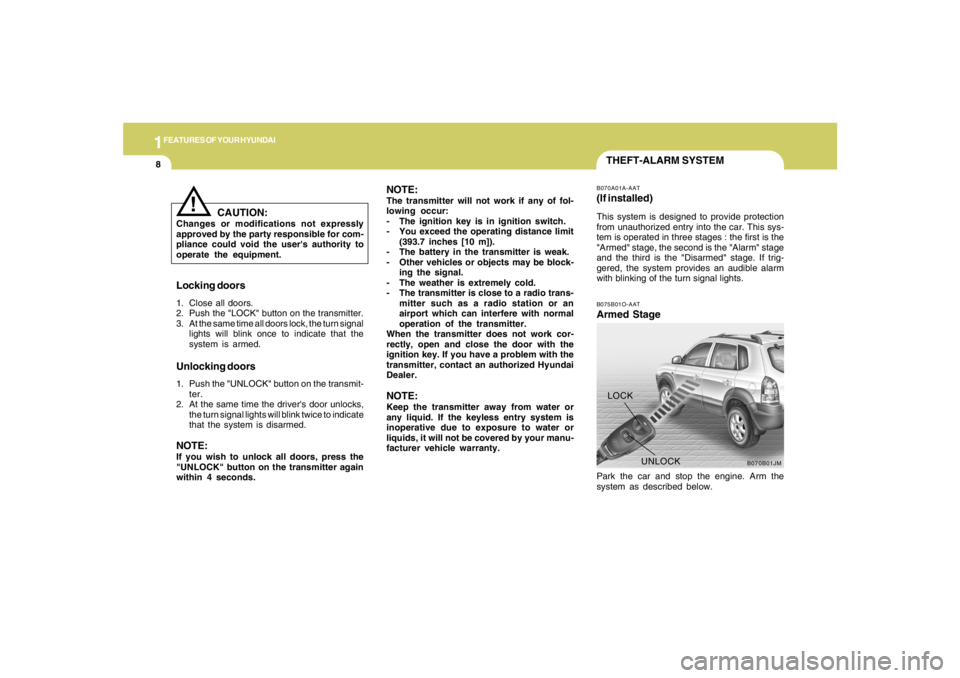
UNLOCK LOCK
THEFT-ALARM SYSTEMB075B01O-AATArmed StagePark the car and stop the engine. Arm the
system as described below.B070A01A-AAT(If installed)This system is designed to provide protection
from unauthorized entry into the car. This sys-
tem is operated in three stages : the first is the
"Armed" stage, the second is the "Alarm" stage
and the third is the "Disarmed" stage. If trig-
gered, the system provides an audible alarm
with blinking of the turn signal lights.
Locking doors1. Close all doors.
2. Push the "LOCK" button on the transmitter.
3. At the same time all doors lock, the turn signal
lights will blink once to indicate that the
system is armed.Unlocking doors1. Push the "UNLOCK" button on the transmit-
ter.
2. At the same time the driver's door unlocks,
the turn signal lights will blink twice to indicate
that the system is disarmed.NOTE:If you wish to unlock all doors, press the
"UNLOCK" button on the transmitter again
within 4 seconds.
CAUTION:
Changes or modifications not expressly
approved by the party responsible for com-
pliance could void the user's authority to
operate the equipment.
!
NOTE:The transmitter will not work if any of fol-
lowing occur:
- The ignition key is in ignition switch.
- You exceed the operating distance limit
(393.7 inches [10 m]).
- The battery in the transmitter is weak.
- Other vehicles or objects may be block-
ing the signal.
- The weather is extremely cold.
- The transmitter is close to a radio trans-
mitter such as a radio station or an
airport which can interfere with normal
operation of the transmitter.
When the transmitter does not work cor-
rectly, open and close the door with the
ignition key. If you have a problem with the
transmitter, contact an authorized Hyundai
Dealer.NOTE:Keep the transmitter away from water or
any liquid. If the keyless entry system is
inoperative due to exposure to water or
liquids, it will not be covered by your manu-
facturer vehicle warranty.
Page 22 of 306
1FEATURES OF YOUR HYUNDAI10
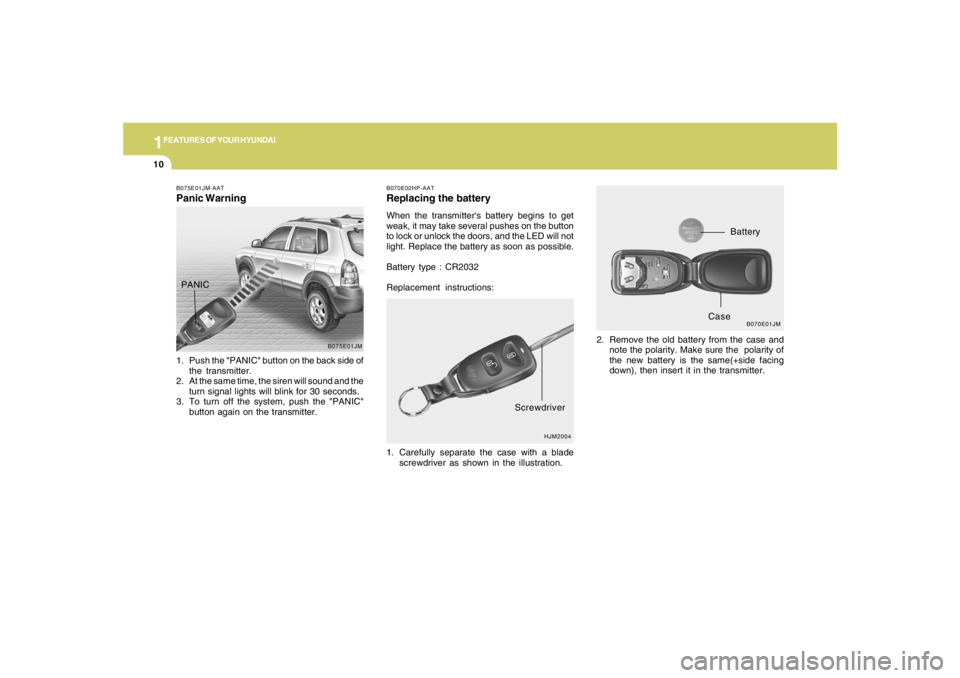
B070E02HP-AATReplacing the batteryWhen the transmitter's battery begins to get
weak, it may take several pushes on the button
to lock or unlock the doors, and the LED will not
light. Replace the battery as soon as possible.
Battery type : CR2032
Replacement instructions:
1. Carefully separate the case with a blade
screwdriver as shown in the illustration.2. Remove the old battery from the case and
note the polarity. Make sure the polarity of
the new battery is the same(+side facing
down), then insert it in the transmitter.
HJM2004
Screwdriver
B070E01JM
Battery
Case
B075E01JM-AATPanic Warning1. Push the "PANIC" button on the back side of
the transmitter.
2. At the same time, the siren will sound and the
turn signal lights will blink for 30 seconds.
3. To turn off the system, push the "PANIC"
button again on the transmitter.
B075E01JM
PANIC
Page 50 of 306
1FEATURES OF YOUR HYUNDAI38
!
WARNING:
o If an airbag deploys, there may be a loud
noise followed by a fine dust released in
the vehicle. These conditions are nor-
mal and are not hazardous - the airbags
are packed in this fine powder. The dust
generated during airbag deployment
may cause skin or eye irritation as well as
aggravate asthma for some persons.
Always wash all exposed skin areas thor-
oughly with lukewarm water and a mild
soap after an accident in which the
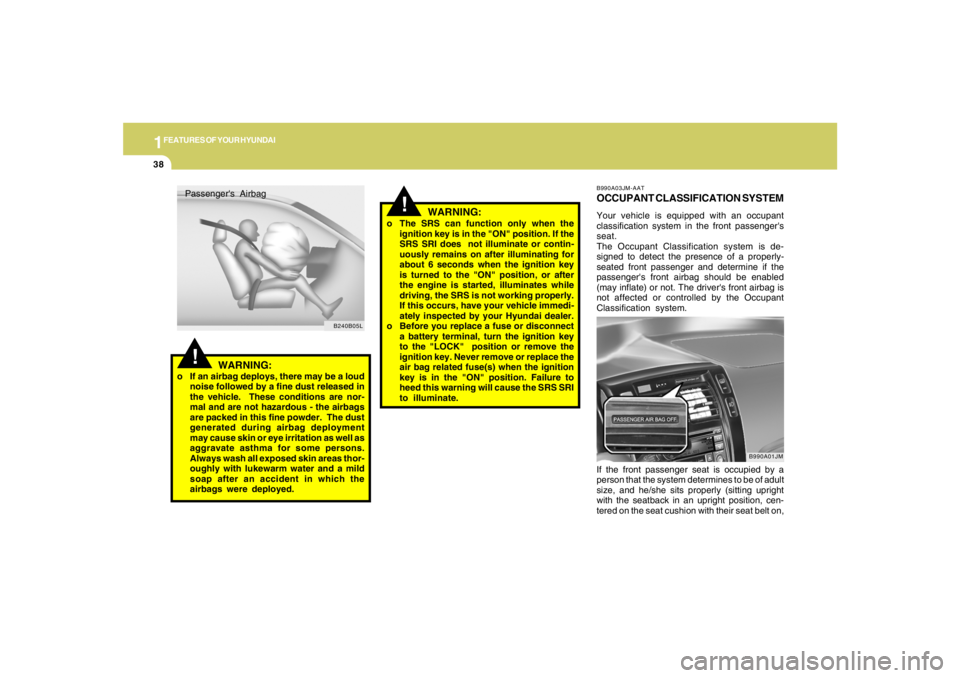
airbags were deployed.Passenger's Airbag
B240B05L
!
o The SRS can function only when the
ignition key is in the "ON" position. If the
SRS SRI does not illuminate or contin-
uously remains on after illuminating for
about 6 seconds when the ignition key
is turned to the "ON" position, or after
the engine is started, illuminates while
driving, the SRS is not working properly.
If this occurs, have your vehicle immedi-
ately inspected by your Hyundai dealer.
o Before you replace a fuse or disconnect
a battery terminal, turn the ignition key
to the "LOCK" position or remove the
ignition key. Never remove or replace the
air bag related fuse(s) when the ignition
key is in the "ON" position. Failure to
heed this warning will cause the SRS SRI
to illuminate.
WARNING:
B990A03JM-AATOCCUPANT CLASSIFICATION SYSTEMYour vehicle is equipped with an occupant
classification system in the front passenger's
seat.
The Occupant Classification system is de-
signed to detect the presence of a properly-
seated front passenger and determine if the
passenger's front airbag should be enabled
(may inflate) or not. The driver's front airbag is
not affected or controlled by the Occupant
Classification system.
If the front passenger seat is occupied by a
person that the system determines to be of adult
size, and he/she sits properly (sitting upright
with the seatback in an upright position, cen-
tered on the seat cushion with their seat belt on,
B990A01JM
Page 68 of 306
1FEATURES OF YOUR HYUNDAI56
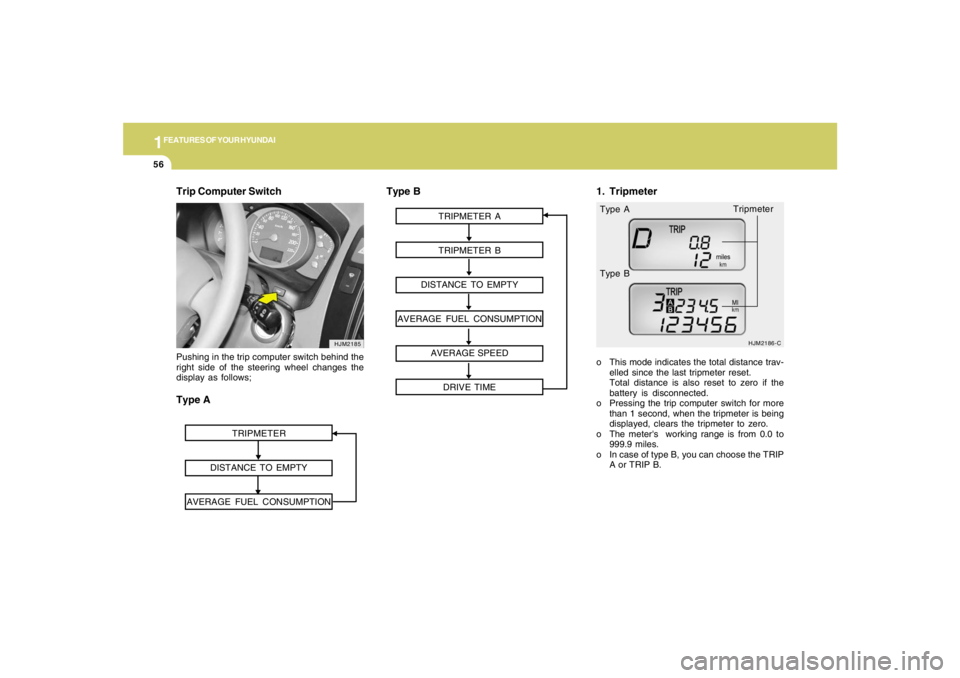
Trip Computer Switch
HJM2185
TRIPMETER
DISTANCE TO EMPTY
AVERAGE FUEL CONSUMPTION
Pushing in the trip computer switch behind the
right side of the steering wheel changes the
display as follows;Type A
TRIPMETER A
TRIPMETER B
DISTANCE TO EMPTY
AVERAGE FUEL CONSUMPTION
AVERAGE SPEED
DRIVE TIME
HJM2186-C
o This mode indicates the total distance trav-
elled since the last tripmeter reset.
Total distance is also reset to zero if the
battery is disconnected.
o Pressing the trip computer switch for more
than 1 second, when the tripmeter is being
displayed, clears the tripmeter to zero.
o The meter's working range is from 0.0 to
999.9 miles.
o In case of type B, you can choose the TRIP
A or TRIP B. Type A
Type B
Type B
1. Tripmeter
Tripmeter
Page 71 of 306
1
FEATURES OF YOUR HYUNDAI
59
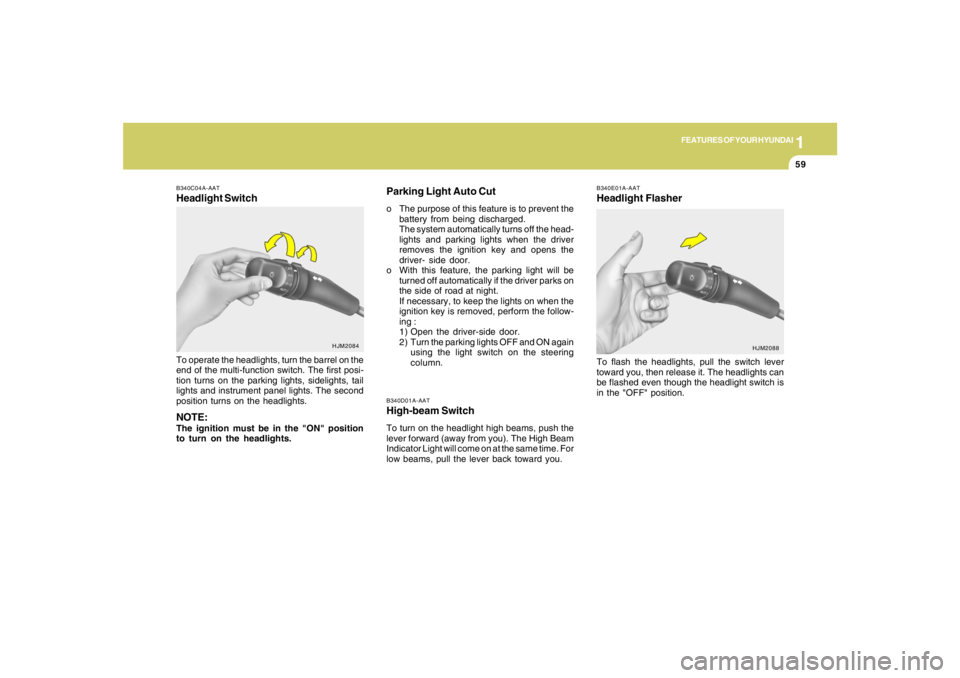
B340D01A-AATHigh-beam SwitchTo turn on the headlight high beams, push the
lever forward (away from you). The High Beam
Indicator Light will come on at the same time. For
low beams, pull the lever back toward you.
B340E01A-AATHeadlight FlasherTo flash the headlights, pull the switch lever
toward you, then release it. The headlights can
be flashed even though the headlight switch is
in the "OFF" position.
B340C04A-AATHeadlight SwitchTo operate the headlights, turn the barrel on the
end of the multi-function switch. The first posi-
tion turns on the parking lights, sidelights, tail
lights and instrument panel lights. The second
position turns on the headlights.NOTE:The ignition must be in the "ON" position
to turn on the headlights.
HJM2084
HJM2088
Parking Light Auto Cuto The purpose of this feature is to prevent the
battery from being discharged.
The system automatically turns off the head-
lights and parking lights when the driver
removes the ignition key and opens the
driver- side door.
o With this feature, the parking light will be
turned off automatically if the driver parks on
the side of road at night.
If necessary, to keep the lights on when the
ignition key is removed, perform the follow-
ing :
1) Open the driver-side door.
2) Turn the parking lights OFF and ON again
using the light switch on the steering
column.
Page 77 of 306
1
FEATURES OF YOUR HYUNDAI
65
!
CAUTION:
o Use when the engine is running and
remove a plug from the power outlet
after using the electric appliance. Using
when the engine stops or remaining the
electric appliance with plugged in for
many hours may cause the battery to be
discharged.
o Do not use the power outlet to connect
electric accessories or equipment other
than those designed to operate on 12
volts.
o Some electronic devices can cause elec-
tronic interference when plugged into
the power outlet. These devices may
cause excessive audio noise and mal-
functions in other electronic systems or
devices used in your vehicle.
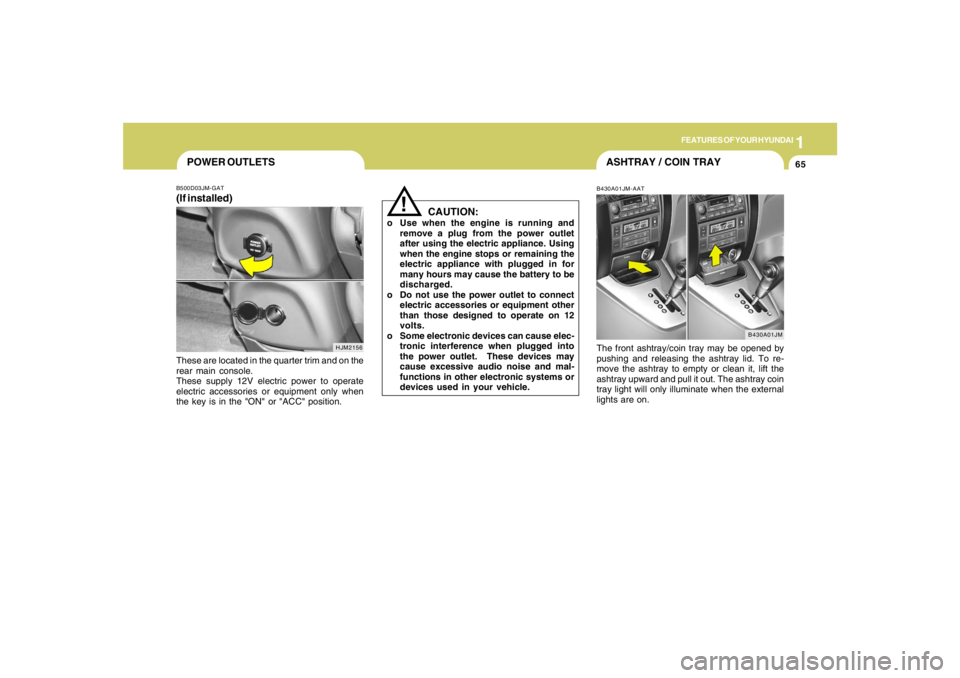
POWER OUTLETSB500D03JM-GAT(If installed)These are located in the quarter trim and on the
rear main console.
These supply 12V electric power to operate
electric accessories or equipment only when
the key is in the "ON" or "ACC" position.
HJM2156
ASHTRAY / COIN TRAYB430A01JM-AATThe front ashtray/coin tray may be opened by
pushing and releasing the ashtray lid. To re-
move the ashtray to empty or clean it, lift the
ashtray upward and pull it out. The ashtray coin
tray light will only illuminate when the external
lights are on.
B430A01JM
Page 81 of 306
1
FEATURES OF YOUR HYUNDAI
69
HJM2028
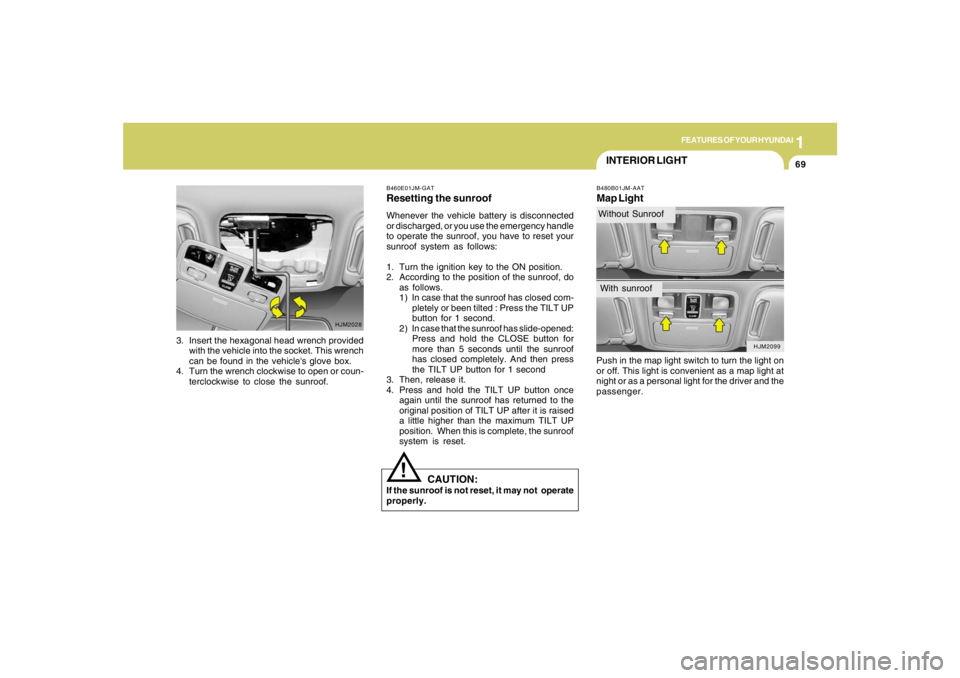
3. Insert the hexagonal head wrench provided
with the vehicle into the socket. This wrench
can be found in the vehicle's glove box.
4. Turn the wrench clockwise to open or coun-
terclockwise to close the sunroof.
INTERIOR LIGHTB480B01JM-AATMap LightPush in the map light switch to turn the light on
or off. This light is convenient as a map light at
night or as a personal light for the driver and the
passenger.
B460E01JM-GATResetting the sunroofWhenever the vehicle battery is disconnected
or discharged, or you use the emergency handle
to operate the sunroof, you have to reset your
sunroof system as follows:
1. Turn the ignition key to the ON position.
2. According to the position of the sunroof, do
as follows.
1) In case that the sunroof has closed com-
pletely or been tilted : Press the TILT UP
button for 1 second.
2) In case that the sunroof has slide-opened:
Press and hold the CLOSE button for
more than 5 seconds until the sunroof
has closed completely. And then press
the TILT UP button for 1 second
3. Then, release it.
4. Press and hold the TILT UP button once
again until the sunroof has returned to the
original position of TILT UP after it is raised
a little higher than the maximum TILT UP
position. When this is complete, the sunroof
system is reset.
CAUTION:
If the sunroof is not reset, it may not operate
properly.
!
HJM2099
Without SunroofWith sunroof
Page 111 of 306

1
FEATURES OF YOUR HYUNDAI
9999999999
Photo sensor
HJM2086
NOTE:o If the battery has been discharged or
disconnected, the temperature mode will
reset to Centigrade degrees.
This is a normal condition and you can
change the temperature mode from Cen-
tigrade to Farenheit as follows;
Press the "TEMP" down button and
"AUTO" button simultaneously for 3
secs. The display shows that the unit of
temperature is adjusted to Centigrade or
Fahrenheit.
(°C
→ →→ →
→°F or °F
→ →→ →
→°C)
o Never place anything covering the sen-
sor which is located on the instrument
panel to ensure better control of the
heating and cooling system.
B970C01JM-AATAutomatic OperationThe FATC (Full Automatic Temperature Con-
trol) system automatically controls heating and
cooling by doing as follows:
1. Push the "AUTO" button. The indicator light
will illuminate confirming that the Face, Floor
and/or Bi-Level modes as well as the blower
speed and air conditioner will be controlled
automatically.2. Push the "TEMP" button to set the desired
temperature.
The temperature will increase to the maxi-
mum 90°F(32°C) by pushing the " " button.
Each push of the button will cause the tem-
perature to increase by 1°F(0.5°C).
The temperature will decrease to the mini-
mum 62°F(17°C) by pushing the " " button.
Each push of the button will cause the tem-
perature to decrease by 1°F(0.5°C).
HJM2124HJM2126