2007 HYUNDAI TUCSON Sound system
[x] Cancel search: Sound systemPage 146 of 306
1FEATURES OF YOUR HYUNDAI
134
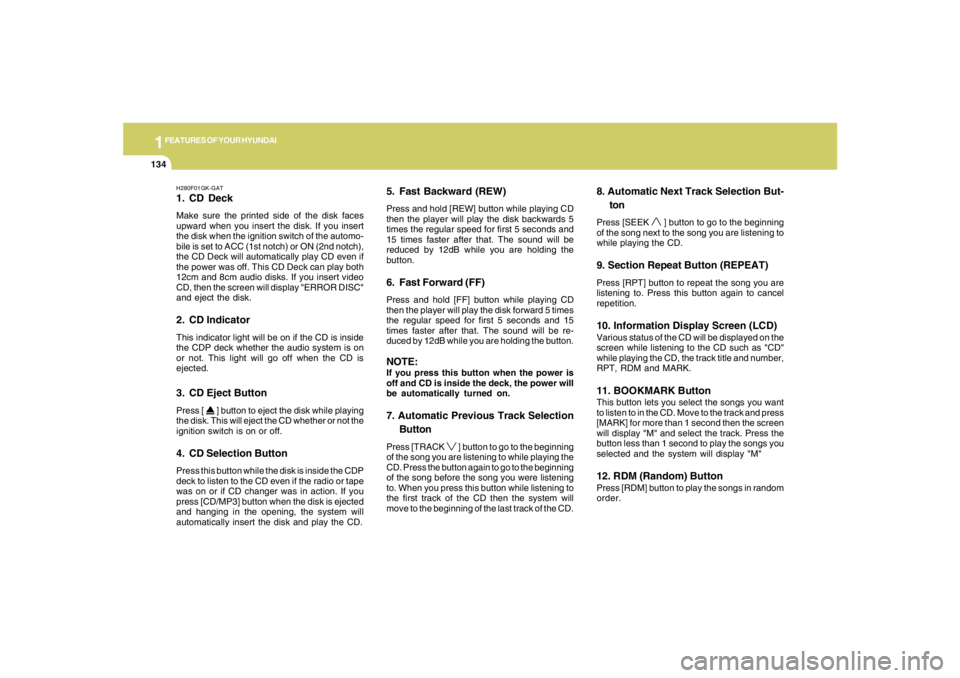
H280F01GK-GAT1. CD DeckMake sure the printed side of the disk faces
upward when you insert the disk. If you insert
the disk when the ignition switch of the automo-
bile is set to ACC (1st notch) or ON (2nd notch),
the CD Deck will automatically play CD even if
the power was off. This CD Deck can play both
12cm and 8cm audio disks. If you insert video
CD, then the screen will display "ERROR DISC"
and eject the disk.2. CD IndicatorThis indicator light will be on if the CD is inside
the CDP deck whether the audio system is on
or not. This light will go off when the CD is
ejected.3. CD Eject ButtonPress [
] button to eject the disk while playing
the disk. This will eject the CD whether or not the
ignition switch is on or off.
4. CD Selection ButtonPress this button while the disk is inside the CDP
deck to listen to the CD even if the radio or tape
was on or if CD changer was in action. If you
press [CD/MP3] button when the disk is ejected
and hanging in the opening, the system will
automatically insert the disk and play the CD.
5. Fast Backward (REW)Press and hold [REW] button while playing CD
then the player will play the disk backwards 5
times the regular speed for first 5 seconds and
15 times faster after that. The sound will be
reduced by 12dB while you are holding the
button.6. Fast Forward (FF)Press and hold [FF] button while playing CD
then the player will play the disk forward 5 times
the regular speed for first 5 seconds and 15
times faster after that. The sound will be re-
duced by 12dB while you are holding the button.NOTE:If you press this button when the power is
off and CD is inside the deck, the power will
be automatically turned on.7. Automatic Previous Track Selection
ButtonPress [TRACK
] button to go to the beginning
of the song you are listening to while playing the
CD. Press the button again to go to the beginning
of the song before the song you were listening
to. When you press this button while listening to
the first track of the CD then the system will
move to the beginning of the last track of the CD.
8. Automatic Next Track Selection But-
tonPress [SEEK
] button to go to the beginning
of the song next to the song you are listening to
while playing the CD.
9. Section Repeat Button (REPEAT)Press [RPT] button to repeat the song you are
listening to. Press this button again to cancel
repetition.10. Information Display Screen (LCD)Various status of the CD will be displayed on the
screen while listening to the CD such as "CD"
while playing the CD, the track title and number,
RPT, RDM and MARK.11. BOOKMARK ButtonThis button lets you select the songs you want
to listen to in the CD. Move to the track and press
[MARK] for more than 1 second then the screen
will display "M" and select the track. Press the
button less than 1 second to play the songs you
selected and the system will display "M"12. RDM (Random) ButtonPress [RDM] button to play the songs in random
order.
Page 150 of 306
1FEATURES OF YOUR HYUNDAI
138
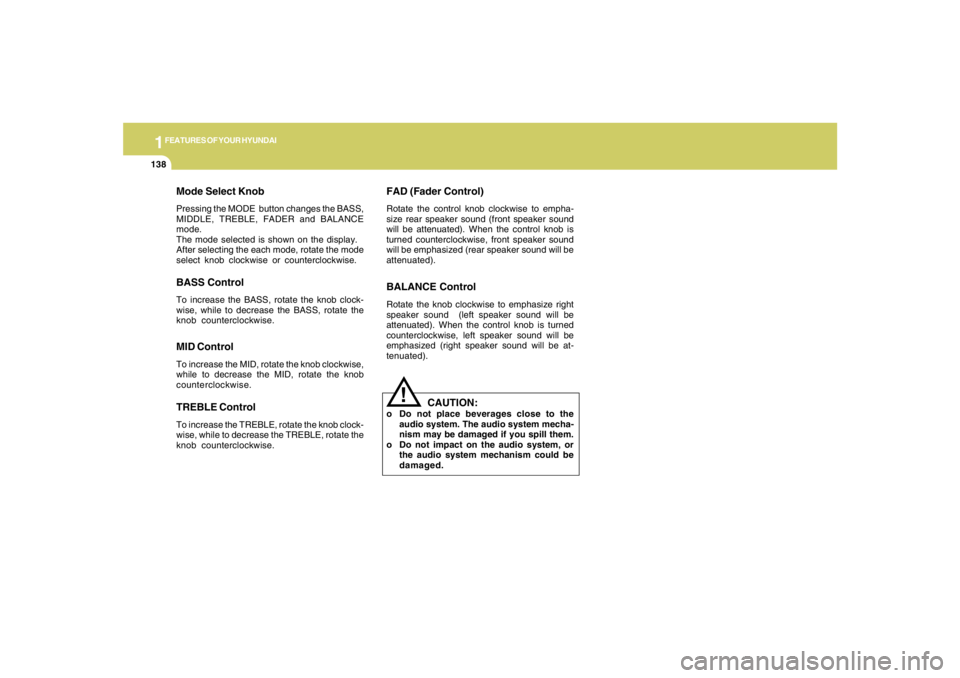
Mode Select KnobPressing the MODE button changes the BASS,
MIDDLE, TREBLE, FADER and BALANCE
mode.
The mode selected is shown on the display.
After selecting the each mode, rotate the mode
select knob clockwise or counterclockwise.BASS ControlTo increase the BASS, rotate the knob clock-
wise, while to decrease the BASS, rotate the
knob counterclockwise.MID ControlTo increase the MID, rotate the knob clockwise,
while to decrease the MID, rotate the knob
counterclockwise.TREBLE ControlTo increase the TREBLE, rotate the knob clock-
wise, while to decrease the TREBLE, rotate the
knob counterclockwise.
FAD (Fader Control)Rotate the control knob clockwise to empha-
size rear speaker sound (front speaker sound
will be attenuated). When the control knob is
turned counterclockwise, front speaker sound
will be emphasized (rear speaker sound will be
attenuated).BALANCE ControlRotate the knob clockwise to emphasize right
speaker sound (left speaker sound will be
attenuated). When the control knob is turned
counterclockwise, left speaker sound will be
emphasized (right speaker sound will be at-
tenuated).
!
CAUTION:
o Do not place beverages close to the
audio system. The audio system mecha-
nism may be damaged if you spill them.
o Do not impact on the audio system, or
the audio system mechanism could be
damaged.
Page 155 of 306
1
FEATURES OF YOUR HYUNDAI
143143143143143
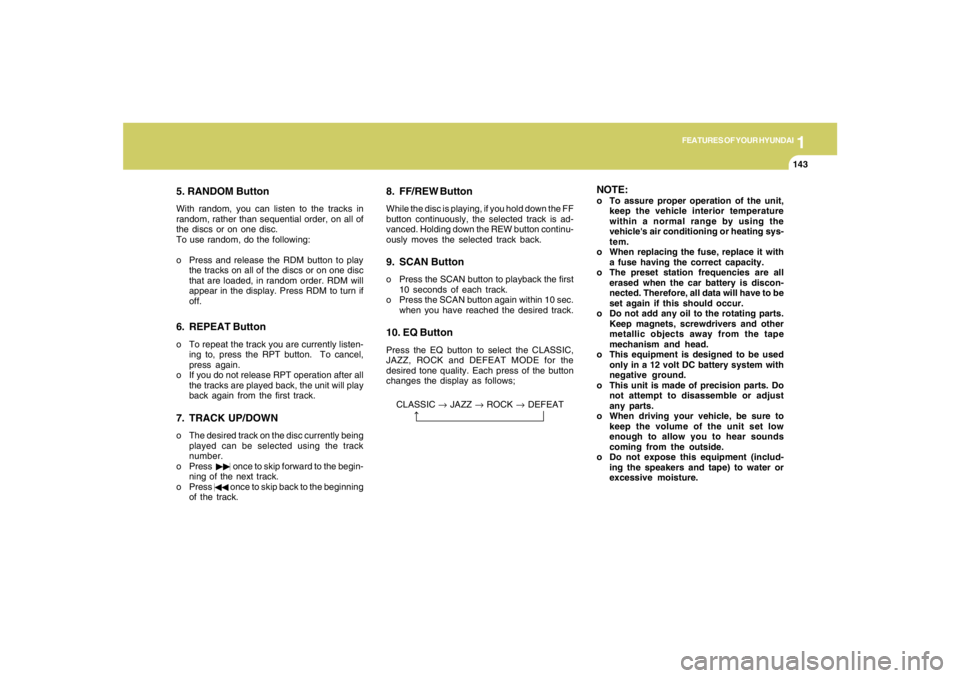
5. RANDOM ButtonWith random, you can listen to the tracks in
random, rather than sequential order, on all of
the discs or on one disc.
To use random, do the following:
o Press and release the RDM button to play
the tracks on all of the discs or on one disc
that are loaded, in random order. RDM will
appear in the display. Press RDM to turn if
off.6. REPEAT Buttono To repeat the track you are currently listen-
ing to, press the RPT button. To cancel,
press again.
o If you do not release RPT operation after all
the tracks are played back, the unit will play
back again from the first track.7. TRACK UP/DOWNo The desired track on the disc currently being
played can be selected using the track
number.
o Press once to skip forward to the begin-
ning of the next track.
o Press once to skip back to the beginning
of the track.
8. FF/REW ButtonWhile the disc is playing, if you hold down the FF
button continuously, the selected track is ad-
vanced. Holding down the REW button continu-
ously moves the selected track back.9. SCAN Buttono Press the SCAN button to playback the first
10 seconds of each track.
o Press the SCAN button again within 10 sec.
when you have reached the desired track.10. EQ ButtonPress the EQ button to select the CLASSIC,
JAZZ, ROCK and DEFEAT MODE for the
desired tone quality. Each press of the button
changes the display as follows;
CLASSIC → JAZZ → ROCK → DEFEAT
NOTE:o To assure proper operation of the unit,
keep the vehicle interior temperature
within a normal range by using the
vehicle's air conditioning or heating sys-
tem.
o When replacing the fuse, replace it with
a fuse having the correct capacity.
o The preset station frequencies are all
erased when the car battery is discon-
nected. Therefore, all data will have to be
set again if this should occur.
o Do not add any oil to the rotating parts.
Keep magnets, screwdrivers and other
metallic objects away from the tape
mechanism and head.
o This equipment is designed to be used
only in a 12 volt DC battery system with
negative ground.
o This unit is made of precision parts. Do
not attempt to disassemble or adjust
any parts.
o When driving your vehicle, be sure to
keep the volume of the unit set low
enough to allow you to hear sounds
coming from the outside.
o Do not expose this equipment (includ-
ing the speakers and tape) to water or
excessive moisture.
Page 162 of 306
![HYUNDAI TUCSON 2007 Owners Manual 1FEATURES OF YOUR HYUNDAI
150
J295D01JM-GAT1. CD DeckThe deck will open only when you press [LOAD]
button. Make sure the printed side of the disk
faces upward when you insert the disk. The CD
changer](/manual-img/35/56210/w960_56210-161.png "HYUNDAI TUCSON 2007 Owners Manual 1FEATURES OF YOUR HYUNDAI
150
J295D01JM-GAT1. CD DeckThe deck will open only when you press [LOAD]
button. Make sure the printed side of the disk
faces upward when you insert the disk. The CD
changer")
1FEATURES OF YOUR HYUNDAI
150
J295D01JM-GAT1. CD DeckThe deck will open only when you press [LOAD]
button. Make sure the printed side of the disk
faces upward when you insert the disk. The CD
changer can only play 12cm disks. If you insert
video CD or DATA CD, then the screen will
display "ERROR DISC," eject the disk and
return to the previous mode.2. CD Load ButtonWhen you press [LOAD] button, the empty lots
of the CD Changer will be opened in the order
of 1, 2, 3, 4, 5 and 6. When you insert CD, you
can listen to the corresponding CD. In this case,
the last CD you inserted will be played. If you do
not take any actions after pressing (LOAD) then
the (LOAD) will be cancelled.3. CD Ejection ButtonWhen you press [
] button, the currently
played CD will be ejected. If you press the button
for more than 2 seconds, you will be able to eject
all CDs. If currently played CD is in the 3rd slot,
the ejection order will be 3, 4, 5, 6, 1 and 2.
4. DISC DisplayThis shows the location of disk inside the CD
Changer and the corresponding CD deck num-
ber will flicker when you load or eject the CD.5. CD Changer Selection ButtonIf the power was turned off when the CD is inside
the CD changer or if you press "CD" button
when radio was on, the system will play CD. If
you press (CD/MP3) when there is no CD in the
changer then the system will display "NO DISK"
for 2 seconds and return to the previous mode.NOTE:If you press this button when the power is
off and CD is inside the deck, the power will
be automatically turned on.6. Disc Selection ButtonIf you press [DISC
] button while using CD
Changer, the next disc will be played (If you
press the button when you are listening to CD
1, the CD 2 will be played).
If you wish to listen to the previous CD, then
press [DISC
] button then the previous disc
will be played (If you press the button when you
are listening to CD 2, the CD 1 will be played).
If the CD Changer is not fully loaded, this will
move to the next available deck. When the
player moves from deck to deck, the screen will
display the selected deck number.
7. Fast Backward ButtonPress and hold [4 REW] button while playing CD
then the player will play the disk backwards 5
times the regular speed for first 5 seconds and
15 times faster after that. The sound will be
reduced by 12dB while you are holding the
button.8. Fast Forward ButtonPress and hold [1 FF] button while playing CD
then the player will play the disk forward 5 times
the regular speed for first 5 seconds and 15
times faster after that. The sound will be re-
duced by 12dB while you are holding the button.9. Automatic Previous Track Selection
ButtonPress [TRACK
] button to go to the beginning
of the song you are listening to while playing the
CD. Press the button again to go to the beginning
of the song before the song you were listening
to.
10. Automatic Next Track Selection
ButtonPress [SEEK
] button to go to the beginning
of the song next to the song you are listening to
while playing the CD.
Page 163 of 306
![HYUNDAI TUCSON 2007 Owners Manual 1
FEATURES OF YOUR HYUNDAI
151151151151151
11. Section Repeat Button (RPT)Press [5 RPT] button to repeat the song you are
listening to. Press this button again to cancel
repetition.12. SCAN ButtonIf y](/manual-img/35/56210/w960_56210-162.png "HYUNDAI TUCSON 2007 Owners Manual 1
FEATURES OF YOUR HYUNDAI
151151151151151
11. Section Repeat Button (RPT)Press [5 RPT] button to repeat the song you are
listening to. Press this button again to cancel
repetition.12. SCAN ButtonIf y")
1
FEATURES OF YOUR HYUNDAI
151151151151151
11. Section Repeat Button (RPT)Press [5 RPT] button to repeat the song you are
listening to. Press this button again to cancel
repetition.12. SCAN ButtonIf you press this button, the player will play 10
seconds of each track. Press it again to cancel
scanning.13. EQ ButtonEach time you press this button the sound
equalizer setting will switch from
POP➟JAZZ➟ROCK➟CLASSIC➟OFF (Not
displayed).14. Bookmark ButtonThis button lets you select the songs you want
to listen to in the CD. Move to the track and press
(6 MARK) for more than 1 second then the
screen will display " M " and select the track.
Press the button less than 1 second to play the
songs you selected and the system will display
" M "15. Random ButtonPress this button to play the songs in random
order regardless of the order of tracks.
NOTE:When you use CD-R or CD-RW, the CD may
not be played due to the manufacturing
method of CD makers and the recording
method of the user. In this case, change CD
unless the continuous use of such CDs
may cause damage to the system.16. File Search KnobTurn this knob to the left and right while listening
to CD to change track number. If you press the
button within 5 seconds then the selected track
will be played. If you do not press the button
within 5 seconds then it will display the currently
played track.17. Scroll ButtonIf the title of MP3 or WMA file is too long, press
this button to scroll the entire song title on the
LCD screen.18. Directory Search ButtonIn case the MP3/WMA CD contains more than
2 folders, press this button up and down to
search each directory. You can move to the
directory and turn the search knob to search
through the tracks. If you do not press the knob
within 5 seconds after you select a track then
the system will automatically return to the cur-
rent track.
!
CAUTION:
o Do not insert warped or poor quality
discs into the CD player as damage to the
unit may occur.
o Do not insert anything like coins into the
player slot as damage to the unit may
occur.
o Do not place beverages close to the
audio system. The playback mechanism
may be damaged if you spill them.
o Do not strike or allow anything to impact
the audio system, damage to the system
mechanisms could occur.
o Off-road or rough surface driving may
cause the compact disc to skip. Do not
use the compact disc when driving in
such conditions as damage to the com-
pact disc face could occur.
o Do not attempt to grab or pull the com-
pact disc out while the disc is being
pulled into the audio unit by the self-
loading mechanism. Damage to the
audio unit and compact disc could oc-
cur.
o Avoid using recorded compact discs in
your audio unit. Original compact discs
are recommended.
Page 168 of 306
2
DRIVING YOUR HYUNDAI
2
WARNING: ENGINE EXHAUST CAN BE DANGEROUS!
C010A02JM-AATEngine exhaust fumes can be extremely dangerous. If, at any time, you smell exhaust fumes inside the vehicle, open the windows immediately.
o Do not inhale exhaust fumes.
Exhaust fumes contain carbon monoxide, a colorless, odorless gas that can cause unconsciousness and death by asphyxiation.
o Be sure the exhaust system does not leak.
The exhaust system should be checked whenever the vehicle is raised to change the oil or for any other purpose. If you hear a change
in the sound of the exhaust or if you drive over something that strikes the underneath side of the car, have the exhaust system checked
as soon as possible by your Hyundai dealer.
o Do not run the engine in an enclosed area.
Letting the engine idle in your garage, even with the garage door open, is a hazardous practice. Never run the engine in your garage
any longer than it takes to start the engine and back the car out.
o Avoid idling the engine for prolonged periods with people inside the car.
If it is necessary to idle the engine for a prolonged period with people inside the car, be sure to do so only in an open area with the air
intake set at "Fresh" and fan operating at one of the higher speeds so fresh air is drawn into the interior.
If you must drive with the tail gate open because you are carrying objects that make this necessary:
1. Close all windows.
2. Open side vents.
3. Set the air intake control at "Fresh", the air flow control at "Floor" or "Face" and the fan at one of the higher speeds.
To assure proper operation of the ventilation system, be sure the ventilation air intakes located just in front of the windshield are kept clear
of snow, ice, leaves or other obstructions.
!!
PROPOSITION 65 WARNING:
Engine exhaust and a wide variety of automobile components and parts, including components found in the interior furnishings
in a vehicle, contain or emit chemicals known to the State of California to cause cancer and birth defects and reproductive harm.
In addition, certain fluids contained in vehicles and certain products of component wear contain or emit chemicals known to
the State of California to cause cancer and birth defects or other reproductive harm.
Page 179 of 306
2
DRIVING YOUR HYUNDAI
13
!
WARNING:
ABS / TCS / ESC will not prevent accidents
due to improper or dangerous driving ma-
neuvers. Even though vehicle control is
improved during emergency braking, al-
ways maintain a safe distance between you
and objects ahead. Vehicle speeds should
always be reduced during extreme road
conditions.
The braking distance for cars equipped
with an anti-lock braking system / TCS / ESC
may be longer than for those without it in
the following road conditions. During these
conditions the vehicle should be driven at
reduced speeds:
o Rough, gravel or snow-covered roads.
o With tire chains installed.
o On roads where the road surface is pit-
ted or has different surface height.
The safety features of an ABS / TCS / ESC
equipped vehicle should not be tested by
high speed driving or cornering. This could
endanger the safety of yourself or others.
TRACTION CONTROL
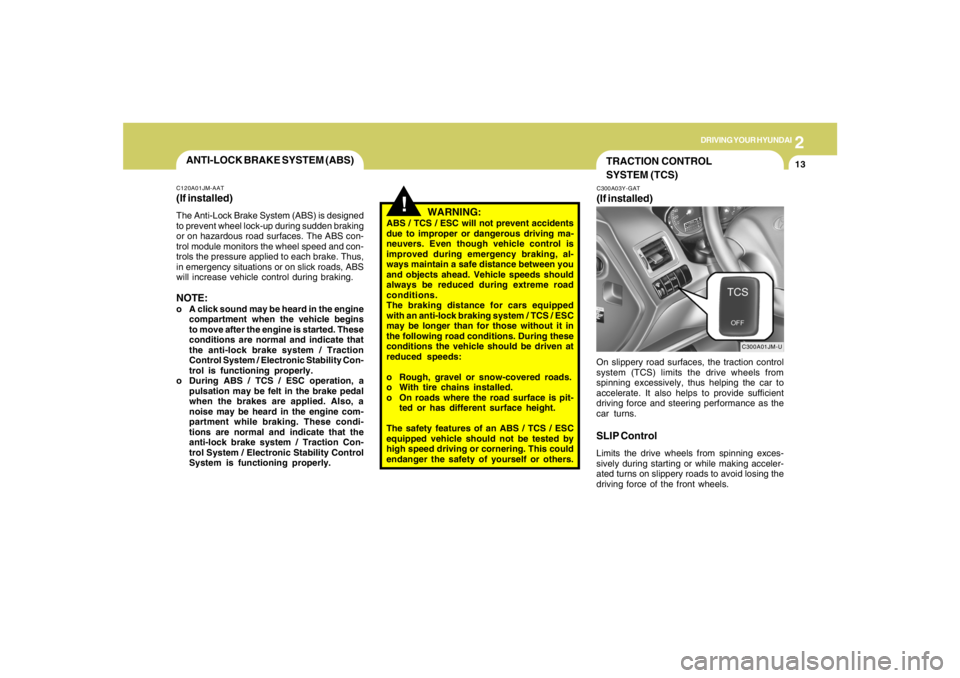
SYSTEM (TCS)C300A03Y-GAT(If installed)
C300A01JM-U
On slippery road surfaces, the traction control
system (TCS) limits the drive wheels from
spinning excessively, thus helping the car to
accelerate. It also helps to provide sufficient
driving force and steering performance as the
car turns.SLIP ControlLimits the drive wheels from spinning exces-
sively during starting or while making acceler-
ated turns on slippery roads to avoid losing the
driving force of the front wheels.
ANTI-LOCK BRAKE SYSTEM (ABS)C120A01JM-AAT(If installed)The Anti-Lock Brake System (ABS) is designed
to prevent wheel lock-up during sudden braking
or on hazardous road surfaces. The ABS con-
trol module monitors the wheel speed and con-
trols the pressure applied to each brake. Thus,
in emergency situations or on slick roads, ABS
will increase vehicle control during braking.NOTE:o A click sound may be heard in the engine
compartment when the vehicle begins
to move after the engine is started. These
conditions are normal and indicate that
the anti-lock brake system / Traction
Control System / Electronic Stability Con-
trol is functioning properly.
o During ABS / TCS / ESC operation, a
pulsation may be felt in the brake pedal
when the brakes are applied. Also, a
noise may be heard in the engine com-
partment while braking. These condi-
tions are normal and indicate that the
anti-lock brake system / Traction Con-
trol System / Electronic Stability Control
System is functioning properly.
Page 180 of 306

2
DRIVING YOUR HYUNDAI
14
!
Driving HintsTCS does not actively apply brakes. Be sure to
decelerate the car sufficiently before entering
curves.
CAUTION:
When the TCS indicator blinks, SLIP con-
trol function has been activated. It also
means that the road is slippery or your car
is accelerating excessively. In this situa-
tion, gently release foot pressure from the
accelerator pedal and maintain moderate
speed.
!
WARNING:
Traction control is a driving aid; all normal
precautions for driving in inclement weath-
er and on slippery driving surfaces should
be observed.
C310B02O-AATTCS ON/OFF ModeWhen the TCS is operating, the TCS indicator
in the instrument cluster will blink.
If you turn the system off by pressing the TCS
switch, the TCS-OFF indicator will come on and
stay on. In the TCS-OFF mode, the SLIP control
will be deactivated. Adjust you driving accord-
ingly. To turn the system back on, press the
switch again. The TCS-OFF indicator should go
off.NOTE:1) The TCS mode will automatically be
turned ON after the engine is turned off
and restarted.
2) When the traction control system is op-
erating properly, you can feel a slight
pulsation in the vehicle. This is only the
effect of brake control and indicates
nothing unusual.
3) When the engine starts, a click may be
heard from the engine compartment;
this is the sound of the traction control
being checked.
4) When moving out of the mud or fresh
snow, pressing the accelerator pedal
may not cause the engine speed to in-
crease due to TCS operation.
C310D01JM-AATIndicators and WarningThe indicators should illuminate when the igni-
tion key is turned to ON or START but should
go out after approximately three seconds.
If the indicators do not illuminate, or the TCS or
TCS-OFF indicator does not go out after 3
seconds, have the system checked by an
authorized dealer.
Should there be any unusual conditions in the
TCS System while driving, TCS-OFF indicator
illuminates as a warning.
If TCS-OFF indicator illuminates, pull your car
to a safe place and stop the engine.
Then, start the engine again to check if the TCS-
OFF indicator goes out.
If the indicator remains lit even after the engine
has been started, have your car checked by an
authorized Hyundai dealer.NOTE:When the TCS-OFF indicator illuminates,
traction control is automatically deacti-
vated.