2007 HYUNDAI TUCSON change time
[x] Cancel search: change timePage 162 of 306
![HYUNDAI TUCSON 2007 Owners Manual 1FEATURES OF YOUR HYUNDAI
150
J295D01JM-GAT1. CD DeckThe deck will open only when you press [LOAD]
button. Make sure the printed side of the disk
faces upward when you insert the disk. The CD
changer](/manual-img/35/56210/w960_56210-161.png "HYUNDAI TUCSON 2007 Owners Manual 1FEATURES OF YOUR HYUNDAI
150
J295D01JM-GAT1. CD DeckThe deck will open only when you press [LOAD]
button. Make sure the printed side of the disk
faces upward when you insert the disk. The CD
changer")
1FEATURES OF YOUR HYUNDAI
150
J295D01JM-GAT1. CD DeckThe deck will open only when you press [LOAD]
button. Make sure the printed side of the disk
faces upward when you insert the disk. The CD
changer can only play 12cm disks. If you insert
video CD or DATA CD, then the screen will
display "ERROR DISC," eject the disk and
return to the previous mode.2. CD Load ButtonWhen you press [LOAD] button, the empty lots
of the CD Changer will be opened in the order
of 1, 2, 3, 4, 5 and 6. When you insert CD, you
can listen to the corresponding CD. In this case,
the last CD you inserted will be played. If you do
not take any actions after pressing (LOAD) then
the (LOAD) will be cancelled.3. CD Ejection ButtonWhen you press [
] button, the currently
played CD will be ejected. If you press the button
for more than 2 seconds, you will be able to eject
all CDs. If currently played CD is in the 3rd slot,
the ejection order will be 3, 4, 5, 6, 1 and 2.
4. DISC DisplayThis shows the location of disk inside the CD
Changer and the corresponding CD deck num-
ber will flicker when you load or eject the CD.5. CD Changer Selection ButtonIf the power was turned off when the CD is inside
the CD changer or if you press "CD" button
when radio was on, the system will play CD. If
you press (CD/MP3) when there is no CD in the
changer then the system will display "NO DISK"
for 2 seconds and return to the previous mode.NOTE:If you press this button when the power is
off and CD is inside the deck, the power will
be automatically turned on.6. Disc Selection ButtonIf you press [DISC
] button while using CD
Changer, the next disc will be played (If you
press the button when you are listening to CD
1, the CD 2 will be played).
If you wish to listen to the previous CD, then
press [DISC
] button then the previous disc
will be played (If you press the button when you
are listening to CD 2, the CD 1 will be played).
If the CD Changer is not fully loaded, this will
move to the next available deck. When the
player moves from deck to deck, the screen will
display the selected deck number.
7. Fast Backward ButtonPress and hold [4 REW] button while playing CD
then the player will play the disk backwards 5
times the regular speed for first 5 seconds and
15 times faster after that. The sound will be
reduced by 12dB while you are holding the
button.8. Fast Forward ButtonPress and hold [1 FF] button while playing CD
then the player will play the disk forward 5 times
the regular speed for first 5 seconds and 15
times faster after that. The sound will be re-
duced by 12dB while you are holding the button.9. Automatic Previous Track Selection
ButtonPress [TRACK
] button to go to the beginning
of the song you are listening to while playing the
CD. Press the button again to go to the beginning
of the song before the song you were listening
to.
10. Automatic Next Track Selection
ButtonPress [SEEK
] button to go to the beginning
of the song next to the song you are listening to
while playing the CD.
Page 163 of 306
![HYUNDAI TUCSON 2007 Owners Manual 1
FEATURES OF YOUR HYUNDAI
151151151151151
11. Section Repeat Button (RPT)Press [5 RPT] button to repeat the song you are
listening to. Press this button again to cancel
repetition.12. SCAN ButtonIf y](/manual-img/35/56210/w960_56210-162.png "HYUNDAI TUCSON 2007 Owners Manual 1
FEATURES OF YOUR HYUNDAI
151151151151151
11. Section Repeat Button (RPT)Press [5 RPT] button to repeat the song you are
listening to. Press this button again to cancel
repetition.12. SCAN ButtonIf y")
1
FEATURES OF YOUR HYUNDAI
151151151151151
11. Section Repeat Button (RPT)Press [5 RPT] button to repeat the song you are
listening to. Press this button again to cancel
repetition.12. SCAN ButtonIf you press this button, the player will play 10
seconds of each track. Press it again to cancel
scanning.13. EQ ButtonEach time you press this button the sound
equalizer setting will switch from
POP➟JAZZ➟ROCK➟CLASSIC➟OFF (Not
displayed).14. Bookmark ButtonThis button lets you select the songs you want
to listen to in the CD. Move to the track and press
(6 MARK) for more than 1 second then the
screen will display " M " and select the track.
Press the button less than 1 second to play the
songs you selected and the system will display
" M "15. Random ButtonPress this button to play the songs in random
order regardless of the order of tracks.
NOTE:When you use CD-R or CD-RW, the CD may
not be played due to the manufacturing
method of CD makers and the recording
method of the user. In this case, change CD
unless the continuous use of such CDs
may cause damage to the system.16. File Search KnobTurn this knob to the left and right while listening
to CD to change track number. If you press the
button within 5 seconds then the selected track
will be played. If you do not press the button
within 5 seconds then it will display the currently
played track.17. Scroll ButtonIf the title of MP3 or WMA file is too long, press
this button to scroll the entire song title on the
LCD screen.18. Directory Search ButtonIn case the MP3/WMA CD contains more than
2 folders, press this button up and down to
search each directory. You can move to the
directory and turn the search knob to search
through the tracks. If you do not press the knob
within 5 seconds after you select a track then
the system will automatically return to the cur-
rent track.
!
CAUTION:
o Do not insert warped or poor quality
discs into the CD player as damage to the
unit may occur.
o Do not insert anything like coins into the
player slot as damage to the unit may
occur.
o Do not place beverages close to the
audio system. The playback mechanism
may be damaged if you spill them.
o Do not strike or allow anything to impact
the audio system, damage to the system
mechanisms could occur.
o Off-road or rough surface driving may
cause the compact disc to skip. Do not
use the compact disc when driving in
such conditions as damage to the com-
pact disc face could occur.
o Do not attempt to grab or pull the com-
pact disc out while the disc is being
pulled into the audio unit by the self-
loading mechanism. Damage to the
audio unit and compact disc could oc-
cur.
o Avoid using recorded compact discs in
your audio unit. Original compact discs
are recommended.
Page 168 of 306
2
DRIVING YOUR HYUNDAI
2
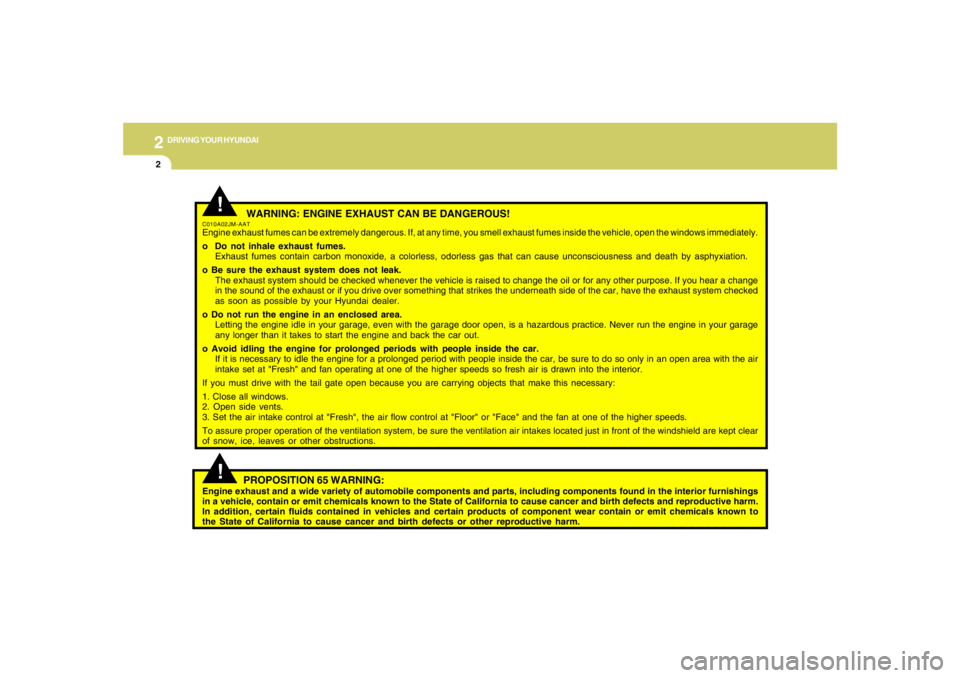
WARNING: ENGINE EXHAUST CAN BE DANGEROUS!
C010A02JM-AATEngine exhaust fumes can be extremely dangerous. If, at any time, you smell exhaust fumes inside the vehicle, open the windows immediately.
o Do not inhale exhaust fumes.
Exhaust fumes contain carbon monoxide, a colorless, odorless gas that can cause unconsciousness and death by asphyxiation.
o Be sure the exhaust system does not leak.
The exhaust system should be checked whenever the vehicle is raised to change the oil or for any other purpose. If you hear a change
in the sound of the exhaust or if you drive over something that strikes the underneath side of the car, have the exhaust system checked
as soon as possible by your Hyundai dealer.
o Do not run the engine in an enclosed area.
Letting the engine idle in your garage, even with the garage door open, is a hazardous practice. Never run the engine in your garage
any longer than it takes to start the engine and back the car out.
o Avoid idling the engine for prolonged periods with people inside the car.
If it is necessary to idle the engine for a prolonged period with people inside the car, be sure to do so only in an open area with the air
intake set at "Fresh" and fan operating at one of the higher speeds so fresh air is drawn into the interior.
If you must drive with the tail gate open because you are carrying objects that make this necessary:
1. Close all windows.
2. Open side vents.
3. Set the air intake control at "Fresh", the air flow control at "Floor" or "Face" and the fan at one of the higher speeds.
To assure proper operation of the ventilation system, be sure the ventilation air intakes located just in front of the windshield are kept clear
of snow, ice, leaves or other obstructions.
!!
PROPOSITION 65 WARNING:
Engine exhaust and a wide variety of automobile components and parts, including components found in the interior furnishings
in a vehicle, contain or emit chemicals known to the State of California to cause cancer and birth defects and reproductive harm.
In addition, certain fluids contained in vehicles and certain products of component wear contain or emit chemicals known to
the State of California to cause cancer and birth defects or other reproductive harm.
Page 194 of 306
2
DRIVING YOUR HYUNDAI
28
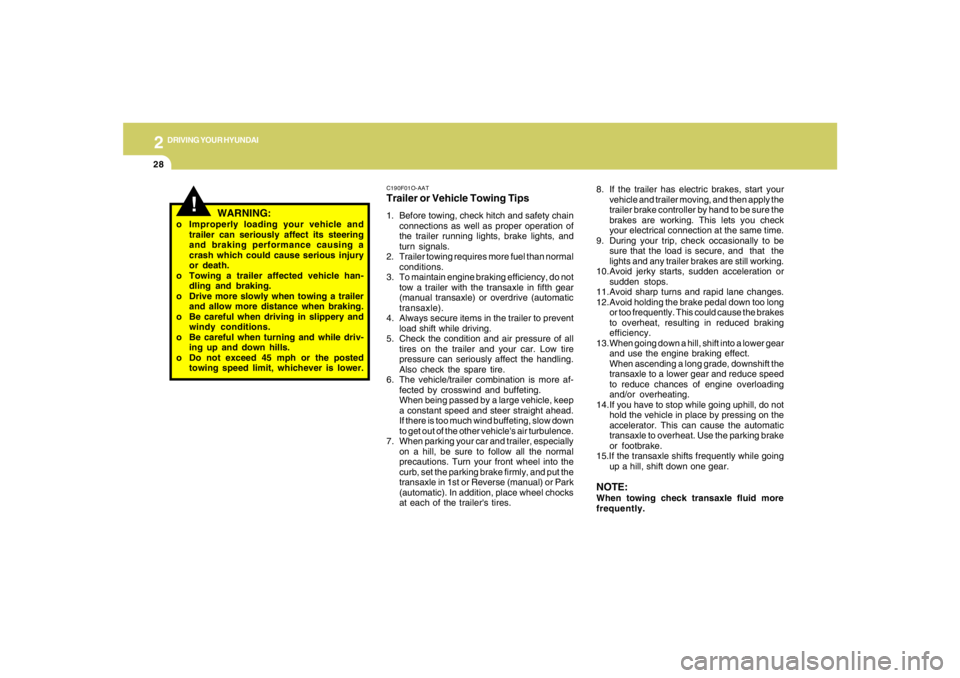
C190F01O-AATTrailer or Vehicle Towing Tips1. Before towing, check hitch and safety chain
connections as well as proper operation of
the trailer running lights, brake lights, and
turn signals.
2. Trailer towing requires more fuel than normal
conditions.
3. To maintain engine braking efficiency, do not
tow a trailer with the transaxle in fifth gear
(manual transaxle) or overdrive (automatic
transaxle).
4. Always secure items in the trailer to prevent
load shift while driving.
5. Check the condition and air pressure of all
tires on the trailer and your car. Low tire
pressure can seriously affect the handling.
Also check the spare tire.
6. The vehicle/trailer combination is more af-
fected by crosswind and buffeting.
When being passed by a large vehicle, keep
a constant speed and steer straight ahead.
If there is too much wind buffeting, slow down
to get out of the other vehicle's air turbulence.
7. When parking your car and trailer, especially
on a hill, be sure to follow all the normal
precautions. Turn your front wheel into the
curb, set the parking brake firmly, and put the
transaxle in 1st or Reverse (manual) or Park
(automatic). In addition, place wheel chocks
at each of the trailer's tires.8. If the trailer has electric brakes, start your
vehicle and trailer moving, and then apply the
trailer brake controller by hand to be sure the
brakes are working. This lets you check
your electrical connection at the same time.
9. During your trip, check occasionally to be
sure that the load is secure, and that the
lights and any trailer brakes are still working.
10.Avoid jerky starts, sudden acceleration or
sudden stops.
11.Avoid sharp turns and rapid lane changes.
12.Avoid holding the brake pedal down too long
or too frequently. This could cause the brakes
to overheat, resulting in reduced braking
efficiency.
13.When going down a hill, shift into a lower gear
and use the engine braking effect.
When ascending a long grade, downshift the
transaxle to a lower gear and reduce speed
to reduce chances of engine overloading
and/or overheating.
14.If you have to stop while going uphill, do not
hold the vehicle in place by pressing on the
accelerator. This can cause the automatic
transaxle to overheat. Use the parking brake
or footbrake.
15.If the transaxle shifts frequently while going
up a hill, shift down one gear.
NOTE:When towing check transaxle fluid more
frequently.
!
WARNING:
o Improperly loading your vehicle and
trailer can seriously affect its steering
and braking performance causing a
crash which could cause serious injury
or death.
o Towing a trailer affected vehicle han-
dling and braking.
o Drive more slowly when towing a trailer
and allow more distance when braking.
o Be careful when driving in slippery and
windy conditions.
o Be careful when turning and while driv-
ing up and down hills.
o Do not exceed 45 mph or the posted
towing speed limit, whichever is lower.
Page 231 of 306
5
VEHICLE MAINTENANCE REQUIREMENTS6
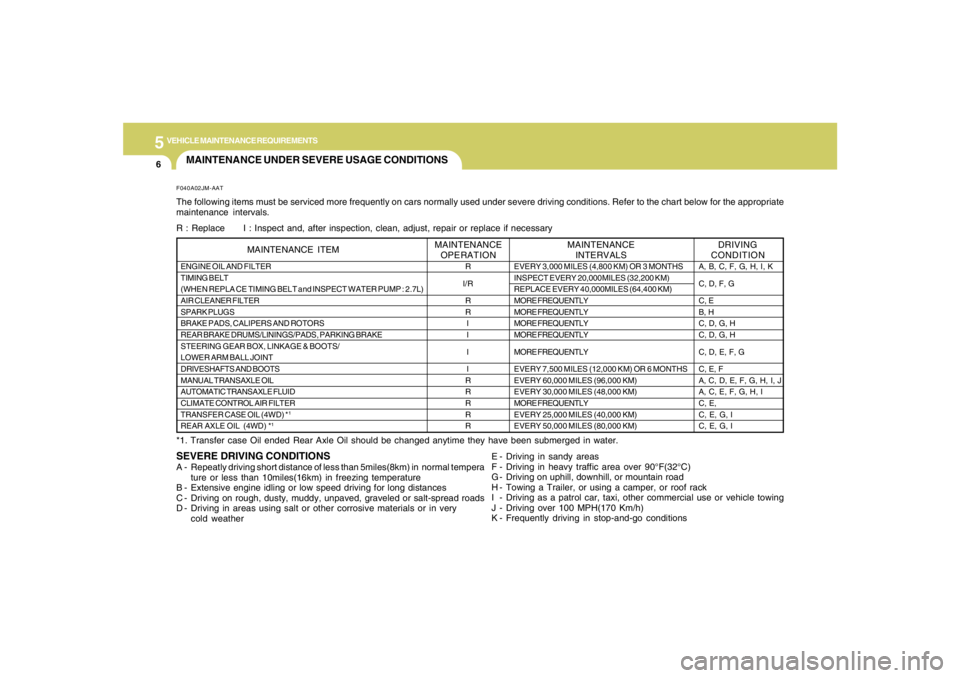
MAINTENANCE UNDER SEVERE USAGE CONDITIONS
SEVERE DRIVING CONDITIONSA - Repeatly driving short distance of less than 5miles(8km) in normal tempera
ture or less than 10miles(16km) in freezing temperature
B - Extensive engine idling or low speed driving for long distances
C - Driving on rough, dusty, muddy, unpaved, graveled or salt-spread roads
D - Driving in areas using salt or other corrosive materials or in very
cold weatherF040A02JM-AATThe following items must be serviced more frequently on cars normally used under severe driving conditions. Refer to the chart below for the appropriate
maintenance intervals.
R : Replace I : Inspect and, after inspection, clean, adjust, repair or replace if necessary
*1. Transfer case Oil ended Rear Axle Oil should be changed anytime they have been submerged in water.
E - Driving in sandy areas
F - Driving in heavy traffic area over 90°F(32°C)
G - Driving on uphill, downhill, or mountain road
H - Towing a Trailer, or using a camper, or roof rack
I - Driving as a patrol car, taxi, other commercial use or vehicle towing
J - Driving over 100 MPH(170 Km/h)
K - Frequently driving in stop-and-go conditionsENGINE OIL AND FILTER
TIMING BELT
(WHEN REPLA CE TIMING BELT and INSPECT WATER PUMP : 2.7L)
AIR CLEANER FILTER
SPARK PLUGS
BRAKE PADS, CALIPERS AND ROTORS
REAR BRAKE DRUMS/LININGS/PADS, PARKING BRAKE
STEERING GEAR BOX, LINKAGE & BOOTS/
LOWER ARM BALL JOINT
DRIVESHAFTS AND BOOTS
MANUAL TRANSAXLE OIL
AUTOMATIC TRANSAXLE FLUID
CLIMATE CONTROL AIR FILTER
TRANSFER CASE OIL (4WD) *
1
REAR AXLE OIL (4WD) *
1
MAINTENANCE ITEM
R
I/R
R
R
I
I
I
I
R
R
R
R
R
EVERY 3,000 MILES (4,800 KM) OR 3 MONTHS
INSPECT EVERY 20,000MILES (32,200 KM)
REPLACE EVERY 40,000MILES (64,400 KM)
MORE FREQUENTLY
MORE FREQUENTLY
MORE FREQUENTLY
MORE FREQUENTLY
MORE FREQUENTLY
EVERY 7,500 MILES (12,000 KM) OR 6 MONTHS
EVERY 60,000 MILES (96,000 KM)
EVERY 30,000 MILES (48,000 KM)
MORE FREQUENTLY
EVERY 25,000 MILES (40,000 KM)
EVERY 50,000 MILES (80,000 KM)
DRIVING
CONDITION MAINTENANCE
INTERVALS MAINTENANCE
OPERATION
A, B, C, F, G, H, I, K
C, D, F, G
C, E
B, H
C, D, G, H
C, D, G, H
C, D, E, F, G
C, E, F
A, C, D, E, F, G, H, I, J
A, C, E, F, G, H, I
C, E,
C, E, G, I
C, E, G, I
Page 244 of 306
6
DO-IT-YOURSELF MAINTENANCE
9
!
!
WARNING:
The cooling fan is controlled by engine
coolant temperature and may sometimes
operate even when the engine is not run-
ning. Use extreme caution when working
near the blades of the coolant fan so that
you are not injured by a rotating fan blade.
As the engine coolant temperature de-
creases, the fan will automatically shut off.
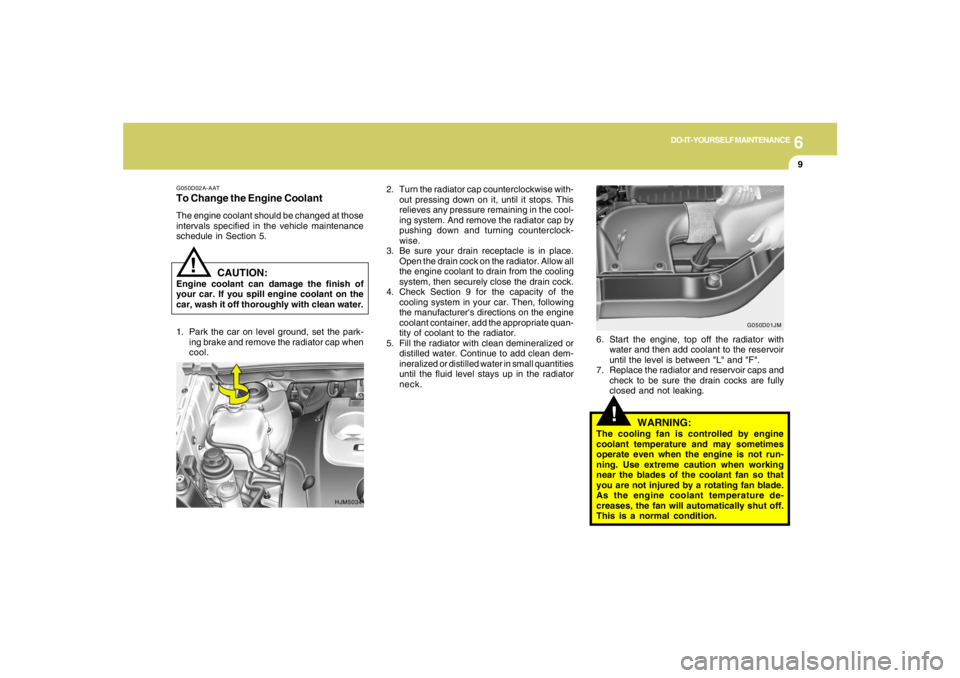
This is a normal condition. 2. Turn the radiator cap counterclockwise with-
out pressing down on it, until it stops. This
relieves any pressure remaining in the cool-
ing system. And remove the radiator cap by
pushing down and turning counterclock-
wise.
3. Be sure your drain receptacle is in place.
Open the drain cock on the radiator. Allow all
the engine coolant to drain from the cooling
system, then securely close the drain cock.
4. Check Section 9 for the capacity of the
cooling system in your car. Then, following
the manufacturer's directions on the engine
coolant container, add the appropriate quan-
tity of coolant to the radiator.
5. Fill the radiator with clean demineralized or
distilled water. Continue to add clean dem-
ineralized or distilled water in small quantities
until the fluid level stays up in the radiator
neck.6. Start the engine, top off the radiator with
water and then add coolant to the reservoir
until the level is between "L" and "F".
7. Replace the radiator and reservoir caps and
check to be sure the drain cocks are fully
closed and not leaking.
G050D02A-AATTo Change the Engine CoolantThe engine coolant should be changed at those
intervals specified in the vehicle maintenance
schedule in Section 5.
HJM5034G050D01JM
CAUTION:
Engine coolant can damage the finish of
your car. If you spill engine coolant on the
car, wash it off thoroughly with clean water.
1. Park the car on level ground, set the park-
ing brake and remove the radiator cap when
cool.
Page 245 of 306
6
DO-IT-YOURSELF MAINTENANCE
10
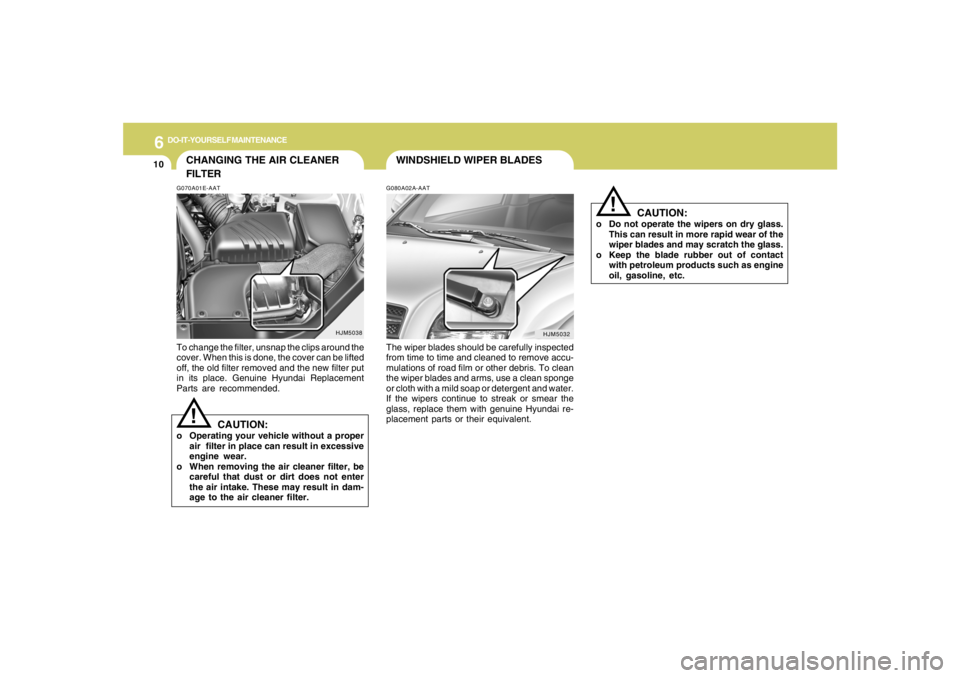
WINDSHIELD WIPER BLADESG080A02A-AATThe wiper blades should be carefully inspected
from time to time and cleaned to remove accu-
mulations of road film or other debris. To clean
the wiper blades and arms, use a clean sponge
or cloth with a mild soap or detergent and water.
If the wipers continue to streak or smear the
glass, replace them with genuine Hyundai re-
placement parts or their equivalent.
!
CAUTION:
o Do not operate the wipers on dry glass.
This can result in more rapid wear of the
wiper blades and may scratch the glass.
o Keep the blade rubber out of contact
with petroleum products such as engine
oil, gasoline, etc.
HJM5032
HJM5038
CHANGING THE AIR CLEANER
FILTERG070A01E-AATTo change the filter, unsnap the clips around the
cover. When this is done, the cover can be lifted
off, the old filter removed and the new filter put
in its place. Genuine Hyundai Replacement
Parts are recommended.
CAUTION:
o Operating your vehicle without a proper
air filter in place can result in excessive
engine wear.
o When removing the air cleaner filter, be
careful that dust or dirt does not enter
the air intake. These may result in dam-
age to the air cleaner filter.
!
Page 255 of 306
6
DO-IT-YOURSELF MAINTENANCE
20
G190A01GK
DOHC CVVT V6
Water Pump Pulley
0.2~0.24 in.
(5~6 mm)
Power steering
COMP
Auto
tensioner
Alternator Pulley
Crankshaft PulleyAlternator
Eng.pulley
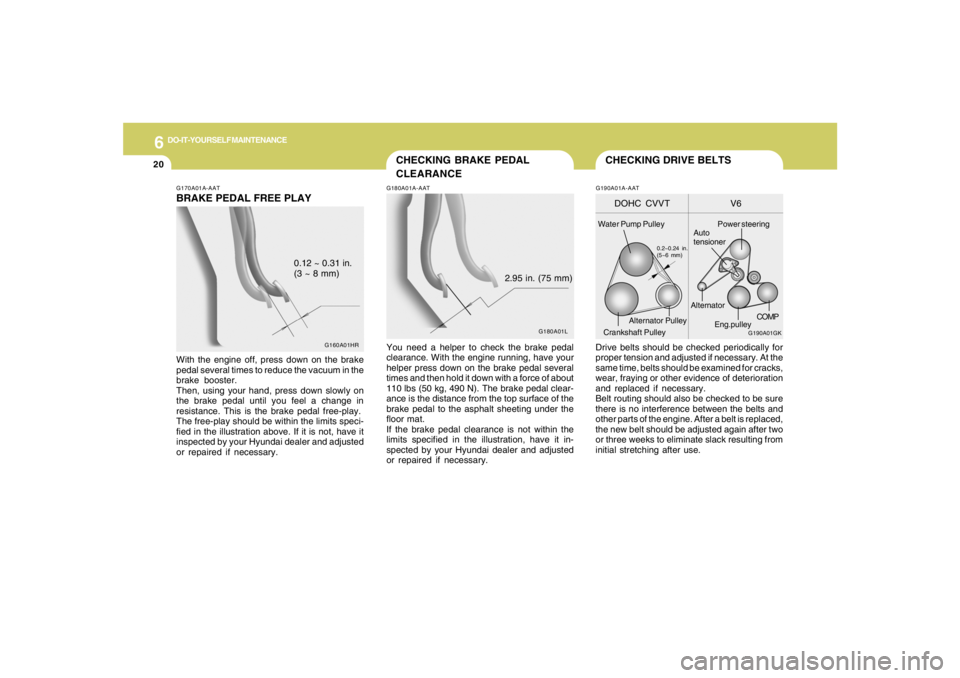
CHECKING DRIVE BELTSDrive belts should be checked periodically for
proper tension and adjusted if necessary. At the
same time, belts should be examined for cracks,
wear, fraying or other evidence of deterioration
and replaced if necessary.
Belt routing should also be checked to be sure
there is no interference between the belts and
other parts of the engine. After a belt is replaced,
the new belt should be adjusted again after two
or three weeks to eliminate slack resulting from
initial stretching after use.G190A01A-AAT
G180A01L
G160A01HR
CHECKING BRAKE PEDAL
CLEARANCEG180A01A-AATYou need a helper to check the brake pedal
clearance. With the engine running, have your
helper press down on the brake pedal several
times and then hold it down with a force of about
110 lbs (50 kg, 490 N). The brake pedal clear-
ance is the distance from the top surface of the
brake pedal to the asphalt sheeting under the
floor mat.
If the brake pedal clearance is not within the
limits specified in the illustration, have it in-
spected by your Hyundai dealer and adjusted
or repaired if necessary.2.95 in. (75 mm)
G170A01A-AATBRAKE PEDAL FREE PLAYWith the engine off, press down on the brake
pedal several times to reduce the vacuum in the
brake booster.
Then, using your hand, press down slowly on
the brake pedal until you feel a change in
resistance. This is the brake pedal free-play.
The free-play should be within the limits speci-
fied in the illustration above. If it is not, have it
inspected by your Hyundai dealer and adjusted
or repaired if necessary.0.12 ~ 0.31 in.
(3 ~ 8 mm)