2007 Hyundai Tiburon set clock
[x] Cancel search: set clockPage 76 of 269

1FEATURES OF YOUR HYUNDAI64
CIGARETTE LIGHTER
INSTRUMENT PANEL LIGHT
CONTROL (RHEOSTAT)B410A01A-AATThe instrument panel lights can be made brighter
or dimmer by turning the instrument panel light
control knob.
OGK046029B420A02A-AAT
For the cigarette lighter to work, the key must
be in the "ACC" position or the "ON" position.
To use the cigarette lighter, push it all the way
into its socket. When the element has heated,
the lighter will pop out to the "ready" position.
Do not hold the cigarette lighter pressed in. This
can damage the heating element and create a
fire hazard.
If it is necessary to replace the cigarette lighter,
use only a genuine Hyundai replacement or its
approved equivalent.
OGK046078
DIGITAL CLOCKB400A01A-AATThere are three control buttons for the digital
clock. Their functions are:
H- Push "H" to advance the hour indicated.
M- Push "M" to advance the minute indicated.
R- Push "R" to reset minutes to ":00" to
facilitate resetting the clock to the correct
time. When this is done:
Pressing "R" between 11 : 01 and 11 : 29
changes the readout to 11 : 00.
Pressing "R" between 11 : 30 and 11 : 59
changes the readout to 12 : 00.
Push the "R" button for 3 seconds to display
a 12 or 24-hour clock.
OGK046056
!
CAUTION:
Do not use electric accessories or equip-
ment other than the Hyundai genuine parts
in the socket.
gkflhma-1a.p659/12/2006, 3:17 PM 64
Page 80 of 269

1FEATURES OF YOUR HYUNDAI68
OGK046034L-1 B460E04GK-AAT
Resetting the Sunroof SystemIf the battery has been recharged, discon-
nected or the sunroof was been opened manu-
ally with the hexagonal head wrench, you may
need to reset the sunroof.To do this;1. Turn the ignition switch "OFF".
2. While pressing " " "up" button turn the
ignition switch "ON".
The resetting was not occur when the
ignition key is turned "OFF" within 1.5
seconds.
3. If the sunroof is set like this, the sunroof is
reset with tilting up/down automatically once
for all.
CAUTION:
If the sunroof is not reset, it may not operate
normally.
!
INTERIOR LIGHTB480A02GK-GATMap Light(1) Push in the map light switch to turn on the
driver side light.
(2) In the "DOOR" position, the interior cour-
tesy light comes on when any door is
opened regardless of the ignition key posi-
tion. The light goes out gradually 6 seconds
after the door is closed.
(3) Push in the map light switch to turn on the
front passenger side light.
2. Insert the hexagonal head wrench provided
with the vehicle into the socket. This wrench
can be found in the vehicle’s trunk or glove
box.
3. Push and turn the wrench clockwise to close
or counterclockwise to open the sunroof.
OGK046021
gkflhma-1a.p659/12/2006, 3:17 PM 68
Page 88 of 269
1FEATURES OF YOUR HYUNDAI76
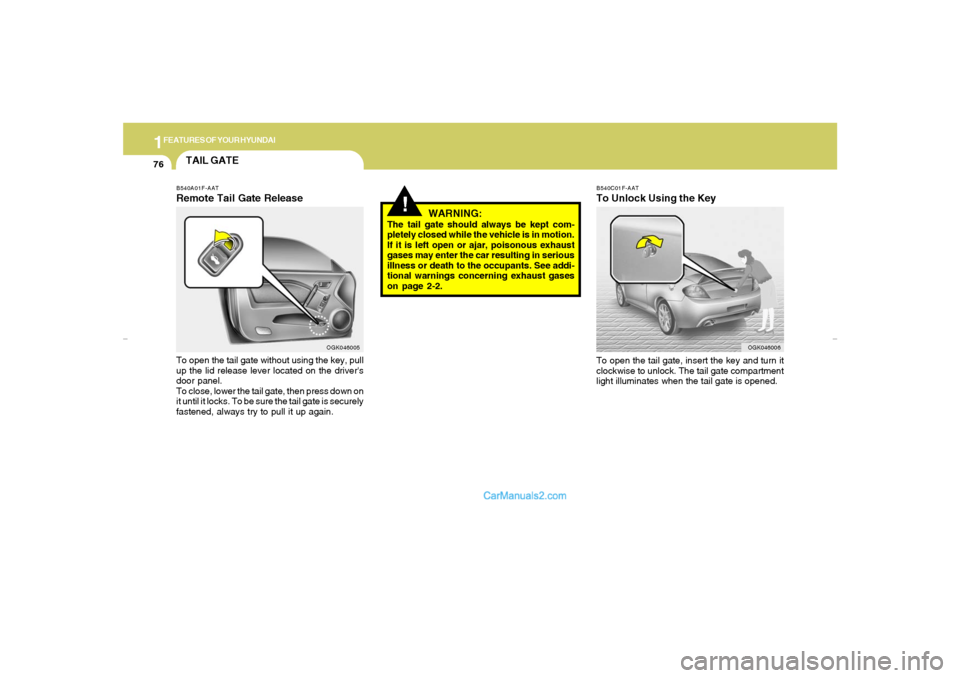
B540C01F-AATTo Unlock Using the KeyTo open the tail gate, insert the key and turn it
clockwise to unlock. The tail gate compartment
light illuminates when the tail gate is opened.
OGK046006
!
WARNING:
The tail gate should always be kept com-
pletely closed while the vehicle is in motion.
If it is left open or ajar, poisonous exhaust
gases may enter the car resulting in serious
illness or death to the occupants. See addi-
tional warnings concerning exhaust gases
on page 2-2.
TAIL GATEB540A01F-AATRemote Tail Gate ReleaseTo open the tail gate without using the key, pull
up the lid release lever located on the driver's
door panel.
To close, lower the tail gate, then press down on
it until it locks. To be sure the tail gate is securely
fastened, always try to pull it up again.
OGK046005
gkflhma-1a.p659/12/2006, 3:17 PM 76
Page 107 of 269

1
FEATURES OF YOUR HYUNDAI
95
B970C01GK-GATAutomatic OperationThe FATC (Full Automatic Temperature Con-
trol) system automatically controls heating and
cooling by doing as follows:
1. Push the "AUTO" switch. The display
"AUTO" will illuminate confirming that the
Face, Floor and/or Bi-Level modes as well
as the blower speed and air conditioner will
be controlled automatically.2. Turn the "TEMP" knob to set the desired
temperature.
The temperature will increase to the maxi-
mum 32°C(90°F) by turning the knob clock-
wise.
The temperature will decrease to the mini-
mum 17°C(62°F) by turning the knob coun-
terclockwise.
NOTE:If the battery has been discharged or dis-
connected, the temperature mode will reset
to Centigrade degrees.
This is a normal condition and you can
change the temperature mode from Centi-
grade to Fahrenheit as follows;
Press the "OFF" and "AUTO " switch simul-
taneously for 3 seconds.
The display shows that the unit of tempera-
ture is adjusted to Centigrade or Fahrenheit
(°C
→ →→ →
→ °F or °F
→ →→ →
→ °C).
OGK046058OGK046061
gkflhma-1b.p659/12/2006, 3:19 PM 95
Page 119 of 269

1
FEATURES OF YOUR HYUNDAI
107
H280B01GK-GAT1. Power Button (POWER ON)Press this button when the ignition switch of the
automobile is set to ACC (1st notch) or ON (2nd
notch) to turn on the power and the audio
system. Press once again when the audio
system is on to turn off the power.2. Volume Control (VOLUME)Turn the volume control clockwise to increase
volume and counterclockwise to reduce. The
volume level will be displayed on the screen
when you adjust the volume.3. Radio Band Selection Button (FM/AM)o Press this button to listen to either FM or AM.
o The radio will be set to each of the following
modes each time you press the button.
FM1 ➟ FM2 ➟ AMNOTE:Push this button when the power is off to
turn on the power automatically.4. SCAN ButtonPress this button to automatically select chan-
nels starting from the current channel and play
each channel for 5 seconds.
5. Automatic Channel Selection Button
(SEEK)Press the upper side of the button to automati-
cally increase frequency and select and play
the receivable channel. Press the lower side of
the button to automatically decrease frequency
and select and play the next available channel.6. Preset Button (1~6)Press this button to listen to the channels
memorized to each button. If you want to memo-
rize the current channel to the preset button,
press the button for more than 1.5 seconds then
the channel will be memorized to the button with
a beep.7. Information Display Screen (LCD)A variety of information will be displayed on the
screen including the radio bands (FM1/FM2/
AM) while listening to the radio, frequency of
each channel, the number of preset channel
and "ST" for FM stereo broadcasting.8. AUDIO Select ButtonPress this button to control tone. Each time you
press the button, the mode will switch from
BASS ➟ MIDDLE ➟ TREBLE ➟ FADER ➟
BALANCE and the mode will be displayed on the
screen.
BASS
MIDDLE
TREBLE
BALANCE
FADER
Turn the TUNE Controller
clockwise to increase bass
tone and counterclockwise
to decrease.
Turn the TUNE Controller
clockwise to increase
middle tone and counter-
clockwise to decrease.
Turn the TUNE Controller
clockwise to increase
treble tone and counter-
clockwise to decrease.
Turn the TUNE Controller
clockwise to increase right
speaker volume and coun-
terclockwise to increase left
speaker volume.
Turn the TUNE Controller
clockwise to increase rear
speaker volume and coun-
terclockwise to increase
front speaker volume.
gkflhma-1b.p659/12/2006, 3:19 PM 107
Page 120 of 269

1FEATURES OF YOUR HYUNDAI
108
!
9. Manual Channel Selection Control
(TUNE)Turn this controller while listening to the radio to
manually adjust frequency. Turn clockwise to
increase frequency and counterclockwise to
reduce frequency.10. EQ ButtonEach time you press this button the sound
equalizer setting will switch from POP ➟ JAZZ
➟ ROCK ➟ CLASSIC ➟ OFF (Not displayed).
CAUTION:
o Do not place beverages close to the
audio system. The audio system mecha-
nism may be damaged if you spill them.
o Do not strike or allow anything to impact
the audio system, damage to the system
mechanisms could occur.
gkflhma-1b.p659/12/2006, 3:19 PM 108
Page 127 of 269

1
FEATURES OF YOUR HYUNDAI
115
H265B01GK-GAT1. Power Button and Volume Control
(POWER ON/ VOLUME)Press this button when the ignition switch of the
automobile is set to ACC (1st notch) or ON (2nd
notch) to turn on the power of the audio system.
When the power is turned on, turn the volume
control clockwise to increase volume and coun-
terclockwise to reduce. Press once again when
the audio system is on to turn off the power.2. Radio Band Selection Button (FM/AM)North American Standard
o Press this button to listen to either FM or AM.
o The radio will be set to each mode each time
you press the button in a loop;
FM1➟FM2➟AM➟FM1 and soon.
European Standard
o Press this button to listen to either FM or AM.
o The radio will be set to each mode each time
you press the button in a loop;
FM1➟FM2➟MW➟LW➟FM1 and soon.
5. Preset Button (1~6)Press this button but do not hold for no more than
2 seconds to listen to the channels memorized
to each button. If you want to memorize the
current channel to the preset button when you
are listening to channel not memorized to any of
the preset buttons, press the button and hold for
more than 2 seconds then the channel will be
memorized to the button with the beep.6. Information Display Screen (LCD)A variety of information will be displayed on the
screen including the radio bands (FM1/FM2/
AM) while listening to the radio, frequency of
each channel, the number of preset channel
and "ST" for FM stereo broadcasting.7. Automatic Channel Scan ButtonPress this button to automatically select next
available channel and play the channel for 5
seconds and continuously move to the next
available channel and play. Press again when
you find the channel you would like to listen to
while scanning, press the button again to stop
scanning and continue to listen to the channel
you selected. And continue to listen to the
current channel.
3. Automatic Channel Selection Button
(SEEK)Press and hold the [
] button for more than 0.5
seconds until you hear the beep to automatically
increase frequency and press and hold the [
] button for more than 0.5 seconds until you hear
the beep to automatically decrease frequency to
select and play the next available channel. If the
received channel is memorized in the preset
buttons then the screen will display the memo-
rized channel.4. Manual Channel Selection Control
(TUNE)Press and hold [
] button for less than 0.5
seconds to increase frequency by 1 step and
[
] to decrease.
Press and hold [
] or [
] button for more than
0.5 seconds even after you hear the beep then
the frequency will increase or decrease quickly.
When you release the button, the system will
turn to the automatic selection mode.
gkflhma-1b.p659/12/2006, 3:19 PM 115
Page 128 of 269

1FEATURES OF YOUR HYUNDAI
116
8. AUDIO Select Buttono Press this button to change AUDIO function
control mode.
Current State➟BASS➟MID➟TRE➟
FAD➟BAL
o Select the audio control mode you want and
increase or decrease the setting by ±10 from
currently audio control mode. If no actions
are taken, the screen will return to the pre-
vious display after 3 seconds.
!
BASS
MIDDLE
TREBLE
BALANCE
Turn the TUNE Controller
clockwise to increase bass
tone and counterclockwise
to decrease.
Turn the TUNE Controller
clockwise to increase
middle tone and counter-
clockwise to decrease.
Turn the TUNE Controller
clockwise to increase
treble tone and counter-
clockwise to decrease.
Turn the TUNE Controller
clockwise to increase right
speaker volume and coun-
terclockwise to increase left
speaker volume.
CAUTION:
o Do not place beverages close to the
audio system. The audio system mecha-
nism may be damaged if you spill them.
o Do not strike or allow anything to impact
the audio system, damage to the system
mechanisms could occur.FADER
Turn the TUNE Controller
clockwise to increase rear
speaker volume and coun-
terclockwise to increase
front speaker volume.
gkflhma-1b.p659/12/2006, 3:19 PM 116