2007 Hyundai Tiburon display
[x] Cancel search: displayPage 126 of 269
1FEATURES OF YOUR HYUNDAI
114
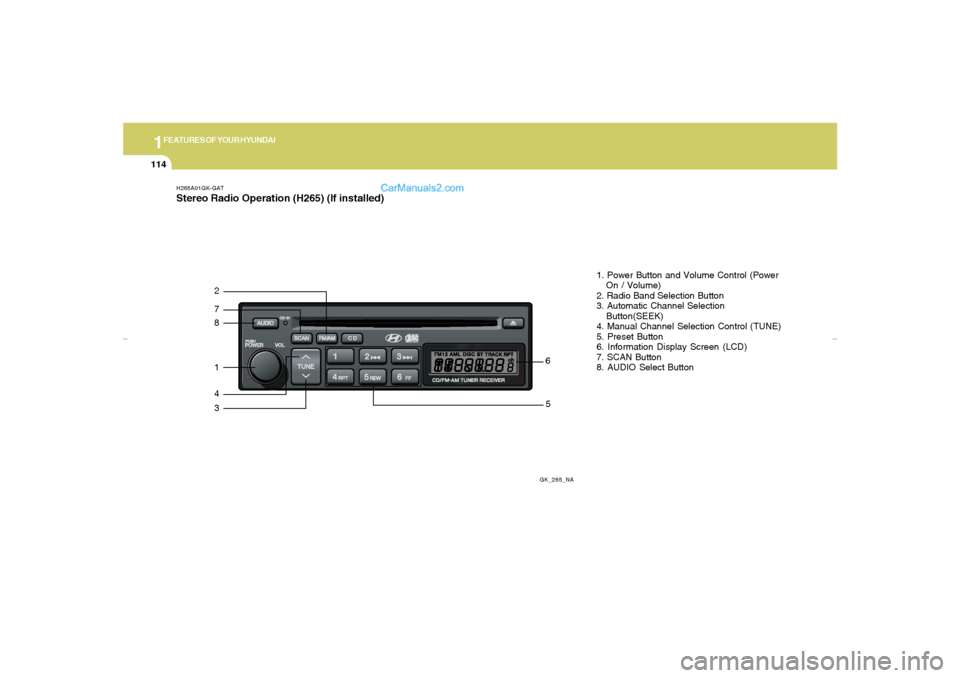
H265A01GK-GATStereo Radio Operation (H265) (If installed)
GK_265_NA
872143
561. Power Button and Volume Control (Power
On / Volume)
2. Radio Band Selection Button
3. Automatic Channel Selection
Button(SEEK)
4. Manual Channel Selection Control (TUNE)
5. Preset Button
6. Information Display Screen (LCD)
7. SCAN Button
8. AUDIO Select Button
gkflhma-1b.p659/12/2006, 3:19 PM 114
Page 127 of 269

1
FEATURES OF YOUR HYUNDAI
115
H265B01GK-GAT1. Power Button and Volume Control
(POWER ON/ VOLUME)Press this button when the ignition switch of the
automobile is set to ACC (1st notch) or ON (2nd
notch) to turn on the power of the audio system.
When the power is turned on, turn the volume
control clockwise to increase volume and coun-
terclockwise to reduce. Press once again when
the audio system is on to turn off the power.2. Radio Band Selection Button (FM/AM)North American Standard
o Press this button to listen to either FM or AM.
o The radio will be set to each mode each time
you press the button in a loop;
FM1➟FM2➟AM➟FM1 and soon.
European Standard
o Press this button to listen to either FM or AM.
o The radio will be set to each mode each time
you press the button in a loop;
FM1➟FM2➟MW➟LW➟FM1 and soon.
5. Preset Button (1~6)Press this button but do not hold for no more than
2 seconds to listen to the channels memorized
to each button. If you want to memorize the
current channel to the preset button when you
are listening to channel not memorized to any of
the preset buttons, press the button and hold for
more than 2 seconds then the channel will be
memorized to the button with the beep.6. Information Display Screen (LCD)A variety of information will be displayed on the
screen including the radio bands (FM1/FM2/
AM) while listening to the radio, frequency of
each channel, the number of preset channel
and "ST" for FM stereo broadcasting.7. Automatic Channel Scan ButtonPress this button to automatically select next
available channel and play the channel for 5
seconds and continuously move to the next
available channel and play. Press again when
you find the channel you would like to listen to
while scanning, press the button again to stop
scanning and continue to listen to the channel
you selected. And continue to listen to the
current channel.
3. Automatic Channel Selection Button
(SEEK)Press and hold the [
] button for more than 0.5
seconds until you hear the beep to automatically
increase frequency and press and hold the [
] button for more than 0.5 seconds until you hear
the beep to automatically decrease frequency to
select and play the next available channel. If the
received channel is memorized in the preset
buttons then the screen will display the memo-
rized channel.4. Manual Channel Selection Control
(TUNE)Press and hold [
] button for less than 0.5
seconds to increase frequency by 1 step and
[
] to decrease.
Press and hold [
] or [
] button for more than
0.5 seconds even after you hear the beep then
the frequency will increase or decrease quickly.
When you release the button, the system will
turn to the automatic selection mode.
gkflhma-1b.p659/12/2006, 3:19 PM 115
Page 128 of 269

1FEATURES OF YOUR HYUNDAI
116
8. AUDIO Select Buttono Press this button to change AUDIO function
control mode.
Current State➟BASS➟MID➟TRE➟
FAD➟BAL
o Select the audio control mode you want and
increase or decrease the setting by ±10 from
currently audio control mode. If no actions
are taken, the screen will return to the pre-
vious display after 3 seconds.
!
BASS
MIDDLE
TREBLE
BALANCE
Turn the TUNE Controller
clockwise to increase bass
tone and counterclockwise
to decrease.
Turn the TUNE Controller
clockwise to increase
middle tone and counter-
clockwise to decrease.
Turn the TUNE Controller
clockwise to increase
treble tone and counter-
clockwise to decrease.
Turn the TUNE Controller
clockwise to increase right
speaker volume and coun-
terclockwise to increase left
speaker volume.
CAUTION:
o Do not place beverages close to the
audio system. The audio system mecha-
nism may be damaged if you spill them.
o Do not strike or allow anything to impact
the audio system, damage to the system
mechanisms could occur.FADER
Turn the TUNE Controller
clockwise to increase rear
speaker volume and coun-
terclockwise to increase
front speaker volume.
gkflhma-1b.p659/12/2006, 3:19 PM 116
Page 129 of 269

1
FEATURES OF YOUR HYUNDAI
117
H265C01GK-GATCompact Disc Player Operation (H265) (If installed)
GK_265_NA
1142
9
101. CD DECK
2. CD INDICATOR
3. CD Disc EJECT Button
4. CD Selection Button
5. Fast Backward
6. Fast Forward
7. Automatic Previous Track Selection Button
8. Automatic Next Track Selection Button
9. Section Repeat Button
10. Information Display Screen (LCD)
11. SCAN Button
7
5
6
8
31
gkflhma-1b.p659/12/2006, 3:19 PM 117
Page 130 of 269

1FEATURES OF YOUR HYUNDAI
118
H265D01GK-GAT1. CD DeckMake sure the printed side of the disk faces
upward when you insert the disk. If you insert
the disk when the ignition switch of the automo-
bile is set to ACC (1st notch) or ON (2nd notch),
the CD DECK will automatically play CD even if
the power was off.
This CD DECK can play both 12cm and 8cm
audio disks. If you insert video CD, then the
screen will display the status of the CD but it will
not play the video file and therefore there will be
no sound.2. CD IndicatorThis indicator light will be on if the CD is inside
the CD DECK if the ignition switch of the auto-
mobile is set to ACC (1st notch) or ON (2nd
notch) regardless of whether the audio system
is on or off. This light will go off when the CD is
ejected.3. CD Eject ButtonPress [
] button to eject the disk while playing
the disk. This will eject the CD whether or not the
ignition switch is on or off.
4. CD Selection ButtonPress this button while the disk is inside the CD
DECK to listen to the CD. If the radio was on
previously then it will be turned off and CD player
will be activated. If you press [CD] button when
the disk is ejected and hanging in the opening the
system will automatically insert the disk and
play the CD.5. Fast Backward (REW)Press and hold [REW] button while playing CD
then the player will play the disk backwards 5
times the regular speed for first 5 seconds and
15 times faster after that. The sound will be
reduced by 12dB while you are holding the
button.6. Fast Forward (FF)Press and hold [FF] button while playing CD
then the player will play the disk forward 5 times
the regular speed for first 5 seconds and 15
times faster after that. The sound will be re-
duced by 12dB while you are holding the button.
7. Automatic Previous Track Selection
ButtonPress [
] button to go to the beginning of the
song you are listening to while playing the CD.
Press the button again to go to the beginning of
the song before the song you were listening to.
When you press this button while listening to the
first track of the CD then the system will move
to the beginning of the last track of the CD.
8. Automatic Next Track Selection But-
tonPress [
] button to go to the beginning of the
song next to the song you are listening to while
playing the CD. When you press this button
while listening to the last track of the CD then the
system will move to the beginning of the first
track of the CD.
9. Section Repeat Button (RPT)Press [RPT] button to repeat the song you are
listening to. Press this button again to cancel
repetition.10. Information Display Screen (LCD)Various status of the CD will be displayed on the
screen while listening to the CD such as "CD"
while playing the CD, the track title and number
and RPT.
gkflhma-1b.p659/12/2006, 3:19 PM 118
Page 132 of 269
1FEATURES OF YOUR HYUNDAI
120
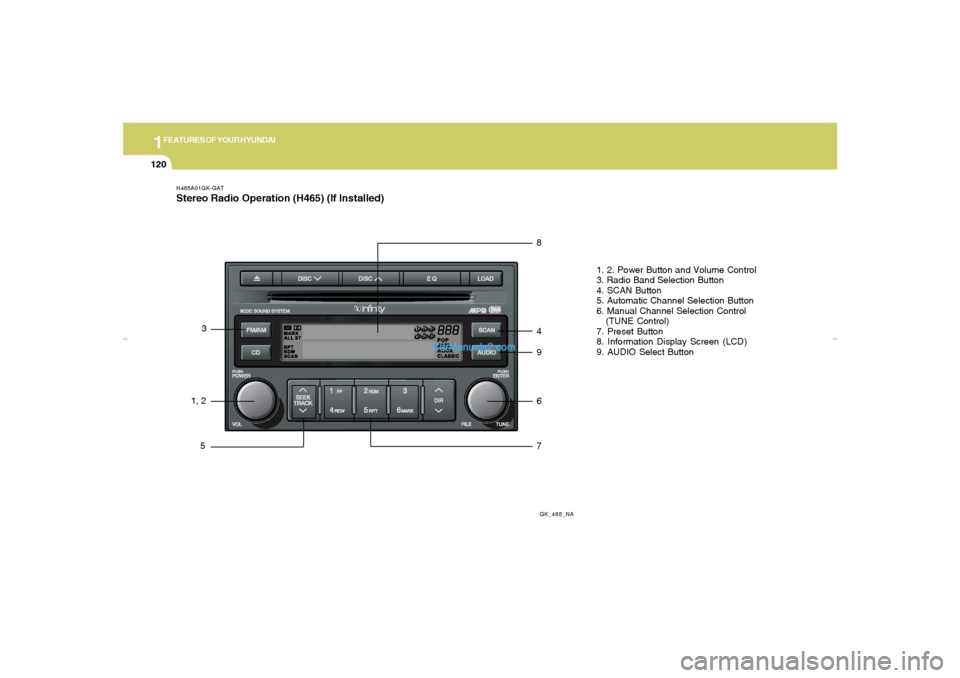
H465A01GK-GATStereo Radio Operation (H465) (If Installed)
GK_465_NA
1, 23
58
4
9
6
71. 2. Power Button and Volume Control
3. Radio Band Selection Button
4. SCAN Button
5. Automatic Channel Selection Button
6. Manual Channel Selection Control
(TUNE Control)
7. Preset Button
8. Information Display Screen (LCD)
9. AUDIO Select Button
gkflhma-1b.p659/12/2006, 3:19 PM 120
Page 133 of 269

1
FEATURES OF YOUR HYUNDAI
121
H465B01GK-GAT1. Power Button (POWER ON)Press this button when the ignition switch of the
automobile is set to ACC (1st notch) or ON (2nd
notch) to turn on the power and the audio
system. Press once again when the audio
system is on to turn off the power.2. Volume Control (VOLUME)Turn the volume control clockwise to increase
volume and counterclockwise to reduce. The
volume level will be displayed on the screen
when you adjust the volume.3. Radio Band Selection Button (FM/AM)o Press this button to listen to either FM or AM.
o The radio will be set to each of the following
modes each time you press the button.
FM1 ➟ FM2 ➟ AMNOTE:Push this button when the power is off to
turn on the power automatically.
4. SCAN ButtonPress this button to automatically select chan-
nels starting from the current channel and play
each channel for 5 seconds. Press again to
keep listening to the channel currently selected.5. Automatic Channel Selection Button
(SEEK)Press the [SEEK
] button to automatically
increase frequency and press the [TRACK
] button to automatically decrease frequency to
select and play the next available channel. If the
received channel is memorized in the preset
buttons then the screen will display the memo-
rized channel.6. Manual Channel Selection Control
(TUNE)Turn the TUNE control clockwise to increase
frequency and counterclockwise to reduce fre-
quency by 1 step for each click.7. Preset Button (1~6)Press this button to listen to the channels
memorized to each button. If you want to memo-
rize the current channel to the preset button,
press the button for more than 1.5 seconds then
the channel will be memorized to the button with
a beep.
8. Information Display Screen (LCD)A variety of information will be displayed on the
screen including the radio bands (FM1/FM2/
AM) while listening to the radio, frequency of
each channel, the number of preset channel
and "ST" for FM stereo broadcasting.9. AUDIO Select ButtonPress this button to control tone. Each time you
press the button, the mode will switch from
BASS➟MIDDLE➟TREBLE➟FADER➟BALANCE
and the mode will be displayed on the screen.BASS
MIDDLE
TREBLE
Turn the TUNE Controller
clockwise to increase bass
tone and counterclockwise
to decrease.
Turn the TUNE Controller
clockwise to increase
middle tone and counter-
clockwise to decrease.
Turn the TUNE Controller
clockwise to increase
treble tone and counter-
clockwise to decrease.
gkflhma-1b.p659/12/2006, 3:19 PM 121
Page 135 of 269
1
FEATURES OF YOUR HYUNDAI
123
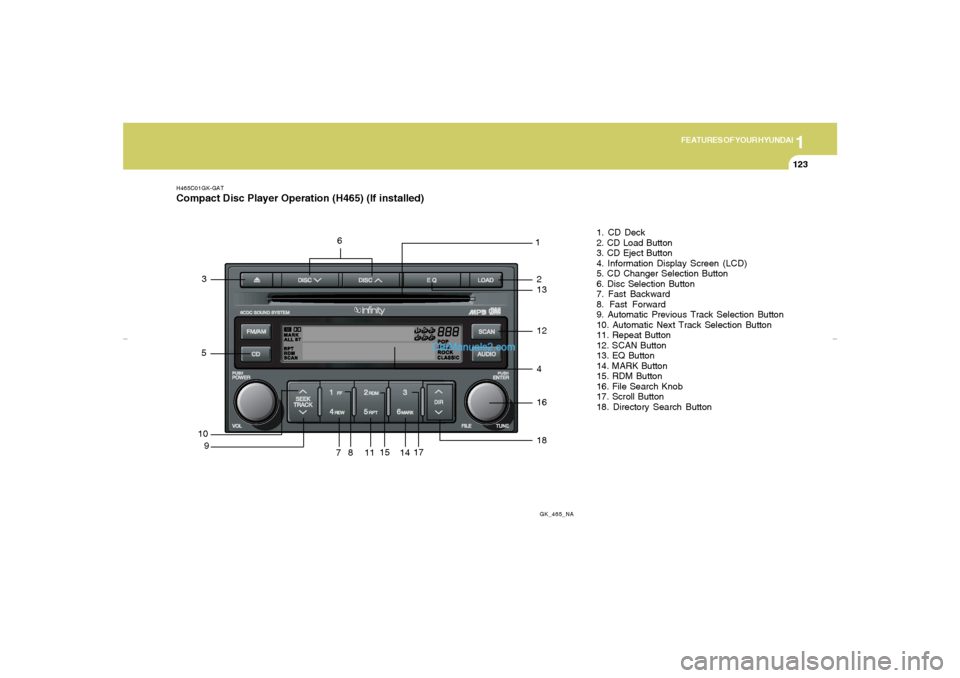
H465C01GK-GATCompact Disc Player Operation (H465) (If installed)
GK_465_NA
10
91
81. CD Deck
2. CD Load Button
3. CD Eject Button
4. Information Display Screen (LCD)
5. CD Changer Selection Button
6. Disc Selection Button
7. Fast Backward
8. Fast Forward
9. Automatic Previous Track Selection Button
10. Automatic Next Track Selection Button
11. Repeat Button
12. SCAN Button
13. EQ Button
14. MARK Button
15. RDM Button
16. File Search Knob
17. Scroll Button
18. Directory Search Button
71117
41618
14
15
53
12132
6
gkflhma-1b.p659/12/2006, 3:20 PM 123