2007 Hyundai Santa Fe buttons
[x] Cancel search: buttonsPage 177 of 355
1165165165165165165
FEATURES OF YOUR HYUNDAI
3. Selecting a disc to playModel D445S
Only the CD loaded in the player can be
played.
Models D465S and D466S
You can select any disc loaded in the CD
changer for playback.
To do so:
Press the corresponding CD selector
button (1 – 6).
The CD changer automatically loads the
selected CD and begins playback of the
first track.
The LCD screen displays the selected CD
as a flashing number.
4. Selecting and playing tracks
(songs)To select tracks, you can use one of 3
methods:
Method 1:
Press the Track Up or Track Down
button repeatedly until you find the track
you want.
Method 2:
Rotate the File Search knob to scroll to
the track you want. The number counter
in the LCD screen shows you the track
number.
Press the File Search knob to ENTER
your selection and begin playback.
Method 3 (only for MP3 and WMA CDs):
Press the DIR Up or Down buttons re-
peatedly to switch to the directory you
want on the CD.
The LCD screen displays the name of
the directory you have switched to.Rotate the File Search knob to scroll to the
track you want in the selected directory.
The number counter in the LCD screen
shows you the track number. Press the File
Search knob to ENTER your selection and
begin playback.
NOTE:You may notice that the track number
counter on the LCD screen matches the
track list on audio CDs exactly while that
may not be the case for MP3 or WMA
CDs. This is because WMA and MP3 CDs
typically contain multiple tracks (files)
that are organized on the CD as directo-
ries. The number counter displays the
track number of the track being played
in relation to the numbering system on
the MP3 or WMA CD. Depending on the
sequence in which the files and directo-
ries were added to the CD, the track
number sequence displayed on the
screen may not match the playback
sequence. This is due to the MP3 and
WMA encoding process and does not
mean that your CD player is defective.
Page 180 of 355
1FEATURES OF YOUR HYUNDAI
168
D466S05CM B466A02CM-AAT
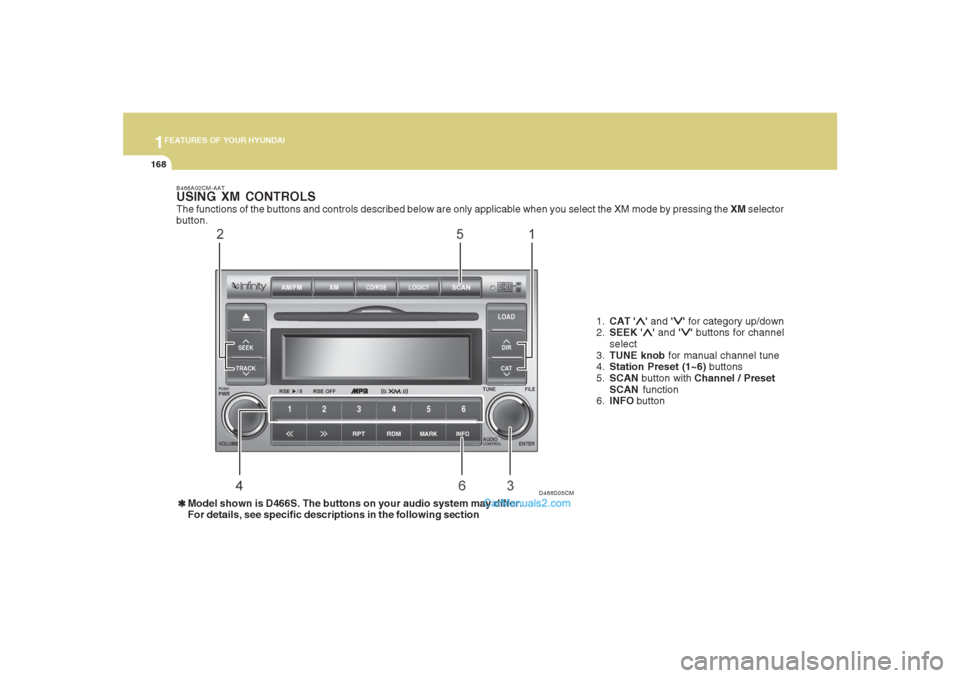
USING XM CONTROLSThe functions of the buttons and controls described below are only applicable when you select the XM mode by pressing the XM selector
button.
1.CAT '
∧ ∧∧ ∧
∧' and '
∨ ∨∨ ∨
∨' for category up/down
2.SEEK '
∧ ∧∧ ∧
∧' and '
∨ ∨∨ ∨
∨' buttons for channel
select
3.TUNE knob for manual channel tune
4.Station Preset (1~6) buttons
5.SCAN button with Channel / Preset
SCAN function
6.INFO button
❃ ❃❃ ❃
❃Model shown is D466S. The buttons on your audio system may differ.
For details, see specific descriptions in the following section
Page 181 of 355
1169169169169169169
FEATURES OF YOUR HYUNDAI
1. CAT UP '
∧ ∧∧ ∧
∧' / DOWN '
∨ ∨∨ ∨
∨' buttons
Press CAT UP '
∧ ∧∧ ∧
∧' / DOWN '
∨ ∨∨ ∨
∨' buttons to
go to next/previous categories. Once
reached the desired category, press the
ENTER knob to select the category. The
audio system will play the first channel of
the new category. If there is no ENTER
carried out 5 seconds after the last CAT UP
'
∧ ∧∧ ∧
∧' / DOWN '
∨ ∨∨ ∨
∨' button, the category up/
down is canceled and the audio system
reverts the display back to current active
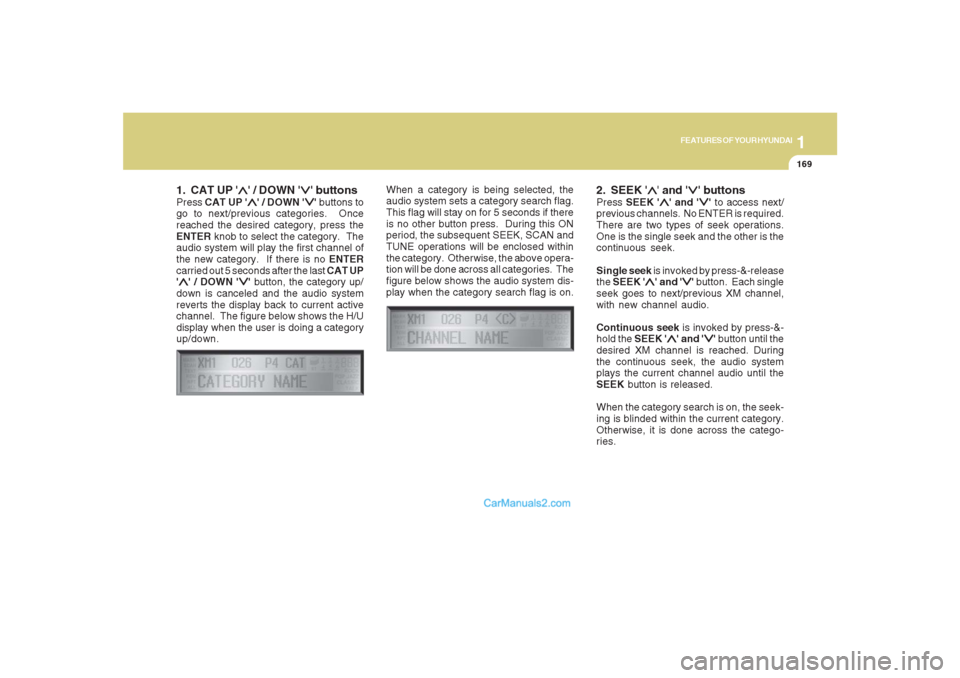
channel. The figure below shows the H/U
display when the user is doing a category
up/down.When a category is being selected, the
audio system sets a category search flag.
This flag will stay on for 5 seconds if there
is no other button press. During this ON
period, the subsequent SEEK, SCAN and
TUNE operations will be enclosed within
the category. Otherwise, the above opera-
tion will be done across all categories. The
figure below shows the audio system dis-
play when the category search flag is on.
2. SEEK '
∧ ∧∧ ∧
∧' and '
∨ ∨∨ ∨
∨' buttons
Press SEEK '
∧ ∧∧ ∧
∧' and '
∨ ∨∨ ∨
∨' to access next/
previous channels. No ENTER is required.
There are two types of seek operations.
One is the single seek and the other is the
continuous seek.
Single seek is invoked by press-&-release
the SEEK '
∧ ∧∧ ∧
∧' and '
∨ ∨∨ ∨
∨' button. Each single
seek goes to next/previous XM channel,
with new channel audio.
Continuous seek is invoked by press-&-
hold the SEEK '
∧ ∧∧ ∧
∧' and '
∨ ∨∨ ∨
∨' button until the
desired XM channel is reached. During
the continuous seek, the audio system
plays the current channel audio until the
SEEK button is released.
When the category search is on, the seek-
ing is blinded within the current category.
Otherwise, it is done across the catego-
ries.
Page 182 of 355
1FEATURES OF YOUR HYUNDAI
170
3. TUNE KnobTurn the TUNE knob to scroll through the
XM channels. This is called manual tun-
ing. Upon reaching the desired channel,
press the knob (ENTER) to make a selec-
tion. During manual tuning, the audio sys-
tem plays the current channel audio until
a selection is made.
If there is no ENTER being pressed 5
seconds after stopped turning the TUNE
knob, the manual tune will be canceled.
The audio system then reverts the display
back to its current channel.
When the category search is on, the manual
tuning is blinded within the current cat-
egory. Otherwise, it is done across the
categories.
4. Channel Preset buttons (1~6)There are 6 Preset buttons in each XM
band you can use to store your favorite XM
channels. Saving a channel as a preset
gives you one-touch access to the channel
you want. Remember that the 6 presets
channels you stored are for the specific XM
band mode you are in. There are a total of
3 XM bands. That means you can store up
to 18 of your favorite channels in the preset
memory.NOTE:Remember that if you store a channel as
preset 3 in XM2 mode, you must first
select XM2 mode before you can use
that preset button.
Using PresetsTo save a XM channel as a preset:
1. Take note of the band selection dis-
played on the LCD screen (XM1, XM2
or XM3)
2. Select a XM channel you want using
either the SEEK '
∧ ∧∧ ∧
∧' and '
∨ ∨∨ ∨
∨' buttons or
the TUNE Knob.
3. Choose the preset button (1 – 6) you
want to store that channel.
4. Press and hold the Preset button for
more than 2 seconds.
The system beeps to indicate that it has
saved the new channel and displays
the preset number on the LCD screen.
NOTE:Saving a new channel erases the previ-
ous setting saved in that preset.
Page 183 of 355
1171171171171171171
FEATURES OF YOUR HYUNDAI
To call back a preset channel:
1. Select the band (XM1, XM2 or XM3) you
want using the XM button.
2. Press the preset button you want.
The system automatically jumps to the
preset channel. The channel informa-
tion and preset number are displayed
on the LCD screen.5. SCAN buttonChannel scan function
Press the SCAN button to scan all the
channels in XM. The audio system plays
the audio of a channel for 10 seconds
before scanning for the next channel. When
the category search is on, the channel
scan is blinded within the current category.
Otherwise, it is done across the catego-
ries.
If you want to keep listening to a particular
channel and want to stop the scanning,
press the SCAN button again.
This function is useful for providing you
with a good overview of all the radio sta-
tions within range of your tuner.Preset scan function
Press and hold the SCAN button for more
than 2 seconds. Each preset channel will
be automatically played for 10 seconds. If
you want to keep listening to a particular
preset channel and want to stop the scan-
ning, press the SCAN button again.
6. INFO buttonINFO button brings out the extra channel
info of the current played channel. The
audio system shows the following extra
channel info in sequence when the INFO
is pressed several times. First, it shows the
song/program title. Then, it follows by the
name of the artist/feature. The last one is
the category name. Another press of INFO
button brings the display back to the status
of the current played channel.Checking RADIO IDEvery SDAR box comes with one unique
RADIO ID. You need ID to make subscrip-
tion with XM service provider. Do single
seek to channel 0 using SEEK '
∧ ∧∧ ∧
∧' and '
∨ ∨∨ ∨
∨'
buttons. The audio system will then dis-
play the RADIO ID of the SDAR box.
Buttons not in use in tuner modeThe following buttons and functions are
not used in XM mode.
-<< button
->> button
-RPT button
-RDM button
-MARK button
Page 184 of 355
1FEATURES OF YOUR HYUNDAI
172
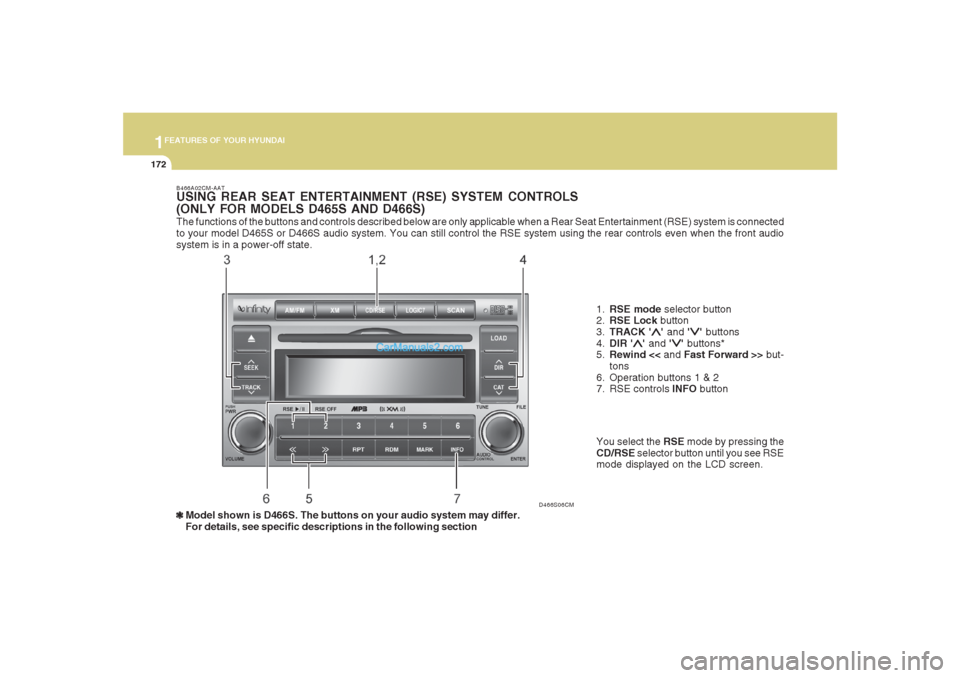
The functions of the buttons and controls described below are only applicable when a Rear Seat Entertainment (RSE) system is connected
to your model D465S or D466S audio system. You can still control the RSE system using the rear controls even when the front audio
system is in a power-off state.
D466S06CM B466A02CM-AAT
USING REAR SEAT ENTERTAINMENT (RSE) SYSTEM CONTROLS
(ONLY FOR MODELS D465S AND D466S)
1.RSE mode selector button
2.RSE Lock button
3.TRACK '
∧ ∧∧ ∧
∧' and '
∨ ∨∨ ∨
∨' buttons
4.DIR '
∧ ∧∧ ∧
∧' and '
∨ ∨∨ ∨
∨' buttons*
5.Rewind << and Fast Forward >> but-
tons
6. Operation buttons 1 & 2
7. RSE controls INFO button
❃ ❃❃ ❃
❃Model shown is D466S. The buttons on your audio system may differ.
For details, see specific descriptions in the following sectionYou select the RSE mode by pressing the
CD/RSE selector button until you see RSE
mode displayed on the LCD screen.
Page 185 of 355
1173173173173173173
FEATURES OF YOUR HYUNDAI
B466B02CM-AAT1. CD/RSE button (Switching to RSE
mode)Switch between RSE mode and CD mode
by pressing the CD/RSE selector button
until you see RSE mode displayed in the
LCD screen. In RSE mode, you can control
the RSE system from the controls on the
front panel of the audio system.NOTE:o If you are in Radio mode, press the
CD/RSE selector button once to switch
to CD mode and then press the CD/
RSE selector button again to switch to
RSE mode.
o If the CD changer does not contain
any CDs, you must press the CD/RSE
selector button a second time within
5 seconds of the first. Otherwise, the
audio system will automatically switch
back to radio mode.
2. RSE Lock buttonIn any mode, press and hold the CD/RSE
selector button for more than 2 seconds to
lock or release the RSE from the LOCK
mode. The LCD screen displays LOCK to
indicate that the system is in LOCK mode.
When the LOCK mode is engaged, only
the POWER ON/OFF button and the EJECT
button on the RSE system will be func-
tional.
This function is useful if you do not want
rear-seat passengers (e.g. children) to play
with the controls or otherwise interrupt disc
playback.
3. Track '
∧ ∧∧ ∧
∧' and '
∨ ∨∨ ∨
∨' buttons
If the RSE system is playing a disc and the
audio system is in RSE mode, press the
TRACK '
∧ ∧∧ ∧
∧' and '
∨ ∨∨ ∨
∨' buttons to select and
play the next or previous track on the disc
being played in the RSE.
The LCD screen displays the track status
as you press the buttons. You can press
the button several times to select the track
you want.
Page 186 of 355
1FEATURES OF YOUR HYUNDAI
174
4. Dir '
∧ ∧∧ ∧
∧' and '
∨ ∨∨ ∨
∨' buttons*
If the RSE system is playing an MP3 disc*
and the audio system is in RSE mode,
press the DIR '
∧ ∧∧ ∧
∧' or '
∨ ∨∨ ∨
∨' buttons to switch
to the next or previous directory on the CD.
The LCD screen displays the name of the
directory you have switched to and auto-
matically begins playback of the first track
in the directory.
* NOTE:The DIR '
∧ ∧∧ ∧
∧' or '
∨ ∨∨ ∨
∨' buttons can only be
used when you are playing a CD which
has organized its tracks in the form of
directories. Normally, only MP3 CDs will
contain a directory tree which you can
navigate using these buttons.
5. << and >> buttons (Rewind and
Fast Forward)If the RSE system is playing a disc and the
audio system is in RSE mode, press and
hold the << or >> button to rewind or fast-
forward playback of the current track. The
LCD screen displays the elapsed time of
the track you are rewinding or fast-for-
warding. Release the << or >> button when
you have reached the point you want.
Playback resumes automatically at the
selected point.6. Operation buttons (1-2)If a disc is loaded in the RSE system and
the audio system is in RSE mode,
o Press button 1 to play/pause the play-
back of the disc loaded in the RSE
system DVD player
o Press button 2 to power off the RSE
system but continues to play the disc in
the DVD player.
7. INFO buttonIf the RSE system is playing a disc and the
audio system is in RSE mode, press INFO
for detailed information on the assignment
of operational / playback controls to the
buttons on the audio system’s front panel.Buttons not in use in RSE modeThe following buttons and functions are
not used in RSE mode.
-RPT button
-RDM button
-MARK button
-SCAN button
- Number buttons 3, 4, 5, 6