Page 163 of 355
1151151151151151151
FEATURES OF YOUR HYUNDAI
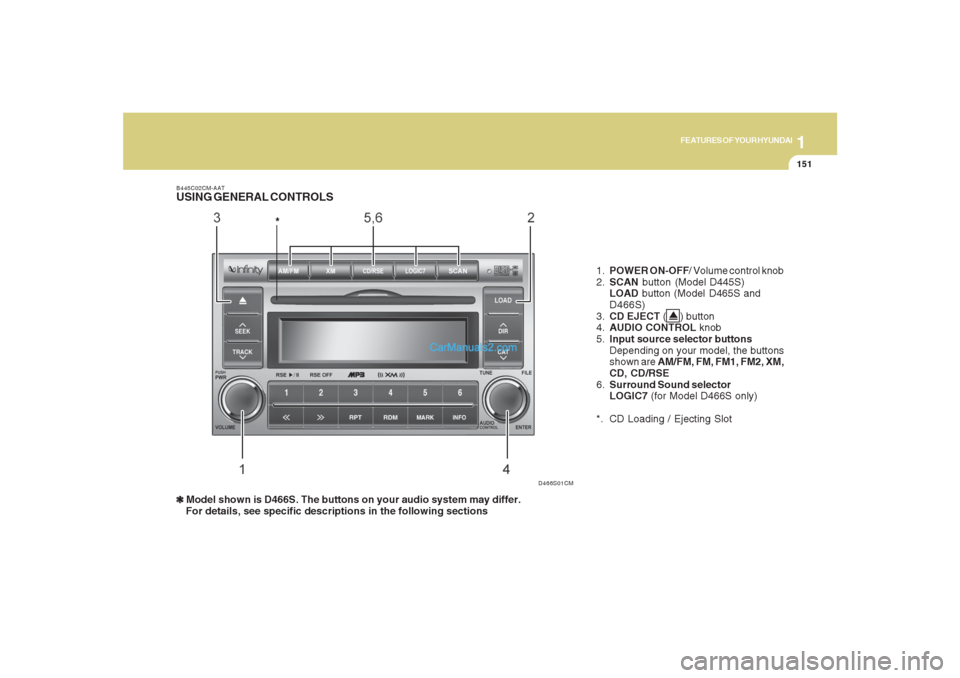
1.POWER ON-OFF/ Volume control knob
2.SCAN button (Model D445S)
LOAD button (Model D465S and
D466S)
3.CD EJECT ( ) button
4.AUDIO CONTROL knob
5.Input source selector buttons
Depending on your model, the buttons
shown are AM/FM, FM, FM1, FM2, XM,
CD, CD/RSE
6.Surround Sound selector
LOGIC7 (for Model D466S only)
*. CD Loading / Ejecting Slot
D466S01CM B445C02CM-AAT
USING GENERAL CONTROLS
*❃ ❃❃ ❃
❃ Model shown is D466S. The buttons on your audio system may differ.
For details, see specific descriptions in the following sections
Page 168 of 355
1FEATURES OF YOUR HYUNDAI
156
B445D02CM-AATUSING AM / FM TUNER CONTROLS❃ ❃❃ ❃
❃Model shown is D466S. The buttons on your audio system may differ.
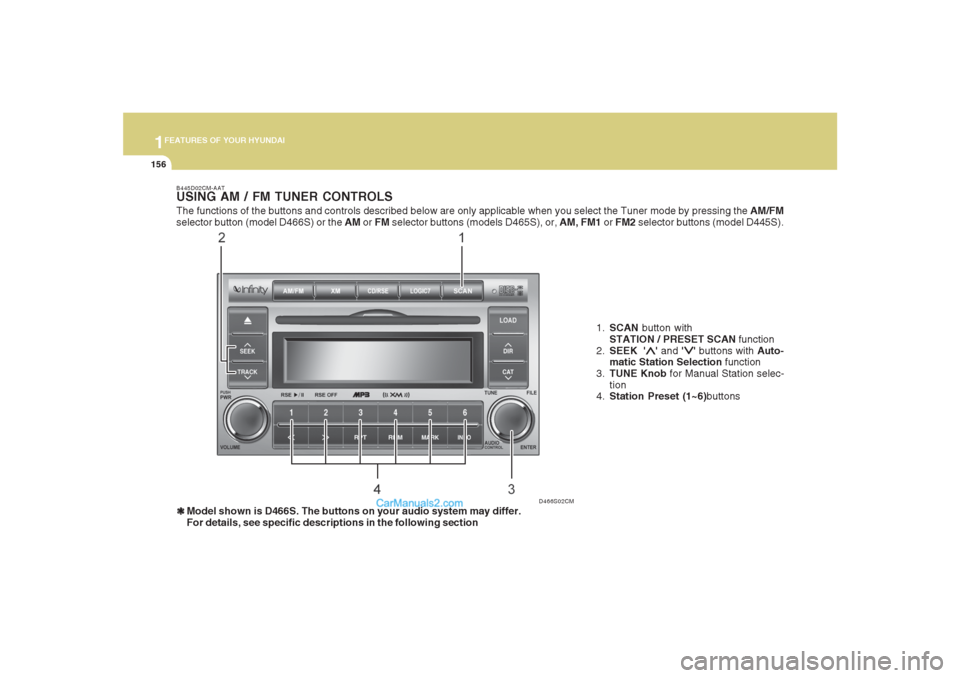
For details, see specific descriptions in the following section1.SCAN button with
STATION / PRESET SCAN function
2.SEEK '
∧ ∧∧ ∧
∧' and '
∨ ∨∨ ∨
∨' buttons with Auto-
matic Station Selection function
3.TUNE Knob for Manual Station selec-
tion
4.Station Preset (1~6)buttons
D466S02CM
The functions of the buttons and controls described below are only applicable when you select the Tuner mode by pressing the AM/FM
selector button (model D466S) or the AM or FM selector buttons (models D465S), or, AM, FM1 or FM2 selector buttons (model D445S).
Page 169 of 355
1157157157157157157
FEATURES OF YOUR HYUNDAI
B445E02CM-AAT1. SCAN buttonStation scan function
Press the SCAN button for the tuner to
scan for radio signals in the selected fre-
quency band (AM or FM). Once the tuner
locks onto the signal of a transmitting sta-
tion, it plays that station for 5 seconds
before scanning for the next available sta-
tion in the selected frequency band.
If you want to keep listening to a particular
station and want to stop the scanning,
press the SCAN button again.
This function is useful for providing you
with a good overview of all the radio sta-
tions within range of your tuner.
Preset scan function
Press and hold the SCAN button for more
than 2 seconds. Each preset radio stations
will be automatically played for 5 seconds.
If you want to keep listening to a particular
preset station and want to stop the scan-
ning, press the SCAN button again.
2. SEEK '
∧ ∧∧ ∧
∧' and '
∨ ∨∨ ∨
∨' buttons
Automatic Station Selection function
Press the '
∧ ∧∧ ∧
∧' and '
∨ ∨∨ ∨
∨' buttons to scan up
and down the frequency range for the next
available radio station and automatically
lock on to that frequency.
The LCD screen displays the frequency of
the radio station transmitting a clear and
strong signal.
Use this function to search for a radio
station you want. If you like a particular
station, you can store it as one of 6 presets
using the Preset buttons described later.
NOTE:This function is not effective if you are
experiencing poor reception in your vi-
cinity.
3. TUNE KnobManual Station Selection
Rotate the knob clockwise or counter-clock-
wise to manually advance up or down the
frequency range. The Tune knob also gives
you fine-grain control which you can use to
manually fine-tune your frequency selec-
tion. This is useful if you are searching for
a radio signal which is not strong enough
for you to use the Automatic Station Selec-
tion functionNOTE:The speed at which you advance up or
down the frequency range depends on
how fast you turn the knob.
Page 171 of 355
1159159159159159159
FEATURES OF YOUR HYUNDAI
The functions of the buttons and controls described below are only applicable when you select the CD mode by pressing the CD selector
button (for model D445S) or the CD/RSE selector button (models D465S and D466S).B445F02CM-AATUSING CD PLAYER CONTROLS❃ ❃❃ ❃
❃Model shown is D466S. The buttons on your audio system may differ.
For details, see specific descriptions in the following section1.SCAN button
2.TRACK '
∧ ∧∧ ∧
∧' and '
∨ ∨∨ ∨
∨' buttons
3. CD selector buttons(1-6)
* Not used with D445S
4.Rewind << and Fast Forward >> but-
tons
5.DIR '
∧ ∧∧ ∧
∧' and '
∨ ∨∨ ∨
∨' buttons
* Used with MP3 and WMA discs
6.File Search Knob
7. Repeat RPT button
Random play RDM button
Marklist MARK button
Disc INFO button
NOTE:For models D465S and D466S, if a RSE
system is connected to your audio sys-
tem, press the CD/RSE selector button
repeatedly to switch between CD mode
and RSE mode.
D466S03CM
Page 172 of 355
1FEATURES OF YOUR HYUNDAI
160
B445G02CM-AAT1. SCAN buttonDisc Scan function
During CD playback, press the SCAN
button to play the first 10 seconds (pre-
view) of all tracks on the current CD.
Once you hear a track you want, press the
SCAN button again to resume normal play-
back2. Track UP '
∧ ∧∧ ∧
∧' and DOWN '
∨ ∨∨ ∨
∨' but-
tons
During CD playback, press the
∧ and
∨
buttons to select and play the next or pre-
vious track on the current disc. The LCD
screen displays the track number as you
press the buttons. You can press the but-
ton several times to select the track you
want.
3. CD selector buttons (1~6)Model D445S:
The CD selector buttons are not used with
Model D445.
Models D465S and D466S:
Press the CD selector button correspond-
ing to the CD you want. The CD player
automatically interrupts playback and loads
the selected CD.NOTE:If no CD is loaded in the selected posi-
tion, the LCD screen displays the No
Disc indicator.4. Rewind << and Fast Forward >>
buttonsDuring CD playback, press and hold the
<< or >> buttons to rewind or fast-forward
playback of the current track. The LCD
screen displays the elapsed time of the
track you are rewinding or fast-forwarding.
Release the << or >> button when you
have reached the point you want. Play-
back resumes automatically at the selected
point.
5. DIR '
∧ ∧∧ ∧
∧' and '
∨ ∨∨ ∨
∨' buttons (MP3 and
WMA discs)
During MP3/WMA CD playback, press the
DIR '
∧ ∧∧ ∧
∧' or '
∨ ∨∨ ∨
∨' buttons to switch to the next
or previous directory on the CD. The LCD
screen displays the name of the directory
you have switched to. You can press the
button several times to search for the direc-
tory you want. The directories are dis-
played in sequence (i.e. ascending or
descending alphabetical order).
To access the directory displayed, press
the File Search knob to ENTER your se-
lection.
NOTE:The Directory UP and DOWN buttons
can only be used when you are playing a
CD which has organized its tracks in the
form of directories. Normally, only MP3
or WMA CDs will contain a directory tree
which you can navigate using these but-
tons.
Page 174 of 355
1FEATURES OF YOUR HYUNDAI
162
B445F02CM-AATPLAYING CDS, MP3 AND WMA DISCS❃ ❃❃ ❃
❃Model shown is D466S. The buttons on your audio system may differ.
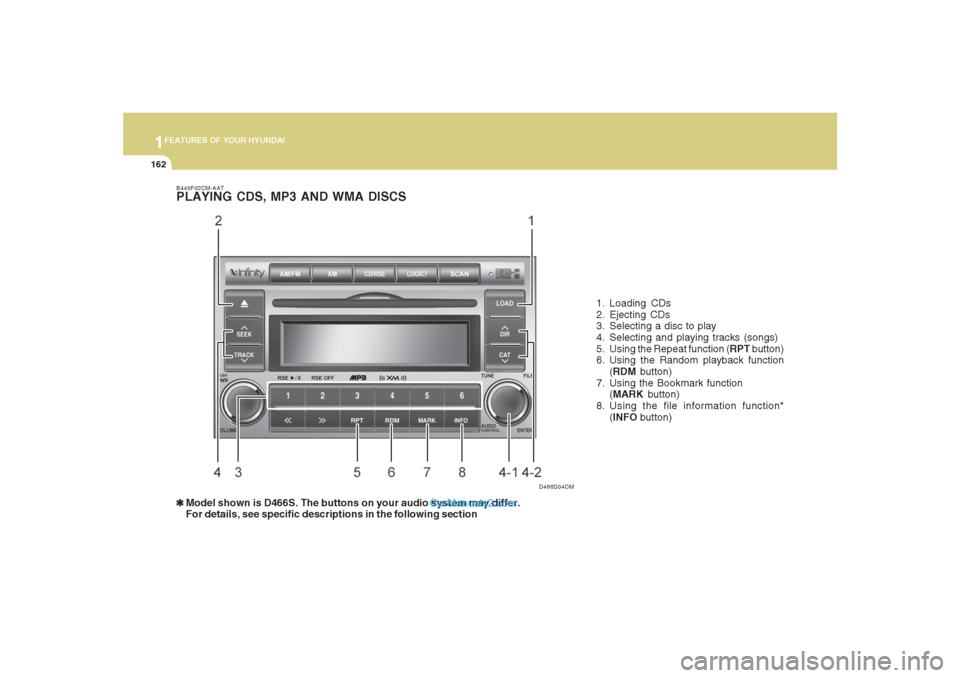
For details, see specific descriptions in the following section1. Loading CDs
2. Ejecting CDs
3. Selecting a disc to play
4. Selecting and playing tracks (songs)
5. Using the Repeat function (RPT button)
6. Using the Random playback function
(RDM button)
7. Using the Bookmark function
(MARK button)
8. Using the file information function*
(INFO button)
D466S04CM
Page 180 of 355
1FEATURES OF YOUR HYUNDAI
168
D466S05CM B466A02CM-AAT
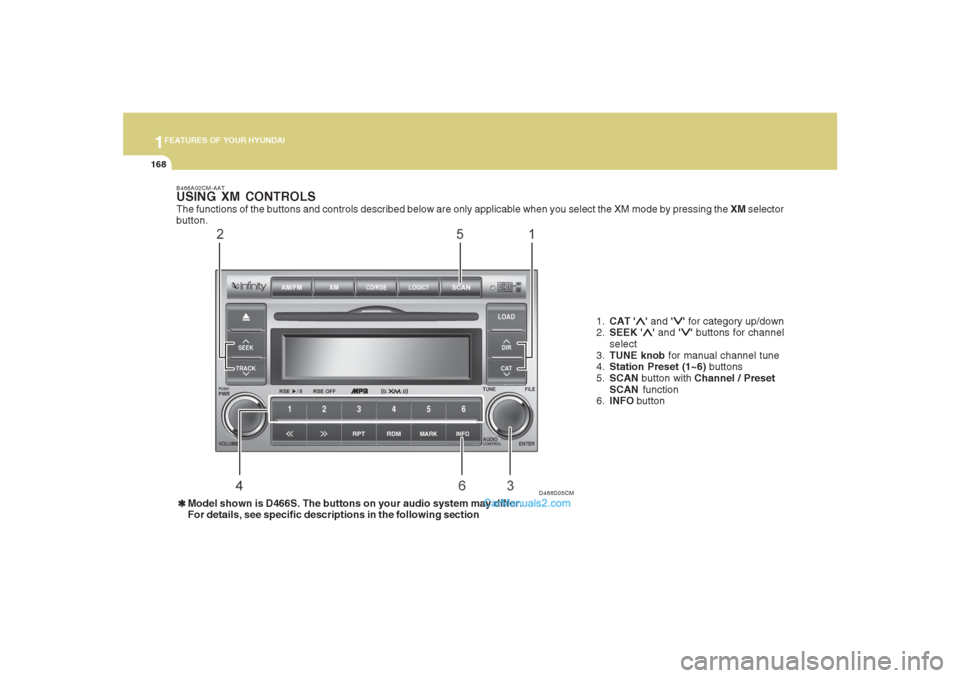
USING XM CONTROLSThe functions of the buttons and controls described below are only applicable when you select the XM mode by pressing the XM selector
button.
1.CAT '
∧ ∧∧ ∧
∧' and '
∨ ∨∨ ∨
∨' for category up/down
2.SEEK '
∧ ∧∧ ∧
∧' and '
∨ ∨∨ ∨
∨' buttons for channel
select
3.TUNE knob for manual channel tune
4.Station Preset (1~6) buttons
5.SCAN button with Channel / Preset
SCAN function
6.INFO button
❃ ❃❃ ❃
❃Model shown is D466S. The buttons on your audio system may differ.
For details, see specific descriptions in the following section
Page 184 of 355
1FEATURES OF YOUR HYUNDAI
172
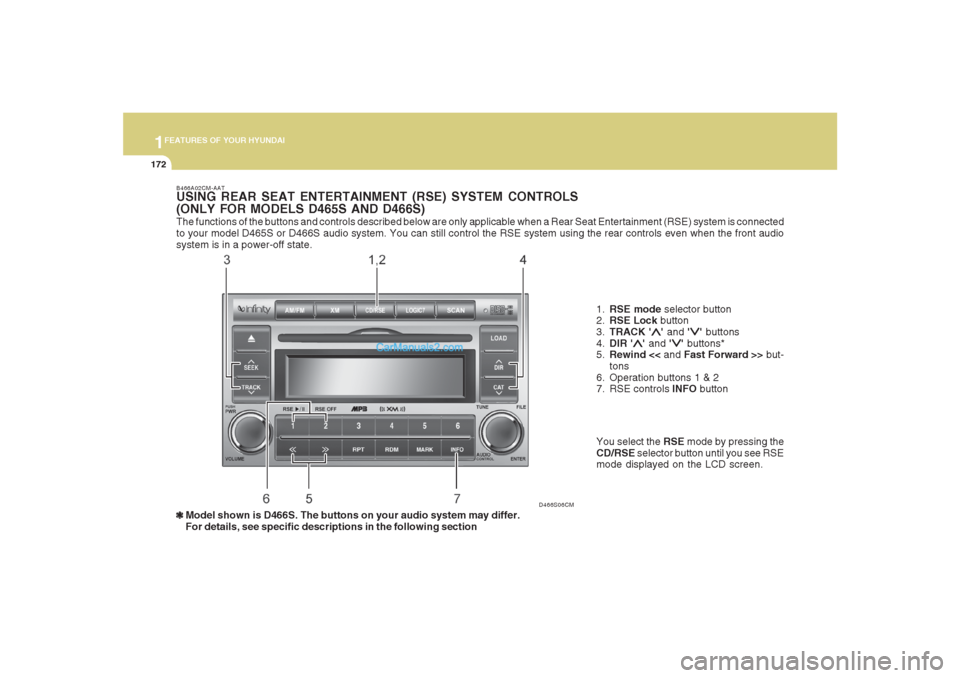
The functions of the buttons and controls described below are only applicable when a Rear Seat Entertainment (RSE) system is connected
to your model D465S or D466S audio system. You can still control the RSE system using the rear controls even when the front audio
system is in a power-off state.
D466S06CM B466A02CM-AAT
USING REAR SEAT ENTERTAINMENT (RSE) SYSTEM CONTROLS
(ONLY FOR MODELS D465S AND D466S)
1.RSE mode selector button
2.RSE Lock button
3.TRACK '
∧ ∧∧ ∧
∧' and '
∨ ∨∨ ∨
∨' buttons
4.DIR '
∧ ∧∧ ∧
∧' and '
∨ ∨∨ ∨
∨' buttons*
5.Rewind << and Fast Forward >> but-
tons
6. Operation buttons 1 & 2
7. RSE controls INFO button
❃ ❃❃ ❃
❃Model shown is D466S. The buttons on your audio system may differ.
For details, see specific descriptions in the following sectionYou select the RSE mode by pressing the
CD/RSE selector button until you see RSE
mode displayed on the LCD screen.