2007 Hyundai Elantra audio
[x] Cancel search: audioPage 181 of 339

Features of your vehicle108 4
1. LOAD Button
2. CD(AUDIO/MP3)/AUX Select Button
3. CD EJECT Button
4. TRACK UP/DOWN Button
5. SCROLL Button
6. FF/REW Button
7. EQ (Equalizer) Button
8. CD SCAN Button
9. MARK (Bookmark) Button
10. RPT (Repeat) Button
11. RDM (Random) Button
12. DISC UP/DOWN Button
13. FILE SEARCH Knob (TUNE Select Knob)
14. DIR (Directory Search) Button
HD_465 AM
COMPACT DISC PLAYER/CD AUTO CHANGER OPERATION (M465) (IF EQUIPPED)
Page 182 of 339

4109
Features of your vehicle
1. LOAD ButtonThis compact disc player will accommo-
date up to six compact discs.
To insert one disc into the player, do the
following:
1. Press and release the LOAD Button.
2. Blue light on the slot will be illuminated
and the lowest number of empty slot
will blink on the display. After "WAIT" is
displayed on the LCD, the slot will open
with "INSERT" displayed on the LCD.
3. Insert a disc partway into the slot, label
side up. The player will pull the disc in.
When the disc is inserted, the disc will
begin to play automatically.✽ ✽
NOTICE• Playback of MP3, AAC, and WMA
file formats are supported. Load to
play time for these formats may be
longer due to the compressed nature
of these discs.
• The disc can be only inserted while the
green light is blinking on the slot.
• This CD player is suitable only for 12
cm discs, do not use irregular shaped
CDs.
To insert multiple discs into the player, do
the followings:
1. Press and hold the LOAD button for
one second or more. You will then hear
a beep sound and the green light on
the slot will be illuminated, and the
numbers of empty disc will blink on the
display.
2. After "WAIT" is displayed on the LCD
with the lowest number of empty slot
blinking, the slot will open with
"INSERT" displayed on the LCD.
3. Insert a disc partway into the slot, label
side up. The player will pull the disc in.
Once the disc is loaded, the numbers
of the empty disc will blink on the dis-
play continuously. If the next "DISC
NO." is displayed when the slot is illu-
minated, you can then load another
disc.
4. Load the remaining disc by following
the same procedures 1 and 2. When
you finished loading 6 discs, the CD
player will begin to play the last CD
loaded.5. To load more than one disc but less
than six, complete Steps 1 and 2.
When you have finished loading discs,
press LOAD button to cancel the load-
ing function or wait for 10 seconds.
The CD player will begin to play the
last CD loaded. As each CD starts to
play, the DISC number will appear on
the display.
✽ ✽
NOTICEThe disc player takes up to six discs.
Do not try to load more than six.2. CD(AUDIO/MP3)/AUX Select
Button Press the CD Button to start CD play-
back, during radio operation or cas-
sette tape playing.
When discs are in the CD deck, if you
press the CD button, the CD player will
begin playing even if the radio or cas-
sette player is being used.
The CD player can be used when the
ignition switch is in either the "ON" or
"ACC" position.
Push the CD button to start CD play-
back without pushing Power ON-OFF
control knob. (Only when a CD is in the
deck.
Page 184 of 339

4111
Features of your vehicle
✽ ✽
NOTICETracks stored on Mark Memory will be
automatically erased after you eject CDs
that contain those tracks.10. RPT (Repeat) Button To repeat the track you are currently
listening to, press the RPT button. To
cancel, press it again. If it pressed for
more than one second, it will be
repeated all tracks within currently
played CD.
To repeat the music within currently
played folder, press the RPT button for
more than one second. Then it will be
repeated in sequential order within the
currently played folder. To cancel,
press it again. (MP3 CD only)
If you do not release RPT operation
when the track ends, it will automati-
cally be replayed. This process will be
continued until you push the button
again.
11. RDM (Random) Button For listen to the music in random order,
press the RDM Button with beep
sound for more than one second. To
cancel, press it again.
For listen to the music within the cur-
rently played folder in random order,
press the RDM Button within one sec-
ond. To cancel, press it again within
one second. If it pressed for more than
one second, it will be played all in ran-
dom order within currently played CD
(MP3 CD only).12. DISC UP/DOWN Button By pressing "DISC "/"DISC "
while CD changer is playing, you can
move to the previews/next disc and
playback automatically begins.
If any of the slots does not contain a
CD, your car audio will skip empty slot
and plays only slot that contains a CD.
When switching CD’s, the LCD dis-
plays the selected CD’s number.
13. FILE SEARCH Knob (TUNE
Select Knob) You can move through the track by
turning the FILE SEARCH knob clock-
wise or counterclockwise.
After moving the desired file, press the
FILE SEARCH knob to playback in the
selected file.
If you do not press the FILE SEARCH
knob within five seconds, the file
searching function will be released.14. DIR (Directory Search) Button You can move through the folder by
pushing the DIR button to up ( ) and
down ( ).
After moving the desired folder, press
the FILE SEARCH knob to play back in
the the selected folder. If you do not
press the FILE SEARCH knob within 5
seconds, the folder searching function
will be released. It is not operated in a
single folder.
Page 185 of 339

Features of your vehicle112 4✽
✽
NOTICE• To assure proper operation of the unit,
keep the vehicle interior temperature
within a normal range by using the
vehicle’s air conditioning or heating
system.
• When replacing the fuse, replace it
with a fuse having the correct capaci-
ty.
• All stored bookmarks are all erased
when the car battery is disconnected
or power to the vehicle is lost. If this
occurs, the bookmarks will have to be
reset.
• Do not add any oil to the rotating
parts. Keep magnets, screwdrivers
and other metallic objects away from
the tape mechanism and head.
CAUTION
Do not insert warped or poor
quality discs into the CD player
as damage to the unit may occur.
Do not insert anything like coins
into the player slot as damage to
the unit may occur.
Do not place beverages close to
the audio system. The playback
mechanism may be damaged if
you spill them.
Do not strike or allow anything to
impact the audio system, damage
to the system mechanisms could
occur.
Off-road or rough surface driving
may cause the com- pact disc to
skip. Do not use the compact disc
when driving in such conditions
as damage to the compact disc
face could occur.
Do not attempt to grab or pull the
compact disc out while the disc is
being pulled into the audio unit
by the self-loading mechanism.
Damage to the audio unit and
compact disc could occur.
(Continued)
(Continued)
This equipment is designed to be
used only in a 12 volt DC battery
system with negative ground.
This unit is made of precision
parts. Do not attempt to disas-
semble or adjust any parts.
When driving your vehicle, be
sure to keep the volume of the
unit set low enough to allow you
to hear sounds coming from the
outside.
Do not expose this equipment
(including the speakers and tape)
to water or excessive moisture.
Avoid using recorded compact
discs in your audio unit. Original
compact discs are recommended.
The unit is not sure of playing CD-
RW (Rewritable).
When using the EQ funtion, turn
off the EQ funtion of the device
on the AUX input.
When no device is connected to
the AUX cable, please pull out the
cable from the JACK on the car.
(AUX MODE is operational and
noise may heard in the AUX
MODE.)
Page 285 of 339

Maintenance30 7
Battery recharging Your vehicle has a maintenance-free,
calcium-based battery.
If the battery becomes discharged in a
short time (because, for example, the
headlights or interior lights were left on
while the vehicle was not in use),
recharge it by slow charging (trickle)
for 10 hours.
If the battery gradually discharges
because of high electric load while the
vehicle is being used, recharge it at 20-
30A for two hours.
Reset itemsItems should be reset after the battery
has been discharged or the battery has
been disconnected.
Sunroof (See Chapter 4)
Trip computer (See Chapter 4)
Climate control system
(See Chapter 4)
Clock (See Chapter 4)
Audio (See Chapter 4)
Auto up/down window (See chapter 4)
(Continued)
When lifting a plastic-cased bat-
tery, excessive pressure on the
case may cause battery acid to
leak, resulting in personal injury.
Lift with a battery carrier or with
your hands on opposite corners.
Never attempt to recharge the
battery when the battery cables
are connected.
The electrical ignition system
works with high voltage. Never
touch these components with the
engine running or the ignition
switched on.
Failure to follow the above warn-
ings can result in serious bodily
injury or death.
PROPOSITION 65 WARNING
Battery posts, terminals, and relat-
ed accessories contain lead and
lead compounds, chemicals known
to the State of California to cause
cancer and reproductive harm.
Batteries also contain other chemi-
cals known to the State of California
to cause cancer. Wash hands after
handling.
Page 302 of 339

747
Maintenance
Memory fuseYour vehicle is equipped with the memo-
ry fuse to prevent battery discharge if
your vehicle is parked without being
operated for prolonged periods. Use the
following procedures before parking the
vehicle for prolonged periods.
1. Turn off the engine.
2. Turn off the headlights and tail lights.
3. Open the driver’s side panel cover and
pull up the memory fuse.
✽ ✽
NOTICE• If the memory fuse is pulled up from
the fuse panel, the warning chime,
audio, clock and interior lamps, etc.,
will not operate. Some items must be
reset after replacement. Refer to
“Battery” in this section.
• Even though the memory fuse is
pulled up, the battery can still be dis-
charged by operation of the head-
lights or other electrical devices.
Engine compartment panel fuse
replacement1. Turn the ignition switch and all other
switches off.
2. Remove the fuse box cover by press-
ing the tap and pulling up.
3. Check the removed fuse; replace it if it
is blown. To remove or insert the fuse,
use the fuse puller in the main fuse
box in the engine compartment.
4. Push in a new fuse of the same rating,
and make sure it fits tightly in the clips.
If it fits loosely, consult an authorized
Hyundai dealer.
OHD076027
OHD076028
Page 305 of 339
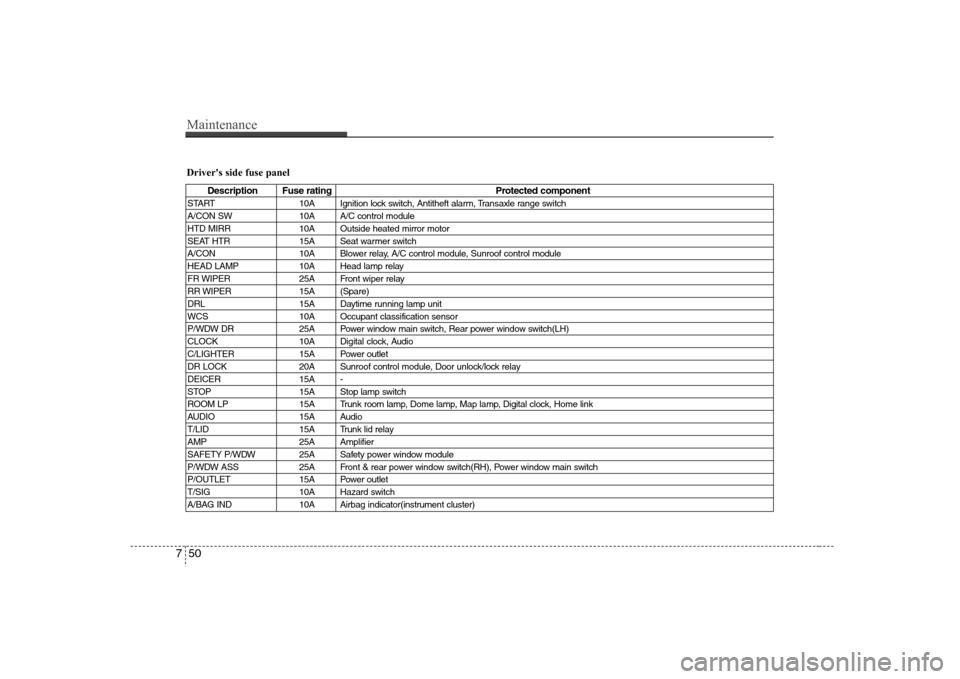
Maintenance50 7Driver's side fuse panel
Description Fuse rating Protected component
START 10A Ignition lock switch, Antitheft alarm, Transaxle range switch
A/CON SW 10A A/C control module
HTD MIRR 10A Outside heated mirror motor
SEAT HTR 15A Seat warmer switch
A/CON 10A Blower relay, A/C control module, Sunroof control module
HEAD LAMP 10A Head lamp relay
FR WIPER 25A Front wiper relay
RR WIPER 15A (Spare)
DRL 15A Daytime running lamp unit
WCS 10A Occupant classification sensor
P/WDW DR 25A Power window main switch, Rear power window switch(LH)
CLOCK 10A Digital clock, Audio
C/LIGHTER 15A Power outlet
DR LOCK 20A Sunroof control module, Door unlock/lock relay
DEICER 15A -
STOP 15A Stop lamp switch
ROOM LP 15A Trunk room lamp, Dome lamp, Map lamp, Digital clock, Home link
AUDIO 15A Audio
T/LID 15A Trunk lid relay
AMP 25A Amplifier
SAFETY P/WDW 25A Safety power window module
P/WDW ASS 25A Front & rear power window switch(RH), Power window main switch
P/OUTLET 15A Power outlet
T/SIG 10A Hazard switch
A/BAG IND 10A Airbag indicator(instrument cluster)
Page 334 of 339

Index2I
Air cleaner ··································································· 7-23
Airbag-advanced supplemental restraint system ········· 3-29
Driver's and passenger's front air bag ······················ 3-37
SRS components and functions ······························· 3-30
Occupant classification system ································ 3-32
Side air bag ······························································· 3-42
Curtain air bag ·························································· 3-43
Air bag warning label ··············································· 3-54
Appearance care ·························································· 7-59
Audio system ······························································· 4-87
M420 ········································································ 4-92
M445 ········································································ 4-97
M465 ······································································ 4-103
Automatic climate control system ······························· 4-69
Automatic transaxle ····················································· 5-10
Ignition key interlock system ··································· 5-14
Automatic transaxle operation ································· 5-11
Transaxle ranges ······················································· 5-12
Shift lock system ······················································ 5-14
Automatic transaxle fluid ············································ 7-20
Battery ········································································· 7-29
Before driving ································································ 5-3
Binding arbitration (U.S.A only) ··································· 8-5
Brake system ······························································· 5-16Anti-lock brake system (ABS) ································· 5-19
Parking brake ··························································· 5-18
Power brakes ···························································· 5-16
Brakes and clutch fluid ················································ 7-19
Bulb wattage ·································································· 9-2
Child restraint system ·················································· 3-21
Tether anchor system ··············································· 3-25
Child seat lower anchors ·········································· 3-27
Placing a passenger seat belt into the auto lock
mode ········································································· 3-23
Climate control air filter ·············································· 7-25
Consumer information ··················································· 8-4
Cruise control system ·················································· 5-26
Defroster ······································································ 4-59
Dimensions ···································································· 9-2
Door locks ····································································· 4-8
Central door lock switch ············································ 4-9
Child-protector rear door lock ·································· 4-11
Economical operation ·················································· 5-30
Emergency starting ························································ 6-4AB
CDE