2007 Hyundai Accent battery
[x] Cancel search: batteryPage 95 of 282

1
FEATURES OF YOUR HYUNDAI
83
B460D01NF-GAT Manual Operation of Sunroof If the sunroof does not electrically oper- ate:
1. Open the spectacle case.
2. Remove the two mounting screws of
the front overhead console with a (+)driver. OMC025022
3. Insert the hexagonal head wrench
provided with the vehicle into the socket. This wrench can be found in the vehicle's trunk or glove box.
4. Turn the wrench clockwise to open or counterclockwise to close thesunroof. OMC025023B460E01TG-GAT Resetting the sunroof Whenever the vehicle battery is discon- nected or discharged, or you use theemergency handle to operate the sunroof, you have to reset your sunroof system as follows:
1. Turn the ignition key to the "ON"
position.
2. Press the TILT UP button for more than 1 second to tilt up the sunroof completely when the sunroof is fullyclosed. Then, release the button.
3. Press and hold the TILT UP button
once again until the sunroof hasreturned to the original position of TILT UP after it is raised a little higher than the maximum TILT UPposition. Then, release the button.
4. Press and hold the TILT UP button
within 5 seconds until the sunroof isoperated as follows; TILT DOWN SLIDE OPEN
SLIDE CLOSEThen, release the button.
Page 122 of 282

1FEATURES OF YOUR HYUNDAI
110
B970C01NF-GAT Automatic Operation The FATC (Full Automatic Tempera- ture Control) system automatically con- trols heating and cooling by doing as follows:
1. Push the "AUTO" switch. The indi-
cator light will illuminate confirming that the Face, Floor and/or Bi-Level modes as well as the blower speed and air conditioner will be controlledautomatically. 2. Turn the "TEMP" knob to set the
desired temperature.The temperature will increase to the maximum 32°C(90°F) by turning the knob clockwise.The temperature will decrease to the minimum 17°C(62°F) by turning the knob counterclockwise.
NOTE: If the battery has been discharged or disconnected, the temperature modewill reset to Centigrade degrees. This is a normal condition and you can change the temperature modefrom Centigrade to Fahrenheit as follows; Press the "OFF" and "AUTO " switch simultaneously for 3 seconds.The display shows that the unit of temperature is adjusted to Centigrade or Fahrenheit (°C
°F or °F
°C).
B970C01MC B970C02MC
1JBA4067
Photo Sensor
NOTE: Never place anything over the sen- sor which is located on the instru- ment panel to ensure better control of the heating and cooling system.
Page 140 of 282

1FEATURES OF YOUR HYUNDAI
128
7. RANDOM (RDM) Button Press the RDM button to listen the tracks in random, rather than sequen-tial, order. Press it again to cancel random play. NOTE:
o To assure proper operation of theunit, keep the vehicle interior tem- perature within a normal range byusing the vehicle's air condition- ing or heating system.
o When replacing the fuse, replace
it with a fuse having the correctcapacity.
o All stored bookmarks are all erased when the car battery is discon-nected or power to the vehicle is lost. If this occurs, the bookmarkswill have to be reset.
o This equipment is designed to be
used only in a 12 volt DC batterysystem with negative ground.
o This unit is made of precision
parts. Do not attempt to disas-semble or adjust any parts.
o When driving your vehicle, be sure
to keep the volume of the unit setlow enough to allow you to hear sounds coming from the outside. o Do not expose this equipment (in-
cluding the speakers and CD) to water or excessive moisture.
! CAUTION:
o Do not insert warped or poor qual- ity discs into the CD player as damage to the unit may occur.
o Do not insert anything like coins
into the player slot as damage tothe unit may occur.
o Do not place beverages close to
the audio system. The playback mechanism may be damaged if you spill them.
o Do not strike or allow anything to impact the audio system, damageto the system mechanisms couldoccur.
o Off-road or rough surface driving
may cause the compact disc toskip. Do not use the compact disc when driving in such conditions as damage to the compact discface could occur.
o Do not attempt to grab or pull thecompact disc out while the disc is being pulled into the audio unit bythe self-loading mechanism. Dam- age to the audio unit and compact disc could occur.
o Avoid using recorded compact discs in your audio unit. Originalcompact discs are recommended.
Page 146 of 282

1FEATURES OF YOUR HYUNDAI
134
o When replacing the fuse, replaceit with a fuse having the correct capacity.
o The preset station frequencies are
all erased when the car battery isdisconnected. Therefore, all data will have to be set again if this should occur.
o Do not add any oil to the rotating parts. Keep magnets, screwdriv-ers and other metallic objects awayfrom the tape mechanism and head.
o This equipment is designed to be
used only in a 12 volt DC batterysystem with negative ground.
o This unit is made of precision
parts. Do not attempt to disas-semble or adjust any parts.
o When driving your vehicle, be sure
to keep the volume of the unit setlow enough to allow you to hear sounds coming from the outside.
o Do not expose this equipment (in- cluding the speakers and tape) towater or excessive moisture.
! CAUTION:
o Do not insert anything like coins into the player slot as damage to the unit may occur.
o Do not place beverages close to
the audio system. The playbackmechanism may be damaged if you spill them.
o Do not strike or allow anything to impact the audio system, damageto the system mechanisms could occur.
Page 150 of 282

1FEATURES OF YOUR HYUNDAI
138
!
CAUTION:
o Do not insert warped or poor qual- ity discs into the CD player as damage to the unit may occur.
o Do not insert anything like coins into the player slot as damage tothe unit may occur.
o Do not place beverages close to the audio system. The playbackmechanism may be damaged ifyou spill them.
o Do not strike or allow anything to
impact the audio system, damage to the system mechanisms could occur.
o Off-road or rough surface driving
may cause the compact disc toskip. Do not use the compact disc when driving in such conditionsas damage to the compact disc face could occur.
o Do not attempt to grab or pull the
compact disc out while the disc isbeing pulled into the audio unit by the self-loading mechanism. Dam- age to the audio unit and compact disc could occur.
o Avoid using recorded compact discs in your audio unit. Originalcompact discs are recommended.
12. DIRECTORY SEARCH
Button
o You can move through the folder by pushing the DIR button to up ( ) anddown ( ). After moving the desired folder, press the FILE SEARCH knob to playbackthe selected folder. If you do not press the FILE SEARCH knob within five seconds, the searchwill stop.
NOTE :
o To assure proper operation of the unit, keep the vehicle interior tem- perature within a normal range by using the vehicle's air condition- ing or heating system.
o When replacing the fuse, replace it with a fuse having the correctcapacity.
o All stored bookmarks are all erased when the car battery is discon-nected or power to the vehicle islost. If this occurs, the bookmarks will have to be reset. o This equipment is designed to be
used only in a 12 volt DC battery system with negative ground.
o This unit is made of precision
parts. Do not attempt to disas-semble or adjust any parts.
o When driving your vehicle, be sure
to keep the volume of the unit setlow enough to allow you to hear sounds coming from the outside.
o Do not expose this equipment (in-
cluding the speakers and tape) towater or excessive moisture.
Page 159 of 282

1
FEATURES OF YOUR HYUNDAI
147
1
FEATURES OF YOUR HYUNDAI
147
1
FEATURES OF YOUR HYUNDAI
147
1
FEATURES OF YOUR HYUNDAI
147
10. REPEAT (RPT) Button
o To repeat the track you are currently listening to, press the RPT button. To cancel, press again.
o To repeat the music within selected
CD, press the RPT button for morethan 0.8 seconds. To cancel, press it again for more than 0.8 seconds.
o If you do not release RPT operation after all the tracks are played back,the unit will play back again from thefirst track.
11. RANDOM (RDM) Button With random, you can listen to the tracks in random, rather than sequen- tial order, on all of the discs or on onedisc. To use random, do the following:
o Press the RDM button to listen to recorded tracks in random sequence.Press RDM again to cancel or turnthe audio unit OFF then ON. The unit defaults to playing tracks in sequen- tial order. NOTE :
o To assure proper operation of the
unit, keep the vehicle interior tem- perature within a normal range byusing the vehicle's air condition- ing or heating system.
o When replacing the fuse, replace it with a fuse having the correctcapacity.
o All stored bookmarks are all erased when the car battery is discon-nected or power to the vehicle is lost. If this occurs, the bookmarkswill have to be reset.
o Do not add any oil to the rotating
parts. Keep magnets, screwdriv-ers and other metallic objects away from the tape mechanism and head.
! CAUTION:
o Do not insert warped or poor qual- ity discs into the CD player as damage to the unit may occur.
o Do not insert anything like coins
into the player slot as damage tothe unit may occur.
o Do not place beverages close to
the audio system. The playbackmechanism may be damaged if you spill them.
o Do not strike or allow anything to impact the audio system, damageto the system mechanisms could occur.
o Off-road or rough surface driving may cause the compact disc toskip. Do not use the compact discwhen driving in such conditions as damage to the compact disc face could occur.
o Do not attempt to grab or pull the compact disc out while the disc isbeing pulled into the audio unit bythe self-loading mechanism. Dam- age to the audio unit and compact disc could occur.
Page 160 of 282

1FEATURES OF YOUR HYUNDAI
148
o This equipment is designed to be
used only in a 12 volt DC battery system with negative ground.
o This unit is made of precision
parts. Do not attempt to disas-semble or adjust any parts.
o When driving your vehicle, be sure
to keep the volume of the unit setlow enough to allow you to hear sounds coming from the outside.
o Do not expose this equipment (in-
cluding the speakers and tape) towater or excessive moisture.
o Avoid using recorded compact
discs in your audio unit. Originalcompact discs are recommended.
o The unit is not sure of playing CD-
RW (Rewritable).
Page 167 of 282
2 DRIVING YOUR HYUNDAI
4
C070C01A-AAT
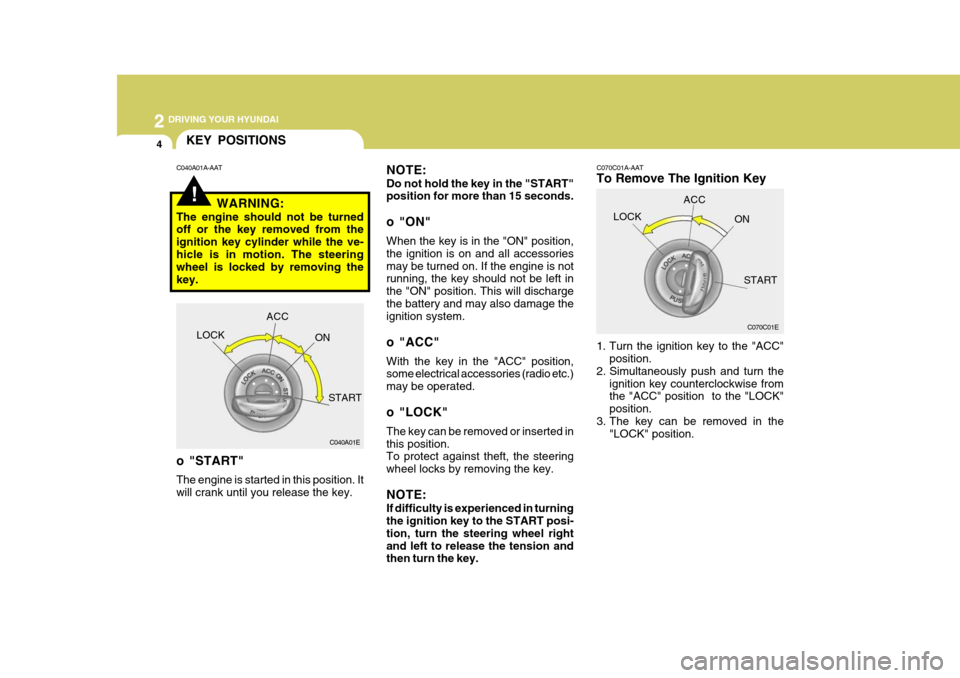
To Remove The Ignition Key
1. Turn the ignition key to the "ACC"position.
2. Simultaneously push and turn the
ignition key counterclockwise from the "ACC" position to the "LOCK" position.
3. The key can be removed in the "LOCK" position.
C070C01E
LOCK
ACC
ON
START
!
KEY POSITIONS
C040A01E
LOCK
ACC
ON
START
o "START" The engine is started in this position. It will crank until you release the key.
C040A01A-AAT
NOTE: Do not hold the key in the "START" position for more than 15 seconds.
o "ON" When the key is in the "ON" position, the ignition is on and all accessoriesmay be turned on. If the engine is not running, the key should not be left in the "ON" position. This will dischargethe battery and may also damage the ignition system.
o "ACC" With the key in the "ACC" position, some electrical accessories (radio etc.) may be operated.
o "LOCK" The key can be removed or inserted in this position. To protect against theft, the steering wheel locks by removing the key. NOTE: If difficulty is experienced in turning the ignition key to the START posi- tion, turn the steering wheel rightand left to release the tension and then turn the key.
WARNING:
The engine should not be turnedoff or the key removed from the ignition key cylinder while the ve-hicle is in motion. The steering wheel is locked by removing the key.