Page 8 of 319
�Î�Î
�Î �Î
�Î
�Î �Î
If equipped. To use the horn, press the pad around the ‘‘H’’ logo.
1: :
Your Vehicle at a Glance
Your Vehicle at a Glance
5
LIGHT CONTROL
SWITCH
STEERING WHEEL
ADJUSTMENT WINDSHIELD WIPERS/
WASHERSREAR WINDOW
DEFOGGER
PASSENGER AIRBAG
OFF INDICATOR
(P.
96)
(P. 102) (P.
75)
MOONROOF BUTTONS
(P. 204)
VTM-4 LOCK
(P. 35)
(P. 77)
(P. 74)
REMOTE AUDIO
CONTROLS
(P.
138) (P. 78)
(P. 175)
CRUISE CONTROL
BUTTONS
VSA OFF SWITCH
(P.
212)
CRUISE CONTROL
MASTER BUTTON
(P. 175) HAZARD WARNING BUTTON
(P. 77)
HORN
HEADLIGHTS/TURN SIGNAL/FOG LIGHTS
1
1
1 1
Page 19 of 319
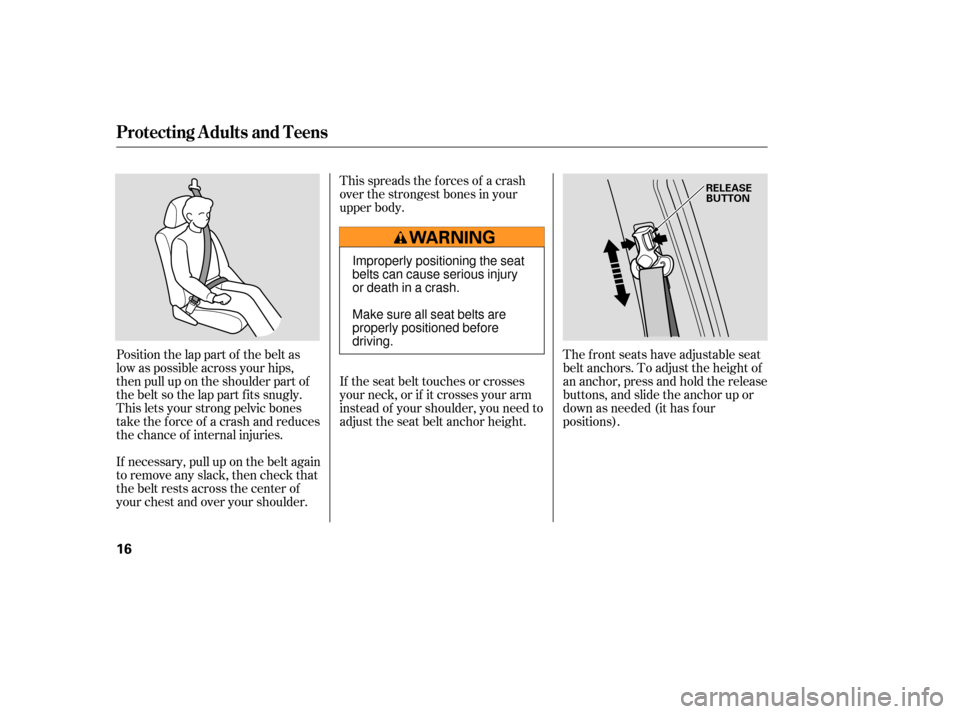
Position the lap part of the belt as
low as possible across your hips,
then pull up on the shoulder part of
the belt so the lap part f its snugly.
This lets your strong pelvic bones
take the force of a crash and reduces
the chance of internal injuries.This spreads the f orces of a crash
over the strongest bones in your
upper body.
If the seat belt touches or crosses
your neck, or if it crosses your arm
instead of your shoulder, you need to
adjust the seat belt anchor height.
The front seats have adjustable seat
belt anchors. To adjust the height of
an anchor, press and hold the release
buttons, and slide the anchor up or
down as needed (it has f our
positions).
If necessary, pull up on the belt again
to remove any slack, then check that
the belt rests across the center of
your chest and over your shoulder.
Protecting A dults and Teens
16
RELEASE
BUTTON
Improperly positioning the seat
belts can cause serious injury
or death in a crash.
Make sure all seat belts are
properly positioned before
driving.
Page 76 of 319
�Î�Î
�Î
�Î
�Î
�Î
�ΠIf equipped.
To
use the horn, press the pad around the ‘‘H’’ logo.
:
1:
Controls Near the Steering Wheel
Instru me ntsand Cont ro ls
73
LIGHT CONTROL
SWITCH HAZARD
WARNING BUTTON
WINDSHIELD WIPERS/
WASHERS
VSA
OFF SWITCH
STEERING WHEEL
ADJUSTMENT PASSENGER
AIRBAG
OFF INDICATOR
(P.96)
(P.102) (P.212)
CRUISE CONTROL
MASTER BUTTON
(P.175)
REMOTE AUDIO
CONTROLS(P.138)
(P.78) CRUISE CONTROL
BUTTONS
(P.175) HORN
(P.77)
VTM-4 LOCK(P.204)
(P.35)
(P.77)
(P.74)
MOONROOF BUTTONS
REAR WINDOW
DEFOGGER
(P.75)
HEADLIGHTS/TURN SIGNAL/
FOG LIGHTS
1 1
1
1
Page 89 of 319
In HI, the heater turns of f when the
seat gets warm, and turns back on
after the seat’s temperature drops.
In LO, the heater runs continuously.
It does not cycle with temperature
changes.
Follow these precautions whenever
you use the seat heaters:Use the HI setting only to heat the
seats quickly, because it draws
large amounts of current f rom the
battery.
Push the top of the switch, HI, to
rapidly heat up the seat. Af ter the
seat reaches a comfortable
temperature, select LO by pushing
the bottom of the switch. This will
keep the seat warm. If the engine is lef t idling f or an
extended period, do not use the
seat heaters, even on the LO
setting. It can weaken the battery,
causing hard starting.
Both f ront seats are equipped with
seat heaters. Because of the sensors
f or the side airbag system, there is
no heater in the passenger’s seat-
back. The ignition switch must be
ON (II) to use the heaters.If equipped
Seat Heaters
86
SEAT HEATER BUTTONS
SEAT HEATER BUTTONS
Page 93 of 319
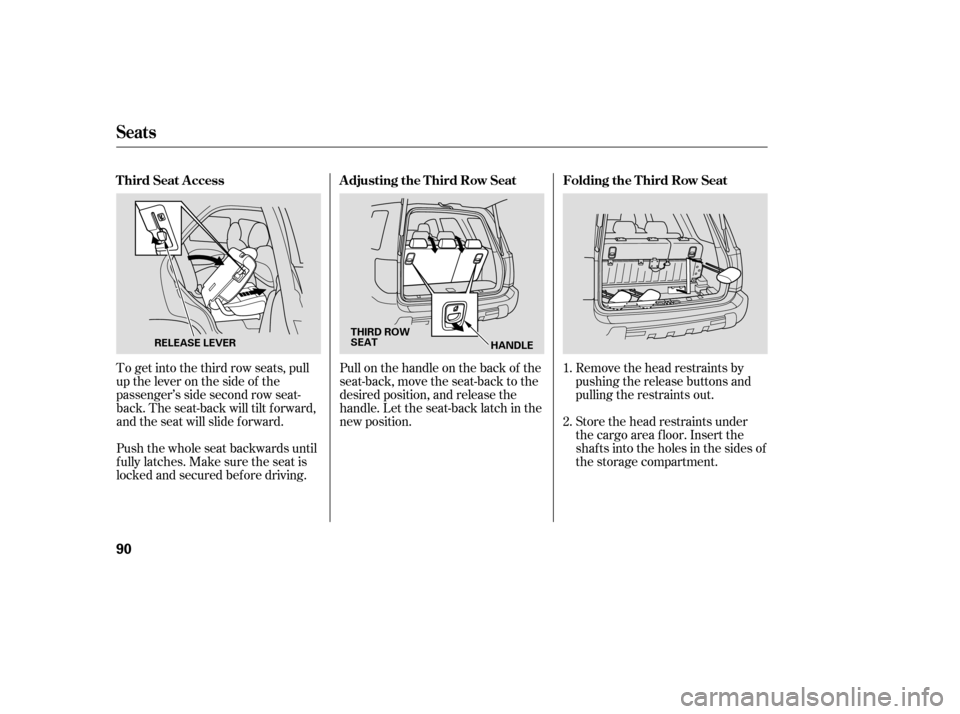
Remove the head restraints by
pushing the release buttons and
pulling the restraints out.
Store the head restraints under
the cargo area floor. Insert the
shafts into the holes in the sides of
the storage compartment.
Pull on the handle on the back of the
seat-back, move the seat-back to the
desired position, and release the
handle. Let the seat-back latch in the
new position.
To get into the third row seats, pull
uptheleveronthesideof the
passenger’s side second row seat-
back. The seat-back will tilt f orward,
and the seat will slide f orward.
Push the whole seat backwards until
f ully latches. Make sure the seat is
locked and secured bef ore driving. 1.
2.
Seats
Folding the T hird Row Seat
A djusting the T hird Row Seat
T hird Seat A ccess
90
THIRD ROW
SEAT
HANDLE
RELEASE LEVER
Page 108 of 319

The heating and air conditioning
system in your vehicle provides a
comf ortable driving environment in
all weather conditions.
The standard audio system has
many f eatures. This section
describes those f eatures and how to
use them.
Your vehicle has an anti-theft audio
system that requires a code number
to enable it.
The security system helps to dis-
courage vandalism and thef t of your
vehicle..............
Vents, Heating, and A/C . 106
.......................
Air Flow Buttons .107
......
Automatic Climate Control . 112
.........
Using the Rear A/C Unit . 113
................................
Audio System .115
..........................
Playing the Radio .117
........................
Radio Reception .122
...
Playing the XM Satellite Radio . 124
................................
Playing a Disc .130
........................
Disc Changer .131, 134
...................
Protecting your Discs . 135
.......
Disc Player Error Messages . 136
Disc Changer Error ...................................
Messages .137
................
Remote Audio Controls . 138
.................
Radio Thef t Protection . 139..........................
Setting the Clock .140
........
Rear Entertainment System . 142
............................
Security System .174
...............................
Cruise Control .175
.........................................
Compass .177
.
Rear View Camera and Monitor . 180
HomeLink Universal ................................
Transceiver .181
On EX and EX-L models
Features
Features
105
Page 109 of 319
Vents, Heating, and A/C
106
TEMPERATURE
CONTROL DIALRECIRCULATION
BUTTON FAN CONTROL
DIAL
REAR WINDOW
DEFOGGER BUTTON
MODE CONTROL DIAL AIR CONDITIONING BUTTON
MODE BUTTON FAN SPEED
INDICATORFAN CONTROL
BUTTONS
TEMPERATURE CONTROL DIAL
AUTO BUTTON
REAR WINDOW
DEFOGGER BUTTON
OFF BUTTON
RECIRCULATION
BUTTON WINDSHIELD
DEFROST
BUTTON
AIR CONDITIONING BUTTON
TEMPERATURE
DISPLAY
REAR A/C
MANUAL BUTTON
LX MODEL
EX and EX-L MODEL
Page 110 of 319

Press the RR A/C MANUAL button
to adjust the temperature of the rear
passenger compartment
independently. See page for
info rmation using the rear A/C unit.
When you turn the A/C off, the
system cannot regulate the inside
temperature if you set the dial below
the outside air temperature.
This
button turns the air
conditioning on and off. On LX
models, the indicator in the button is
on when the A/C is on. On EX and
EX-L models, you will see A/C ON
or A/C OFF in the display.
The
temperature setting is shown in
the display.
Tu
rning this dial clockwise increases
the temperature of the airflow.
Select the fan speed by pressing the
fan control buttons ( or ).
The fan speed is shown in vertical
bars on the display.
Tu
rn the dial clockwise to increase
the fan speed and airflow. Turn the
dial counterclockwise to decrease it. On EX and EX-L models, see page f or inf ormation on automatic
climate control and semi-automatic
operation. The climate control system can also
be operated by voice control. See the
Navi section in your quick start
guide f or an overview of this system,
and the navigation system manual
f or complete details.
112 113
On vehicles with navigation system
On LX models On EX and EX-L models
On EX and EX-L models On EX and EX-L models
On EX and EX-L models
Vents, Heating, and A/C
RR A/C MANUAL Button
Air Conditioning (A/C) Button T emperature Control Dial
Fan Control Voice Control System
Features
107