Page 183 of 319
�Ý
�Û
When in reverse, the touch screen
and navigation system ‘‘hard’’
buttons are locked out, except the
‘‘ZOOM’’ button. Touching the ‘‘ ’’
or ‘‘ ’’ button allows you to adjust
the brightness of the rearview
camera image.
Whenever you shif t to R (reverse)
with the ignition switch in the ON
(II) position, the rear view is shown
on the navigation or Compass
system screen. Since the rearview camera display
area is limited, you should always
back up slowly and caref ully, and
look behind you f or obstacles.
For the best picture, always keep the
rearview camera clean, and do not
cover the camera lens. To avoid
scratching the lens when you clean it,
use a moist, sof t cloth.
On EX-L models with navigation system
Rearview Camera and Monitor
180
REAR VIEW CAMERA
The camera brightness cannot be
adjusted by voice control.
Page 184 of 319

�µ
If you are training HomeLink to
operate a garage door or gate, you
should unplug the motor f or that
device during training. Repeatedly
pressing the remote control button
could burn out the motor.
HomeLink stores the code in a
permanent memory. There should
be no need to retrain HomeLink if
your vehicle’s battery goes dead or is
disconnected. The HomeLinkuniversal
transceiver built into your vehicle
canbeprogrammedtooperateupto
three remotely controlled devices
around your home, such as garage
doors, lighting, or home security
systems.
If your garage door opener was
manuf actured bef ore April 1982, you
may not be able to program
HomeLink to operate it. They do not have the safety feature that causes
the motor to stop and reverse if an
obstacle is detected during closing,
increasing the risk of injury.
Always ref er to the opening
instructions and saf ety inf ormation
that came with your garage door
opener or other equipment you
intend to operate with HomeLink. If
you do not have this inf ormation,
contact the manuf acturer of the
equipment.
For quick and accurate training,
make sure the remote transmitter
for the device (garage door,
automatic gate, security system, etc.)
has a fresh battery.
If you just
received your vehicle and have not
trained any of the buttons in
HomeLink bef ore, you should erase
any previously learned codes bef ore
training the first button. To do this,
press and hold the two outside
buttons on the HomeLink
transceiver fo r about 25 seconds,
until the red indicator f lashes.
Release the buttons, then proceed to
step 1.
If you are training the second or
third buttons, go directly to step 1.
Unplug the garage door opener
motor f rom the electrical outlet.
Holdtheendof thegaragedoor
opener remote transmitter 2 to 5
inches f rom HomeLink. Make
sure you are not blocking your
view of the red indicator in
HomeLink.
1.
2.
If equipped
CONT INUED
General Inf ormation T raining HomeL ink
Important Saf ety Precautions
Bef ore you begin
HomeL ink Universal Transceiver
Features
181
Page 194 of 319
Your dealer has Honda accessories
that allow you to personalize your
vehicle. These accessories have
been designed and approved for your
vehicle, and are covered by warranty.
When properly installed, cellular
phones, alarms, two-way radios, and
low-powered audio systems should
not interfere with your vehicle’s
computer controlled systems, such
as your airbags and anti-lock brakes. Befo
re installing any accesso ry:
Make sure the accessory does not
obscure any lights, or interfere
with proper vehicle operation or
performance.
Befo re installing any electronic
accessory, have the insta ller
contact your dealer for assistance.
If possible, have your dealer
insp ect the final installation.
Modifying
your vehicle, or installing
some non-Honda accessories, can
make it unsafe. Before you make any
modifications or add any accessories,
be sure to read the following
info rmation.
Al though non-Honda accessories
may fit on your vehicle, they may not
meet factory specifications, and
could adversely affect your vehicle’s
handling and stability. Be sure electronic accessories do
not overload electrical circuits
(see page ) or interf ere with
proper operation of your vehicle.
Do not install accessories on the
side pillars or across the rear
windows as these may interf ere
with proper operation of the side
curtain airbags.283
A ccessories
A ccessories and Modif ications
Bef ore Driving
191
Improper accessories or
modifications can affect your
vehicle’s handling, stability, and
performance, and cause a
crash in which you can be hurt
or killed.
Follow all instructions in this
owner’s manual regarding
accessories and modifications.
Page 195 of 319

Removing parts f rom your vehicle,
or replacing components with
non-Honda components could
seriously af f ect your vehicle’s
handling, stability, and reliability.Raising your vehicle with a
non-Honda suspension kit can
af f ect the handling and stability.
Herearesomeexamples:
Lowering your vehicle with a
non-Honda suspension kit that
signif icantly reduces ground
clearance can allow the
undercarriage to hit speed bumps
or other raised objects, which
could cause the airbags to deploy. If you plan to modif y your vehicle,
consult your dealer.Modif ying your steering wheel or
any other part of your vehicle’s
safety features can make the
systems inef f ective. Larger or smaller wheels and tires
can interf ere with the operation of
your vehicle’s anti-lock brakes and
other systems. Non-Honda wheels, because they
are a universal design, can cause
excessive stress on suspension
components and will not be
compatible with the tire pressure
monitoring system (TPMS).
Modif ying Your Vehicle
A ccessories and Modif ications
192
Page 200 of 319

This section gives you tips on
starting the engine under various
conditions, and how to operate the
automatic transmission. It also
includes important inf ormation on
parking your vehicle, the braking
system, the VTM-4 system (4WD
models only), the VSA system, the
tire pressure monitoring system, and
f acts you need if you are planning to
tow a trailer.........................
Driving Guidelines .198
.......................
Starting the Engine .199
..............
Automatic Transmission .200
..............................
VTM-4 System .204
Tire Pressure Monitoring
........................
System (TPMS) .205
..................................
Parking Tips .207
.............................
Braking System .208
...............
Anti-lock Brakes (ABS) .209
Vehicle Stability Assist (VSA)
........................................
System .211
.........................
VSA Of f Switch .212
...........................
Towing a Trailer .213
......................
Trailer Driving Tips .219
Towing Your Vehicle Behind a
................................
Motorhome .221
Of f -Highway Driving ..................................
Guidelines .222
Driving
Driving
197
Page 202 of 319

If the engine does not start within
15 seconds, or starts but stalls
right away, repeat step 4 with the
accelerator pedal pressed halfway
down. If the engine starts, release
pressu re on the accelerator pedal
so the engine does not race.
If the engine fails to start, press
the accelerator pedal all the way
down, and hold it there while
starting to clear flooding. If the
engine still does not start, return
to step 5.
Check
the steering wheel
ad justment (see page ).
Make sure the doors and the
tailgate are secu rely closed and
locked.
Fasten your seat belt. Check that
your passengers have fastened
their seat belts (see page ).
Wh en you start the engine, check
the gauges and indicato rs in the
instrument panel (see page ). Without
touching the accelerator
pedal, turn the ignition key to the
START (III) position. Do not hold
the key in the START (III)
position for more than 15 seconds
at a time. If the engine does not
start right away, pause for at least
10 seconds before trying again.
Make
sure the shift lever is in
Park. Press on the brake pedal.
In
cold weather, turn off all
electrical accessories to reduce
the drain on the battery.
Apply
the parking brake. 5.
6.
1.
2.
3.
4.
78
61
15
6.
7.
8.
9.
79
Driving
Guidelines, Starting the Engine
Starting theEngine
Driving
199
The engine is harder to start in cold
weather. Also, the thinner air found at
altitudes above 8,000 feet (2,400
meters) adds to this problem.
The immobilizer system protects your
veh icle from theft. If an improperly-
coded key (or other device) is used, the
engine’s f uel system is disabled. For
more inf ormation, see page .
Page 203 of 319
If the malf unction indicator lamp
comes on along with the ‘‘D’’
indicator, there is a problem with the
automatic transmission control
system. Avoid rapid acceleration, and
have the transmission checked by
your dealer as soon as possible.
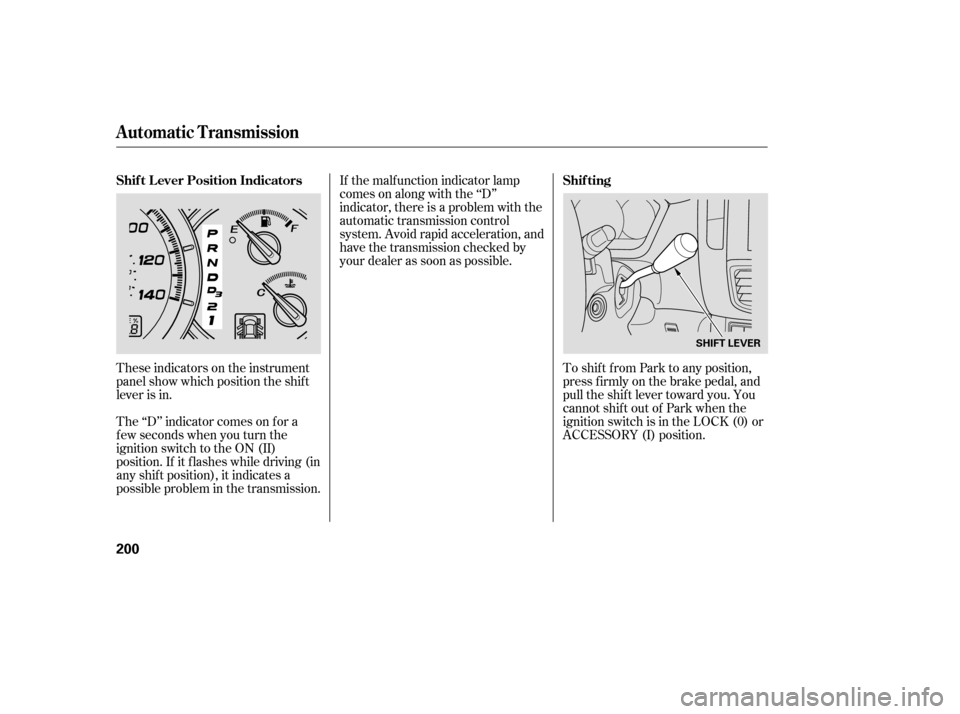
These indicators on the instrument
panel show which position the shif t
lever is in.
The ‘‘D’’ indicator comes on f or a
f ew seconds when you turn the
ignition switch to the ON (II)
position. If it f lashes while driving (in
any shif t position), it indicates a
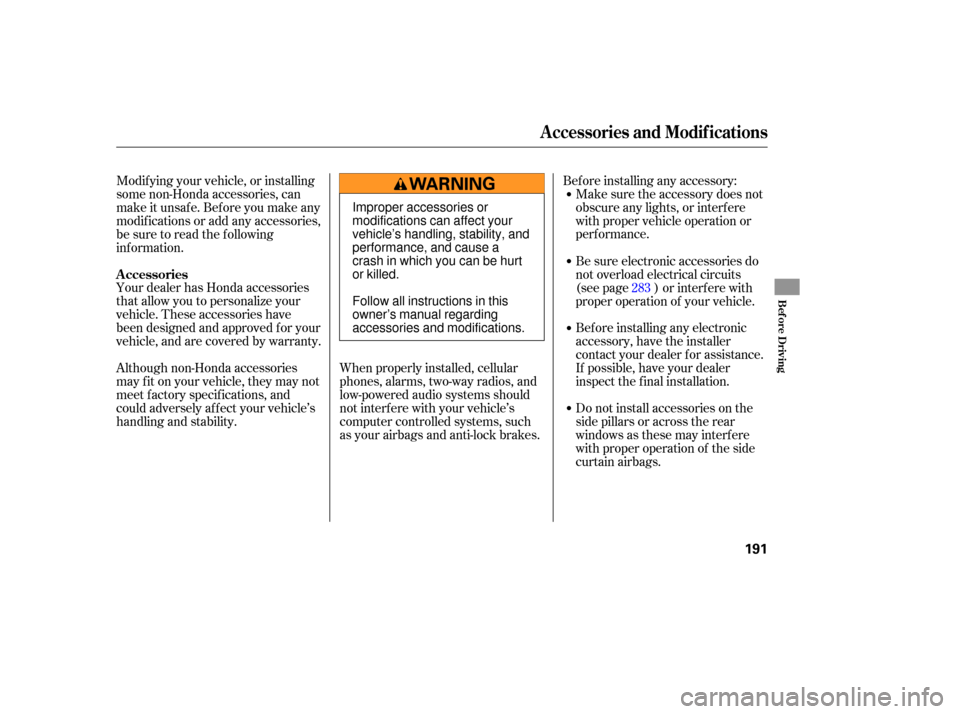
possible problem in the transmission. To shif t f rom Park to any position,
pressfirmlyonthebrakepedal,and
pull the shif t lever toward you. You
cannot shif t out of Park when the
ignition switch is in the LOCK (0) or
ACCESSORY (I) position.
Automatic Transmission
Shif t L ever Position Indicators
Shif ting
200
SHIFT LEVER
Page 204 of 319

�µ
�µ
�µ
�µTo shift from:
PtoR
RtoP
NtoR
Dto2 2to1
1to2
2toD
DtoD DtoN
DtoD NtoDRtoN Do
this:
Press the brake pedal and
pull the shift lever towards
you.
Pull the shift lever towards
you.
Move the shift lever.
3
3
3
3
Use neutral if you
need to restart a stalled engine, or if
it is necessary to stop briefly with
the engine idling. Shift to the Park
position if you need to leave your
vehicle for any reason. Press on the
brake pedal when you are moving
the shift lever from neutral to
another gear.
Use this position for
your norm al driving. The
transmission automatically selects a
suitable gear for the vehicle speed
and acceleration. You may notice the
transmission shifting up at higher
speeds when the engine is cold. This
helps the engine warm up faster.
This
position mechani-
cally locks the transmission. Use
Park whenever you are turning off or
starting the engine. To shift out of
Park, you must press on the brake
pedal and have your foot off the
accelerator pedal. Pull the shift lever
to wards you, then move it out of
Park.
Press the brake
pedal and pull the shift lever towards
you to shift from Park to reverse. To
shif t f rom reverse to neutral, come
to a complete stop and then shift. If you have done all of the above and
still cannot move the lever out of
Park, see on
page .
To avoid transmission damage, come
to a complete stop bef ore shif ting
into Park. The shif t lever must be in
Park bef ore you can remove the key
from the ignition switch. 203
CONT INUED
Neutral (N)
Drive (D)
Park (P)
Reverse (R)
Shif t L ock Release
Automatic Transmission
Driving
201