Page 176 of 268

Your vehicle is equipped with f ront
disc brakes. The brakes on the rear
wheels are drum. A power assist
helps reduce the ef f ort needed on
thebrakepedal.TheABShelpsyou
retain steering control when braking
very hard.
Resting your f oot on the brake pedal
applies the brakes slightly. This
builds up heat, and reduces brake
ef f ectiveness and brake pad lif e. In
addition, f uel economy can be
reduced. It also keeps your brake
lights on all the time, conf using
drivers behind you.Check the brakes after driving
through deep water. Apply the
brakes moderately to see if they f eel
normal. If not, apply them gently and
f requently until they do. Be extra
cautious in your driving.
Your vehicle is equipped with an
advanced hydraulic booster.
The advanced hydraulic booster has
some f eatures.
This f eature enables you to press the
brakepedalwithlessforcebythe
help of hydraulic pressure in the oil
pressure pump.
This f eature controls the braking
pressure appropriately, coordinating
with the regenerating brake of the
IMA motor.
When you release the brake pedal
while the Auto Idle Stop f unction
activates, this f eature keeps the
braking pressure until the engine
starts, and prevents the vehicle from
dropping back.
This f eature helps you apply the
brakes with less f orce during an
emergency braking situation.
Constant application of the brakes
when going down a long hill builds
up heat and reduces their ef f ective-
ness. Use the engine to assist the
brakes by taking your f oot of f the
accelerator and downshif ting to a
lower gear.
Power-Assist Cooperative Control with Regenerative
Brake
Creep Aid System
Brake-Assist
Braking System
Driving
173
Page 180 of 268

If you have the skills and tools to
perform more complex maintenance
tasks on your vehicle, you may want
to purchase the service manual. See
page f or inf ormation on how to
obtain a copy, or see your dealer. This section also includes
instructions on how to read the
maintenance minder messages on
the information display, a
maintenance record, and instructions
for simple maintenance tasks you
may want to take care of yourself. This section explains why it is
important to keep your vehicle well
maintained and how to f ollow basic
maintenance saf ety precautions. ......................
Maintenance Saf ety .178
....................
Maintenance Minder .179
....................
Maintenance Record .186
..............................
Fluid Locations .188
........................
Adding Engine Oil .189
.........
Changing the Oil and Filter .190
..............................
Engine Coolant .192
....................
Windshield Washers .194
........................
Transmission Fluid .195
Continuously Variable ............
Transmission (CVT) .195
....................................
Brake Fluid .196
.............................................
Lights .197
................................
Roof Antenna .202
................
Cleaning the Seat Belts .203
.....................................
Floor Mats .203
..................
DustandPollenFilter .204
.................................
Wiper Blades .205
...........................................
Wheels .207
...............................................
Tires .207
......
Checking the 12 Volt Battery .212
.............................
Vehicle Storage .213
255
Maintenance
Maint enance
177
Page 182 of 268
�µ
�µ
�µ
�µ
�µ
�µ
�µ
�µ
�µ
�µ �µ
�µ
CONTINUED
Calculated Engine
Oil Life (%)
100 % 91 %
90 % 81 %
80 % 71 %
70 % 61 %
60 % 51 %
50 % 41 %
40 % 31 %
30 % 21 %
20 % 16 %
15 % 11 %
10 % 6 %
5% 1%
0% Displayed
Engine Oil Life (%)
100 %
90 %
80 %
70 %
60 %
50 %
40 %
30 %
20 %
15 %
10 %
5%
0%
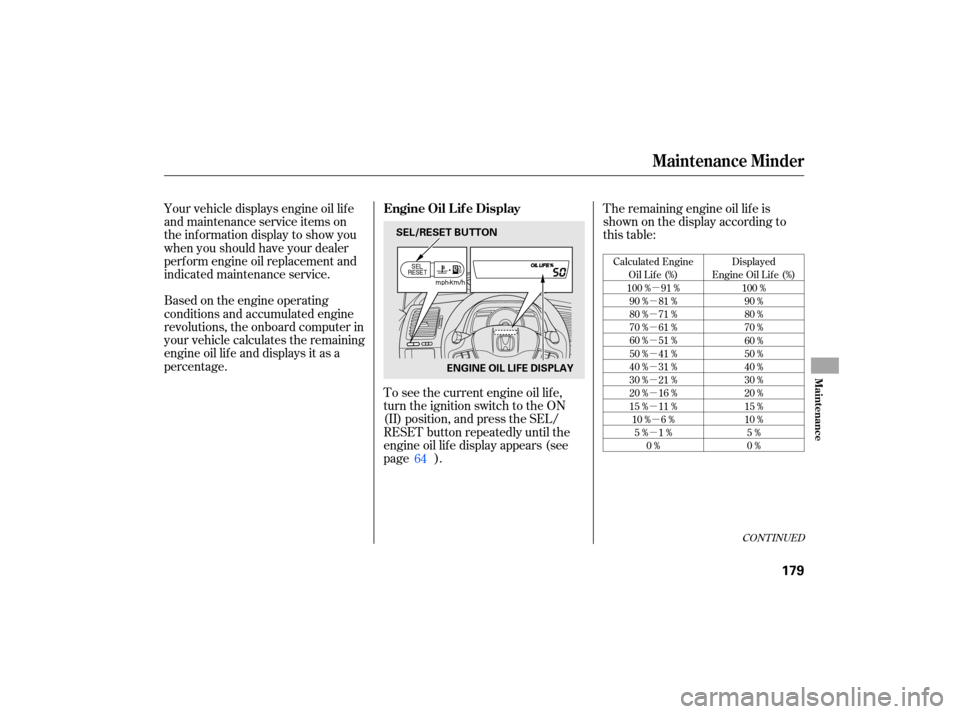
Based on the engine operating
conditions and accumulated engine
revolutions, the onboard computer in
your vehicle calculates the remaining
engine oil life and displays it as a
percentage. The
remaining engine oil life is
shownonthedisplayaccordingto
this table:
To see the current engine oil life,
turn the ignition switch to the ON
(II) position, and press the SEL/
RESET button repeatedly until the
engine oil lif e display appears (see
page ).
Your vehicle displays engine oil lif e
and maintenance service items on
the inf ormation display to show you
when you should have your dealer
perf orm engine oil replacement and
indicated maintenance service.
64
Maintenance Minder
Engine Oil L if e Display
Maint enance
179
SEL/RESET BUTTONENGINE OIL LIFE DISPLAY
Page 183 of 268
The maintenance item code or codes
indicate the main and sub items
required at the time of the oil change
(see page ).
If the remaining engine oil lif e is 15
to 6 percent, you will see the engine
oil lif e indicator every time you turn
the ignition switch to the ON (II)
position. The maintenance minder
indicator will also come on, and the
maintenance item code(s) for other
scheduled maintenance items
needing service will be displayed
next to the engine oil lif e indicator. When the remaining engine oil lif e is
5 to 1 percent, you will see a
‘‘SERVICE OIL LIFE’’ message
along with the same maintenance
item code(s), every time you turn the
ignition switch to the ON (II)
position.
185
Maintenance Minder
180
ENGINE OIL
LIFE DISPLAY
MAINTENANCE
MINDER INDICATOR
MAINTENANCE ITEM CODE(S)
Page 184 of 268

If you still do not perf orm the
indicated maintenance, you will see
negative mileage. It is displayed
when you drive more than 10 miles
(f or U.S. models) or 10 km (f or
Canadian models) af ter seeing the 0
percent message. Af terward, it
shows your driving distance if you
continue to drive. Immediately have
the indicated maintenance done by
your dealer.
When the remaining engine oil lif e is
0 percent, the engine oil lif e indicator
will blink. The display comes on
everytimeyouturntheignition
switch to the ON (II) position. When
you see this message, have the
indicated maintenance perf ormed by
your dealer as soon as possible. You can change the inf ormation
display f rom the engine oil lif e
display to the odometer, the trip
meter, or the outside temperature
every time you press and release the
SEL/RESET button.
When the engine oil lif e is 0 percent
or negative mileage, the
maintenance minder indicator
remainsonevenif youchangethe
inf ormation display.
Immediately have the service done,
and make sure to reset the display as
described on the next page.
Maintenance Minder
Maint enance
181
Page 185 of 268
Your dealer will reset the display
after completing the required
maintenance service. You will see
‘‘OIL LIFE 100%’’ on the information
display the next time you turn the
ignition switch to the ON (II)
position.
Press the SEL/RESET button
repeatedly until the engine oil life
is displayed.
All
maintenance items displayed in
the information display are in code.
For an explanation of these
maintenance codes, see page . Press the SEL/RESET button f or
about 10 seconds. The engine oil
lif e and the maintenance item
code(s) will blink.
If maintenance service is done by
someone other than your dealer,
reset the maintenance minder as
f ollows:
Turn the ignition switch to the ON
(II) position.
1.
2. 3.
185
Maintenance Minder
Maintenance Main Items and Sub
Items Resetting the Engine Oil Lif e
Display
182
MAINTENANCE MAIN ITEM
MAINTENANCE
SUB ITEM
Page 186 of 268

If you have the required service
done but do not reset the display, or
reset the display without doing the
service, the system will not show the
proper maintenance intervals. This
canleadtoseriousmechanical
problems because you will no longer
have an accurate record of when
maintenance is needed.
Your authorized Honda dealer
knows your vehicle best and can
provide competent, ef f icient service.However, service at a dealer is not
mandatory to keep your warranties
in ef f ect. Maintenance may be done
by any qualif ied service f acility or
person who is skilled in this type of
automotive service. Make sure to
have the service facility or person
reset the display as previously
described. Keep all receipts as proof
of completion, and have the person
who does the work fill out the
maintenance record. Check your
warranty booklet f or more
inf ormation.
We recommend using Honda parts
and fluids whenever you have
maintenance done. These are
manuf actured to the same high
quality standards as the original
components, so you can be conf ident
of their performance and durability.
Press the SEL/RESET button f or
more than 5 seconds. The
maintenance item code(s) will
disappear, and the engine oil lif e
will reset to ‘‘100.’’
4.
CONT INUED
Maintenance Minder
Important Maintenance
Precautions
Maint enance
183
Page 187 of 268

�µ�µ�µ
�µ
�µ �µ
�Ì Youshouldcheckthefollowing
items
at the specified intervals. If
you are unsure of how to perform
any check, turn to the appropriate
page listed.
Engine oil level Check every
time you fill the fuel tank. See
page .
Engine coolant level Check the
radiator reserve tank every time
youfillthefueltank.Seepage .
Automatic transmission Check
the fluid level monthly. See page
.
Brakes Check the fluid level
monthly. See page .
Tires Check the tire pressure
monthly. Examine the tread for
wear and foreign objects. See page
. Lights
Check the operation of
the headlights, parking lights,
taillights, high-mount brake light,
tu rn signals, brake lights, and
license plate light monthly. See
page .
According to state and federal
regulations, f ailure to perf orm
maintenance on the items marked
with will not void your emissions
warranties. However, all
maintenance services should be
perf ormed in accordance with the
intervals indicated by the
inf ormation display. 153
154
195 196
207 197
U.S. Vehicles:
Maintenance Minder
Owner’s Maintenance Checks
Maintenance, replacement, or
repair of emissions control
devices and systems may be done
by any automotive repair
establishment or individual using
parts that are ‘‘certif ied’’ to EPA
standards.
184

