Page 6 of 311
�Î
�Î�Î
�Î
CONTINUED: If equipped
Your Vehicle at a Glance
Y
ou r Vehicle at a Glance
3
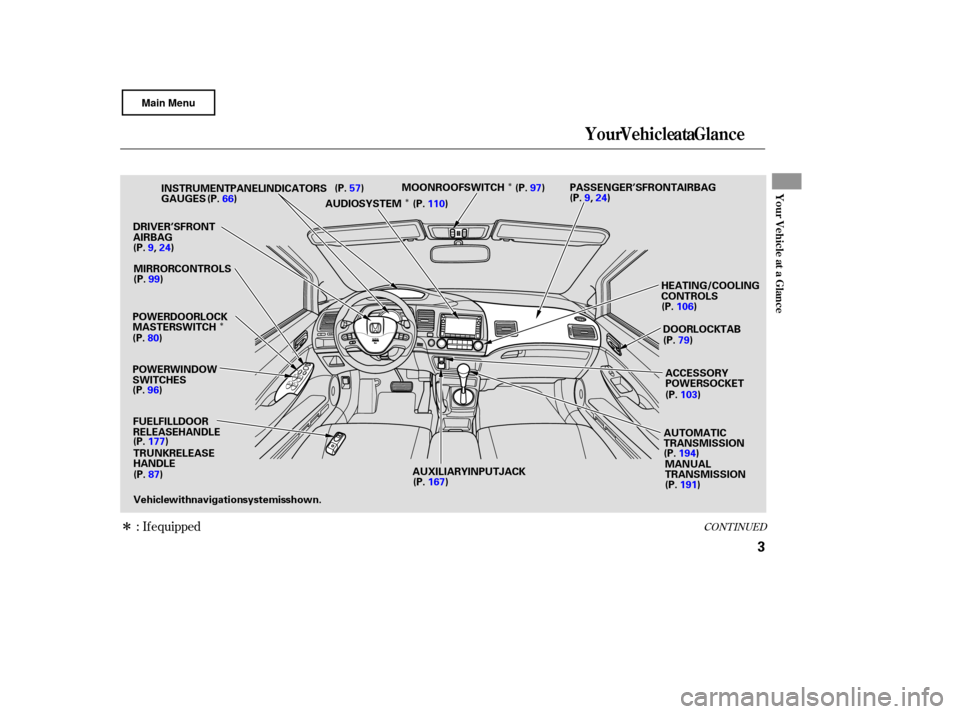
POWER WINDOW
SWITCHES GAUGES
POWER DOOR LOCK
MASTER SWITCH FUEL FILL DOOR
RELEASE HANDLETRUNK RELEASE
HANDLE
DRIVER’S FRONT
AIRBAG
HEATING/COOLING
CONTROLS
AUTOMATIC
TRANSMISSIONMANUAL
TRANSMISSION
MIRROR CONTROLS
INSTRUMENT PANEL INDICATORS
AUDIO SYSTEMMOONROOF SWITCH
Vehicle with navigation system is shown. PASSENGER’S FRONT AIRBAG
DOOR LOCK TABACCESSORY
POWER SOCKET
AUXILIARY INPUT JACK
(P.
57)
(P. 66)
(P.9,24) (P. 99)
(P. 80)
(P. 96)
(P. 177)
(P. 87) (P.
110) (P.
97)
(P.9,24)
(P. 106)
(P. 103)
(P. 194)
(P. 191)
(P.
167) (P.
79)
Page 7 of 311
�Î
�Î
�Î
�Î
�Î �Î�Î
�Î
To use the horn, press the pad around the ‘‘H’’ logo.
Only on vehicles equipped with navigation system. Refer to the navigation system manual.
:
1:
2: If
equipped
Your Vehicle at a Glance
4
HEADLIGHTS/TURN SIGNALS
DISPLAY CHANGE
BUTTON
SEL/RESET
BUTTON
REMOTE AUDIO
CONTROLS
VOICE CONTROL
SWITCHES
STEERING WHEEL
ADJUSTMENT HAZARD
WARNING BUTTON
PASSENGER
AIRBAG OFF
INDICATOR
HORN REAR
WINDOW DEFOGGER
WINDSHIELD
WIPERS/WASHERS
HEATED MIRRORS
CRUISE CONTROL BUTTONS
Vehicle with navigation system is shown.
INSTRUMENT
PANEL
BRIGHTNESS BUTTONS
HOOD RELEASE HANDLE
VEHICLE
STABILITY
ASSIST (VSA) SYSTEM
OFF SWITCH (P.
73)
(P. 66)
(P. 66)
(P. 203)
(P. 166)
(P. 178)
(P. 75) (P.
171)(P.
100)
(P.
74)
(P.
74)
(P.
30)
(P.
71)
(P. 72)
1
2 1
1
Page 58 of 311

This section gives inf ormation about
the controls and displays that
contribute to the daily operation of
your vehicle. All the essential
controls are within easy reach............................
Control Locations .56
............................
Instrument Panel .57
..........
Instrument Panel Indicators .59
.............................................
Gauges .66
.....................................
Odometer .66
..............
Display Change Button .66
...................................
Trip Meter .67
..................................
Fuel Gauge .67
...................
Temperature Gauge .67
Outside Temperature
...................................
Indicator .68
..........
Check Fuel Cap Indicator .68
..................
Maintenance Minder .69
Controls Near the Steering ...........................................
Wheel .70
.
Windshield Wipers and Washers .71
...........
Turn Signal and Headlights .72
............
Daytime Running Lights .73
........
Instrument Panel Brightness .73
.................
Hazard Warning Button .74
.................
Rear Window Def ogger .74
..........
Steering Wheel Adjustment .75
...............................
Keys and Locks .76
........................
Immobilizer System .77
................................
Ignition Switch .78 ......................................
Door Locks .79
......................
Power Door Locks .80
..............
Childproof Door Locks .80
.
Auto Door Locking/Unlocking .81
.....................
Auto Door Locking .81
.................
Auto Door Unlocking .83
................................................
Trunk .87
........
Emergency Trunk Opener .87
.......................
Remote Transmitter .88
.................................................
Seats .91
..............................
Power Windows .96
.........................................
Moonroof .97
.............................................
Mirrors .99
...............................
Parking Brake .100
...............................
Interior Lights .101
.........
Interior Convenience Items .102
.....................
Beverage Holders .103
.........
Accessory Power Socket .103
..................................
Glove Box .103
.............
Console Compartment .103
Instruments and Controls
Inst rument s and Cont rols
55
Page 59 of 311
�Î
�Î
�Î �Î
:
If equipped
Control Locations
56
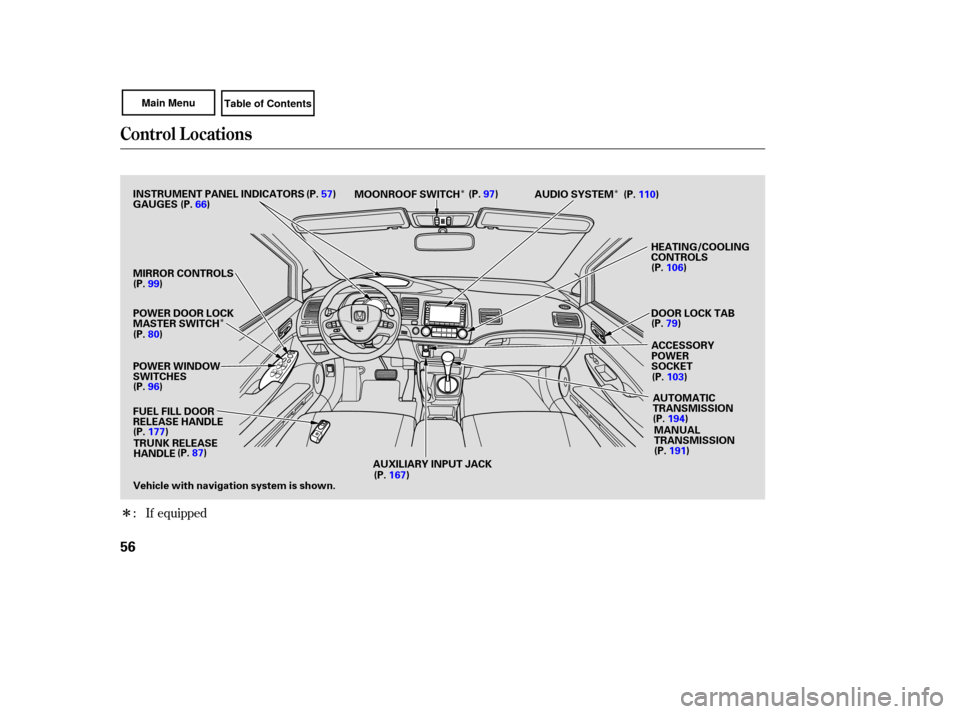
POWER WINDOW
SWITCHES AUDIO
SYSTEM
HEATING/COOLING
CONTROLS
POWER DOOR LOCK
MASTER SWITCH
MIRROR
CONTROLS
FUEL FILL DOOR
RELEASE HANDLE AUTOMATIC
TRANSMISSION
MANUAL
TRANSMISSION
MOONROOF
SWITCH
TRUNK RELEASE
HANDLE
Vehicle with navigation system is shown.
INSTRUMENT
PANEL INDICATORS
ACCESSORY
POWER
SOCKET
AUXILIARY INPUT JACK DOOR
LOCK TAB
GAUGES
(P.
57)
(P. 66)
(P. 99)
(P. 80)
(P. 96)
(P. 87) (P.
97)
(P. 110)
(P. 106)
(P. 103)
(P. 194)
(P. 191)
(P. 167)
(P.
177) (P.
79)
Page 73 of 311
�Î�Î
�Î
�Î
�Î
�ÎTo
use the horn, press the pad around the ‘‘H’’ logo.
:
1 : If equipped
Controls Near the Steering Wheel
70
HEADLIGHTS/
TURN SIGNALS
HAZARD WARNING
BUTTON PASSENGER AIRBAG
OFF INDICATOR
SEL/RESET
BUTTON
HORN
HOOD RELEASE HANDLE WINDSHIELD
WIPERS/WASHERS
CRUISE CONTROL
BUTTONS
STEERING
WHEEL
ADJUSTMENT
REMOTE
AUDIO CONTROLS
INSTRUMENT
PANEL BRIGHTNESS
DISPLAY CHANGE BUTTON
REAR WINDOW
DEFOGGER
HEATED MIRRORS
Vehicle with navigation system is shown.
VEHICLE
STABILITY ASSIST
(VSA) SYSTEM OFF SWITCH
(P.
73)
(P. 66)
(P. 66)
(P. 166)
(P. 178)
(P. 75)
(P. 171) (P.
100)
(P.
74)
(P.
74)
(P.
30)
(P.
72)
(P. 71)
(P. 203)
1
1
1
Page 77 of 311
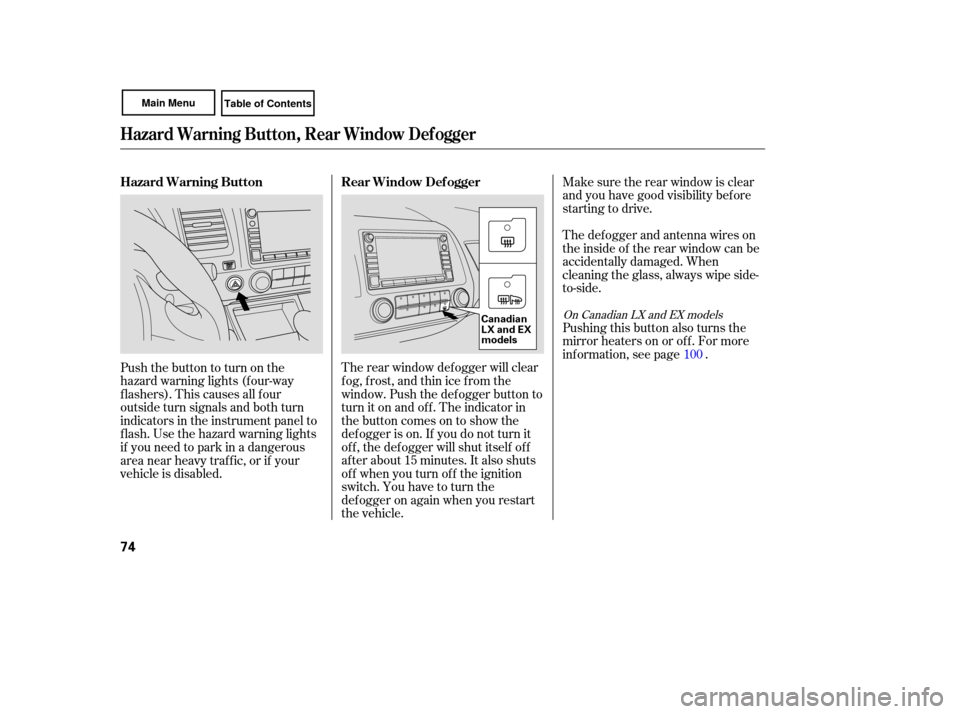
Make sure the rear window is clear
and you have good visibility before
starting to drive.
The defogger and antenna wires on
the inside of the rear window can be
accidentally damaged. When
cleaning the glass, always wipe side-
to-side.
Pushing this button also turns the
mirror heaters on or off. For more
inf ormation, see page .
The rear window def ogger will clear
fog, frost, and thin ice from the
window. Push the def ogger button to
turn it on and off. The indicator in
the button comes on to show the
def ogger is on. If you do not turn it
of f , the def ogger will shut itself of f
af ter about 15 minutes. It also shuts
of f when you turn of f the ignition
switch. You have to turn the
def ogger on again when you restart
the vehicle.
Pushthebuttontoturnonthe
hazard warning lights (f our-way
flashers). This causes all four
outside turn signals and both turn
indicators in the instrument panel to
f lash. Use the hazard warning lights
if you need to park in a dangerous
area near heavy traffic, or if your
vehicle is disabled.
100
On Canadian LX and EX models
Hazard Warning Button, Rear Window Def ogger
Rear Window Def ogger
Hazard Warning Button
74
Canadian
LX and EX
models
Page 102 of 311
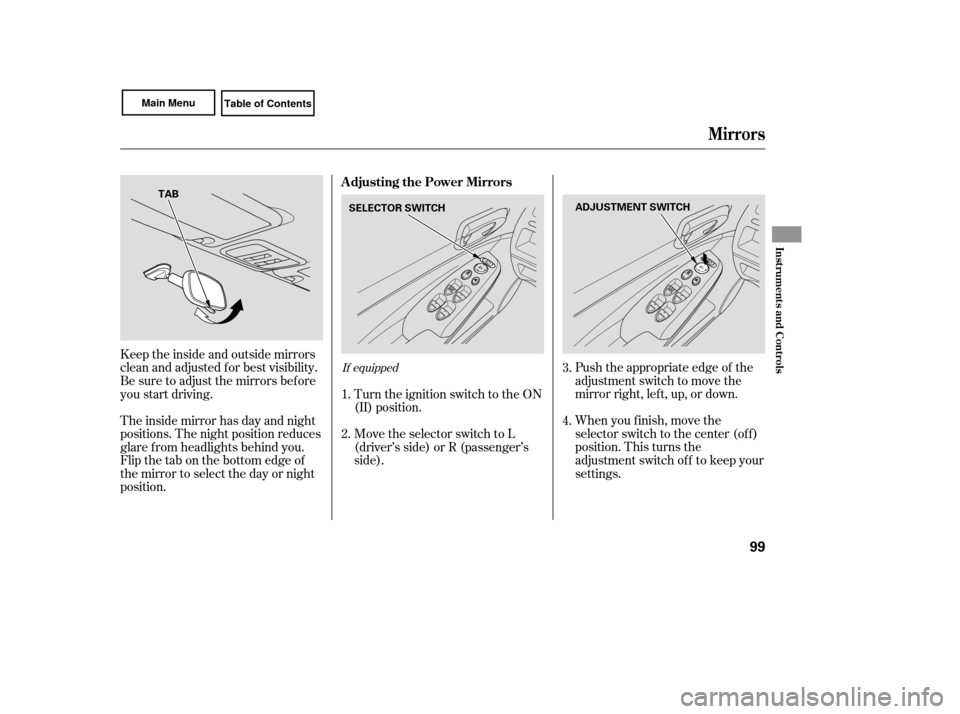
Push the appropriate edge of the
adjustment switch to move the
mirrorright,left,up,ordown.
When you f inish, move the
selector switch to the center (off)
position. This turns the
adjustment switch of f to keep your
settings.
Keeptheinsideandoutsidemirrors
clean and adjusted f or best visibility.
Be sure to adjust the mirrors bef ore
you start driving.
The inside mirror has day and night
positions. The night position reduces
glare f rom headlights behind you.
Flip the tab on the bottom edge of
the mirror to select the day or night
position.
Turn the ignition switch to the ON
(II) position.
Move the selector switch to L
(driver’s side) or R (passenger’s
side).
2. 3.
4.
1.If equipped
A djusting the Power Mirrors
Mirrors
Inst rument s and Cont rols
99
SELECTOR SWITCH
ADJUSTMENT SWITCH
TAB
Page 103 of 311
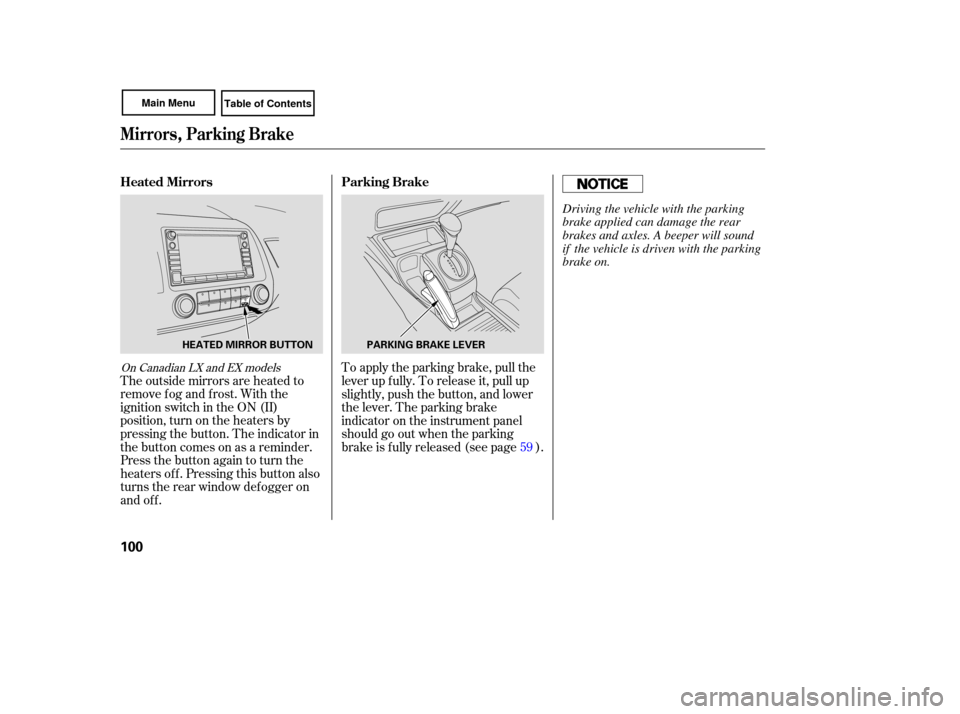
The outside mirrors are heated to
remove fog and frost. With the
ignition switch in the ON (II)
position, turn on the heaters by
pressing the button. The indicator in
the button comes on as a reminder.
Press the button again to turn the
heaters off. Pressing this button also
turns the rear window defogger on
and off. To
apply the parking brake, pull the
lever up fully. To release it, pull up
slightly, push the button, and lower
the lever. The parking brake
indicator on the instrument panel
should go out when the parking
brake is f ully released (see page ). 59
On Canadian LX and EX models
Parking Brake
Heated Mirrors
Mirrors, Parking Brake
100
PARKING BRAKE LEVER
HEATED MIRROR BUTTON
Driving the vehicle with the parking
brake applied can damage the rear
brakes and axles. A beeper will sound
if the vehicle is driven with the parking
brake on.