Page 76 of 292
Insert the key in the ignition
switch, and unlock the steering
column.
Push the lever under the steering
column all the way down.Move the steering wheel up or
down, and in or out to the desired
position. Make sure you can see
the instrument panel gauges and
the indicator lights.
Make any steering wheel adjustment
bef ore you start driving.
1. 2.
3.
Steering Wheel A djustment
Inst rument s and Cont rols
73
Adjusting the steering wheel
position while driving may
cause you to lose control of the
vehicle and be seriously injured
inacrash.
Adjust the steering wheel only
when the vehicle is stopped.
�����—�����—�
���y�
�������������y���
�(�����������y���������y
Page 79 of 292
�µ�µ�µ
�µ
You can insert or
remove the key only in this position.
To turn the key, the shift lever must
be in Park, and you must push the
key in slightly. If the f ront wheels
are turned, the anti-thef t lock may
make it difficult to turn the key.
Firmly turn the steering wheel to the
left or to the right as you turn thekey.
The ignition switch has f our
positions: LOCK (0), ACCESSORY
(I), ON (II), START (III) You can
operate the audio system and the
accessory power sockets in this
position.
This is the normal key
position when driving. Several of the
lights on the instrument panel come
on as a test when you turn the
ignition switch f rom the
ACCESSORY (I) to the ON (II)
position.
Use this position
only to start the engine. The switch
returns to the ON (II) position when
you let go of the key.
L OCK (0) A CCESSORY (I)
ON (II)
ST A RT (III)
Ignition Switch
76
�����—�����—�
���y�
���������
���y���
�(�����������y�������
�y
Page 81 of 292

�µ
With the driver’s door open and the
key in the ignition, both door lock
switches are disabled. They are not
disabled if the driver’s door is closed.
Pushing the switch down on the
open passenger’s door will lock all
doors.
The childproof door locks are
designed to prevent children seated
in the rear f rom accidentally opening
the rear doors. Each rear door has a
lock lever near the edge. With the
lever in the LOCK position, the door
cannot be opened f rom inside
regardless of the position of the lock
tab. To open the door, pull the lock
tab up, and use the outside door
handle. Pressthisbuttononceto
lock all doors. Some exterior and
interior lights will f lash. The doors
do not lock if they are not f ully
closed or the key is in the ignition
switch.
L ockout Prevent ionChildproof Door L ocks Remote T ransmitter
LOCK
Door Locks, Remote Transmitter
78
LEVERPANIC
BUTTON
TRUNK
RELEASE
BUTTON LOCK
BUTTON
UNLOCK
BUTTON
LOCK
UNLOCK
�����—�����—�
���y�
�������������y���
�(�����������y���������y
Page 82 of 292

�µ�µ
�µ Pressthisbuttonfor
about 1 second to attract attention;
thehornwillsoundandtheexterior
lights will f lash f or about 30 seconds.
To cancel panic mode, press any
other button on the remote
transmitter, or turn the ignition
switch to the ON (II) position.
Pressthisbuttonfor
about 1 second to open the trunk.
You cannot open the trunk if the key
is in the ignition switch.
You cannot lock the doors with the
remote transmitter if they are not
f ully closed or the key is in the
ignition switch.
If you unlock the doors with the
remote transmitter, but do not open
any of the doors within 30 seconds,
the doors automatically relock.
Af ter the doors automatically relock,
the security system will be active.
When you push LOCK twice within 5
seconds, you will hear a beep to
verify that the security system is
active.
Press this button once
to unlock the driver’s door. Push it
twice to unlock the other doors.
The ceiling light (if the ceiling light
switch is in the center position) will
come on when you press the
UNLOCK button. If you do not open
any door, the light stays on f or about
30 seconds, then f ades out. If you
relock the doors with the remote
transmitter before 30 seconds have
elapsed, the light will go of f
immediately.U.S. EX, EX-L, and V6 mo dels
Canadian SE, EX-L, and V6 mo dels
U.S. EX, EX-L, and V6 mo delsCanadian SE, EX-L, and V6 mo delsPA NIC
TRUNK
UNL OCK
Remote Transmitter
Inst rument s and Cont rols
79
�����—�����—�
���y�
�������������y���
�(�����������y���������y
Page 93 of 292
Keeptheinsideandoutsidemirrors
clean and adjusted f or best visibility.
Be sure to adjust the mirrors bef ore
you start driving.
The inside mirror has day and night
positions. The night position reduces
glare f rom headlights behind you.
Flip the tab on the bottom edge of
the mirror to select the day or night
position.Push or pull the adjustment knob
right, left, up, or down to move the
mirror.
When you f inish, turn the
adjustment knob to the center
(of f ) position. This turns of f the
adjustment knob to keep your
settings.
The outside mirrors are manually
adjustable. Turn the ignition switch to the ON
(II) position.
Turn the adjustment knob to L
(driver’s side) or R (passenger’s
side).
1. 3.
2. 4.
If equipped
Adjusting the Power Mirrors
Mirrors
90
TAB
ADJUSTMENT KNOB
�����—�����—�
���y�
�������������y���
�(�����������y���������y
Page 100 of 292
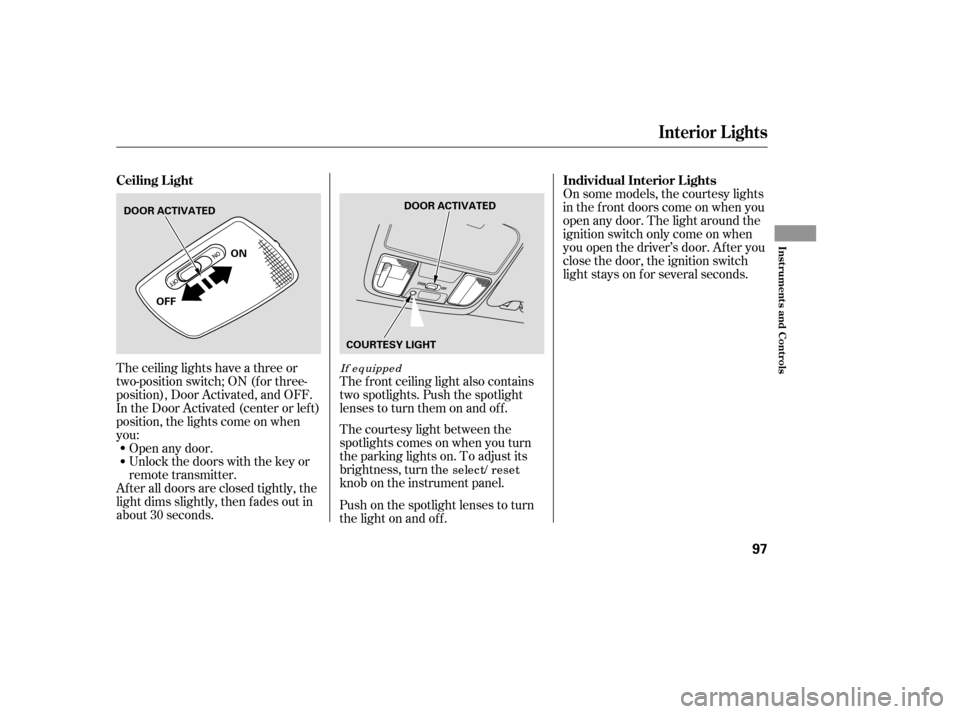
The ceiling lights have a three or
two-position switch; ON (f or three-
position), Door Activated, and OFF.
In the Door Activated (center or left)
position, the lights come on when
you:
After all doors are closed tightly, the
light dims slightly, then f ades out in
about 30 seconds.Open any door.
Unlock the doors with the key or
remote transmitter.
The courtesy light between the
spotlights comes on when you turn
the parking lights on. To adjust its
brightness, turn th
e select/ reset
knob on the instrument panel.
The f ront ceiling light also contains
two spotlights. Push the spotlight
lenses to turn them on and off.
Push on the spotlight lenses to turn
the light on and of f . On some models, the courtesy lights
in the f ront doors come on when you
open any door. The light around the
ignition switch only come on when
you open the driver’s door. Af ter you
close the door, the ignition switch
light stays on f or several seconds.
If equipped
Ceiling L ight
Individual Interior L ights
Interior Lights
Inst rument s and Cont rols
97
DOOR ACTIVATED
ON
OFF DOOR ACTIVATED
COURTESY LIGHT
�����—�����—�
���y�
����
��������y���
�(�����������y���
�����y
Page 103 of 292
Open the glove box by pulling the
handle to the lef t. Close it with a f irm
push. Lock or unlock the glove box
with the master key.
The glove box light comes on when
the parking lights are on.
To open the sunglasses holder, push
on the f ront edge. Make sure the
holder is closed while you are driving.If equipped
Sunglasses Holder Glove Box
Interior Convenience Items
100
GLOVE BOX
An open glove box can cause
serious injury to your passenger
inacrash,evenifthe
passenger is wearing the seatbelt.
Always keep the glove box
closed while driving.
�����—�����—�
���y�
����
��������y���
�(�����������y���
�����y
Page 146 of 292

The security system automatically
sets 15 seconds after you lock the
doors, hood, and trunk. For the
system to activate, you must lock the
doors f rom the outside with the key,
lock tab, door lock switch, or remote
transmitter. The security system
light on the instrument panel starts
blinking immediately to show you
the system is setting itself.Once the security system is set,
opening any door (without using the
key or the remote transmitter), the
hood, or the trunk will cause it to
sound. It also sounds if the radio is
removed f rom the dashboard or the
wiring is cut.
The security system will not set if
the hood, trunk, or any door is not
f ully closed. If the system will not set,
check the Door Monitor on the
instrument panel (see page ), to
see if the doors and trunk are f ully
closed. Since it is not part of the
monitor display, manually check thehood.
Do not attempt to alter this system
or add other devices to it.
The security system helps to protect
your vehicle and valuables f rom thef t.
The horn sounds and a combination
of headlights, parking lights, side
marker lights and taillights f lashes if
someone attempts to break into your
vehicleorremovetheradio.This
alarm continues f or two minutes,
then the system resets. To reset an
alarming system before the two
minutes have elapsed, unlock either
f ront door with the key or the
remote transmitter.
With the system set, you can still
open the trunk with the remote
transmitter without triggering the
alarm. The alarm will sound if the
trunk lock is f orced, or the trunk is
opened with the trunk release lever
or the emergency trunk opener.
60
U.S. EX, EX-L, and V6 mo delsCanadian SE, EX-L, and V6 mo dels
Security System
144
SECURITY SYSTEM INDICATOR
�����—�����—�
���y�
����
����
���y���
�(�����������y���
�����y


