2007 GMC YUKON XL fuel pressure
[x] Cancel search: fuel pressurePage 184 of 608

Brake System Warning Light......................232
Anti-Lock Brake System Warning Light.......233
StabiliTrak
®Indicator Light..........................234
Engine Coolant Temperature Gage.............234
Tire Pressure Light.....................................235
Malfunction Indicator Lamp.........................236
Oil Pressure Gage.....................................239
Oil Pressure Light......................................240
Security Light.............................................241
Fog Lamp Light..........................................241
Cruise Control Light...................................242
Highbeam On Light....................................242
Tow/Haul Mode Light.................................242
Fuel Gage..................................................243
Low Fuel Warning Light.............................243
Driver Information Center (DIC)..................244
DIC Operation and Displays
(With DIC Buttons)..................................244
DIC Operation and Displays
(Without DIC Buttons).............................251
DIC Warnings and Messages.....................254
DIC Vehicle Customization
(With DIC Buttons)..................................264Audio System(s)..........................................274
Setting the Time (Radio with a
Single CD Player)...................................276
Setting the Time (Radio with a
Six-Disc CD Player)................................277
Radio with CD (MP3).................................278
Radio with CD and DVD (MP3)..................295
XM Radio Messages..................................319
Navigation/Radio System............................321
Rear Seat Entertainment System................321
Rear Seat Audio (RSA)..............................332
Theft-Deterrent Feature..............................334
Audio Steering Wheel Controls...................334
Radio Reception.........................................335
Care of Your CDs and DVDs.....................336
Care of the CD and DVD Player................337
Rear Side Window Antenna.......................337
XM™ Satellite Radio Antenna System........337
Section 3 Instrument Panel
184
Page 245 of 608

DIC Buttons
The buttons are the
trip/fuel, vehicle
information,
customization, and
set/reset buttons. The
button functions
are detailed in the
following pages.
3(Trip/Fuel):Press this button to display the
odometer, trip odometer, fuel range, average
economy, fuel used, timer, and transmission
temperature. Some vehicles also display
instantaneous economy and a Displacement
on Demand™ (DoD™) indicator.
T(Vehicle Information):Press this button to
display the oil life, units, tire pressure readings
for vehicles with a Tire Pressure Monitor (TPM)
system, engine hours, Tire Pressure Monitor
(TPM) system programming for vehicles with a
TPM system, and remote keyless entry transmitter
programming.
U(Customization):Press this button to
customize the feature settings on your vehicle.
SeeDIC Vehicle Customization (With DIC Buttons)
on page 264for more information.
V(Set/Reset):Press this button to set or reset
certain functions and to turn off or acknowledge
messages on the DIC.
245
Page 263 of 608

TIGHTEN GAS CAP
If the vehicle’s fuel cap is not tightened properly,
this message may display along with the check
engine light on the instrument panel cluster.
SeeMalfunction Indicator Lamp on page 236.
Reinstall the fuel cap fully. SeeFilling the Tank on
page 432. The diagnostic system can determine
if the fuel cap has been left off or improperly
installed. A loose or missing fuel cap will allow fuel
to evaporate into the atmosphere. A few driving
trips with the cap properly installed should turn this
light and message off.
TIRE LEARNING ACTIVE
If your vehicle has a Tire Pressure Monitor (TPM)
system, this message will display when the system
is re-learning the tire positions on your vehicle. See
DIC Operation and Displays (With DIC Buttons) on
page 244orDIC Operation and Displays (Without
DIC Buttons) on page 251for more information.
The tire positions must be re-learned after rotating
the tires or after replacing a tire or sensor. SeeTire
Inspection and Rotation on page 497,Tire Pressure
Monitor System on page 492, andInation - Tire
Pressure on page 490for more information.
TRACTION CONTROL OFF
If your vehicle has StabiliTrak®, this message will
display when the traction control system is
turned off. Adjust your driving accordingly.
SeeStabiliTrak
®System on page 348for more
information.
TRANSMISSION HOT IDLE ENGINE
Notice:If you drive your vehicle while
the transmission uid is overheating and the
transmission temperature warning is displayed
on the instrument panel cluster and/or DIC,
you can damage the transmission. This could
lead to costly repairs that would not be
covered by your warranty. Do not drive your
vehicle with overheated transmission uid
or while the transmission temperature warning
is displayed.
If the transmission uid in the vehicle gets hot, this
message will display along with a continuous
chime. Driving with the transmission uid
temperature high can cause damage to the vehicle.
Stop the vehicle and let it idle to allow the
transmission to cool. This message will clear and
the chime will stop when the uid temperature
reaches a safe level.
263
Page 380 of 608

Once you are moving on the freeway, make
certain you allow a reasonable following distance.
Expect to move slightly slower at night.
When you want to leave the freeway, move to the
proper lane well in advance. If you miss your
exit, do not, under any circumstances, stop and
back up. Drive on to the next exit.
The exit ramp can be curved, sometimes quite
sharply. The exit speed is usually posted.
Reduce your speed according to your
speedometer, not to your sense of motion. After
driving for any distance at higher speeds, you may
tend to think you are going slower than you
actually are.
Before Leaving on a Long Trip
Make sure you are ready. Try to be well rested.
If you must start when you are not fresh — such as
after a day’s work — do not plan to make too
many miles that rst part of the journey. Wear
comfortable clothing and shoes you can easily
drive in.
Is your vehicle ready for a long trip? If you keep it
serviced and maintained, it is ready to go. If it
needs service, have it done before starting out.Of course, you will nd experienced and able
service experts in GM dealerships all across North
America. They will be ready and willing to help
if you need it.
Here are some things you can check before a trip:
Windshield Washer Fluid:Is the reservoir
full? Are all windows clean inside and outside?
Wiper Blades:Are they in good shape?
Fuel, Engine Oil, Other Fluids:Have you
checked all levels?
Lamps:Are they all working? Are the lenses
clean?
Tires:They are vitally important to a safe,
trouble-free trip. Is the tread good enough
for long-distance driving? Are the tires
all inated to the recommended pressure?
Weather Forecasts:What is the weather
outlook along your route? Should you
delay your trip a short time to avoid a major
storm system?
Maps:Do you have up-to-date maps?
380
Page 394 of 608

Certication/Tire Label
A vehicle specic Certication/Tire label is found
on the rear edge of the driver’s door. The
label shows the size of your vehicle’s original tires
and the ination pressures needed to obtain the
gross weight capacity of your vehicle. This is called
Gross Vehicle Weight Rating (GVWR). The
GVWR includes the weight of the vehicle, all
occupants, fuel, and cargo.
The Certication/Tire label also tells you the
maximum weights for the front and rear axles,
called Gross Axle Weight Rating (GAWR).To nd out the actual loads on your front and rear
axles, you need to go to a weigh station and
weigh your vehicle. Your dealer can help you with
this. Be sure to spread out your load equally on
both sides of the centerline.
Never exceed the GVWR for your vehicle, or the
GAWR for either the front or rear axle.
The Certication/Tire label also contains
information about your Front Axle Reserve
Capacity.
And, if you do have a heavy load, you should
spread it out.{CAUTION:
Do not load your vehicle any heavier than
the Gross Vehicle Weight Rating (GVWR),
or either the maximum front or rear Gross
Axle Weight Rating (GAWR). If you do,
parts on your vehicle can break, and it
can change the way your vehicle handles.
These could cause you to lose control
and crash. Also, overloading can shorten
the life of your vehicle.
394
Page 423 of 608

Service.........................................................426
Accessories and Modications....................426
California Proposition 65 Warning...............427
Doing Your Own Service Work...................427
Adding Equipment to the Outside of
Your Vehicle...........................................428
Fuel..............................................................428
Gasoline Octane........................................428
Gasoline Specications...............................428
California Fuel............................................429
Additives....................................................429
Fuel E85 (85% Ethanol).............................430
Fuels in Foreign Countries.........................431
Filling the Tank..........................................432
Filling a Portable Fuel Container................434
Checking Things Under the Hood..............434
Hood Release............................................435
Engine Compartment Overview...................436
Engine Oil..................................................438
Engine Oil Life System...............................441
Engine Air Cleaner/Filter.............................443
Automatic Transmission Fluid.....................445
Engine Coolant...........................................449Coolant Surge Tank Pressure Cap.............451
Engine Overheating....................................452
Overheated Engine Protection
Operating Mode......................................454
Cooling System..........................................455
Engine Fan Noise......................................460
Power Steering Fluid..................................461
Windshield Washer Fluid............................462
Brakes.......................................................463
Battery.......................................................466
Jump Starting.............................................467
Rear Axle.....................................................472
Four-Wheel Drive.........................................473
Front Axle....................................................474
Headlamp Aiming........................................475
Bulb Replacement........................................478
Halogen Bulbs............................................478
Taillamps, Turn Signal, Stoplamps and
Back-up Lamps.......................................478
License Plate Lamp....................................480
Replacement Bulbs....................................481
Section 5 Service and Appearance Care
423
Page 432 of 608
Filling the Tank
{CAUTION:
Fuel vapor burns violently and a fuel re
can cause bad injuries. To help avoid
injuries to you and others, read and follow
all the instructions on the pump island.
Turn off your engine when you are
refueling. Do not smoke if you are near
fuel or refueling your vehicle. Keep
sparks, ames, and smoking materials
away from fuel. Do not leave the fuel
pump unattended when refueling your
vehicle — this is against the law in some
places. Keep children away from the fuel
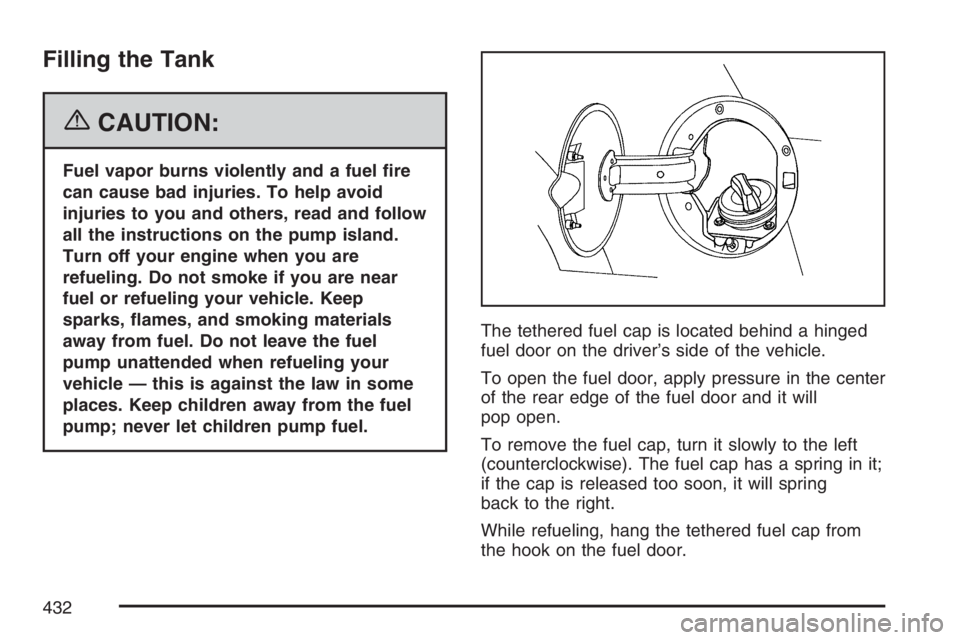
pump; never let children pump fuel.The tethered fuel cap is located behind a hinged
fuel door on the driver’s side of the vehicle.
To open the fuel door, apply pressure in the center
of the rear edge of the fuel door and it will
pop open.
To remove the fuel cap, turn it slowly to the left
(counterclockwise). The fuel cap has a spring in it;
if the cap is released too soon, it will spring
back to the right.
While refueling, hang the tethered fuel cap from
the hook on the fuel door.
432
Page 460 of 608
5. Then replace the pressure cap. Be sure the
pressure cap is hand-tight and fully seated.
6. Verify coolant level after engine is shutoff and
the coolant is cold. If necessary, repeat
coolant ll procedure steps 1 through 6.
Engine Fan Noise
If your vehicle has a clutched engine cooling fan,
when the clutch is engaged, the fan spins
faster to provide more air to cool the engine. In
most everyday driving conditions, the fan is
spinning slower and the clutch is not fully engaged.
This improves fuel economy and reduces fan
noise. Under heavy vehicle loading, trailer towing,
and/or high outside temperatures, the fan speed
increases as the clutch more fully engages, so you
may hear an increase in fan noise. This is
normal and should not be mistaken as the
transmission slipping or making extra shifts. It is
merely the cooling system functioning properly.
The fan will slow down when additional cooling is
not required and the clutch disengages.You may also hear this fan noise when you start
the engine. It will go away as the fan clutch
partially disengages.
If your vehicle has electric cooling fans, you may
hear the fans spinning at low speed during
most everyday driving. The fans may turn off if no
cooling is required. Under heavy vehicle loading,
trailer towing, and/or high outside temperatures, or
if you are operating your air conditioning system,
the fans may change to high speed and you
may hear an increase in fan noise. This is normal
and indicates that the cooling system is
functioning properly. The fans will change to low
speed when additional cooling is no longer
required.
460