2007 GMC SIERRA tow
[x] Cancel search: towPage 222 of 680

2(Headlamps):Turn the control to this position
to turn on the headlamps together with the
following:
Parking Lamps
Instrument Panel Lights
Taillamps
License Plate Lamps
When the headlamps are turned on while the
vehicle is on, the headlamps turn off automatically
10 minutes after the ignition is turned off. When
the headlamps are turned on while the vehicle
is off, the headlamps will stay on for 10 minutes
before automatically turning off to prevent the
battery from being drained. Turn the headlamp
control to off and then back to the headlamp
on position to make the headlamps stay on for an
additional 10 minutes.
Push the turn signal/multifunction lever toward the
instrument panel to change the headlamps
from low beam to high beam.
Headlamps on Reminder
A reminder chime will sound when the headlamps
or parking lamps are manually turned on and
your ignition is off and a door is open. To disable
the chime, turn the light off.
Daytime Running Lamps (DRL)
Daytime Running Lamps (DRL) can make it easier
for others to see the front of your vehicle during
the day. DRL can be helpful in many different
driving conditions, but they can be especially
helpful in the short periods after dawn and before
sunset. Fully functional DRL are required on all
vehicles rst sold in Canada.
The DRL system will come on when the following
conditions are met:
The engine is running.
The ignition is on.
The exterior lamps control is in AUTO.
The light sensor determines it is daytime.
222
Page 233 of 680

Notice:Adding any electrical equipment to
your vehicle may damage it or keep other
components from working as they should. The
repairs would not be covered by your
warranty. Do not use equipment exceeding
maximum amperage rating of 20 amperes.
Check with your dealer/retailer before adding
electrical equipment.
When adding electrical equipment, be sure to
follow the proper installation instructions included
with the equipment.
Notice:Improper use of the power outlet can
cause damage not covered by your warranty.
Do not hang any type of accessory or
accessory bracket from the plug because the
power outlets are designed for accessory
power plugs only.Ashtray(s) and Cigarette Lighter
Your vehicle may have a front ashtray located near
the center of the instrument panel. Pull on the door
to open it. The ashtray may have a cigarette lighter.
Notice:If you put papers, pins, or other
ammable items in the ashtray, hot cigarettes
or other smoking materials could ignite
them and possibly damage your vehicle. Never
put ammable items in the ashtray.
To remove the ashtray, open the door and pull the
ashtray bin toward you. To replace the ashtray,
insert the ashtray bin inside the ashtray door and
press down until it engages. To use the cigarette
lighter, push it in all the way, and let go. When it is
ready, the lighter will pop back out by itself.
Notice:Holding a cigarette lighter in while it
is heating does not let the lighter back
away from the heating element when it is hot.
Damage from overheating can occur to the
lighter or heating element, or a fuse could be
blown. Do not hold a cigarette lighter in while it
is heating.
233
Page 241 of 680

Pressing one of these buttons when the system is
off will turn the system on. Pressing one of
these buttons when in automatic control will place
the fan under manual control. The fan setting
will remain displayed and the AUTO light will turn
off. The air delivery mode will remain under
automatic control.
yNz(Mode):Press the mode up and down
buttons to manually change the direction of
the airow in your vehicle. Repeatedly press the
button until the desired mode appears on the
display. Pressing one of these buttons when the
system is off will change air delivery mode without
turning the system on. Pressing one of these
buttons when in automatic control will place the
mode under manual control.
The air delivery mode setting will be displayed and
the AUTO light will turn off. The fan will remain
under automatic control.
H(Vent):Air is directed to the instrument
panel outlets.
)(Bi-Level):Air is directed partly to the
instrument panel outlets and to the oor outlets. A
little air is directed towards the windshield and
side window outlets. Cooler air is directed to the
upper outlets and warmer air to the oor outlets.
6(Floor):Air is directed to the oor outlets, with
some to the windshield, side window outlets,
and second row oor outlets. In this mode, the
system will automatically select outside air.
-(Defog):See “Defogging and Defrosting” later
in this section.
@(Recirculation):Press this button to turn the
recirculation mode on. When the button is
pressed, an indicator light will come on.
This mode keeps outside air from entering the
vehicle. It can be used to reduce outside air and
prevent odors from entering the vehicle.
Recirculation may also help cool the air inside the
vehicle more quickly once the temperature inside
the vehicle is less than the outside temperature.
241
Page 248 of 680

Speedometer and Odometer
Your speedometer lets you see your speed in both
miles per hour (mph) and kilometers per hour
(km/h). Your odometer shows how far your vehicle
has been driven, in either miles (used in the United
States) or kilometers (used in Canada).
Engine Hour Meter Display
The Driver Information Center (DIC) can also
display the number of hours the engine has run.
To display the engine hours, turn the ignition
off, press and hold the reset button for at least
four seconds. The hour meter will be displayed for
up to 30 seconds, or until the ignition is turned
on. SeeDIC Operation and Displays (With
DIC Buttons) on page 268orDIC Operation and
Displays (Without DIC Buttons) on page 275
for more information.
Trip Odometer
The trip odometer can tell you how far your
vehicle has been driven since you last set the trip
odometer to zero.
Press the reset button, located on the instrument
panel cluster next to the voltmeter, to toggle
between the trip odometer and the regular
odometer. Holding the reset button for
approximately one second while the trip odometer
is displayed will reset it.
To display the odometer reading with the ignition
off, press the reset button.
SeeDIC Operation and Displays (With DIC
Buttons) on page 268orDIC Operation and
Displays (Without DIC Buttons) on page 275for
more information.
Tachometer
Your tachometer displays the engine speed in
revolutions per minute (rpm). See “Grade Braking
(Allison Transmission
®)” underTow/Haul Mode
on page 144for more information.
248
Page 256 of 680
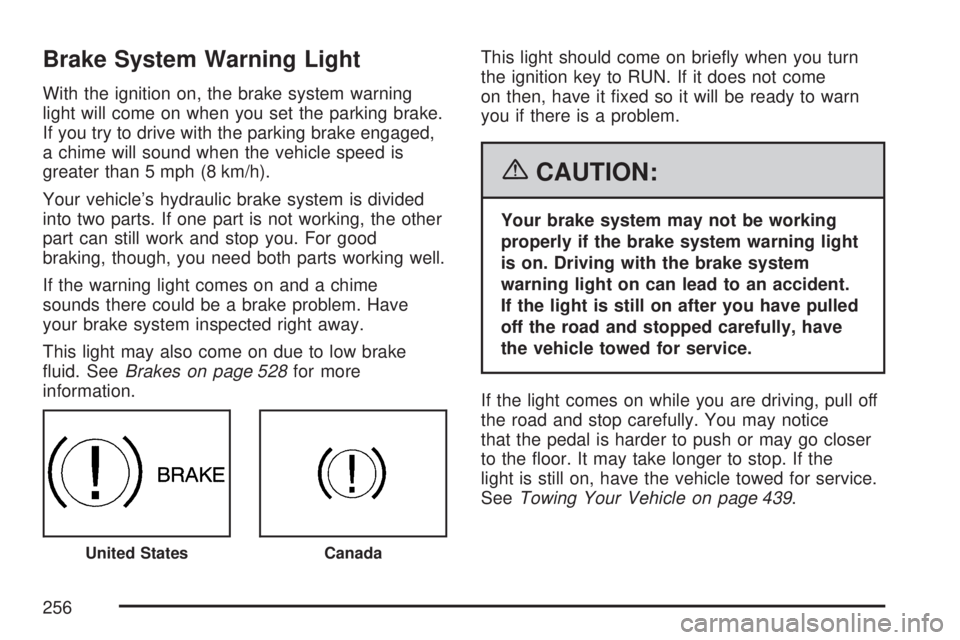
Brake System Warning Light
With the ignition on, the brake system warning
light will come on when you set the parking brake.
If you try to drive with the parking brake engaged,
a chime will sound when the vehicle speed is
greater than 5 mph (8 km/h).
Your vehicle’s hydraulic brake system is divided
into two parts. If one part is not working, the other
part can still work and stop you. For good
braking, though, you need both parts working well.
If the warning light comes on and a chime
sounds there could be a brake problem. Have
your brake system inspected right away.
This light may also come on due to low brake
uid. SeeBrakes on page 528for more
information.This light should come on briey when you turn
the ignition key to RUN. If it does not come
on then, have it xed so it will be ready to warn
you if there is a problem.
{CAUTION:
Your brake system may not be working
properly if the brake system warning light
is on. Driving with the brake system
warning light on can lead to an accident.
If the light is still on after you have pulled
off the road and stopped carefully, have
the vehicle towed for service.
If the light comes on while you are driving, pull off
the road and stop carefully. You may notice
that the pedal is harder to push or may go closer
to the oor. It may take longer to stop. If the
light is still on, have the vehicle towed for service.
SeeTowing Your Vehicle on page 439.
United StatesCanada
256
Page 261 of 680

This light should come on, as a check to show
you it is working, when the ignition is on and the
engine is not running. If the light does not
come on, have it repaired. This light will also
come on during a malfunction in one of two ways:
Light Flashing— A misre condition has
been detected. A misre increases vehicle
emissions and may damage the emission
control system on your vehicle. Diagnosis and
service may be required.
Light On Steady— An emission control
system malfunction has been detected on your
vehicle. Diagnosis and service may be
required.
If the Light is Flashing
The following may prevent more serious damage
to your vehicle:
Reducing vehicle speed
Avoiding hard accelerations
Avoiding steep uphill grades
If you are towing a trailer, reduce the amount
of cargo being hauled as soon as it is
possibleIf the light stops ashing and remains on steady,
see “If the Light Is On Steady” following.
If the light continues to ash, when it is safe to do
so, stop the vehicle. Find a safe place to park
your vehicle. Turn the key off, wait at least
10 seconds and restart the engine. If the light
remains on steady, see “If the Light Is On Steady”
following. If the light is still ashing, follow the
previous steps, and see your dealer for service as
soon as possible.
If the Light Is On Steady
You may be able to correct the emission system
malfunction by considering the following:
Did you recently put fuel into your vehicle?
If so, reinstall the fuel cap, making sure to fully
install the cap. SeeFilling the Tank on page 493.
The diagnostic system can determine if the
fuel cap has been left off or improperly installed. A
loose or missing fuel cap will allow fuel to
evaporate into the atmosphere. A few driving trips
with the cap properly installed should turn the
light off.
261
Page 266 of 680

Tow/Haul Mode Light
This light comes on
when the Tow/Haul
mode has been
activated.
For more information, seeTow/Haul Mode on
page 144.
Fuel Gage
When the ignition is on, the fuel gage tells you
about how much fuel you have left in your tank.The gage will rst indicate empty before you are
out of fuel, and you should get more fuel as
soon as possible.
When the fuel tank is low the FUEL LEVEL LOW
message will appear. SeeDIC Warnings and
Messages on page 279for more information.
Here are some situations you may experience with
your fuel gage. None of these indicate a problem
with the fuel gage.
At the gas station, the fuel pump shuts off
before the gage reads full.
It takes a little more or less fuel to ll up than
the fuel gage indicated. For example, the
gage may have indicated the tank was half full,
but it actually took a little more or less than
half the tank’s capacity to ll the tank.
The gage goes back to empty when you turn
off the ignition.
If you have a diesel engine, see “Fuel Gage” in
the Diesel Engine Supplement.
United StatesCanada
266
Page 273 of 680

Remember, you must reset the OIL LIFE display
yourself after each oil change. It will not reset
itself. Also, be careful not to reset the OIL LIFE
display accidentally at any time other than
when the oil has just been changed. It cannot be
reset accurately until the next oil change. To
reset the engine oil life system, seeEngine Oil
Life System on page 503.
Units
Press the vehicle information button until UNITS
displays. This display allows you to select between
English or Metric units of measurement. Once in
this display, press the set/reset button to select
between ENGLISH or METRIC units. All of
the vehicle information will then be displayed in
the unit of measurement selected.
Tire Pressure
If your vehicle has a Tire Pressure Monitor (TPM)
system, the pressure for each tire can be
viewed in the DIC. The tire pressure will be shown
in either pounds per square inch (psi) or
kilopascals (kPa). Press the vehicle information
button until the DIC displays FRONT TIRES
PSI (kPa) LEFT ## RIGHT ##. Press the vehicle
information button again until the DIC displays
REAR TIRES PSI (kPa) LEFT ## RIGHT ##.If a low or high tire pressure condition is detected
by the system while driving, a message advising
you to check the pressure in a specic tire
will appear in the display. SeeInation - Tire
Pressure on page 559andDIC Warnings
and Messages on page 279for more information.
If the tire pressure display shows dashes
instead of a value, there may be a problem with
your vehicle. If this consistently occurs, see
your dealer for service.
Trailer Gain and Output
On vehicles with the Integrated Trailer Brake
Control (ITBC) system, the trailer brake display
appears in the DIC. Press the vehicle information
button until TRAILER GAIN and OUTPUT display.
TRAILER GAIN shows the trailer gain setting. This
setting can be adjusted from 0.0 to 10.0 with
either a trailer connected or disconnected.
To adjust this setting, see “Integrated Trailer
Brake Control System” underTowing a Trailer on
page 445for more information.
273