2007 GMC SIERRA CLASSIC tow
[x] Cancel search: towPage 108 of 674
Aftermarket equipment, such as seat covers, can
affect how well the passenger sensing system
operates. You may want to consider not using seat
covers or other aftermarket equipment if your
vehicle has the passenger sensing system. See
Adding Equipment to Your Airbag-Equipped
Vehicle on page 109for more information about
modications that can affect how the system
operates.
{CAUTION:
Stowing of articles under the passenger’s
seat or between the passenger’s seat
cushion and seatback may interfere with
the proper operation of the passenger
sensing system.
Servicing Your Airbag-Equipped
Vehicle
Airbags affect how your vehicle should be
serviced. There are parts of the airbag system in
several places around your vehicle. You do
not want the system to inate while someone is
working on your vehicle. Your dealer and the
service manual have information about servicing
your vehicle and the airbag system. To purchase a
service manual, seeService Publications
Ordering Information on page 657.
108
Page 113 of 674

Keys............................................................ 115
Remote Keyless Entry System.................. 116
Remote Keyless Entry System
Operation............................................... 117
Doors and Locks........................................ 120
Door Locks................................................ 120
Power Door Locks..................................... 121
Delayed Locking........................................ 122
Programmable Automatic Door Locks........ 123
Rear Door Security Locks (Crew Cab)....... 126
Lockout Protection..................................... 126
Rear Doors............................................... 126
Tailgate..................................................... 127
Windows...................................................... 129
Manual Windows....................................... 129
Power Windows........................................ 130
Swing-Out Windows.................................. 131
Sliding Rear Window................................. 131
Sun Visors................................................ 131Theft-Deterrent Systems............................. 131
Content Theft-Deterrent............................. 131
Passlock
®.................................................. 133
Starting and Operating Your Vehicle......... 134
New Vehicle Break-In................................ 134
Ignition Positions....................................... 135
Retained Accessory Power (RAP)............. 137
Starting the Engine.................................... 137
Engine Coolant Heater.............................. 139
Automatic Transmission Operation............. 140
Tow/Haul Mode......................................... 147
Manual Transmission Operation................. 149
Four-Wheel Drive...................................... 153
Parking Brake........................................... 169
Shifting Into Park (P)
(Automatic Transmission)....................... 170
Shifting Out of Park (P)
(Automatic Transmission)....................... 172
Parking Over Things That Burn................. 173
Engine Exhaust......................................... 174
Running the Engine While Parked............. 175
Section 2 Features and Controls
113
Page 114 of 674
Mirrors......................................................... 176
Manual Rearview Mirror............................. 176
Automatic Dimming Rearview Mirror with
OnStar
®, Compass and Temperature
Display................................................... 176
Automatic Dimming Rearview Mirror with
Compass and Temperature Display........ 180
Outside Manual Mirrors............................. 183
Outside Trailer-Tow Mirrors....................... 183
Outside West Coast-Type Mirrors.............. 185
Outside Power Mirrors............................... 185
Outside Power Foldaway Mirrors............... 186
Outside Automatic Dimming Mirror............. 187
Outside Curb View Assist Mirrors.............. 187
Outside Convex Mirror............................... 188
Outside Heated Mirrors............................. 188
OnStar
®System.......................................... 189Universal Home Remote System................ 191
Universal Home Remote System
(With Three Round LED)....................... 191
Universal Home Remote System
(With One Triangular LED)..................... 192
Universal Home Remote System
Operation (With Three Round LED)....... 193
Universal Home Remote System
Operation (With One Triangular LED)..... 198
Storage Areas............................................. 202
Glove Box................................................. 202
Cupholder(s).............................................. 202
Front Storage Area.................................... 202
Center Console Storage Area.................... 202
Tonneau Cover......................................... 203
Sunroof....................................................... 205
Section 2 Features and Controls
114
Page 123 of 674
Programmable Automatic
Door Locks
Your vehicle may have an automatic lock/unlock
feature which enables you to program your
vehicle’s power door locks. You can program this
feature through the Driver Information Center
(DIC), or by the following method. SeeDIC Vehicle
Customization on page 282.
Programmable Locking Feature
Following are the two available programming
options:
Mode 1:All doors lock when the transmission is
shifted into gear. This is the mode that is
pre-programmed in the factory for your vehicle for
automatic transmission vehicles.Mode 2:All doors lock when the vehicle speed is
greater than 8 mph (13 km/h). This is the mode
that is pre-programmed in the factory for manual
transmission vehicles.
The following instructions tell you how to change
the automatic door lock mode (automatic
transmission only). Choose one of the two
programming options listed above before entering
the program mode. To enter the program mode,
do the following:
1. Begin with the ignition off. Then pull the turn
signal/multifunction lever toward you and hold
it there while you perform the next step.
2. Turn the key to RUN then back to LOCK
twice. Then, with the key in LOCK, release
the turn signal/multifunction lever. Once
you do this, the doors will lock and unlock, the
horn will chirp twice, and a 30-second timer
will begin. You are now ready to program
the automatic door lock feature.
123
Page 125 of 674
Mode 4:No automatic door unlock.
The following instructions tell you how to
change the automatic door unlock mode
(automatic transmission only). Choose one of the
four programming options listed above before
entering the program mode. To enter the program
mode, do the following:
1. Begin with the ignition off. Then pull the turn
signal/multifunction lever toward you and hold
it there while you perform the next step.
2. Turn the key to RUN and LOCK twice. Then,
with the key in LOCK, release the turn
signal/multifunction lever. Once you do this,
the doors will lock and unlock, the horn
will chirp twice, and a 30-second timer will
begin. You are now ready to program
the automatic door unlock feature.3. Press the door unlock switch once. You will
hear one, two, three, or four chimes. The
number of chimes tells you which unlock mode
is currently selected. Continue to press the
door unlock switch until the number of chimes
that you hear matches the number of the
desired mode. If you take longer than
30 seconds, the locks will automatically lock
and unlock and the horn will chirp twice
to indicate that you have left the program
mode. If this occurs, you can repeat the
procedure beginning with Step 1 to re-enter
the programming mode.
You can exit the program mode any time by
turning the ignition to RUN. The doors will
automatically lock and unlock and the horn will
chirp twice to indicate that you are leaving
the program mode. If the lock/unlock switches are
not pressed while in the programming mode,
the current automatic settings will not be modied.
See your dealer for more information.
125
Page 127 of 674
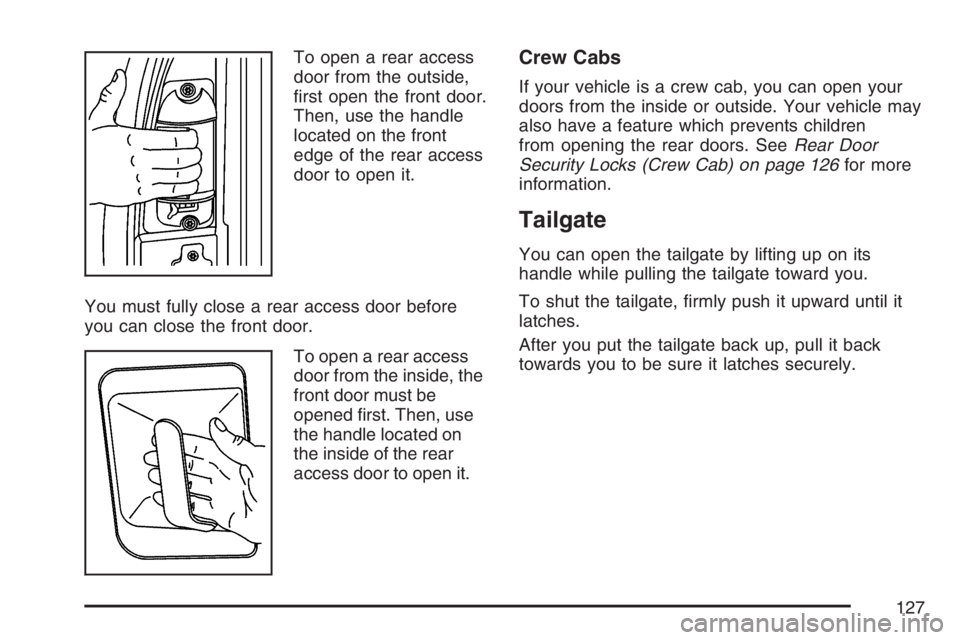
To open a rear access
door from the outside,
rst open the front door.
Then, use the handle
located on the front
edge of the rear access
door to open it.
You must fully close a rear access door before
you can close the front door.
To open a rear access
door from the inside, the
front door must be
opened rst. Then, use
the handle located on
the inside of the rear
access door to open it.Crew Cabs
If your vehicle is a crew cab, you can open your
doors from the inside or outside. Your vehicle may
also have a feature which prevents children
from opening the rear doors. SeeRear Door
Security Locks (Crew Cab) on page 126for more
information.
Tailgate
You can open the tailgate by lifting up on its
handle while pulling the tailgate toward you.
To shut the tailgate, rmly push it upward until it
latches.
After you put the tailgate back up, pull it back
towards you to be sure it latches securely.
127
Page 134 of 674
Starting and Operating Your
Vehicle
New Vehicle Break-In
Notice:Your vehicle does not need an
elaborate break-in. But it will perform better in
the long run if you follow these guidelines:
Keep your speed at 55 mph (88 km/h)
or less for the rst 500 miles (805 km).
Do not drive at any one constant speed, fast
or slow, for the rst 500 miles (805 km). Do
not make full-throttle starts. Avoid
downshifting to brake, or slow, the vehicle.
Avoid making hard stops for the rst
200 miles (322 km) or so. During this time
your new brake linings are not yet broken
in. Hard stops with new linings can mean
premature wear and earlier replacement.
Follow this breaking-in guideline every time
you get new brake linings.
Do not tow a trailer during break-in. See
Towing a Trailer on page 429for the trailer
towing capabilities of your vehicle and more
information.
Following break-in, engine speed and load can
be gradually increased.
134
Page 141 of 674
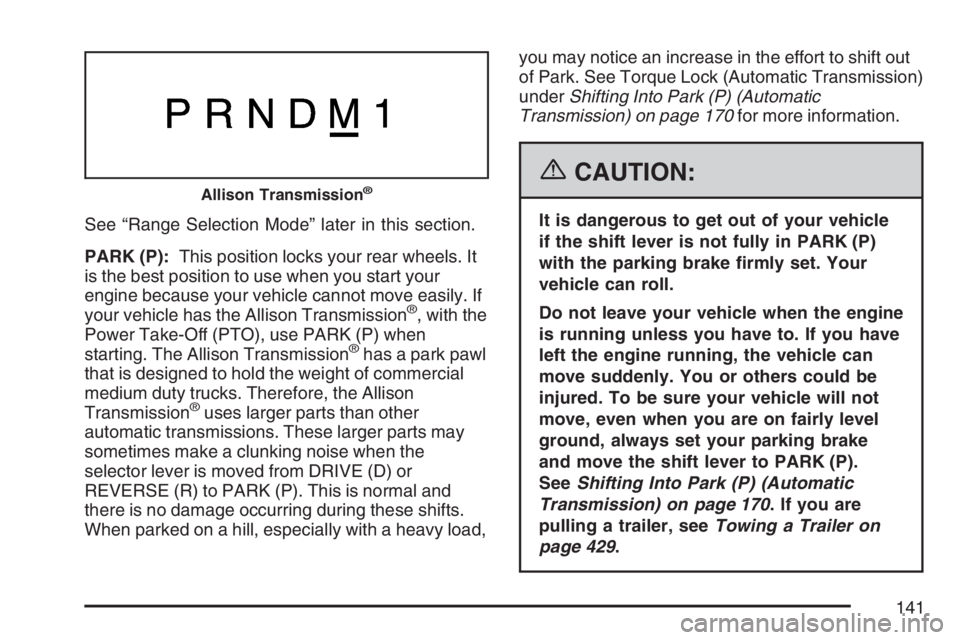
See “Range Selection Mode” later in this section.
PARK (P):This position locks your rear wheels. It
is the best position to use when you start your
engine because your vehicle cannot move easily. If
your vehicle has the Allison Transmission
®, with the
Power Take-Off (PTO), use PARK (P) when
starting. The Allison Transmission
®has a park pawl
that is designed to hold the weight of commercial
medium duty trucks. Therefore, the Allison
Transmission
®uses larger parts than other
automatic transmissions. These larger parts may
sometimes make a clunking noise when the
selector lever is moved from DRIVE (D) or
REVERSE (R) to PARK (P). This is normal and
there is no damage occurring during these shifts.
When parked on a hill, especially with a heavy load,you may notice an increase in the effort to shift out
of Park. See Torque Lock (Automatic Transmission)
underShifting Into Park (P) (Automatic
Transmission) on page 170for more information.
{CAUTION:
It is dangerous to get out of your vehicle
if the shift lever is not fully in PARK (P)
with the parking brake rmly set. Your
vehicle can roll.
Do not leave your vehicle when the engine
is running unless you have to. If you have
left the engine running, the vehicle can
move suddenly. You or others could be
injured. To be sure your vehicle will not
move, even when you are on fairly level
ground, always set your parking brake
and move the shift lever to PARK (P).
SeeShifting Into Park (P) (Automatic
Transmission) on page 170. If you are
pulling a trailer, seeTowing a Trailer on
page 429.
Allison Transmission®
141