Page 199 of 452

Radio Data System (RDS)
The audio system has a Radio Data System
(RDS). RDS features are available for use only on
FM stations that broadcast RDS information.
With RDS, the radio can do the following:
•Seek to stations broadcasting the selected
type of programming
•Receive announcements concerning local and
national emergencies
•Display messages from radio stations
This system relies upon receiving specific
information from these stations and only works
when the information is available. In rare cases, a
radio station may broadcast incorrect information
that causes the radio features to work improperly.
If this happens, contact the radio station.
While the radio is tuned to an RDS station, the
station name or call letters appear on the display
instead of the frequency. RDS stations may
also provide the time of day, a program type (PTY)
for current programming, and the name of the
program being broadcast.
Playing the Radio
PWR (Power):Press this knob to turn the system
on and off.
oVOLp(Volume):Turn this knob clockwise or
counterclockwise to increase or to decrease the
volume.
INFO (Information):Press this knob to switch the
display between the radio station frequency and
the time. When the ignition is off, press this
knob to display the time.
For RDS, press the INFO knob to change what
appears on the display while using RDS. The
display options are station name, RDS station
frequency, PTY, and the name of the program
(if available).
To change the default on the display, press the
INFO knob until you see the desired display, then
hold the knob until you hear a beep. The
selected display is now the default.
199
Page 207 of 452

Cassette Tape Messages
CHK TAPE (Check Tape):If this message
appears on the display, the tape does not play
due to one of the following errors:
•The tape is tight and the player cannot turn the
tape hubs. Remove the tape. Hold the tape with
the open end down and try to turn the right hub
counterclockwise with a pencil. Turn the tape
over and repeat. If the hubs do not turn easily,
the tape may be damaged and should not be
used in the player. Try a new tape to make sure
your player is working properly.
•The tape is broken. Try a new tape.
•The tape is wrapped around the tape head.
Attempt to get the cassette out. Try a new tape.
CLEAN:If this message appears on the display,
the cassette tape player needs to be cleaned.
It still plays tapes, but it should be cleaned as soon
as possible to prevent damage to the tapes and
player. SeeCare of the Cassette Tape Player
on page 224.
If the cassette tape is not playing correctly, for any
other reason, try a known good cassette.If any error occurs repeatedly or if an error cannot
be corrected, contact your dealer. If the radio
displays an error message, write it down and
provide it to your dealer when reporting the
problem.
CD Adapter Kits
It is possible to use a portable CD player with the
cassette tape player after activating the bypass
feature on your tape player.
To activate the bypass feature, perform the
following steps:
1. Turn the ignition on.
2. Turn the radio off.
3. Press and hold the TAPE DISC button for
five seconds. READY appears on the
display and the tape symbol on the display
flashes, indicating the feature is active.
4. Insert the adapter into the cassette tape slot.
It powers up the radio and begins playing.
The override feature remains active until the eject
button is pressed.
207
Page 211 of 452

CD Messages
If the CD comes out, it could be for one of the
following reasons:
•It is very hot. When the temperature returns to
normal, the CD should play.
•You are driving on a very rough road. When the
road becomes smoother, the CD should play.
•The CD is dirty, scratched, wet, or
upside down.
•The air is very humid. If so, wait about an hour
and try again.
•There may have been a problem while burning
the CD.
•The label may be caught in the CD player.
If the CD is not playing correctly, for any other
reason, try a known good CD.
If any error occurs repeatedly or if an error cannot
be corrected, contact your dealer. If the radio
displays an error message, write it down
and provide it to your dealer when reporting the
problem.
Radio with Six-Disc CD
Playing the Radio
PWR (Power):Push this knob to turn the system
on and off.
oVOLUMEp:Turn this knob clockwise or
counterclockwise to increase or to decrease the
volume.
INFO (Information):When the ignition is off,
press this knob to display the time.
211
Page 240 of 452

Steering in Emergencies
There are times when steering can be more
effective than braking. For example, you come
over a hill and find a truck stopped in your lane,
or a car suddenly pulls out from nowhere, or
a child darts out from between parked cars and
stops right in front of you. You can avoid
these problems by braking — if you can stop in
time. But sometimes you cannot; there is not room.
That is the time for evasive action — steering
around the problem.
Your vehicle can perform very well in emergencies
like these. First apply your brakes.
SeeBraking on page 232. It is better to remove as
much speed as you can from a possible collision.
Then steer around the problem, to the left or
right depending on the space available.An emergency like this requires close attention and
a quick decision. If you are holding the steering
wheel at the recommended 9 and 3 o’clock
positions, you can turn it a full 180 degrees very
quickly without removing either hand. But you have
to act fast, steer quickly, and just as quickly
straighten the wheel once you have avoided the
object.
The fact that such emergency situations are always
possible is a good reason to practice defensive
driving at all times and wear safety belts properly.
240
Page 292 of 452
Filling the Tank
{CAUTION:
Fuel vapor burns violently and a fuel re
can cause bad injuries. To help avoid
injuries to you and others, read and follow
all the instructions on the pump island.
Turn off your engine when you are
refueling. Do not smoke if you are near
fuel or refueling your vehicle. Keep
sparks, ames, and smoking materials
away from fuel. Do not leave the fuel
pump unattended when refueling your
vehicle. This is against the law in some
places. Keep children away from the fuel
pump; never let children pump fuel.The tethered fuel cap
is located behind a
hinged fuel door on
the driver side of
the vehicle.
If the vehicle has E85 fuel capability, a yellow cap
with the words “E85/gasoline” can be seen.
To remove the fuel cap, turn it slowly
counterclockwise.
While refueling, hang the tethered fuel cap from
the hook on the fuel door.
292
Page 293 of 452

{CAUTION:
If you spill fuel and then something
ignites it, you could be badly burned. Fuel
can spray out on you if you open the fuel
cap too quickly. This spray can happen if
your tank is nearly full, and is more likely
in hot weather. Open the fuel cap slowly
and wait for any hiss noise to stop. Then
unscrew the cap all the way.
Be careful not to spill fuel. Do not top off or overfill
the tank and wait a few seconds after you have
finished pumping before removing the nozzle.
Clean fuel from painted surfaces as soon
as possible. SeeWashing Your Vehicle on
page 380.
When replacing the fuel cap, turn it clockwise until it
clicks. Make sure the cap is fully installed. The
diagnostic system can determine if the fuel cap has
been left off or improperly installed. This would
allow fuel to evaporate into the atmosphere. See
Malfunction Indicator Lamp on page 178.
{CAUTION:
If a re starts while you are refueling, do
not remove the nozzle. Shut off the ow of
fuel by shutting off the pump or by
notifying the station attendant. Leave the
area immediately.
Notice:If you need a new fuel cap, be sure
to get the right type. Your dealer can get
one for you. If you get the wrong type, it
may not t properly. This may cause your
malfunction indicator lamp to light and
may damage your fuel tank and emissions
system. SeeMalfunction Indicator Lamp
on page 178.
293
Page 315 of 452
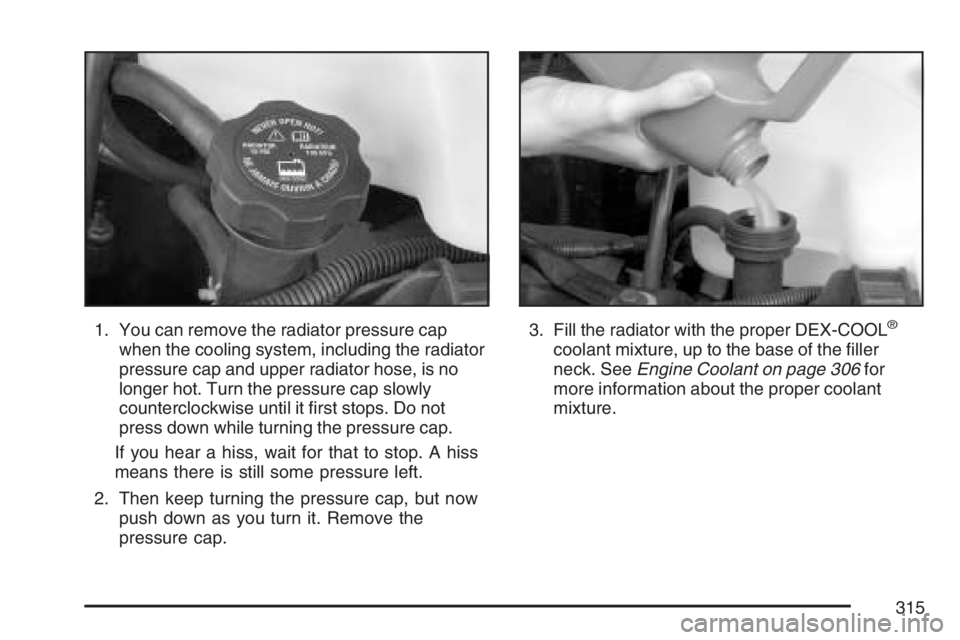
1. You can remove the radiator pressure cap
when the cooling system, including the radiator
pressure cap and upper radiator hose, is no
longer hot. Turn the pressure cap slowly
counterclockwise until it first stops. Do not
press down while turning the pressure cap.
If you hear a hiss, wait for that to stop. A hiss
means there is still some pressure left.
2. Then keep turning the pressure cap, but now
push down as you turn it. Remove the
pressure cap.3. Fill the radiator with the proper DEX-COOL®
coolant mixture, up to the base of the filler
neck. SeeEngine Coolant on page 306for
more information about the proper coolant
mixture.
315
Page 334 of 452
Bulb Replacement
For the proper type of replacement bulbs, see
Replacement Bulbs on page 338.
For any bulb changing procedure not listed in this
section, contact your dealer.
Halogen Bulbs
{CAUTION:
Halogen bulbs have pressurized gas
inside and can burst if you drop or
scratch the bulb. You or others could be
injured. Be sure to read and follow the
instructions on the bulb package.
Headlamps
To remove the headlamp assembly from the
vehicle and access the bulbs, do the following:
1. Open the hood. SeeHood Release on
page 295for more information.
2. Remove the two bolts from the headlamp
assembly.
3. Remove the two pins on the top of the
headlamp assembly. To remove the pins, turn
the outer pin clockwise and pull it straight
up. To remove the inner pin, turn it
counterclockwise and pull it straight up.
334