Page 146 of 562

OnStar®service is provided to you subject to the
OnStar®Terms and Conditions. You may cancel
your OnStar®service at any time by contacting
OnStar®as provided below. A complete OnStar®
Owner’s Guide and the OnStar®Terms and
Conditions are included in the vehicle’s OnStar®
Subscriber glove box literature. For more
information, visit onstar.com or onstar.ca, contact
OnStar
®at 1–888–4–ONSTAR (1–888–466–7827)
or TTY 1–877–248–2080, or press the OnStar®
button to speak with an OnStar®advisor 24 hours a
day, 7 days a week.
Not all OnStar
®features are available on all
vehicles. To check if your vehicle is equipped to
provide the services described below, or for a
full description of OnStar
®services and system
limitations, see the OnStar®Owner’s Guide in your
glove box or visit onstar.com.
OnStar®Services
For new vehicles equipped with OnStar®, the Safe
& Sound Plan, or the Directions & Connections®
Plan is included for one year from the date of
purchase. You can extend this plan beyond the
rst year, or upgrade to the Directions &
Connections
®Plan. For more information, press
the OnStar®button to speak with an advisor. Some
OnStar®services (such as Remote Door Unlock
or Stolen Vehicle Location Assistance) may not be
available until you register with OnStar
®.
Available Services with Safe & Sound®Plan
Automatic Notication of Airbag Deployment
Advanced Automatic Crash Notication (AACN)
(If equipped)
Link to Emergency Services
Roadside Assistance
146
Page 147 of 562

Stolen Vehicle Location Assistance
AccidentAssist
Remote Door Unlock/Vehicle Alert
OnStar®Vehicle Diagnostics
GM®Goodwrench®On Demand Diagnostics
OnStar®Hands-Free Calling with 30
complimentary minutes
OnStar®Virtual Advisor
Available Services included with Directions
& Connections®Plan
All Safe and Sound Plan Services
Driving Directions - Advisor delivered or
OnStar®Turn-by-Turn Navigation (If equipped)
RideAssist
Information and Convenience Services
OnStar®Hands-Free Calling
OnStar®Hands-Free Calling allows eligible
OnStar®subscribers to make and receive calls
using voice commands. Hands-Free Calling is fully
integrated into the vehicle, and can be used
with OnStar
®Pre-Paid Minute Packages.
Hands-Free Calling may also be linked to a
Verizon Wireless service plan, depending on
eligibility. To nd out more, refer to the OnStar
®
Owner’s Guide in the vehicle’s glove box, visit
www.onstar.com or www.onstar.ca, or speak with
an OnStar
®advisor by pressing the OnStar®
button or calling 1-888-4-ONSTAR
(1-888-466-7827).
OnStar®Virtual Advisor
OnStar®Virtual Advisor is a feature of OnStar®
Hands-Free Calling that uses your minutes
to access location-based weather, local traffic
reports, and stock quotes. By pressing the phone
button and giving a few simple voice commands,
you can browse through the various topics.
See the OnStar
®Owner’s Guide for more
information.
147
Page 160 of 562

Reprogramming a Single Universal
Home Remote Button
To program a device to Universal Home Remote
using a Universal Home Remote button
previously trained, follow these steps:
1. Press and hold the desired Universal Home
Remote button. Do not release the button.
2. The indicator light will begin to ash after
20 seconds. While still holding the Universal
Home Remote button, proceed with Step
2 under “Programming Universal Home
Remote” shown earlier in this section.
For additional information on Universal Home
Remote, seeCustomer Assistance Offices
on page 530.
Storage Areas
Glove Box
To open, pull up on the handle. Use the key to
lock and unlock.
Overhead Console
Your vehicle may have this feature. The overhead
console may include reading lamps, a Universal
Home Remote and a sunroof switch. SeeSunroof
on page 164andUniversal Home Remote
System (With Three Round LED) on page 149or
Universal Home Remote System (With One
Triangular LED) on page 150for more information.
Center Console Storage Area
Squeeze the front lever on the center console
while lifting the top to open it.
Your vehicle’s console will have cupholders
located on the front and rear of the storage
compartment.
The console may also contain one or more of the
following components:
Rear Seat Audio Controls
Rear Seat Accessory Power Outlets
Rear Climate Control
To open the center armrest compartment, lift the
cover by pulling up on the latch handle located
underneath the front edge of the armrest.
160
Page 161 of 562

Luggage Carrier
{CAUTION:
If you try to carry something on top of
your vehicle that is longer or wider than
the luggage carrier — like paneling,
plywood, a mattress and so forth — the
wind can catch it as you drive along. This
can cause you to lose control. What you
are carrying could be violently torn off,
and this could cause you or other drivers
to have a collision, and of course damage
your vehicle. You may be able to carry
something like this inside. But, never
carry something longer or wider than the
luggage carrier on top of your vehicle.If your vehicle has a luggage carrier, it will allow
you to load things on top of your vehicle. The
luggage carrier has side rails attached to the roof,
places to use for tying things down and may
have sliding crossrails. These let you load some
other things on top of your vehicle, as long as they
are not wider or longer than the luggage carrier.
To slide the crossrails to where you want
them, pull up on the lever on each side of the
crossrail. This releases the crossrail and allows
you to slide it. When the crossrail is where
you want it, press down on the levers to lock it
into place.
Notice:Loading cargo on the luggage carrier
that weighs more than 220 lbs (100 kg) or
hangs over the rear or sides of the vehicle may
damage your vehicle. Load cargo so that it
rests on the slats as far forward as possible
and against the side rails, making sure to
fasten it securely.
Do not exceed the maximum vehicle capacity
when loading your vehicle. For more information
on vehicle capacity and loading, seeLoading Your
Vehicle on page 349.
161
Page 162 of 562

To prevent damage or loss of cargo as you are
driving, check now and then to make sure
the luggage carrier is locked and cargo is still
securely fastened.
When the luggage carrier is not in use, place the
crossrails at the following positions for wind
noise reduction. Place one crossrail at the rear
most point of the vehicle and the other crossrail
above the opening of the rear door.
Rear Floor Storage Lid
{CAUTION:
If any removable convenience item is not
secured properly, it can move around in a
collision or sudden stop. People in the
vehicle could be injured. Be sure to
secure any such item properly.
Your vehicle has a rear cargo area with a
removable storage lid.To remove the rear oor storage lid, do the
following:
1. Press the latch release and lift up the latch
handle.
2. Raise the lid slightly to unhook it.
3. Pull the lid toward you to release it from the
forward mounting tabs.
To reinstall the rear oor storage lid, reverse the
previous steps. Make sure the lid is secure by
applying slight pressure to the latch until you hear
it click.
Convenience Net
Your vehicle may have this feature. A convenience
net in the rear of your vehicle helps keep small
items in place during sharp turns or quick
stops and starts. The net is not designed to retain
these items during off-road use. The net is not
for larger, heavier items.
162
Page 164 of 562
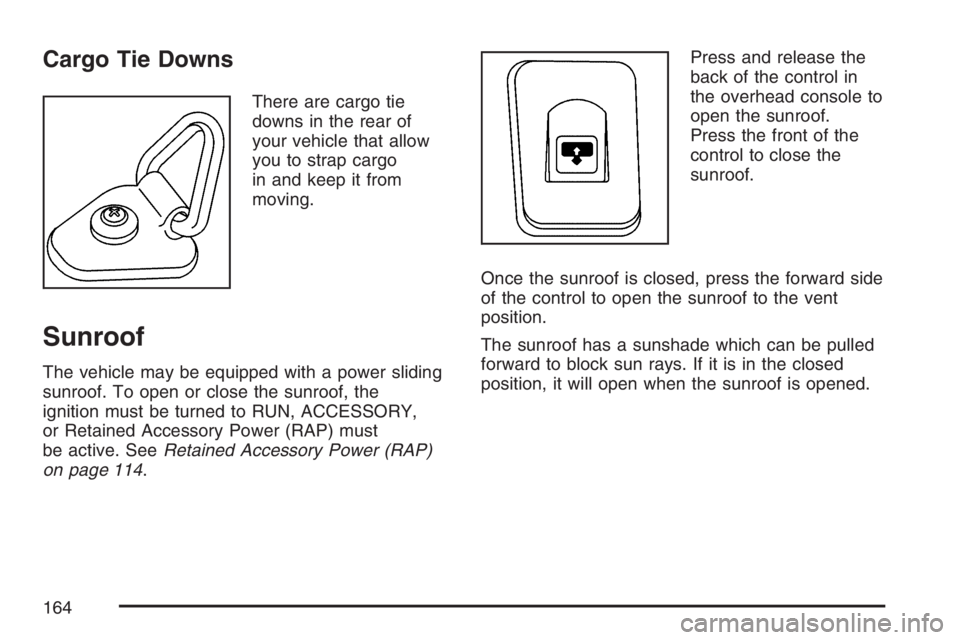
Cargo Tie Downs
There are cargo tie
downs in the rear of
your vehicle that allow
you to strap cargo
in and keep it from
moving.
Sunroof
The vehicle may be equipped with a power sliding
sunroof. To open or close the sunroof, the
ignition must be turned to RUN, ACCESSORY,
or Retained Accessory Power (RAP) must
be active. SeeRetained Accessory Power (RAP)
on page 114.Press and release the
back of the control in
the overhead console to
open the sunroof.
Press the front of the
control to close the
sunroof.
Once the sunroof is closed, press the forward side
of the control to open the sunroof to the vent
position.
The sunroof has a sunshade which can be pulled
forward to block sun rays. If it is in the closed
position, it will open when the sunroof is opened.
164
Page 165 of 562

Instrument Panel Overview........................ 168
Hazard Warning Flashers.......................... 170
Other Warning Devices............................. 170
Horn.......................................................... 170
Tilt Wheel.................................................. 171
Turn Signal/Multifunction Lever.................. 171
Turn and Lane-Change Signals................. 172
Headlamp High/Low-Beam Changer.......... 173
Flash-to-Pass............................................ 173
Windshield Wipers..................................... 173
Windshield Washer.................................... 174
Rear Window Wiper/Washer...................... 174
Headlamp Washer..................................... 175
Cruise Control........................................... 176
Headlamps................................................ 179
Headlamps on Reminder........................... 180
Daytime Running Lamps (DRL)................. 180
Automatic Headlamp System..................... 181
Fog Lamps................................................ 182
Instrument Panel Brightness...................... 182
Dome Lamps............................................. 182
Dome Lamp Override................................ 183
Entry Lighting............................................ 183
Exit Lighting.............................................. 183Reading Lamps......................................... 183
Electric Power Management...................... 184
Battery Run-Down Protection..................... 185
Accessory Power Outlet(s)........................ 185
Ashtray(s) and Cigarette Lighter................ 186
Climate Controls......................................... 186
Dual Climate Control System..................... 186
Dual Automatic Climate Control System.... 189
Outlet Adjustment...................................... 194
Rear Climate Control System.................... 195
Warning Lights, Gages, and Indicators..... 197
Instrument Panel Cluster........................... 198
Speedometer and Odometer...................... 199
Trip Odometer........................................... 199
Tachometer............................................... 199
Safety Belt Reminder Light........................ 200
Passenger Safety Belt Reminder Light....... 200
Airbag Readiness Light............................. 201
Passenger Airbag Status Indicator............. 202
Charging System Light.............................. 205
Voltmeter Gage......................................... 205
Brake System Warning Light..................... 206
Anti-Lock Brake System Warning Light...... 207
Section 3 Instrument Panel
165
Page 171 of 562
Tilt Wheel
The steering wheel should be adjusted before
you drive.
The tilt lever is located
to the left of the steering
column, under the
turn signal lever.
It can be raised to the highest level to give
your legs more room when you enter and exit
the vehicle.
To tilt the wheel, hold the steering wheel and pull
the lever toward you. Move the steering wheel
to a comfortable level, then release the lever
to lock the wheel in place.
Turn Signal/Multifunction Lever
The lever on the left side of the steering column
includes the following:
GTurn and Lane Change Signals
23Headlamp High/Low-Beam Changer
Flash-to-Pass Feature
NWindshield Wipers
JWindshield Washer
ICruise Control
171