2007 GMC ENVOY lights
[x] Cancel search: lightsPage 156 of 562
Reprogramming Universal Home
Remote Buttons
You can reprogram any of the three buttons by
repeating the instructions.
Erasing Universal Home Remote
Buttons
You should erase the programmed buttons when
you sell the vehicle or terminate your lease.
To erase either rolling code or xed code on the
Universal Home Remote device, do the following:
1. Press and hold the two outside buttons at
the same time for approximately 20 seconds,
until the indicator lights, located directly
above the buttons, begin to blink rapidly.
2. Once the indicator lights begin to blink,
release both buttons. The codes from all
button will be erased.
For additional information on Universal Home
Remote, seeCustomer Assistance Offices
on page 530.
Universal Home Remote System
Operation (With One Triangular LED)
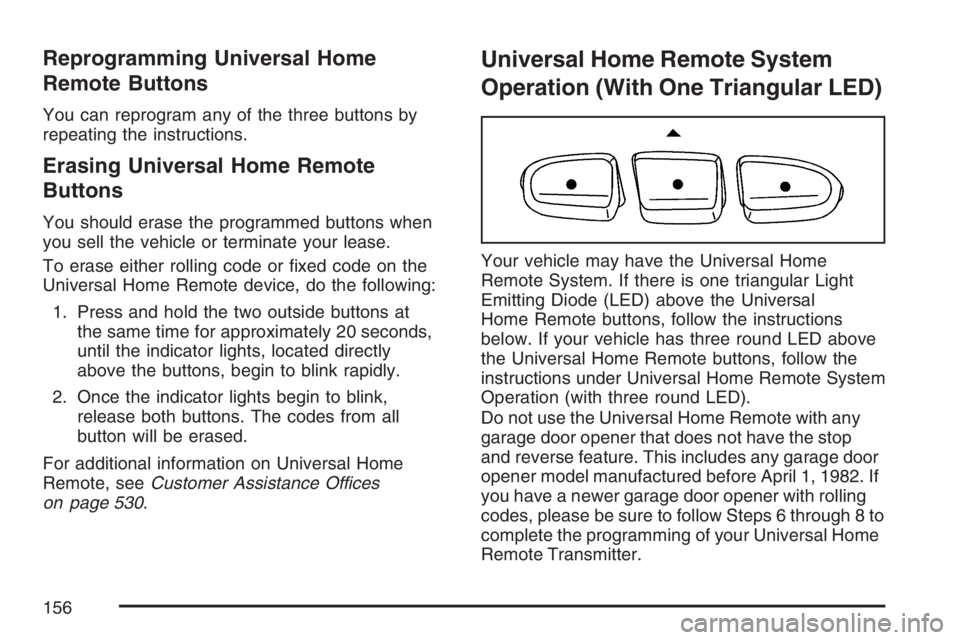
Your vehicle may have the Universal Home
Remote System. If there is one triangular Light
Emitting Diode (LED) above the Universal
Home Remote buttons, follow the instructions
below. If your vehicle has three round LED above
the Universal Home Remote buttons, follow the
instructions under Universal Home Remote System
Operation (with three round LED).
Do not use the Universal Home Remote with any
garage door opener that does not have the stop
and reverse feature. This includes any garage door
opener model manufactured before April 1, 1982. If
you have a newer garage door opener with rolling
codes, please be sure to follow Steps 6 through 8 to
complete the programming of your Universal Home
Remote Transmitter.
156
Page 165 of 562

Instrument Panel Overview........................ 168
Hazard Warning Flashers.......................... 170
Other Warning Devices............................. 170
Horn.......................................................... 170
Tilt Wheel.................................................. 171
Turn Signal/Multifunction Lever.................. 171
Turn and Lane-Change Signals................. 172
Headlamp High/Low-Beam Changer.......... 173
Flash-to-Pass............................................ 173
Windshield Wipers..................................... 173
Windshield Washer.................................... 174
Rear Window Wiper/Washer...................... 174
Headlamp Washer..................................... 175
Cruise Control........................................... 176
Headlamps................................................ 179
Headlamps on Reminder........................... 180
Daytime Running Lamps (DRL)................. 180
Automatic Headlamp System..................... 181
Fog Lamps................................................ 182
Instrument Panel Brightness...................... 182
Dome Lamps............................................. 182
Dome Lamp Override................................ 183
Entry Lighting............................................ 183
Exit Lighting.............................................. 183Reading Lamps......................................... 183
Electric Power Management...................... 184
Battery Run-Down Protection..................... 185
Accessory Power Outlet(s)........................ 185
Ashtray(s) and Cigarette Lighter................ 186
Climate Controls......................................... 186
Dual Climate Control System..................... 186
Dual Automatic Climate Control System.... 189
Outlet Adjustment...................................... 194
Rear Climate Control System.................... 195
Warning Lights, Gages, and Indicators..... 197
Instrument Panel Cluster........................... 198
Speedometer and Odometer...................... 199
Trip Odometer........................................... 199
Tachometer............................................... 199
Safety Belt Reminder Light........................ 200
Passenger Safety Belt Reminder Light....... 200
Airbag Readiness Light............................. 201
Passenger Airbag Status Indicator............. 202
Charging System Light.............................. 205
Voltmeter Gage......................................... 205
Brake System Warning Light..................... 206
Anti-Lock Brake System Warning Light...... 207
Section 3 Instrument Panel
165
Page 179 of 562

Erasing Speed Memory
When you turn off the cruise control or the
ignition, the cruise control set speed memory
is erased.
Headlamps
The exterior lamps
knob is located on
your instrument panel
to the left of the
steering wheel.
c(Off):Turn the knob to this symbol and
release it to turn off the Daytime Running Lamps
(DRL) and the Automatic Headlamps (AHS).
An indicator illuminates when the position
is selected. This position is not available for
vehicles rst sold in Canada.
i(Automatic DRL/AHS):Turn the knob to
this symbol to put the system into automatic
headlamp mode. An indicator comes on when
the position is selected.
;(Parking Lamps):Turn the knob to this
symbol to turn on the parking lamps, as well as
the following:
Sidemarker Lamps
Taillamps
License Plate Lamps
Instrument Panel Lights
2(Headlamps):Turn the knob to this symbol to
turn on the headlamps, as well as the following:
Parking Lamps
Sidemarker Lamps
Taillamps
License Plate Lamps
Instrument Panel Lights
179
Page 181 of 562

Automatic Headlamp System
When it is dark enough outside, the Automatic
Headlamp System turns on the headlamps when
the vehicle is started and after the transaxle
has been shifted out of the PARK (P) position.
The headlamps, taillamps, sidemarker, and parking
lamps will come on. The instrument panel lights
and radio lights will also turn on at normal
brightness. Once on, the system remains on
during these conditions even if the vehicle
is shifted back into PARK (P).
The vehicle has a light sensor on the top of the
instrument panel. Make sure it is not covered or the
system may come on whenever the ignition is on
and the vehicle is shifted out of the PARK (P)
position.
The system could also turn on the lamps when
driving through a parking garage, heavy overcast
weather or a tunnel. This is normal.There is a delay in the transition between the
daytime and nighttime operation of the Daytime
Running Lamps (DRL) and the automatic headlamp
systems, so that driving under bridges or bright
overhead street lights does not affect the system.
The DRL and automatic headlamp system are only
affected when the light sensor sees a change in
lighting lasting longer than the delay.
If you start your vehicle in a dark garage, the
automatic headlamp system comes on after the
transmission is shifted out of PARK (P). Once you
leave the garage, it will take about one minute
for the automatic headlamp system to change to
DRL if it is light outside. During that delay, the
instrument panel cluster might not be as bright as
usual. Make sure the instrument panel brightness
control is in the full bright position.
If the vehicle is running and the automatic
headlamp system is already on, it can be turned
off by turning and releasing the headlamp
control at the off position. The automatic headlamp
system stays off until you turn and release the
headlamp control at the off position again.
SeeHeadlamps on page 179.
181
Page 182 of 562

Fog Lamps
Use the fog lamps for better vision in foggy or
misty conditions. The ignition must be in RUN for
the fog lamps to work.
The fog lamp button is
located on the
instrument panel to the
right of the exterior
lamps knob.
Press the button to turn the fog lamps on. Press
the button again to turn them off. A light glows
near the button while the fog lamps are on.
Fog lamps turn off whenever the high-beam
headlamps are on.
Some localities have laws that require the
headlamps to be on along with the fog lamps.
Instrument Panel Brightness
Press the knob located
next to the exterior
lamps knob to extend it.
Turn the knob to adjust the instrument panel
lights. Turn the knob all the way up to turn on the
interior lamps. Press the knob back into its
stored position when you are not using it.
Dome Lamps
The dome lamps will come on when you open a
door unless the dome lamp override is pressed in.
182
Page 197 of 562

Warning Lights, Gages, and
Indicators
This part describes the warning lights and gages
that may be on your vehicle. The pictures will
help you locate them.
Warning lights and gages can signal that
something is wrong before it becomes serious
enough to cause an expensive repair or
replacement. Paying attention to your warning
lights and gages could also save you or others
from injury.
Warning lights come on when there may be or is
a problem with one of your vehicle’s functions.
As you will see in the details on the next few
pages, some warning lights come on briey when
you start the engine just to let you know they’re
working. If you are familiar with this section,
you should not be alarmed when this happens.Gages can indicate when there may be or is a
problem with one of your vehicle’s functions. Often
gages and warning lights work together to let you
know when there’s a problem with your vehicle.
When one of the warning lights comes on and
stays on when you are driving, or when one of the
gages shows there may be a problem, check
the section that tells you what to do about
it. Please follow this manual’s advice.
Waiting to do repairs can be costly—and even
dangerous. So please get to know your warning
lights and gages. They’re a big help.
Your vehicle may also have a Driver Information
Center (DIC) that works along with the warning
lights and gages. SeeDriver Information
Center (DIC) on page 218.
197
Page 204 of 562

Here is why:
{CAUTION:
Even though the passenger sensing
system is designed to turn off the
passenger’s frontal airbag if the system
detects a rear-facing child restraint, no
system is fail-safe, and no one can
guarantee that an airbag will not deploy
under some unusual circumstance, even
though it is turned off. We recommend
that rear-facing child restraints be
transported in vehicles with a rear seat
that will accommodate a rear-facing child
restraint, whenever possible.
If the word OFF or the off symbol is lit on the
airbag status indicator, it means that the
passenger sensing system has turned off the right
front passenger’s frontal airbag. SeePassenger
Sensing System on page 82for more on this,
including important safety information.If, after several seconds, all status indicator lights
remain on, or if there are no lights at all, there
may be a problem with the lights or the passenger
sensing system. See your dealer for service.{CAUTION:
If the off indicator and the airbag
readiness light ever come on together, it
means that something may be wrong with
the airbag system. If this ever happens,
have the vehicle serviced promptly,
because an adult-size person sitting in the
right front passenger seat may not have
the protection of the frontal airbag. See
Airbag Readiness Light on page 201.
204
Page 232 of 562

Headlamp Delay
Press the customization button until HEADLAMP
DELAY: 10 SEC appears in the display. To select
your preference for how long the headlamps will
stay on when you turn off the vehicle, press the
select button while HEADLAMP DELAY: 10 SEC is
displayed on the DIC. Pressing the select button will
scroll through the following choices:
HEADLAMP DELAY: 10 SEC (Seconds)
(default)
HEADLAMP DELAY: 20 SEC
HEADLAMP DELAY: 40 SEC
HEADLAMP DELAY: 1 MIN (Minute)
HEADLAMP DELAY: 2 MIN
HEADLAMP DELAY: 3 MIN
HEADLAMP DELAY: OFF
The amount of time you choose will be the amount
of time that the headlamps stay on after you turn off
the vehicle. If you choose OFF, the headlamps will
turn off as soon as you turn off the vehicle.
Choose one of the available options and press the
customization button while it is displayed on the
DIC to select it and move on to the next feature.
Perimeter Lights
Press the customization button until PERIMETER
LIGHTS: ON appears in the display. To select
your preference for perimeter lighting, press
the select button while PERIMETER LIGHTS:
ON is displayed on the DIC. Pressing the select
button will scroll through the following choices:
PERIMETER LIGHTS: ON (default):The
headlamps and back-up lamps will come on for
40 seconds, if it is dark enough outside, when you
unlock the vehicle with the Remote Keyless
Entry (RKE) transmitter.
PERIMETER LIGHTS: OFF:The perimeter lights
will not come on when you unlock the vehicle
with the RKE transmitter.
Choose one of the available options and press the
customization button while it is displayed on the
DIC to select it and move on to the next feature.
232