2007 GMC ENVOY DENALI ECU
[x] Cancel search: ECUPage 162 of 562

To prevent damage or loss of cargo as you are
driving, check now and then to make sure
the luggage carrier is locked and cargo is still
securely fastened.
When the luggage carrier is not in use, place the
crossrails at the following positions for wind
noise reduction. Place one crossrail at the rear
most point of the vehicle and the other crossrail
above the opening of the rear door.
Rear Floor Storage Lid
{CAUTION:
If any removable convenience item is not
secured properly, it can move around in a
collision or sudden stop. People in the
vehicle could be injured. Be sure to
secure any such item properly.
Your vehicle has a rear cargo area with a
removable storage lid.To remove the rear oor storage lid, do the
following:
1. Press the latch release and lift up the latch
handle.
2. Raise the lid slightly to unhook it.
3. Pull the lid toward you to release it from the
forward mounting tabs.
To reinstall the rear oor storage lid, reverse the
previous steps. Make sure the lid is secure by
applying slight pressure to the latch until you hear
it click.
Convenience Net
Your vehicle may have this feature. A convenience
net in the rear of your vehicle helps keep small
items in place during sharp turns or quick
stops and starts. The net is not designed to retain
these items during off-road use. The net is not
for larger, heavier items.
162
Page 163 of 562

To use the convenience net, do the following:
1. Attach the upper loops to the retainers on both
sides of the liftgate opening. The label should
be in the upper passenger’s side corner,
visible from the rear of the vehicle.
2. Attach the lower hooks to the rear cargo tie
downs on the oor.
Cargo Cover
If your vehicle has a cargo cover, you can use it
to cover items in the cargo area of your vehicle.
To install the cargo cover, do the following:
1. Align the endcap with the pocket in the trim
panel located behind the rear seat.
2. Squeeze the opposite endcap, align it with the
pocket located on the opposite side of the trim
panel and release.
3. Grasp the handle and unroll the cover.
4. Latch the posts into the sockets on the inside
of the vehicle to secure it.To remove the cargo cover, do the following:
1. Release the cover from the latch posts and
carefully roll it back up.
2. Squeeze one endcap and remove it from the
pocket in the trim panel.
3. Remove the cargo cover from the other
endcap so that you can remove the shade
from the vehicle.{CAUTION:
An improperly stored cargo cover could
be thrown about the vehicle during a
collision or sudden maneuver. You or
others could be injured. If you remove the
cover, always store it in the proper
storage location. When you put it back,
always be sure that it is securely
reattached.
163
Page 166 of 562

StabiliTrak®Service Light........................... 207
StabiliTrak®Indicator Light......................... 208
Engine Coolant Temperature Gage............ 208
Tire Pressure Light.................................... 209
Malfunction Indicator Lamp........................ 210
Oil Pressure Gage..................................... 213
Change Engine Oil Light........................... 214
Security Light............................................ 214
Cruise Control Light.................................. 215
Reduced Engine Power Light.................... 215
Highbeam On Light................................... 215
Service Four-Wheel Drive Warning Light ... 216
Check Gages Warning Light...................... 216
Gate Ajar Light.......................................... 216
Fuel Gage................................................. 217
Low Fuel Warning Light............................ 217
Check Gas Cap Light................................ 217
Driver Information Center (DIC).................. 218
DIC Operation and Displays...................... 219
DIC Warnings and Messages.................... 222
DIC Vehicle Customization........................ 229Audio System(s)......................................... 236
Setting the Time........................................ 238
Radio with CD (Base)............................... 238
Radio with CD (MP3)................................ 248
Radio with Six-Disc CD............................. 258
Using an MP3........................................... 271
XM Radio Messages................................. 277
Navigation/Radio System........................... 280
Rear Seat Entertainment System............... 280
Rear Seat Audio (RSA)............................. 295
Theft-Deterrent Feature............................. 296
Audio Steering Wheel Controls.................. 297
Radio Reception........................................ 298
Care of Your CDs and DVDs.................... 299
Care of the CD and DVD Player............... 299
Fixed Mast Antenna.................................. 299
XM™ Satellite Radio Antenna System....... 300
Chime Level Adjustment............................ 300
Section 3 Instrument Panel
166
Page 203 of 562

{CAUTION:
If the on indicator comes on when you have
a rear-facing child restraint installed in the
right front passenger’s seat, it means that
the passenger sensing system has not
turned off the passenger’s frontal airbag.
A child in a rear-facing child restraint can
be seriously injured or killed if the right
front passenger’s airbag inates. This is
because the back of the rear-facing child
restraint would be very close to the
inating airbag. Do not use a rear-facing
child restraint in the right front passenger’s
seat if the airbag is turned on.
If your vehicle has a rear seat that will
accommodate a rear-facing child restraint, a label
on your sun visor says, “Never put a rear-facing
child seat in the front.” This is because the risk to
the rear-facing child is so great, if the airbag
deploys.
{CAUTION:
Even though the passenger sensing
system is designed to turn off the
passenger’s frontal airbag if the system
detects a rear-facing child restraint, no
system is failsafe, and no one can
guarantee that an airbag will not deploy
under some unusual circumstance, even
though it is turned off. We recommend
that rear-facing child restraints be secured
in the rear seat, even if the airbag is off.
If your vehicle does not have a rear seat that
will accommodate a rear-facing child restraint,
never put a child in a rear-facing child restraint
in the right front passenger seat the unless
passenger airbag status indicator shows off. Never
put a rear facing child restraint in the right front
passenger seat unless the airbag is off.
203
Page 214 of 562

Change Engine Oil Light
Your vehicle may
have a change
engine oil light.
When this light comes on it means that an oil
change and other maintenance procedures
are required for your vehicle.
SeeScheduled Maintenance on page 507and
Engine Oil on page 394for more information.
Once the engine oil has been changed, the change
engine oil light must be reset. Until it is reset,
the light will stay on when the engine is on.
Security Light
This light will come on
briey when you turn
the key toward START.
The light will stay on until the engine starts. If the
light ashes, the Passlock
®system has entered
a tamper mode. If the vehicle fails to start,
seePasslock
®on page 111.
If the light comes on continuously while driving
and stays on, there may be a problem with
the Passlock
®system. Your vehicle will not be
protected by Passlock®, and you should see
your dealer.
Also, seeContent Theft-Deterrent on page 110for
additional information regarding the security light.
214
Page 217 of 562
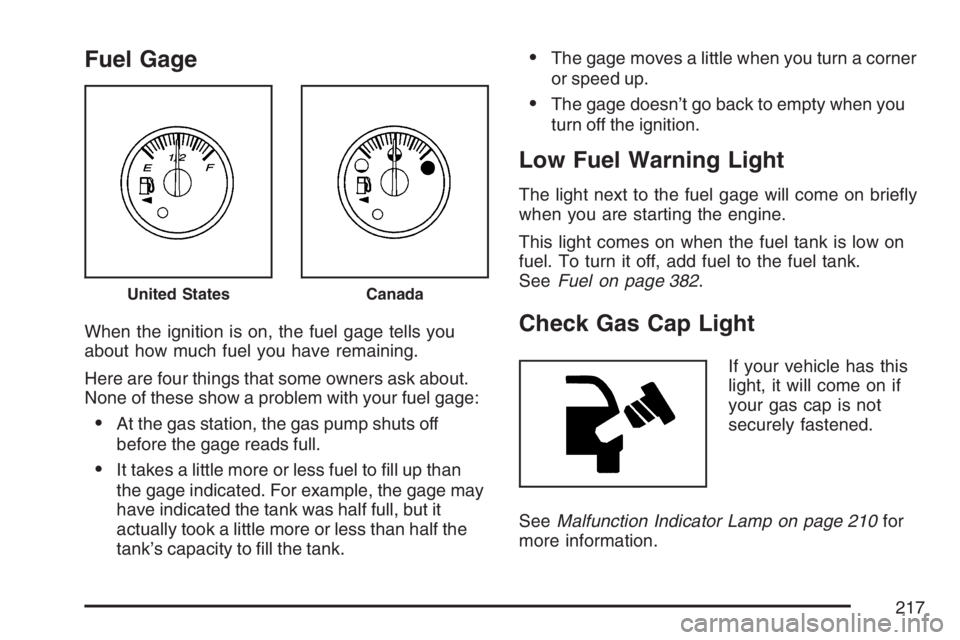
Fuel Gage
When the ignition is on, the fuel gage tells you
about how much fuel you have remaining.
Here are four things that some owners ask about.
None of these show a problem with your fuel gage:
At the gas station, the gas pump shuts off
before the gage reads full.
It takes a little more or less fuel to ll up than
the gage indicated. For example, the gage may
have indicated the tank was half full, but it
actually took a little more or less than half the
tank’s capacity to ll the tank.
The gage moves a little when you turn a corner
or speed up.
The gage doesn’t go back to empty when you
turn off the ignition.
Low Fuel Warning Light
The light next to the fuel gage will come on briey
when you are starting the engine.
This light comes on when the fuel tank is low on
fuel. To turn it off, add fuel to the fuel tank.
SeeFuel on page 382.
Check Gas Cap Light
If your vehicle has this
light, it will come on if
your gas cap is not
securely fastened.
SeeMalfunction Indicator Lamp on page 210for
more information.
United StatesCanada
217
Page 278 of 562

Radio Display Message Condition Action Required
No Info Song/Program Title
not availableNo song title information is available at this time on this
channel. The system is working properly.
No Info Category Name
not availableNo category information is available at this time on this
channel. The system is working properly.
No Info No Text/Informational
message availableNo text or informational messages are available at this time
on this channel. The system is working properly.
Not Found No channel available for
the chosen categoryThere are no channels available for the selected category.
The system is working properly.
XM Locked Theft lock active The XM™ receiver in the vehicle may have previously been
in another vehicle. For security purposes, XM™ receivers
cannot be swapped between vehicles. If this message is
received after having your vehicle serviced, check with
your dealer.
Radio ID Radio ID label (channel 0) If tuned to channel 0, this message alternates with the
XM™ Radio 8 digit radio ID label. This label is needed to
activate the service.
Unknown Radio ID not known
(should only be if
hardware failure)If this message is received when tuned to channel 0, there
could be a receiver fault. Consult with your dealer.
Chk XMRcvr Hardware failure If this message does not clear within a short period of time,
the receiver could have a fault. Consult with your dealer.
278
Page 280 of 562

Radio Display Message Condition Action Required
Not Found No channel available for
the chosen categoryThere are no channels available for the selected category.
The system is working properly.
XM Lock Theft lock active The XM™ receiver in your vehicle may have previously
been in another vehicle. For security purposes, XM™
receivers cannot be swapped between vehicles. If this
message is received after having your vehicle serviced,
check with your dealer.
Radio ID Radio ID label
(channel 0)If tuned to channel 0, this message will alternate with the
XM™ Radio eight digit radio ID label. This label is needed
to activate the service.
Unknown Radio ID not known
(should only be if
hardware failure)If this message is received when tuned to channel 0, there
could be a receiver fault. Consult with your dealer.
Check XM Hardware failure If this message does not clear within a short period of time,
the receiver could have a fault. Consult with your dealer.
Navigation/Radio System
Your vehicle may have a navigation radio system.
The navigation system has built-in features
intended to minimize driver distraction. Technology
alone, no matter how advanced, can never
replace your own judgment. See the Navigation
System manual for some tips to help you
reduce distractions while driving.
Rear Seat Entertainment System
Your vehicle may have the Digital Versatile
Disc (DVD) Rear Seat Entertainment (RSE)
system. The RSE system includes a DVD player,
a video display screen, two sets of wireless
headphones, and a remote control.
280