2007 FIAT BRAVO key
[x] Cancel search: keyPage 30 of 246

29
SAFETY
DEVICES
CORRECT USE
OF THE CAR
WARNING
LIGHTS AND
MESSAGES
IN AN
EMERGENCY
CAR
MAINTENANCE
TECHNICAL
SPECIFICATIONS
INDEX
DASHBOARD
AND CONTROLS
NoteEvery press on button Õor Ôin-
creases/decreases by 1 unit. Keeping the
button pressed obtains automatic fast in-
crease or decrease. When you are near
the required setting complete adjustment
by single presses.
– if selecting “Mode”: briefly press but-
ton MODE, “24h” or “12h mode will
flash on the display;
– press button
Õor Ôto select “24h” or
“12h”.
After setting, briefly press button MODE
to go back to the submenu screen or
press the button for long to go back to the
main menu screen without storing set-
tings.
– press again button MODEfor long to
go back to the standard screen or to the
main menu according to the current menu
level.Set date (Setting the date)
This function enables to update the date
(day – month – year).
To correct the date proceed as follows:
– briefly press button MODE: “year” will
flash on the display;
– press button
Õor Ôfor setting;
– briefly press button MODE: “month”
will flash on the display;
– press button
Õor Ôfor setting;
– briefly press button MODE: “day” will
flash on the display;
– press button
Õor Ôfor setting.
NoteEvery press on button
Õor Ôin-
creases/decreases by 1 unit. Keeping the
button pressed obtains automatic fast in-
crease or decrease. When you are near
the required setting complete adjustment
by single presses.
– briefly press button MODEto go back
to the menu screen or press the button
for long to go back to the standard screen
without storing settings.Engine oil information
(Engine info) (where provided)
You can display engine oil information
(pressure) in place of the date. Follow the
instructions below to turn on/off engine
oil information display:
– briefly press button MODE: on the dis-
play you will see “Engine info repetition”;
– press button
Õor Ôand select “ON”
to turn on or “OFF” to turn off;
– briefly press button MODEin order to
return to the menu screen or keep the
pushbutton pressed in order to return to
the standard screen without memorizing.
Turn the ignition key on MAR, after the
initial check stage the multifunction display
that can be reconfigured, will show (if pre-
viously enabled) engine oil information.
023-036 BRAVO GB 10-05-2007 10:05 Pagina 29
Page 33 of 246

32
SAFETY
DEVICES
CORRECT USE
OF THE CAR
WARNING
LIGHTS AND
MESSAGES
IN AN
EMERGENCY
CAR
MAINTENANCE
TECHNICAL
SPECIFICATIONS
INDEX
DASHBOARD
AND CONTROLS
Button vol.
(Adjusting the button volume)
With this function the volume of the
roger-beep accompanying the activation
of buttons MODE,
Õand Ôcan be ad-
justed according to 8 levels.
To adjust the volume proceed as follows:
– briefly press button MODE: the previ-
ously set volume “level” will flash on the
display;
– press button
Õor Ôfor setting;
– briefly press button MODEto go back
to the menu screen or press the button
for long to go back to the standard screen
without storing settings.
Belt Buzzer
(S.B.R. buzzer reactivation)
This function can be only displayed after
Fiat Dealership has deactivated the S.B.R.
system (see paragraph “S.B.R. system” in
section “Safety devices”).Service (Scheduled Servicing)
Through this function it is possible to dis-
play information connected to proper car
servicing.
Proceed as follows:
– briefly press button MODE: service in
km or mi, according to previous setting,
will be displayed (see paragraph “Distance
unit”);
– briefly press button MODEto go back
to the menu screen or press the button
for long to go back to the standard screen
without storing settings.NoteThe “Service schedule” includes car
maintenance every 30,000 km (or 18,000
miles) or every year; this is shown auto-
matically, with the ignition key at MAR,
starting from 2,000 km (or equivalent val-
ue in miles) or 30 days from this deadline
and it is shown again every 200 km (or
equivalent value in miles). Below 200 km
servicing indications are displayed more
frequently. Servicing indication will be dis-
played in km or mi according to previous
setting. When a programmed maintenance
interval (coupon) is near to come, turning
the ignition key to MAR, the display will
show the message “Service” followed by
the number of km/mi or days to go before
car servicing. Contact a Fiat Dealership to
carry out any service operation provided
by the “Service schedule” and to reset the
display.
023-036 BRAVO GB 10-05-2007 10:05 Pagina 32
Page 35 of 246

34
SAFETY
DEVICES
CORRECT USE
OF THE CAR
WARNING
LIGHTS AND
MESSAGES
IN AN
EMERGENCY
CAR
MAINTENANCE
TECHNICAL
SPECIFICATIONS
INDEX
DASHBOARD
AND CONTROLS
Exit Menu
This is the last function that closes the cir-
cular setting cycle listed in the initial menu
screen.
Briefly press button MODEto go back to
the standard screen without storing set-
tings.
Press button
Ôto return to the first menu
option (Speed Beep).
TRIP COMPUTER
General features
The “Trip computer” displays information
(with ignition key at MAR), relating to the
operating status of the car. This function
comprises two separate and independent
trips: “Trip A” and “Trip B” concerning
the “complete mission” of the car (jour-
ney).
Both functions are resettable (reset - start
of new mission).“Trip A” shall be used to display the fig-
ures relating to:
– Range
– Trip distance
– Average consumption
– Instant consumption
– Average speed
– Travel time (driving time).
023-036 BRAVO GB 10-05-2007 10:06 Pagina 34
Page 37 of 246

36
SAFETY
DEVICES
CORRECT USE
OF THE CAR
WARNING
LIGHTS AND
MESSAGES
IN AN
EMERGENCY
CAR
MAINTENANCE
TECHNICAL
SPECIFICATIONS
INDEX
DASHBOARD
AND CONTROLS
TRIP button fig. 26
The TRIPbutton, set on right steering
column stalk, shall be used (with ignition
key at MAR), to display and to reset the
previously described values to start a new
mission:
– short push to display the different val-
ues;
– long push to reset and then start a new
mission.New mission
Reset can be:
– “manual” resetting by the user, by press-
ing the relevant button;
– “automatic” resetting, when the “trip
distance” reaches 9999,9 km or when the
“trip time” reaches 99.59 (99 hours and
59 minutes);
– after disconnecting/reconnecting the
battery.
IMPORTANT The reset operation in the
presence of the screens concerning the
“Trip A” makes it possible to reset only
the information associated with this func-
tion.
IMPORTANT The reset operation in the
presence of the screens concerning the
“Trip B” makes it possible to reset only
the information associated with this func-
tion.
fig. 26F0Q0647m
Start of journey procedure
With ignition key at MAR, press and keep
button TRIPpressed for over 2 seconds
to reset.
Exit Trip
The TRIPfunction is quitted automati-
cally after all values have been displayed or
by keeping button MODEpressed for
over 1 second.
023-036 BRAVO GB 10-05-2007 10:06 Pagina 36
Page 39 of 246

38
SAFETY
DEVICES
CORRECT USE
OF THE CAR
WARNING
LIGHTS AND
MESSAGES
IN AN
EMERGENCY
CAR
MAINTENANCE
TECHNICAL
SPECIFICATIONS
INDEX
DASHBOARD
AND CONTROLS
ELECTRICALLY ADJUSTABLE
FRONT SEATS (where provided)
fig. 28
Adjustment is possible when the ignition
key is at MARor within 1 minute with ig-
nition key at STOPor removed.
When opening one of the front doors, it
is possible to adjust the seat on the side
of the door opened for about 3 minutes
or until closing the door.Seat adjustment controls are the
following:
Multifunction control A:
❒to adjust height;
❒to move seat backwards or forwards.
Multifunction control B:
❒back rest angle adjustment;
❒lumbar adjustment.fig. 28F0Q0601m
Seat warming (where provided)
fig. 29
With ignition key at MAR, press buttons
Cto switch the seat warming on/off.
The led on the button will light up when
the function is on.
fig. 29F0Q0013m
037-056 BRAVO GB 10-05-2007 9:00 Pagina 38
Page 42 of 246
41
SAFETY
DEVICES
CORRECT USE
OF THE CAR
WARNING
LIGHTS AND
MESSAGES
IN AN
EMERGENCY
CAR
MAINTENANCE
TECHNICAL
SPECIFICATIONS
INDEX
DASHBOARD
AND CONTROLS
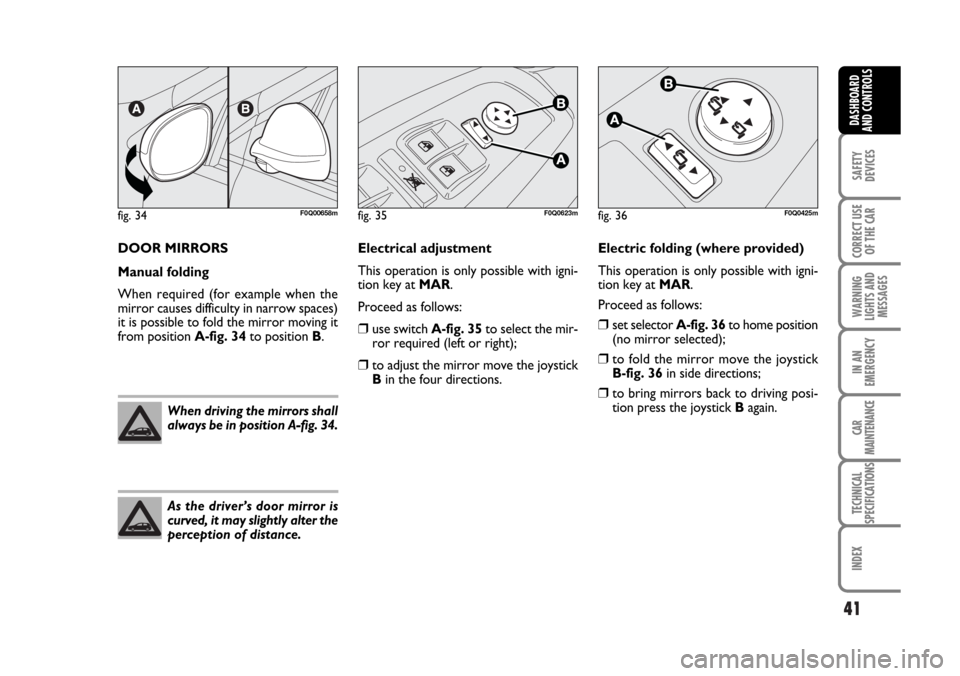
DOOR MIRRORS
Manual folding
When required (for example when the
mirror causes difficulty in narrow spaces)
it is possible to fold the mirror moving it
from position A-fig. 34to position B.
When driving the mirrors shall
always be in position A-fig. 34.
As the driver’s door mirror is
curved, it may slightly alter the
perception of distance.
Electric folding (where provided)
This operation is only possible with igni-
tion key at MAR.
Proceed as follows:
❒set selector A-fig. 36to home position
(no mirror selected);
❒to fold the mirror move the joystick
B-fig. 36 in side directions;
❒to bring mirrors back to driving posi-
tion press the joystick Bagain.
fig. 34F0Q00658mfig. 35F0Q0623mfig. 36F0Q0425m
Electrical adjustment
This operation is only possible with igni-
tion key at MAR.
Proceed as follows:
❒use switch A-fig. 35to select the mir-
ror required (left or right);
❒to adjust the mirror move the joystick
Bin the four directions.
037-056 BRAVO GB 10-05-2007 9:00 Pagina 41
Page 56 of 246

EXTERNAL LIGHTS
The left-hand stalk fig. 45controls the ex-
ternal lights.
The external lights can only be switched
on when the ignition key is at MAR.
LIGHTS SWITCHED OFF
Knurled ring turned to O.
SIDELIGHTS
Turn the knurled ring to
6.
The warning light
3on the instrument
panel will turn on.
DIPPED BEAM HEADLIGHTS
Turn the knurled ring to
2.
The warning light
3on the instrument
panel will turn on.
MAIN BEAM HEADLIGHTS
When the knurled ring is at
2push the
lever towards the dashboard (stable posi-
tion).
The warning light
1on the instrument
panel will turn on.
To turn the main beams off, pull the stalk
towards the steering wheel (dipped beams
will turn on again).PARKING LIGHTS
These lights can only be turned on with ig-
nition key at STOPor removed, by mov-
ing the left stalk knurled ring first to O and
then to 6or 2.
Warning light 3on the instrument pan-
el will turn on. To select the right or left
lights use the direction indicator stalk.
FLASHING THE HEADLIGHTS
Pull the stalk towards the steering wheel
(unstable position) regardless of the po-
sition of the knurled ring.
The warning light
1on the instrument
panel will turn on.
fig. 45F0Q0649m
55
SAFETY
DEVICES
CORRECT USE
OF THE CAR
WARNING
LIGHTS AND
MESSAGES
IN AN
EMERGENCY
CAR
MAINTENANCE
TECHNICAL
SPECIFICATIONS
INDEX
DASHBOARD
AND CONTROLS
fig. 46F0Q0650m
DIRECTION INDICATORS
fig. 46
Push the stalk to (stable) position:
❒up (position 1): right-hand direction in-
dicator on
❒down (position 2): left-hand direction
indicator on
Warning light
Îor ¥will come on flash-
ing on the instrument cluster at the same
time.
Indicators are switched off automatically
when the steering wheel is straightened.
“Lane change” function
If you want the indicator to flash briefly to
show that you are about to change lane,
move the left stalk to unstable position for
less than one second. The direction indi-
cator of the side selected will flash 3 times
and then it will turn off automatically.
037-056 BRAVO GB 10-05-2007 9:00 Pagina 55
Page 57 of 246

56
SAFETY
DEVICES
CORRECT USE
OF THE CAR
WARNING
LIGHTS AND
MESSAGES
IN AN
EMERGENCY
CAR
MAINTENANCE
TECHNICAL
SPECIFICATIONS
INDEX
DASHBOARD
AND CONTROLS
AUTOMATIC HEADLIGHTS
SENSOR (daylight sensor) fig. 48
(where provided)
It detects the changes of the external light
intensity of the car according to the light
sensitivity set: greater is the sensitivity,
smaller is the amount of external light nec-
essary to control the switching-on of the
exterior headlights. The daylight sensor
sensitivity can be adjusted with the “Set-
up Menu” of the instrument panel.
Activation
Turn the knurled ring to
2A: in this way,
the automatic activation of the side/tail-
lights and dipped beam headlights are si-
multaneously enabled according to the ex-
ternal luminosity.
During the sensor operation lights can on-
ly be made flashing.
Deactivation
As a result of the sensor deactivation, the
main beam headlights will switch off and,
after about 10 seconds, sidelights will
switch off too.
The light sensor is not able to detect the
fog presence, lights shall therefore be
switched on manually.
fig. 48F0Q0652m
“Cornering lights”
With low beams on at a speed of less than
40 km/h, when the steering wheel is
turned through a large angle or upon ac-
tivation of the direction indicator, a light
(incorporated in the fog lamp) will come
on to expand the angle of night-time visi-
bility on the side to which the vehicle is
turned.
“FOLLOW ME HOME”
DEVICE fig. 47
This function allows the illumination of the
space in front of the car for a preset pe-
riod of time.Activation
With the ignition key at STOPor re-
moved, pull the stalk towards the steering
wheel and operate it within 2 minutes
from when the engine is turned off.
At each single movement of the stalk, the
staying on of the lights is extended by 30
seconds up to a maximum of 210 seconds;
then the lights are switched off automati-
cally.
Each time the lever is operated, the in-
strument panel warning light
3turns
on (together with the message on the dis-
play) (see section “Warning lights and
messages”).
Deactivation
Keep the stalk pulled towards the steer-
ing wheel for more than 2 seconds.
fig. 47F0Q0651m
037-056 BRAVO GB 10-05-2007 9:00 Pagina 56