Page 119 of 568

▫Front Instrument Panel Cupholders —
Manual Transmission..................201
▫Rear Cupholder — Quad Cab —
If Equipped.........................202
▫Rear Cupholder — Mega Cab............202
�Storage..............................203
▫Center Storage Compartment (40–20–40 Seat) —
If Equipped.........................203
▫Center Storage Compartment (Bucket Seats)—
If Equipped.........................204
▫Storage And Seats (Quad Cab Models)......206
▫Storage And Seats (Mega Cab Models)......207
▫Plastic Grocery Bag Retainers
(Mega Cab Models)....................208�Rear Window Features...................209
▫Electric Rear Window Defroster And
Heated Side View Mirrors — If Equipped....209
▫Power Sliding Rear Window—If Equipped . . . 209
▫Sliding Rear Window—If Equipped........210
�Fold Flat Load Floor — If Equipped.........210
�Pickup Box...........................213
�Slide-In Campers.......................215
▫Camper Applications...................215
�Easy-Off Tailgate.......................215
�Safety Tips...........................217
▫Transporting Passengers................217
▫Lock Your Vehicle.....................217
UNDERSTANDING THE FEATURES OF YOUR VEHICLE 119
3
Page 263 of 568
Press the rotary TUNE control a third time and TREBLE
will display. Turn the TUNE control to the right or left to
increase or decrease the Treble tones.
Press the rotary TUNE control a fourth time and BAL will
display. Turn the TUNE control to the right or left to
adjust the sound level from the right or left side speakers.
Press the rotary TUNE control a fifth time and FADE will
display. Turn the TUNE control to the right or left to
adjust the sound level between the front and rear speak-
ers.
Press the rotary TUNE control again to exit setting tone,
balance, and fade.
RND/PTY Button (Radio Mode)
Pressing this button once will turn on the PTY mode for
5 seconds. If no action is taken during the 5-second time
out, the PTY icon will turn off. Turning the tune knobwithin 5 seconds will allow the program format type to
be selected. Many radio stations do not currently broad-
cast PTY information.
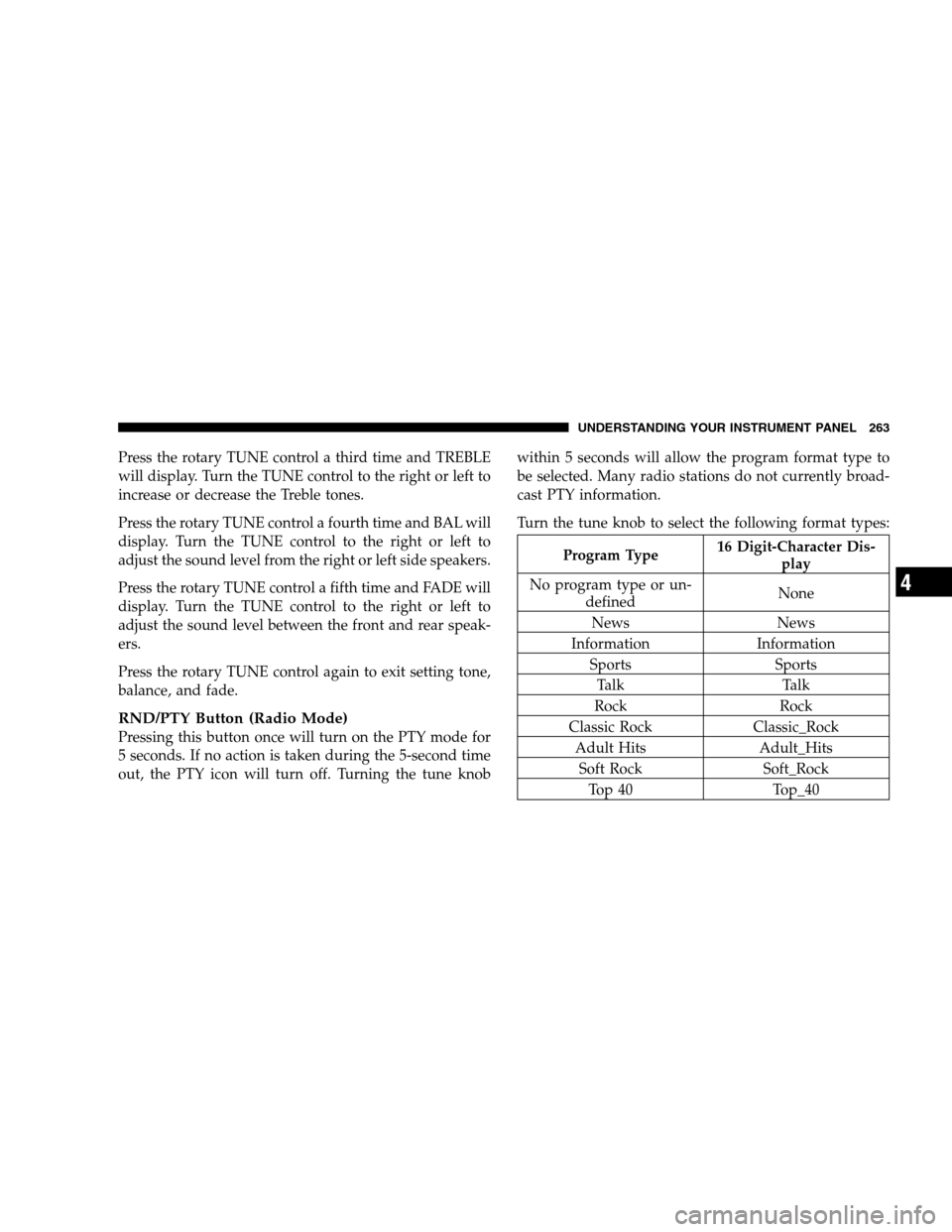
Turn the tune knob to select the following format types:
Program Type16 Digit-Character Dis-
play
No program type or un-
definedNone
News News
Information Information
Sports Sports
Talk Talk
Rock Rock
Classic Rock Classic_Rock
Adult Hits Adult_Hits
Soft Rock Soft_Rock
Top 40 Top_40
UNDERSTANDING YOUR INSTRUMENT PANEL 263
4
Page 407 of 568
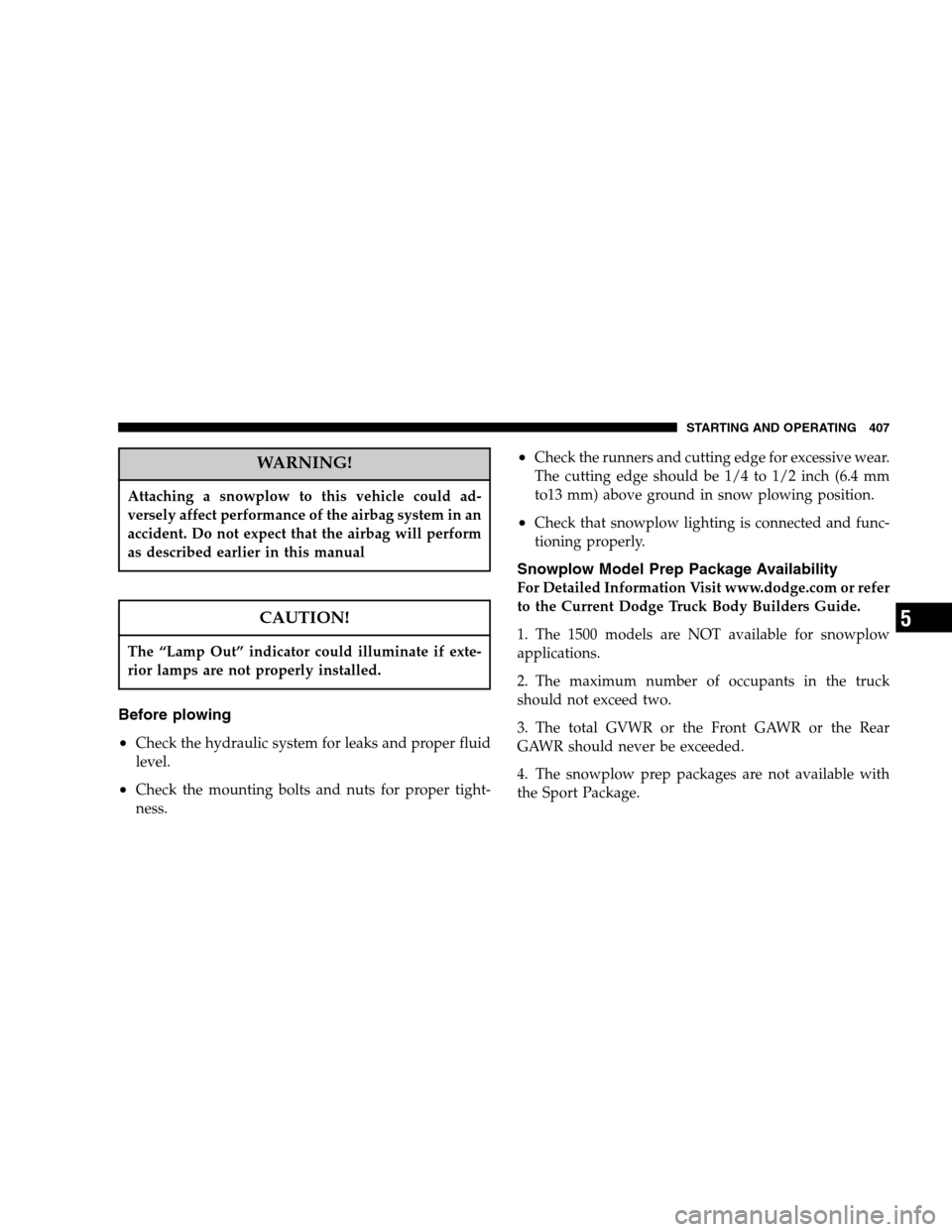
WARNING!
Attaching a snowplow to this vehicle could ad-
versely affect performance of the airbag system in an
accident. Do not expect that the airbag will perform
as described earlier in this manual
CAUTION!
The “Lamp Out” indicator could illuminate if exte-
rior lamps are not properly installed.
Before plowing
•
Check the hydraulic system for leaks and proper fluid
level.
•Check the mounting bolts and nuts for proper tight-
ness.
•Check the runners and cutting edge for excessive wear.
The cutting edge should be 1/4 to 1/2 inch (6.4 mm
to13 mm) above ground in snow plowing position.
•Check that snowplow lighting is connected and func-
tioning properly.
Snowplow Model Prep Package Availability
For Detailed Information Visit www.dodge.com or refer
to the Current Dodge Truck Body Builders Guide.
1. The 1500 models are NOT available for snowplow
applications.
2. The maximum number of occupants in the truck
should not exceed two.
3. The total GVWR or the Front GAWR or the Rear
GAWR should never be exceeded.
4. The snowplow prep packages are not available with
the Sport Package.
STARTING AND OPERATING 407
5