Page 89 of 492
{ª248-555-12129). Your cellular phone's audio is trans-
mitted through your vehicle's audio system; the system
will automatically mute your radio when using the
UConnectŸ system.
NOTE:The UConnectŸ system use requires a cellular
phone equipped with the Bluetooth9Hands-Free Profile,9
version 0.96 or higher. See www.chrysler.com/uconnect
for supported phones.
UConnectŸ allows you to transfer calls between the
system and your cellular phone as you enter or exit your
vehicle, and enables you to mute the system's micro-
phone for private conversation.
The UConnectŸ phonebook enables you to store up to 32
names and four numbers per name. Each language has a
separate 32-name phonebook accessible only in that
language. This system is driven through your Blue-
toothŸ Hands-Free profile cellular phone. UConnectŸ
features BluetoothŸ technology - the global standardthat enables different electronic devices to connect to
each other without wires or a docking station, so UCon-
nect works no matter where you stow your cellular
phone (be it your purse, pocket, or briefcase), as long as
your phone is turned on and has been paired to the
vehicle's UConnectŸ system. The UConnectŸ system
allows up to seven cellular phones to be linked to system.
Only one linked (or paired) cellular phone can be used
with the system at a time. The system is available in
English, Spanish, or French languages (as equipped).
The rearview mirror contains the microphone for the
system and the control buttons that will enable you to
access the system.
88 UNDERSTANDING THE FEATURES OF YOUR VEHICLE
Page 91 of 492

²Prior to giving a voice command, one must wait for
the voice on beep, which follows the9Ready9prompt
or another prompt.
²For certain operations, compound commands can be
used. For example, instead of saying9Setup9and then
9Phone Pairing,9the following compound command
can be said:9Setup Phone Pairing.9
²For each feature explanation in this section, only the
combined form of the voice command is given. You
can also break the commands into parts and say each
part of the command, when you are asked for it. For
example, you can use the combined form voice com-
mand9Phonebook New Entry,9or you can break the
combined form command into two voice commands:
9Phonebook9and9New Entry.9Please remember, the
UConnectŸ system works best when you talk in a
normal conversational tone, as if speaking to some one
sitting eight feet away from you.
Voice Command Tree
Refer to ªVoice Treeº at the end of this section.
Help Command
If you need assistance at any prompt, or if you want to
know your options are at any prompt, say9Help9follow-
ing the voice on beep. The UConnectŸ system will play
all the options at any prompt if you ask for help.
To activate the UConnectŸ system from idle, simply
press the 'Phone' button and follow audible prompts for
directions. All UConnectŸ system sessions begin with a
press of the 'Phone' button on the mirror.
Cancel Command
At any prompt, after the voice on beep, you can say
9Cancel9and you will be returned to the main menu.
However, in a few instances the system will take you
back to the previous menu.
90 UNDERSTANDING THE FEATURES OF YOUR VEHICLE
Page 155 of 492
REAR WINDOW FEATURES
Electric Rear Window Defroster and Heated Side
view Mirrors Ð If Equipped
The Electric Rear Window Defroster and Heated
side view mirrors are activated by pressing the
heated grid button, located on the Climate Control panel,
with the ignition On. Turning Off the ignition will
deactivate the Electric Rear Window Defroster and
Heated side view mirrors feature. These features also
turn off after activation, when 15 minutes have elapsed.
To reactivate, simply press the button again.
Power Sliding Rear WindowÐIf Equipped
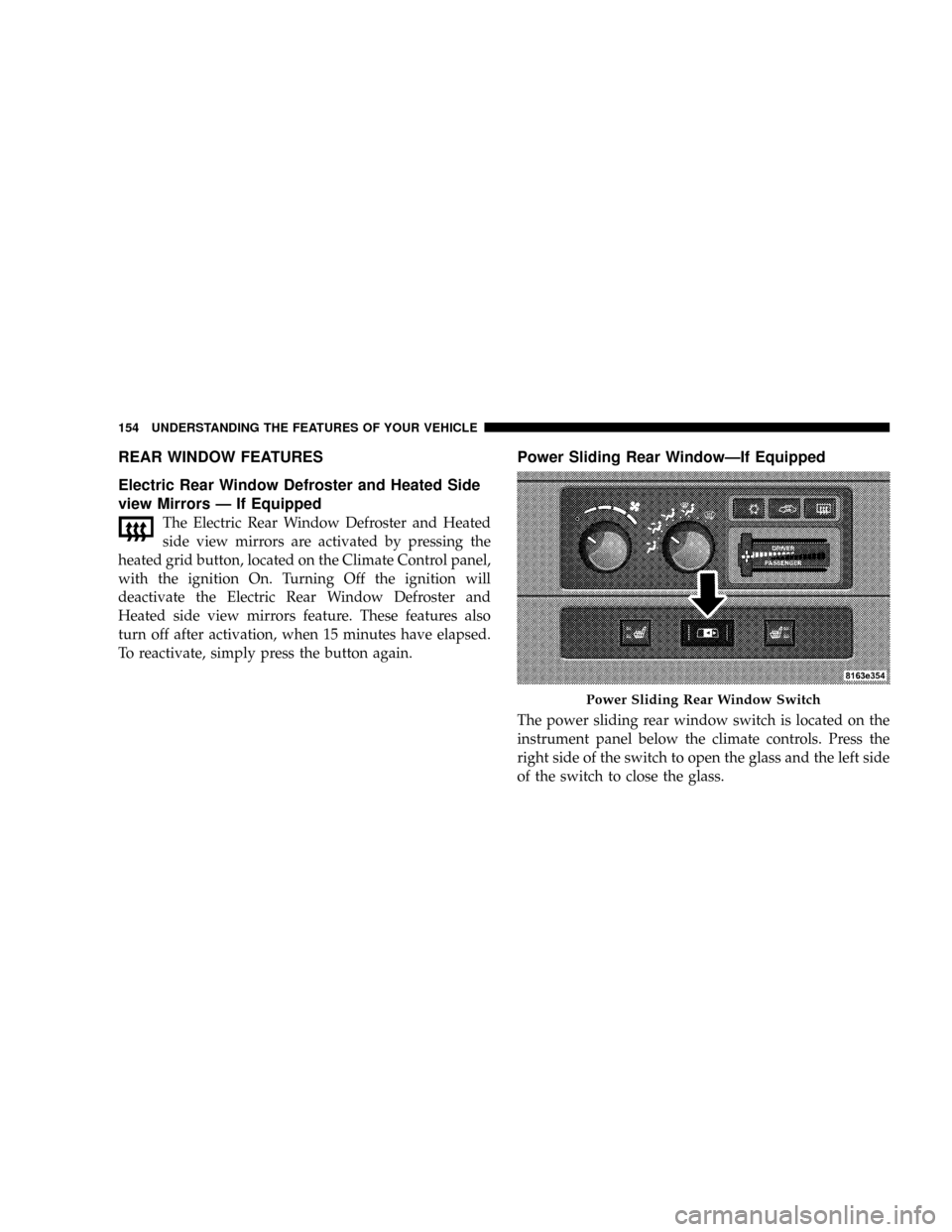
The power sliding rear window switch is located on the
instrument panel below the climate controls. Press the
right side of the switch to open the glass and the left side
of the switch to close the glass.
Power Sliding Rear Window Switch
154 UNDERSTANDING THE FEATURES OF YOUR VEHICLE
Page 245 of 492

NSulfur In Gasoline.....................337
NMaterials Added To Fuel................337
NFuel System Cautions..................338
NCarbon Monoxide Warnings..............339
mAdding Fuel..........................339
NAdding Fuel (Gas Engines)..............339
mVehicle Loading........................341
NCertification Label.....................341
mTrailer Towing.........................345
NCommon Towing Definitions.............345
NTrailer Hitch Classification...............349
NTrailer Towing Weights (Maximum Trailer
Weight Ratings)......................350NTrailer And Tongue Weight..............350
NTowing Requirements..................351
NTowing Tips.........................356
NTrailer Towing Mirrors Ð If Equipped......358
mSnowplow............................359
NDodge Power Wagon Models.............359
mRecreational Towing Ð 4±Wheel Drive Vehicles
(Behind Motorhome, Etc.).................360
NRecreational Towing Procedure Ð Manual
Shift Transfer Case Ð If Equipped.........361
NReturning To Normal Operation Ð Manual
Shift Transfer Case....................362
mEquipment Identification Plate.............363
244 STARTING AND OPERATING
Page 359 of 492
Trailer Towing Mirrors Ð If Equipped
These mirrors are designed with an adjustable mirror
head to provide a greater vision range when towing
extra-wide loads. To change position inboard or out-
board, the mirror head should be rotated (flipped Out or
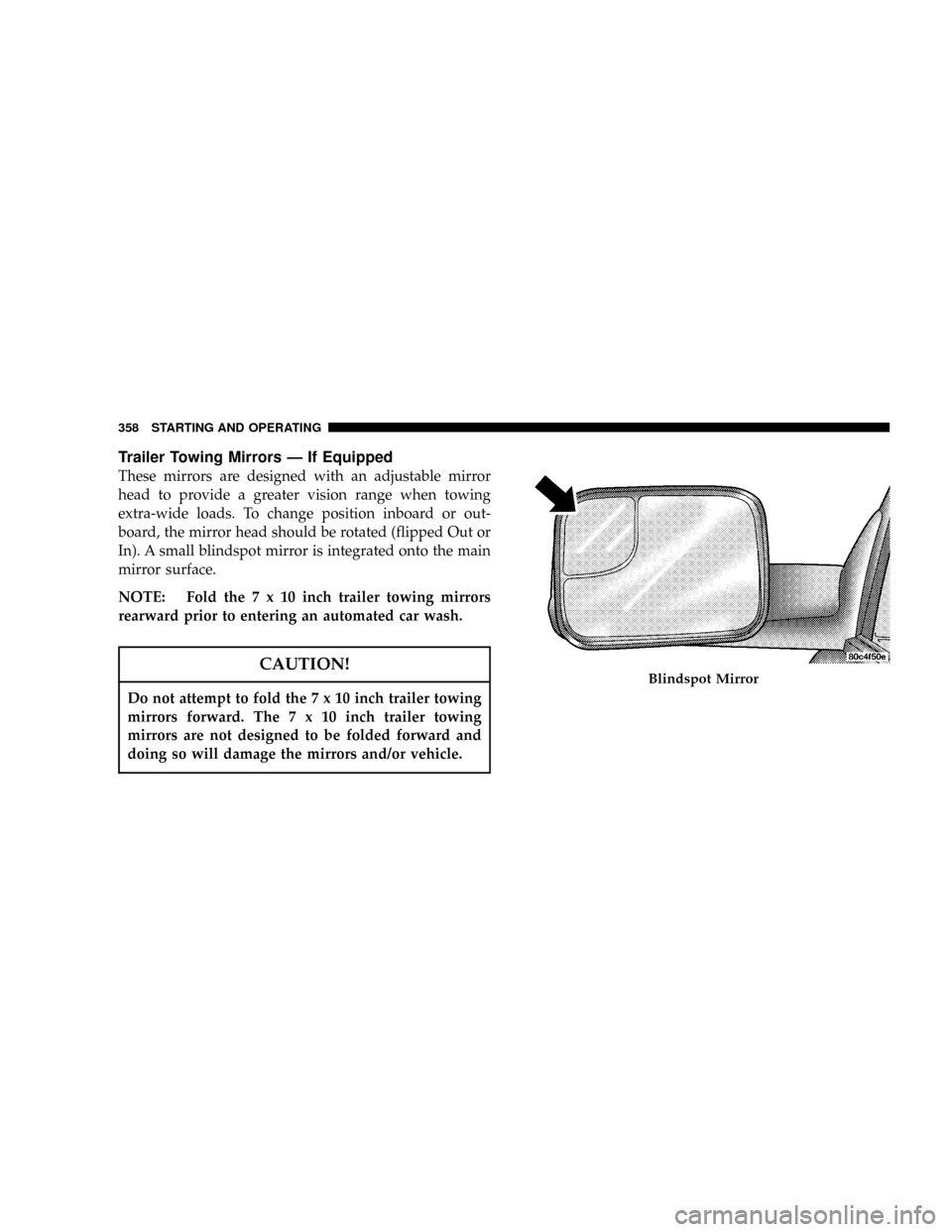
In). A small blindspot mirror is integrated onto the main
mirror surface.
NOTE: Fold the7x10inch trailer towing mirrors
rearward prior to entering an automated car wash.
CAUTION!
Do not attempt to fold the7x10inch trailer towing
mirrors forward. The7x10inch trailer towing
mirrors are not designed to be folded forward and
doing so will damage the mirrors and/or vehicle.
Blindspot Mirror
358 STARTING AND OPERATING
Page 425 of 492

soaking your leather upholstery with any liquid. Please
do not use polishes, oils, cleaning fluids, solvents, deter-
gents, or ammonia based cleaners to clean your leather
upholstery. Application of a leather conditioner is not
required to maintain the original condition.
WARNING!
Do not use volatile solvents for cleaning purposes.
Many are potentially flammable, and if used in
closed areas they may cause respiratory harm.
Glass Surfaces
All glass surfaces should be cleaned on a regular basis
with MopartGlass Cleaner or any commercial
household-type glass cleaner. Never use an abrasive type
cleaner. Use caution when cleaning the inside rear win-
dow equipped with electric defrosters or the right rear
quarter window equipped with the radio antenna. Donot use scrapers or other sharp instruments which may
scratch the elements. When cleaning the rear view mirror,
spray cleaner on the towel or rag that you are using. Do
not spray cleaner directly on the mirror.
Cleaning Plastic Instrument Cluster Lenses
The lenses in front of the instruments in this vehicle are
molded in clear plastic. When cleaning the lenses, care
must be taken to avoid scratching the plastic.
1. Clean with a wet soft rag. A mild soap solution may be
used, but do not use high alcohol content or abrasive
cleaners. If soap is used, wipe clean with a clean damp
rag.
2. Dry with a soft tissue.
Seat Belt Maintenance
Do not bleach, dye or clean the belts with chemical
solvents or abrasive cleaners. This will weaken the fabric.
Sun damage can also weaken the fabric.
424 MAINTAINING YOUR VEHICLE
Page 427 of 492
Cavity Cartridge
FuseMini
FuseDescription
1 20 Amp
YellowPower Outlet Console
2 20 Amp
YellowCabin Compartment
Node (CCN) Door
Locks/Brake Trans-
mission Shift Inter-
lock (BTSI)
3 20 Amp
YellowSpare
4 15 Amp
BlueSpare
5 20 Amp
YellowPower Sunroof
6 10 Amp
RedVIST Fan/WastegateCavity Cartridge
FuseMini
FuseDescription
7 15 Amp
BlueReverse Lockout Sole-
noid Battery (SRT-10
Only)
8 10 Amp
RedHeated Mirrors
9 30 Amp
PinkOff Road Module
Power
10 5 Amp
OrangeTrx-Off Rd Pkg Sen
(Gas Engine Only)
426 MAINTAINING YOUR VEHICLE
Page 429 of 492
Cavity Cartridge
FuseMini
FuseDescription
23 10 Amp
RedEngine Control Mod-
ule (ECM)/Wireless
Control Module
(WCM)/HVC
24 20 Amp
BlueSubwoofer Amplifier
(SRT-10 Only)
25 10 Amp
RedPower Mirror
26 20 Amp
YellowBrake Switch/Center
High Mount Stop
Lamp (CHMSL)
27 40 Amp
GreenPower Seats
28 10 Amp
RedPower Run/Start-
NCC/Wireless Con-
trol Module (WCM)/
ABS/RWALCavity Cartridge
FuseMini
FuseDescription
29 10 Amp
RedSwitches/EC Mirror/
Smart Bar
30 15 Amp
BlueSpare
31 10 Amp
RedPCM/Transfer Case
Brake
32 10 Amp
RedHVAC/Ajustable
Pedals/Heated Seats
Switch LED/Exhaust
Brake
33 10 Amp
RedPower-IGN Run Misc
34 10 Amp
RedSpare
35 15 Amp
BlueCabin Compartment
Node (CCN) Illumi-
nation
428 MAINTAINING YOUR VEHICLE