Page 181 of 400
1. At theClock Setupscreen highlight “Displayed
Clock: User Defined Clock”.
2. To increase the clock by hours, make sure “HR +” is
highlighted and press ENTER. Press ENTER again to
increase the clock by another hour. You will see on the
“User Defined Time” display the number of hours you
have increased the clock by.3. To decrease the clock by one hour, use the Select
Encoder to highlight the “-” sign. Press ENTER. Press
ENTER again to decrease the clock by another hour.
4. To increase the clock by minutes, make sure “MIN +”
is highlighted and press ENTER. Press ENTER again to
increase the clock by another minute.
5. To decrease the clock by minutes, use the Select
Encoder to highlight the “-“ sign. Press ENTER. Press
ENTER again to decrease the clock by another minute.
6. Select “DONE” to exit from the clock setting mode.
Press ENTER to save your changes. If you press CAN-
CEL or NAV then your changes will not be saved.
UNDERSTANDING YOUR INSTRUMENT PANEL 181
4
Page 182 of 400
Audio Clock Display
Select this option to change the size of the clock on the
audio screens.
1. When you are at an audio screen, quickly press the
TIME button on the navigation faceplate.
2. In this example the large clock appears on the screen.3. To switch the clock to the small clock, quickly press
TIME again.
4. To toggle back to the large clock, simply press TIME.
182 UNDERSTANDING YOUR INSTRUMENT PANEL
Page 187 of 400

PTY Button�SEEK�
When the desired program is obtained, press the�SEEK�
button within five seconds. The channel will change to
the next channel that matches the program type selected.
Satellite Antenna
To ensure optimum reception, do not place items on the
roof around the rooftop antenna location. Metal objects
placed within the line of sight of the antenna will cause
decreased performance. Larger luggage items should be
placed as far forward as possible. Do not place items
directly on or above the antenna.
Reception Quality
Satellite reception may be interrupted due to one of the
following reasons.
•The vehicle is parked in an underground parking
structure or under a physical obstacle.
•Dense tree coverage may interrupt reception in the
form of short audio mutes.
•Driving under wide bridges or along tall buildings can
cause intermittent reception.
•Placing objects over or too close to the antenna can
cause signal blockage.
REMOTE SOUND SYSTEM CONTROLS
The remote sound system controls are located on the
surface of the steering wheel at the 3 and 9 o’clock
positions.
Vehicles equipped with steering wheel mounted buttons
are also equipped with the Electronic Vehicle Information
Electronic Vehicle Information Center
UNDERSTANDING YOUR INSTRUMENT PANEL 187
4
Page 290 of 400
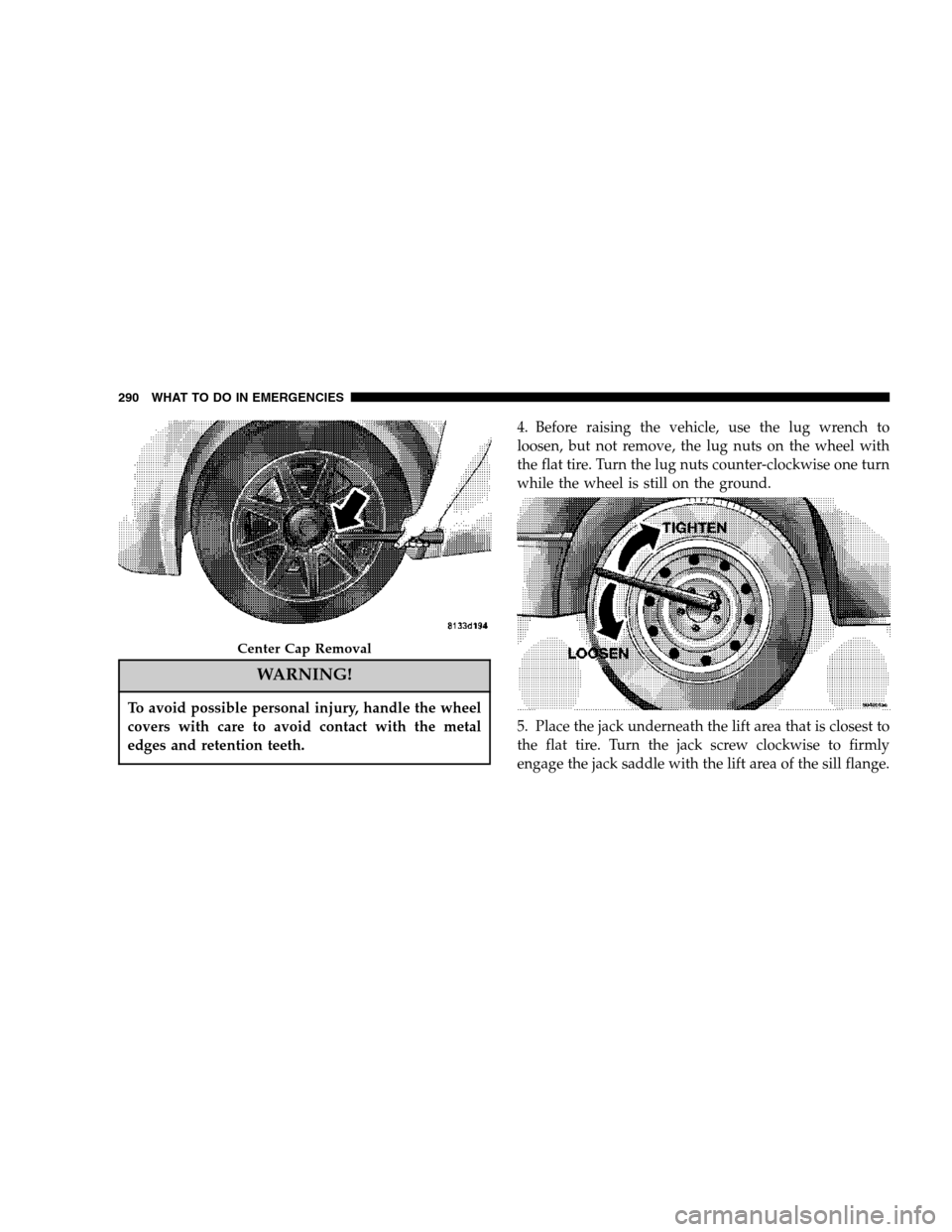
WARNING!
To avoid possible personal injury, handle the wheel
covers with care to avoid contact with the metal
edges and retention teeth.
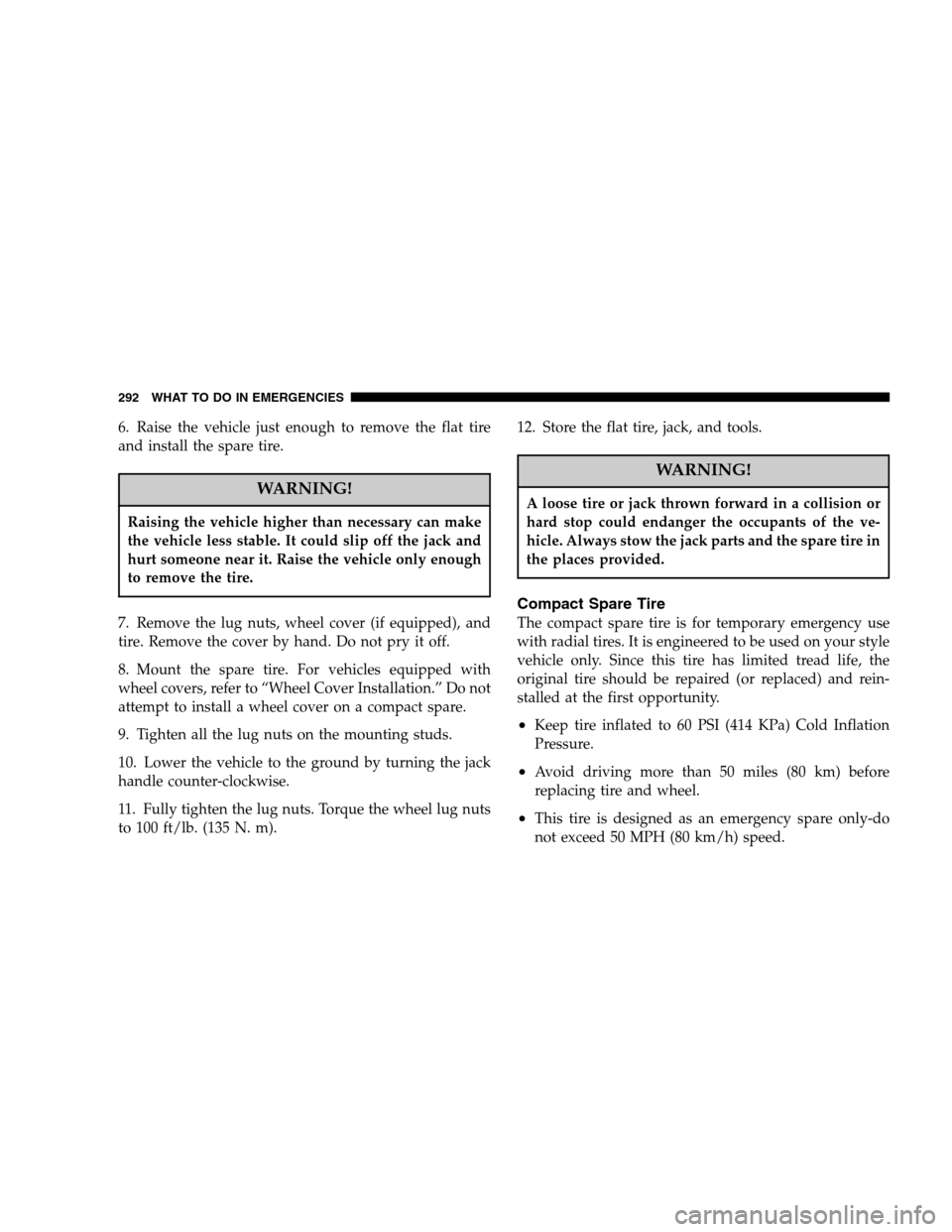
4. Before raising the vehicle, use the lug wrench to
loosen, but not remove, the lug nuts on the wheel with
the flat tire. Turn the lug nuts counter-clockwise one turn
while the wheel is still on the ground.
5. Place the jack underneath the lift area that is closest to
the flat tire. Turn the jack screw clockwise to firmly
engage the jack saddle with the lift area of the sill flange.
Center Cap Removal
290 WHAT TO DO IN EMERGENCIES
Page 292 of 400
6. Raise the vehicle just enough to remove the flat tire
and install the spare tire.
WARNING!
Raising the vehicle higher than necessary can make
the vehicle less stable. It could slip off the jack and
hurt someone near it. Raise the vehicle only enough
to remove the tire.
7. Remove the lug nuts, wheel cover (if equipped), and
tire. Remove the cover by hand. Do not pry it off.
8. Mount the spare tire. For vehicles equipped with
wheel covers, refer to “Wheel Cover Installation.” Do not
attempt to install a wheel cover on a compact spare.
9. Tighten all the lug nuts on the mounting studs.
10. Lower the vehicle to the ground by turning the jack
handle counter-clockwise.
11. Fully tighten the lug nuts. Torque the wheel lug nuts
to 100 ft/lb. (135 N. m).12. Store the flat tire, jack, and tools.
WARNING!
A loose tire or jack thrown forward in a collision or
hard stop could endanger the occupants of the ve-
hicle. Always stow the jack parts and the spare tire in
the places provided.
Compact Spare Tire
The compact spare tire is for temporary emergency use
with radial tires. It is engineered to be used on your style
vehicle only. Since this tire has limited tread life, the
original tire should be repaired (or replaced) and rein-
stalled at the first opportunity.
•Keep tire inflated to 60 PSI (414 KPa) Cold Inflation
Pressure.
•Avoid driving more than 50 miles (80 km) before
replacing tire and wheel.
•This tire is designed as an emergency spare only-do
not exceed 50 MPH (80 km/h) speed.
292 WHAT TO DO IN EMERGENCIES
Page 345 of 400

LIGHT BULBS — Exterior Bulb Number
Low Beam Headlight.....................9006
High Beam Headlight.....................9005
Front Park/Turn Light...................3457A
Front Fog Light—If Equipped. . . 9145/H10 (Serviced at
Dealer)
Front Sidemarker........194NA (Serviced at Dealer)
Tail/Stop/Turn Light...............3157KP27/7W
Rear Sidemarker.................3757APY27/7W
Backup Light......................921/W16W
Center High Mount Stop Light (CHMSL)....... LED
License.............................. W5W
BULB REPLACEMENT
Low Beam Headlight, High Beam Headlight, and
Park/Turn Light
1. Open the hood.
NOTE:Removal of the air cleaner filter housing may be
necessary prior to replacing bulbs in the headlight assem-
bly on the driver side of the vehicle.2. Twist the appropriate bulb and socket assembly
counter-clockwise and then pull it out of the headlight
assembly.
3. Pull the bulb out of the socket assembly.
4. Push the replacement bulb into the socket assembly.
5. Reinstall the bulb and socket assembly into the head-
light assembly, and then turn it clockwise.
1 — Low Beam Headlight Bulb
2 — High Beam Headlight BulbMAINTAINING YOUR VEHICLE 345
7
Page 347 of 400
3. Push the electrical connector locking tab to the side.
4. Disconnect the electrical connector.
5. Remove 1 wing nut from the back of the tail light
assembly.
6. Remove 2 push pin fasteners under the liftgate with a
flat blade tool.7. Pull tail light assembly clear from vehicle to access
bulbs.
8. Turn the appropriate bulb and socket assembly
counter-clockwise to remove it from the tail light assem-
bly.
1 — Tail/Stop Light BulbMAINTAINING YOUR VEHICLE 347
7
Page 348 of 400
9. Pull the bulb out of the socket assembly.
10. Push the replacement bulb into the socket assembly.
11. Reinstall the bulb and socket assembly into the tail
light assembly, and then turn it clockwise.
12. Reinstall the tail light assembly, fasteners, and elec-
trical connector.
13. Close the liftgate.
2 — Turn Signal Light Bulb3 — Backup Light Bulb 348 MAINTAINING YOUR VEHICLE