Page 167 of 400

AM/FM Button (CD Mode for MP3 Play)
Switches back to Radio mode.
RND/ PTY Button (CD Mode for MP3 Play)
Pressing this button plays files randomly.
SET/DIR Button (CD Mode for MP3 Play)
Press the SET/DIR Button to display folders, when
playing an MP3 discs that have a file/folder structure.
Turn the TUNE control to display available folders or
move through available folders. Press the TUNE control
to select a folder.
Buttons1-6(CDMode for MP3 Play)
Selects disc positions1-6forPlay/Load/Eject.
Operating Instructions - Hands Free Phone (If
Equipped)
Refer to Hands Free Phone in Section 3 of the Owner’s
Manual.
Operating Instructions - Satellite Radio Mode (If
Equipped)
Refer to the Satellite Radio section of the Owner’s
Manual.
Operating Instructions - Video Entertainment
System (VES�) (If Equipped)
Refer to separate Video Entertainment System (VES�)
Guide.
SATELLITE RADIO — IF EQUIPPED
Satellite radio uses direct satellite to receiver broadcast-
ing technology to provide clear digital sound, coast to
coast. The subscription service provider is Sirius™ Satel-
lite Radio. This service offers over 100 channels of music,
sports, news, entertainment, and programming for chil-
dren, directly from its satellites and broadcasting studios.
INSTRUMENT PANEL AND CONTROLS 167
4
Page 168 of 400

System Activation
NOTE:Your vehicle’s radio must be on and in satellite
mode when the activation process takes place.
To activate your Sirius Satellite Radio service, call the
toll-free number 888-539-7474, or visit the Sirius web site
at www.sirius.com. Please have the following informa-
tion available when activating your system:
1. The Electronic Serial Number/Sirius Identification
Number (ESN/SID).
2. Credit card information.
3. Your Vehicle Identification Number.
Electronic Serial Number/Sirius Identification
Number (ESN/SID)
The Electronic Serial Number/Sirius Identification Num-
ber is needed to activate your Sirius Satellite Radio
system. To access the ESN/SID, refer to the following
steps:
ESN/SID Access With REF Radios
With the ignition switch in the ACCESSORY position and
the radio OFF, press the CD Eject and Time buttons
simultaneously for 3 seconds. The first four digits of the
twelve-digit ESN/SID number will display. Press the
SEEK UP button to display the next four digits. Continue
to press the SEEK UP button until all twelve ESN/SID
digits display. The SEEK DOWN will page down until
the first four digits display. The radio will exit the
ESN/SID mode when any other button is pushed, the
ignition is turned OFF, or 5 minutes has passed since any
button was pushed.
168 INSTRUMENT PANEL AND CONTROLS
Page 174 of 400
NOTE:If you experience difficulty in playing a particu-
lar disc, it may be damaged (i.e. scratched, reflective
coating removed, a hair, moisture or dew on the disc)
oversized, or have theft protection encoding. Try a
known good disc before considering disc player service.
SOUND BOX OPERATION
The Sound Box includes one subwoofer, two tweeters
and lights that pulsate with the music.
The lights can be either be turned off, on constantly or
pulse with the beat of the music. To control the lights,
select one of the following three positions:
Switch
PositionLight Operation
1Constant (left) position — In this position the sound
is active and the lights will remain on constantly.
2Pulse off / light off (center) position – In this posi-
tion the sound is active but the lights will be turned
off.
3Pulse (right) position — In this position the sound is
active and the lights will pulse with the music. 174 INSTRUMENT PANEL AND CONTROLS
Page 200 of 400
(2WD). If the indicator light is on, the desired position
(4WD LOCK and 4WD LOW) has been obtained.
If One or More Shift Requirements are not Met:
1. An indicator light will flash.
2. The transfer casewill notshift.
NOTE:Before retrying a selection, make certain that all
the necessary requirements for selecting a new transfer
case position have been met. To retry the selection, turn
the control knob back to the current position, wait five (5)
seconds, and retry selection. To find the shift require-
ments, refer to the�Shifting Procedure�for your transfer
case, located in this section of the owner’s manual.
The “SVC 4WD” warning light monitors the electric shift
4WD system. If this light remains on after engine start up
or illuminates during driving, it means that the 4WD
system is not functioning properly and that service is
required.WARNING!
Always engage the parking brake when powering
down the vehicle if the�SVC 4WD�light is illumi-
nated. Not engaging the parking brake may allow
the vehicle to roll, which may cause personal injury.
NOTE:Do not attempt to make a shift while only the
front or rear wheels are spinning. The NV233/243 trans-
fer case is not equipped with a synchronizer and there-
fore the front and rear driveshaft speeds must be equal
for the shift to take place. Shifting while only the front or
rear wheels are spinning can cause damage to the trans-
fer case.
When operating your vehicle in 4WD LOW, the engine
speed is approximately three times that of the 2WD or
200 STARTING AND OPERATING
Page 206 of 400
NOTE:The transfer case Neutral (N) position is to be
used for recreational towing only. See Recreational Tow-
ing section for specific procedures on shifting into and
out of Neutral (N).
Transfer Case Position Indicator Lights
Transfer case position indicator lights are located on the
instrument cluster. If there are no indicator lights on or
flashing the transfer case position is Four-Wheel Drive
(4WD) and indicate the current and desired transfer case
selection (4WD⇔4WD LOCK).
The “SVC 4WD” warning light monitors the electric shift
4WD system. If this light remains on after engine start up
or illuminates during driving, it means that the 4WD
system is not functioning properly and that service is
required.
WARNING!
Always engage the parking brake when powering
down the vehicle if the�Service 4WD�light is
illuminated. Not engaging the parking brake may
allow the vehicle to roll which may cause personal
injury.
NOTE:Do not attempt to make a shift while only the
front or rear wheels are spinning. The NV 244 Generation
II transfer case is not equipped with a synchronizer and
therefore the front and rear driveshaft speeds must be
equal for the shift to take place. Shifting while only the
front or rear wheels are spinning can cause damage to the
transfer case.
When operating your vehicle in 4WD LOW, the engine
speed is approximately three times that of the 4WD or
206 STARTING AND OPERATING
Page 217 of 400
WARNING!
Continued operation with reduced power steering
assist could pose a safety risk to yourself and others.
Service should be obtained as soon as possible.
CAUTION!
Prolonged operation of the steering system at the
end of the steering wheel travel will increase the
steering fluid temperature and should be avoided
when possible. Damage to the power steering pump
may occur.
ROCKING THE VEHICLE
If vehicle becomes stuck in snow, sand, or mud, it can
often be moved by a rocking motion. Move the gear
selector rhythmically between FIRST and REVERSE,
while applying slight pressure to the accelerator.
The least amount of accelerator pedal pressure to main-
tain the rocking motion without spinning the wheels or
racing the engine is most effective. Allow the engine to
idle with the transmission selector in NEUTRAL for at
least one minute after every five rocking-motion cycles.
This will minimize overheating and reduce the risk of
transmission failure during prolonged efforts to free a
stuck vehicle.
STARTING AND OPERATING 217
5
Page 220 of 400
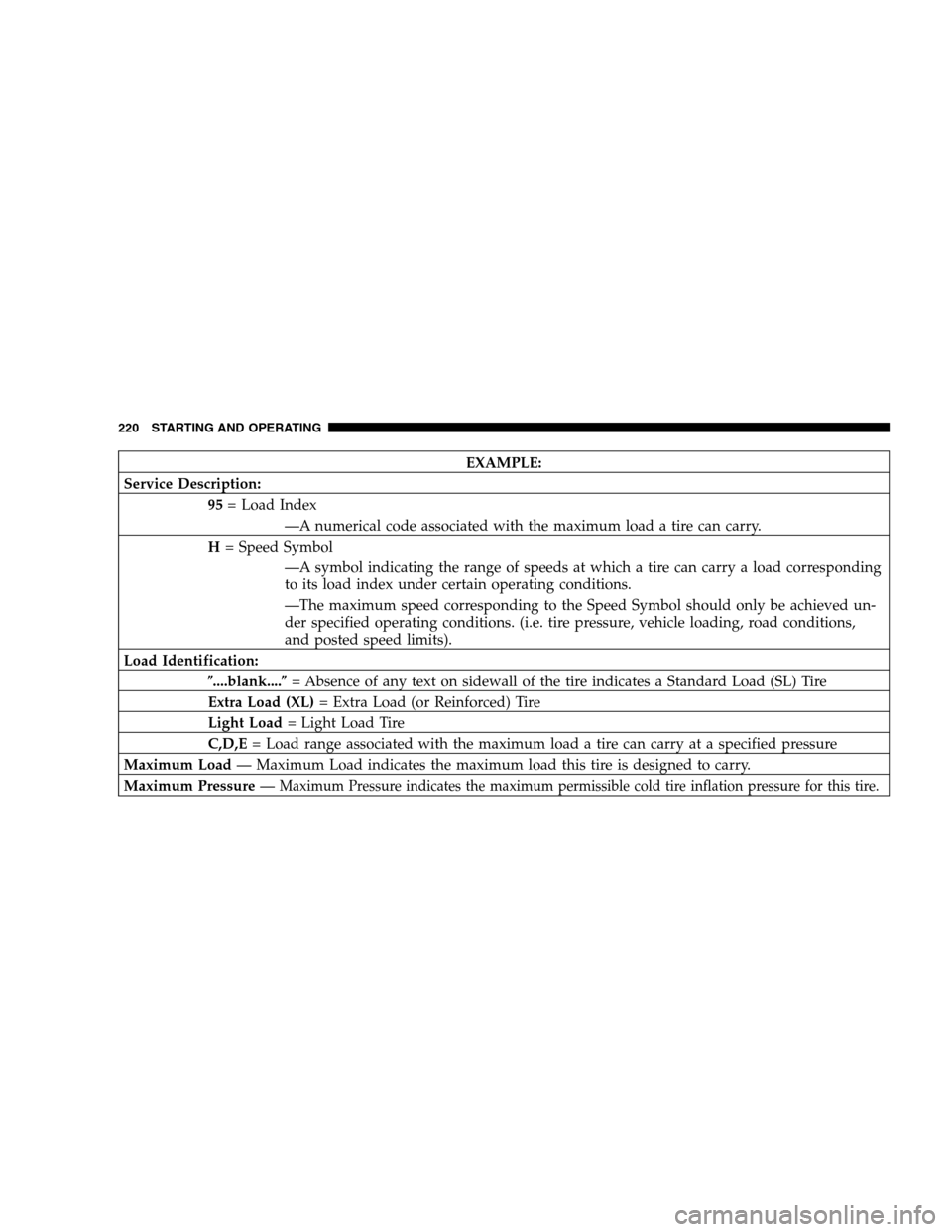
EXAMPLE:
Service Description:
95= Load Index
—A numerical code associated with the maximum load a tire can carry.
H= Speed Symbol
—A symbol indicating the range of speeds at which a tire can carry a load corresponding
to its load index under certain operating conditions.
—The maximum speed corresponding to the Speed Symbol should only be achieved un-
der specified operating conditions. (i.e. tire pressure, vehicle loading, road conditions,
and posted speed limits).
Load Identification:
�....blank....�= Absence of any text on sidewall of the tire indicates a Standard Load (SL) Tire
Extra Load (XL)= Extra Load (or Reinforced) Tire
Light Load= Light Load Tire
C,D,E= Load range associated with the maximum load a tire can carry at a specified pressure
Maximum Load— Maximum Load indicates the maximum load this tire is designed to carry.
Maximum Pressure—
Maximum Pressure indicates the maximum permissible cold tire inflation pressure for this tire.
220 STARTING AND OPERATING
Page 233 of 400
Life of Tire
The service life of a tire is dependent upon varying
factors including but not limited to:
•Driving style
•Tire pressure
•Distance driven
WARNING!
Tires and spare tire should be replaced after six
years, regardless of the remaining tread. Failure to
follow this warning can result in sudden tire failure.
You could lose control and have an accident result-
ing in serious injury or death.
Keep dismounted tires in a cool, dry place with as little
exposure to light as possible. Protect tires from contact
with oil, grease, and gasoline.
Replacement Tires
The tires on your new vehicle provide a balance of many
characteristics. They should be inspected regularly for
wear and correct cold tire inflation pressure. The manu-
facturer strongly recommends that you use tires equiva-
lent to the originals in size, quality and performance
when replacement is needed (refer to the paragraph on
“Tread Wear Indicators”). Refer to the “Tire and Loading
Information” placard for the size designation of your tire.
The service description and load identification will be
found on the original equipment tire. Failure to use
equivalent replacement tires may adversely affect the
safety, handling, and ride of your vehicle. We recommend
that you contact your original equipment or an autho-
rized tire dealer with any questions you may have on tire
specifications or capability.
STARTING AND OPERATING 233
5