Page 152 of 504
Interior light Defeat (OFF)
Rotate the dimmer control to the
OFF position (extreme bottom).
The interior lights will remain off
when the doors or liftgate are
open.
Parade Mode (Daytime Brightness Feature)
Rotate the dimmer control to the
first detent. This feature brightens
the odometer, radio and overhead
displays when the park lights or
headlights are on.
Automatic Headlights — If Equipped
This system automatically turns
your headlights ON or OFF based
on ambient light levels. To turn
the system ON, turn the headlight
switch to the extreme counter-
clockwise position. When the sys-
tem is ON, the Headlight Time
Delay feature is also ON. This
means your headlights will stay
ON for up to 90 seconds after you turn the ignition
switch OFF. To turn the Automatic System OFF, turn the
headlight switch clockwise to the OFF position.
NOTE:The engine must be running before the head-
lights will come ON in the Automatic mode.
152 UNDERSTANDING THE FEATURES OF YOUR VEHICLE
Page 201 of 504
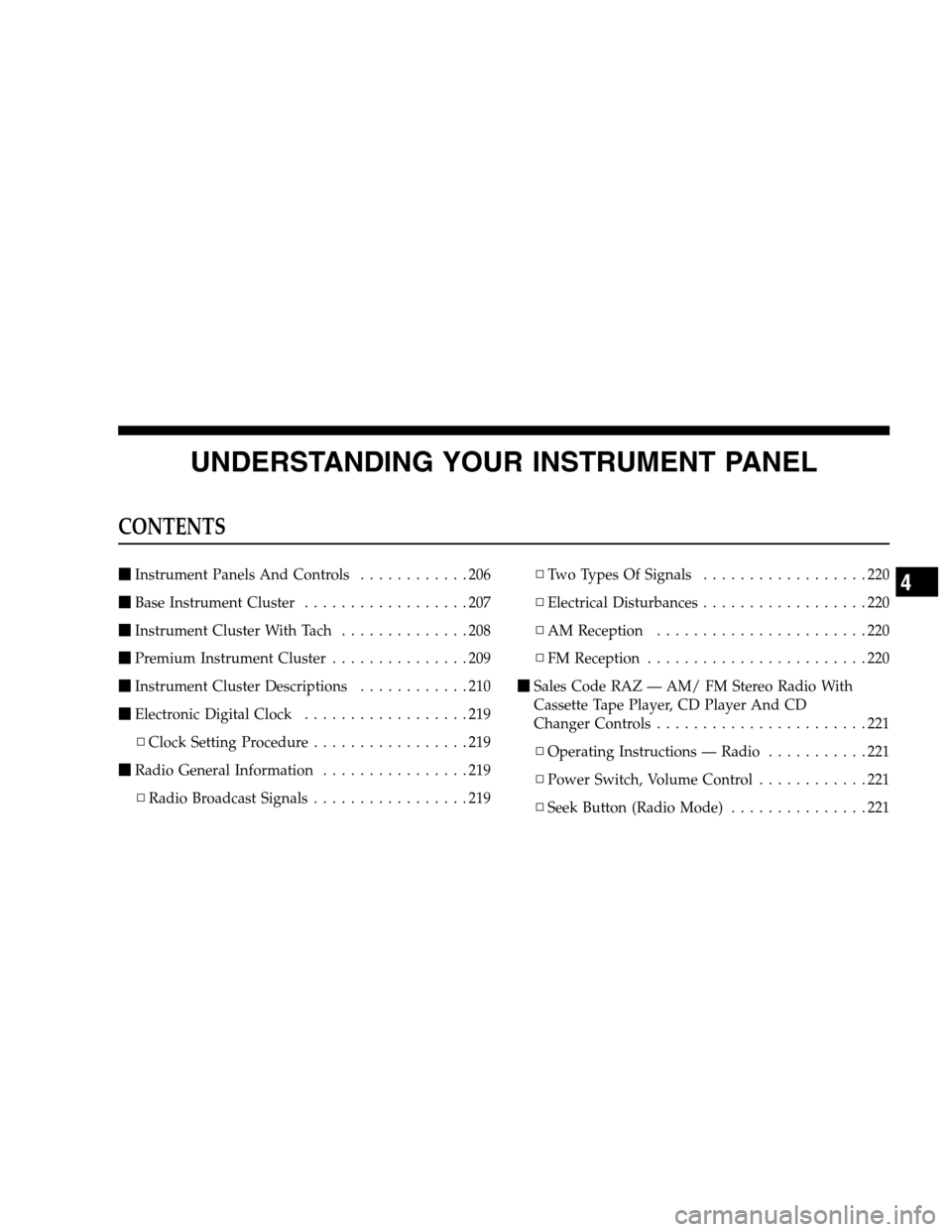
UNDERSTANDING YOUR INSTRUMENT PANEL
CONTENTS
�Instrument Panels And Controls............206
�Base Instrument Cluster..................207
�Instrument Cluster With Tach..............208
�Premium Instrument Cluster...............209
�Instrument Cluster Descriptions............210
�Electronic Digital Clock..................219
▫Clock Setting Procedure.................219
�Radio General Information................219
▫Radio Broadcast Signals.................219▫Two Types Of Signals..................220
▫Electrical Disturbances..................220
▫AM Reception.......................220
▫FM Reception........................220
�Sales Code RAZ — AM/ FM Stereo Radio With
Cassette Tape Player, CD Player And CD
Changer Controls.......................221
▫Operating Instructions — Radio...........221
▫Power Switch, Volume Control............221
▫Seek Button (Radio Mode)...............2214
Page 202 of 504

▫Tuning .............................222
▫Radio Data System (RDS)...............222
▫PTY (Program Type) Button..............222
▫Balance............................224
▫Fade..............................224
▫Tone Control........................224
▫AM/FM Selection.....................224
▫Scan Button.........................224
▫To Set The Radio Push-Button Memory......225
▫To Change From Clock To Radio Mode......225
▫Operating Instructions — Tape Player.......225
▫Seek Button.........................225
▫Fast Forward (FF).....................226▫Rewind (RW)........................226
▫TapeEject...........................226
▫Scan Button.........................226
▫Changing Tape Direction................226
▫MetalTapeSelection ...................226
▫Pinch Roller Release...................227
▫Noise Reduction......................227
▫Operating Instructions — CD Player........227
▫Inserting The Compact Disc..............227
▫Seek Button.........................228
▫EJT CD (Eject) Button..................228
▫FF/Tune/RW........................229
▫Program Button 4 (Random Play)..........229
202 UNDERSTANDING YOUR INSTRUMENT PANEL
Page 203 of 504

▫Mode..............................229
▫Tape CD Button......................229
▫Time Button.........................230
▫Scan Button.........................230
▫CD Changer Control Capability — If
Equipped...........................230
�Sales Code REV — AM & FM Stereo Radio With
CD Player And CD/DVD Changer Controls....231
▫Radio Operation......................232
▫CD Player Operation...................235
▫CD/DVD Changer Operation.............237
▫Notes On Playing MP3 Files.............237
▫Operation Instructions - (CD Mode For MP3
Audio Play).........................240�Sales Code RBQ — AM/FM Stereo Radio With
6 - Disc CD Changer....................241
▫Radio Operation......................242
▫CD Player Operation...................244
�Sales Code RBK — AM/ FM Stereo Radio With
CD Player And CD Changer Controls........249
▫Radio Operation......................249
▫CD Player Operation...................251
▫CD Changer Control Capability — If
Equipped...........................253
�Sales Code RB1 — AM/FM Stereo Radio With
DVD/GPS Navigation System..............255
▫Clock Setting Procedure.................256
�6 Disc CD/DVD Changer (RDV) — If
Equipped............................257
UNDERSTANDING YOUR INSTRUMENT PANEL 203
4
Page 219 of 504

25. Trip Odometer Button
Press this button to change the display from odometer to
trip odometer. The word TRIP will appear when in the
trip odometer mode.
Push in and hold the button for two seconds to reset the
trip odometer to 0 miles or kilometers. The odometer
must be in trip mode to reset.
ELECTRONIC DIGITAL CLOCK
The clock and radio each use the display panel built into
the radio. A digital readout shows the time in hours and
minutes whenever the ignition switch is in the ON or
ACC position and the time button is pressed.
When the ignition switch is in the OFF position, or when
the radio frequency is being displayed, time keeping is
accurately maintained.
Clock Setting Procedure
1. Turn the ignition switch to the ON or ACC position
and press the time button. Using the tip of a ballpoint pen
or similar object, press either the hour (H) or minute (M)
buttons on the radio.
2. Press the H button to set hours or the M button to set
minutes. The time setting will increase each time you
press a button.
RADIO GENERAL INFORMATION
Radio Broadcast Signals
Your new radio will provide excellent reception under
most operating conditions. Like any system, however, car
radios have performance limitations, due to mobile op-
eration and natural phenomena, which might lead you to
believe your sound system is malfunctioning. To help
UNDERSTANDING YOUR INSTRUMENT PANEL 219
4
Page 221 of 504
SALES CODE RAZ — AM/ FM STEREO RADIO
WITH CASSETTE TAPE PLAYER, CD PLAYER
AND CD CHANGER CONTROLS
NOTE:The radio sales code is located on the lower left
side of your radio faceplate.
Operating Instructions — Radio
NOTE:Power to operate the radio is controlled by the
ignition switch. It must be in the ON or ACC position to
operate the radio.
Power Switch, Volume Control
Press the ON/VOL control to turn the radio on. Turn the
volume control clockwise to increase the volume. The
volume will be displayed and continuously updated
while the button is pressed.
Seek Button (Radio Mode)
Press and release the Seek button to search for the next
station in either the AM or FM mode. Press the top of the
button to seek up and the bottom to seek down. Holding
the button will by pass stations until you release the
button.
RAZ Radio
UNDERSTANDING YOUR INSTRUMENT PANEL 221
4
Page 225 of 504

To stop the search, press SCAN a second time.
To Set The Radio Push-button Memory
When you are receiving a station that you wish to
commit to push-button memory, press the SET button.
SET 1 will show in the display window. Select the
push-button you wish to lock onto this station and press
and release that button. If a station is not selected within
5 seconds after pressing the SET button, the station will
continue to play but will not be locked into push-button
memory.
You may add a second station to each push-button by
repeating the above procedure with this exception: Press
the SET button twice and SET 2 will show in the display
window. Each button can be set for SET 1 and SET 2 in
both AM and FM. This allows a total of 10 AM and 10 FM
stations to be locked into memory. You can recall the
stations stored in SET 2 memory by pressing the push-
button twice.
To Change From Clock To Radio Mode
Press the Time button to change the display between
radio frequency and time.
Operating Instructions — Tape Player
Insert the cassette with the exposed tape side toward the
right and the mechanical action of the player will gently
pull the cassette into the play position.
NOTE:When subjected to extremely cold temperatures,
the tape mechanism may require a few minutes to warm
up for proper operation. Sometimes poor playback may
be experienced due to a defective cassette tape. Clean and
demagnetize the tape heads at least twice a year.
Seek Button
Press the SEEK button up for the next selection on the
tape and down to return to the beginning of the current
selection.
UNDERSTANDING YOUR INSTRUMENT PANEL 225
4
Page 232 of 504
Radio Operation
Power/Volume Control
Press the ON/VOL control to turn the radio on. Turn the
volume control clockwise to increase the volume.
NOTE:Power to operate the radio is supplied through
the ignition switch. It must be in the ON or ACC position
to operate the radio.
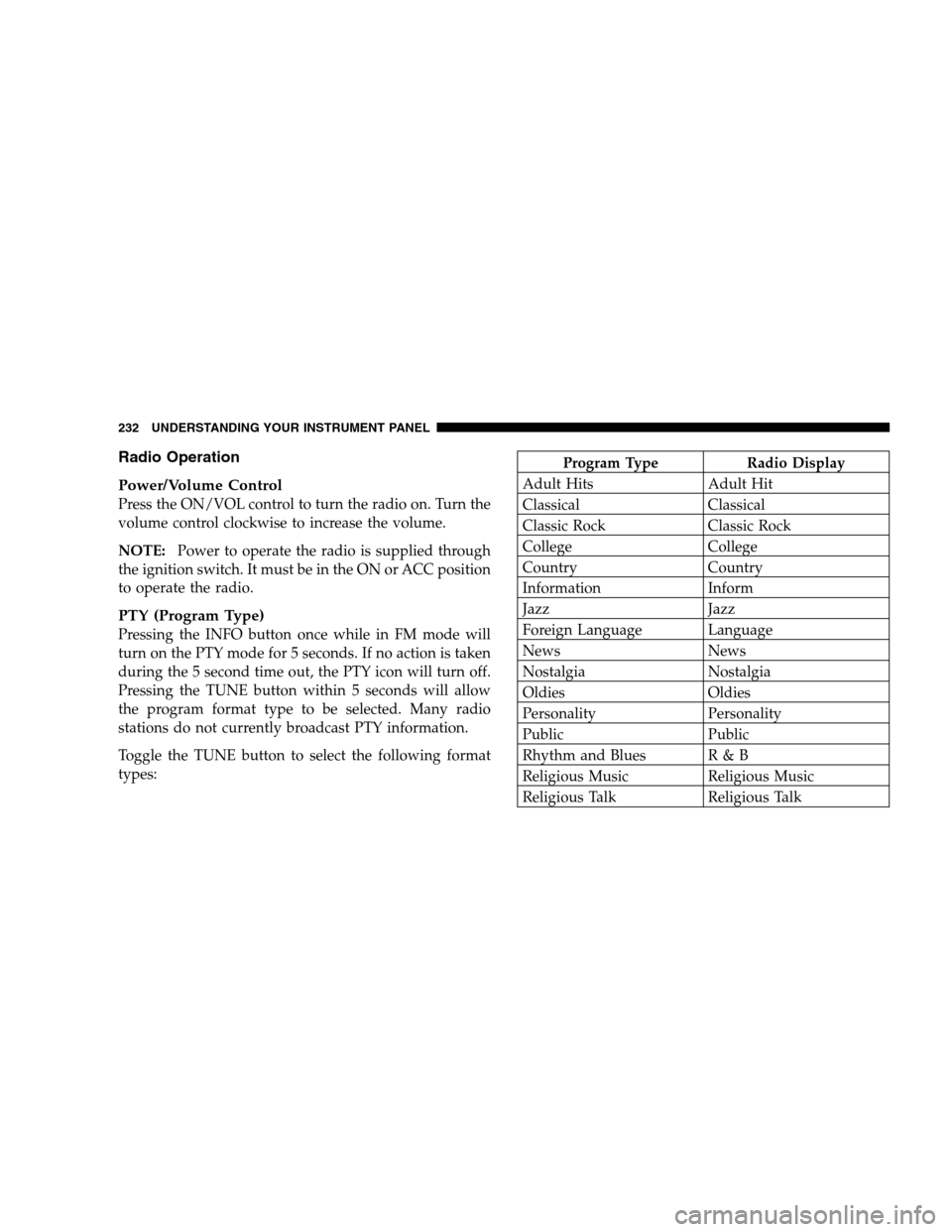
PTY (Program Type)
Pressing the INFO button once while in FM mode will
turn on the PTY mode for 5 seconds. If no action is taken
during the 5 second time out, the PTY icon will turn off.
Pressing the TUNE button within 5 seconds will allow
the program format type to be selected. Many radio
stations do not currently broadcast PTY information.
Toggle the TUNE button to select the following format
types:
Program Type Radio Display
Adult Hits Adult Hit
Classical Classical
Classic Rock Classic Rock
College College
Country Country
Information Inform
Jazz Jazz
Foreign Language Language
News News
Nostalgia Nostalgia
Oldies Oldies
Personality Personality
Public Public
Rhythm and Blues R & B
Religious Music Religious Music
Religious Talk Religious Talk
232 UNDERSTANDING YOUR INSTRUMENT PANEL