Page 232 of 464
3. Direct sunlight or objects blocking the line of sight
between the headphone transmitter on the video screen
and the headphones.
Operating Instructions — MP3 Player, Portable
Walkman
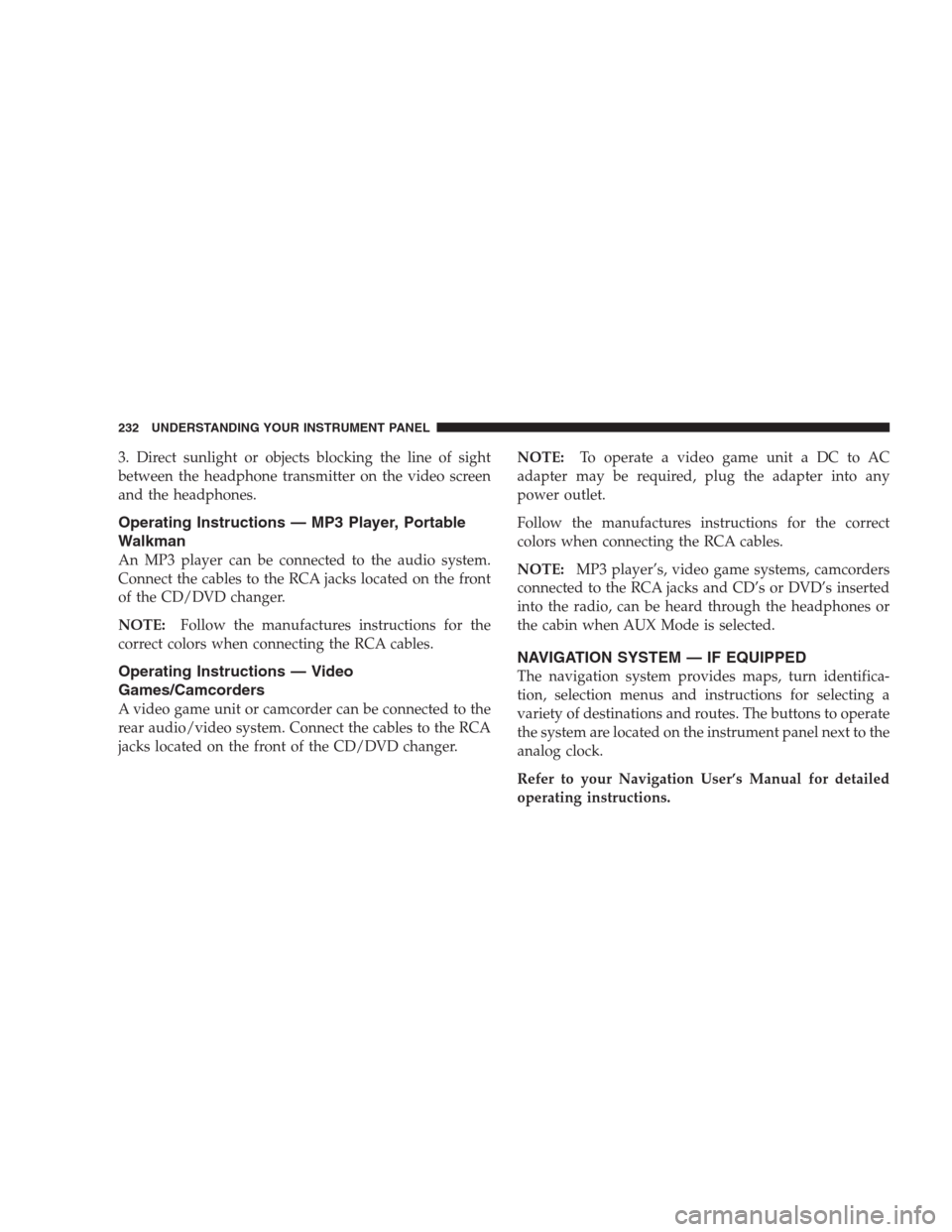
An MP3 player can be connected to the audio system.
Connect the cables to the RCA jacks located on the front
of the CD/DVD changer.
NOTE:Follow the manufactures instructions for the
correct colors when connecting the RCA cables.
Operating Instructions — Video
Games/Camcorders
A video game unit or camcorder can be connected to the
rear audio/video system. Connect the cables to the RCA
jacks located on the front of the CD/DVD changer.NOTE:To operate a video game unit a DC to AC
adapter may be required, plug the adapter into any
power outlet.
Follow the manufactures instructions for the correct
colors when connecting the RCA cables.
NOTE:MP3 player’s, video game systems, camcorders
connected to the RCA jacks and CD’s or DVD’s inserted
into the radio, can be heard through the headphones or
the cabin when AUX Mode is selected.
NAVIGATION SYSTEM — IF EQUIPPED
The navigation system provides maps, turn identifica-
tion, selection menus and instructions for selecting a
variety of destinations and routes. The buttons to operate
the system are located on the instrument panel next to the
analog clock.
Refer to your Navigation User’s Manual for detailed
operating instructions.
232 UNDERSTANDING YOUR INSTRUMENT PANEL
Page 240 of 464
CD/DVD DISC MAINTENANCE
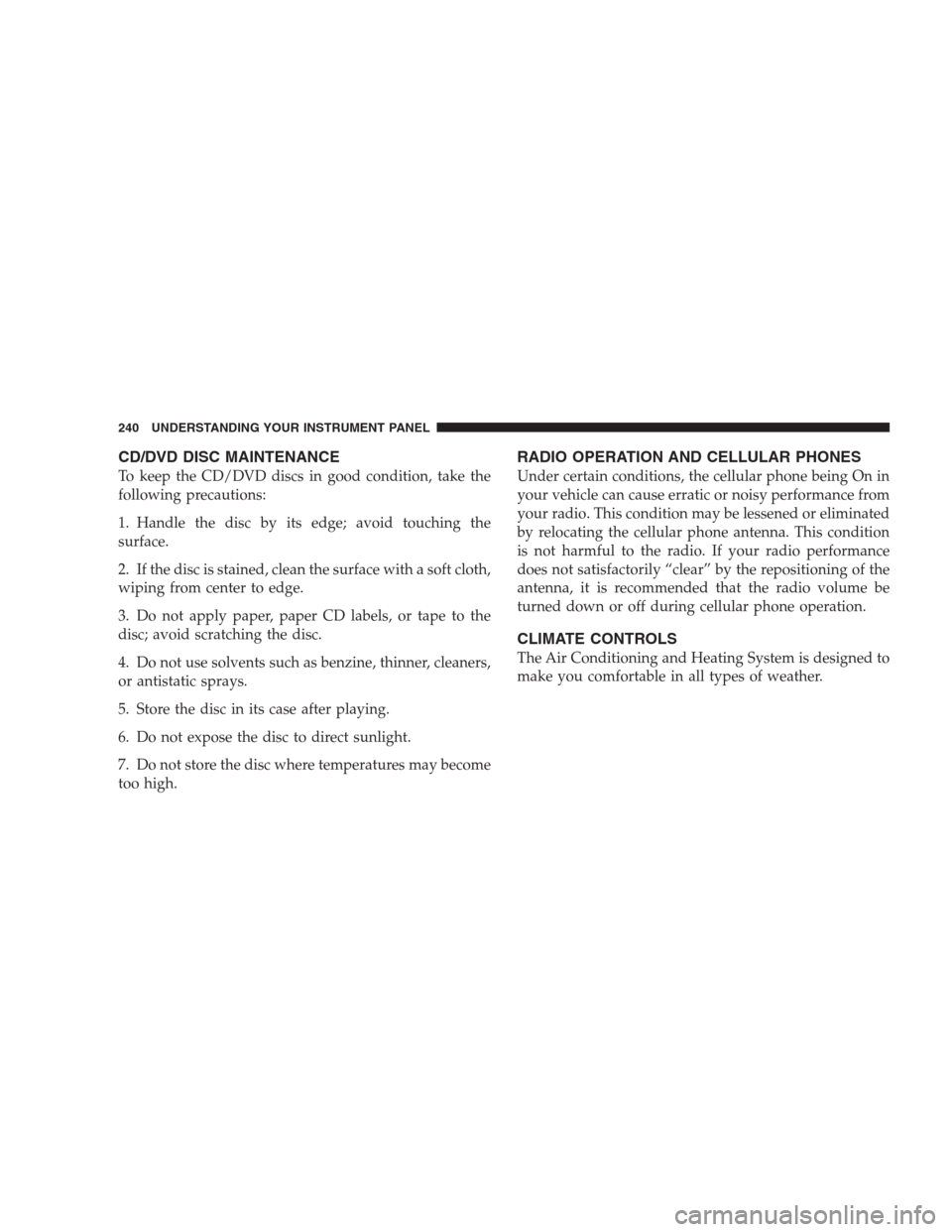
To keep the CD/DVD discs in good condition, take the
following precautions:
1. Handle the disc by its edge; avoid touching the
surface.
2. If the disc is stained, clean the surface with a soft cloth,
wiping from center to edge.
3. Do not apply paper, paper CD labels, or tape to the
disc; avoid scratching the disc.
4. Do not use solvents such as benzine, thinner, cleaners,
or antistatic sprays.
5. Store the disc in its case after playing.
6. Do not expose the disc to direct sunlight.
7. Do not store the disc where temperatures may become
too high.
RADIO OPERATION AND CELLULAR PHONES
Under certain conditions, the cellular phone being On in
your vehicle can cause erratic or noisy performance from
your radio. This condition may be lessened or eliminated
by relocating the cellular phone antenna. This condition
is not harmful to the radio. If your radio performance
does not satisfactorily “clear” by the repositioning of the
antenna, it is recommended that the radio volume be
turned down or off during cellular phone operation.
CLIMATE CONTROLS
The Air Conditioning and Heating System is designed to
make you comfortable in all types of weather.
240 UNDERSTANDING YOUR INSTRUMENT PANEL
Page 403 of 464
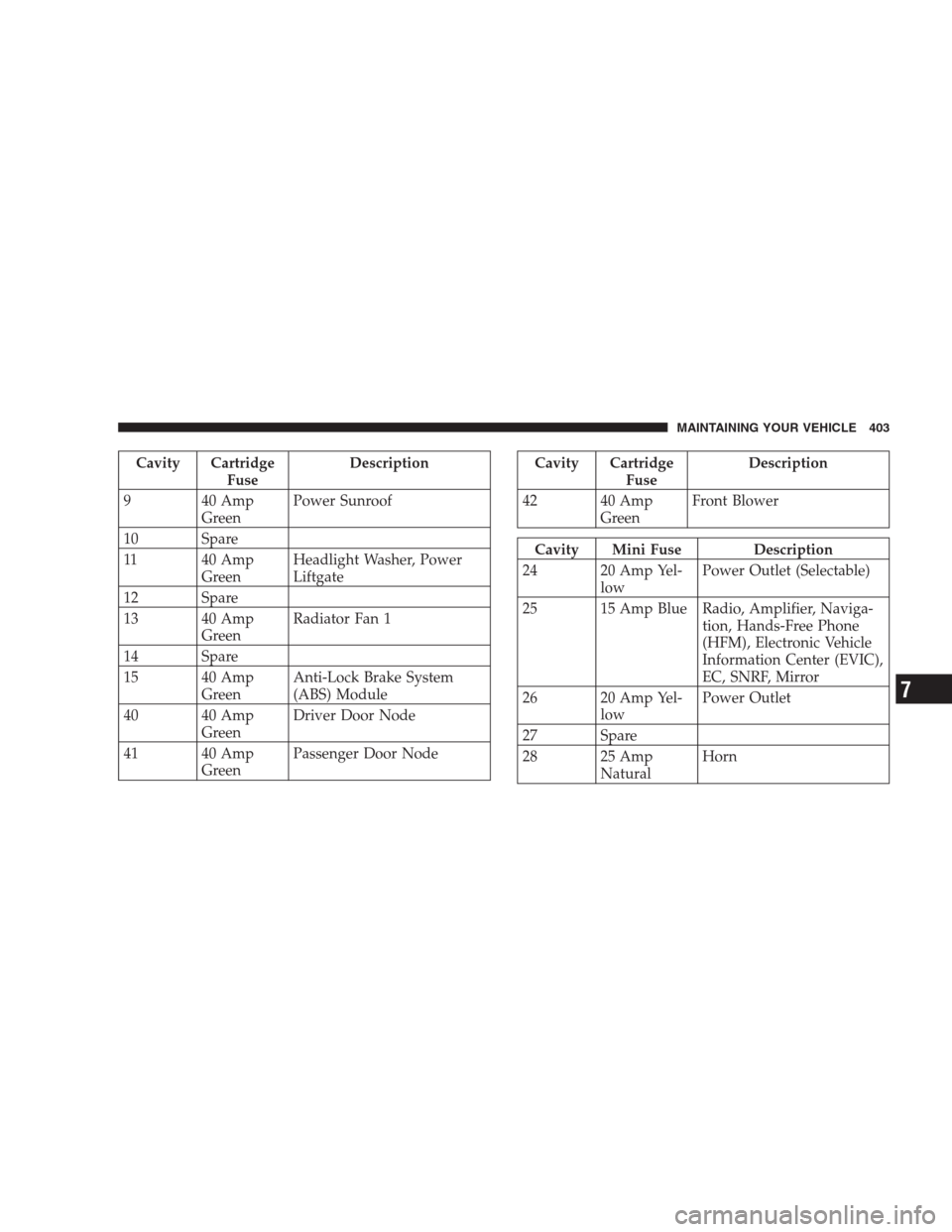
Cavity Cartridge
FuseDescription
9 40 Amp
GreenPower Sunroof
10 Spare
11 40 Amp
GreenHeadlight Washer, Power
Liftgate
12 Spare
13 40 Amp
GreenRadiator Fan 1
14 Spare
15 40 Amp
GreenAnti-Lock Brake System
(ABS) Module
40 40 Amp
GreenDriver Door Node
41 40 Amp
GreenPassenger Door NodeCavity Cartridge
FuseDescription
42 40 Amp
GreenFront Blower
Cavity Mini Fuse Description
24 20 Amp Yel-
lowPower Outlet (Selectable)
25 15 Amp Blue Radio, Amplifier, Naviga-
tion, Hands-Free Phone
(HFM), Electronic Vehicle
Information Center (EVIC),
EC, SNRF, Mirror
26 20 Amp Yel-
lowPower Outlet
27 Spare
28 25 Amp
NaturalHorn
MAINTAINING YOUR VEHICLE 403
7
Page 404 of 464
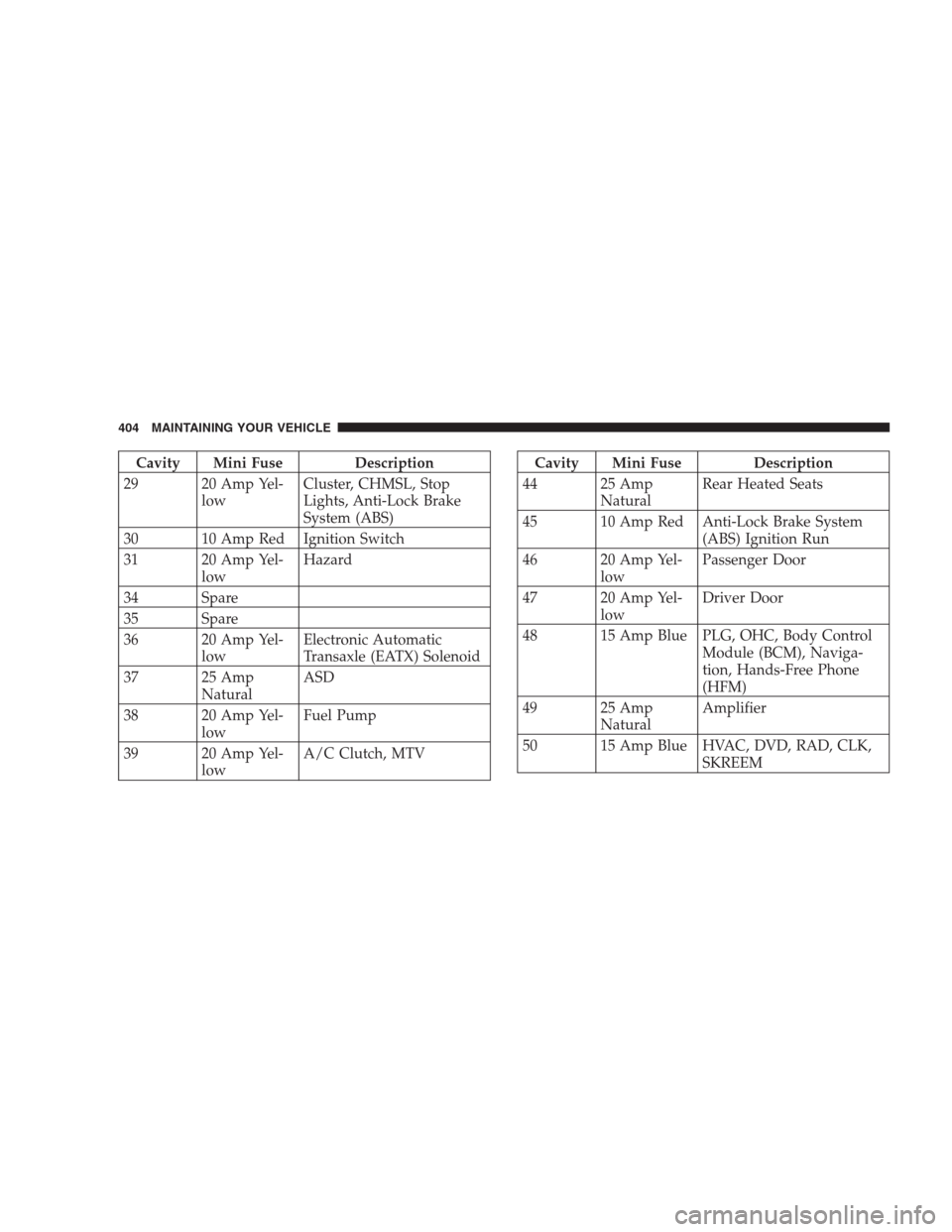
Cavity Mini Fuse Description
29 20 Amp Yel-
lowCluster, CHMSL, Stop
Lights, Anti-Lock Brake
System (ABS)
30 10 Amp Red Ignition Switch
31 20 Amp Yel-
lowHazard
34 Spare
35 Spare
36 20 Amp Yel-
lowElectronic Automatic
Transaxle (EATX) Solenoid
37 25 Amp
NaturalASD
38 20 Amp Yel-
lowFuel Pump
39 20 Amp Yel-
lowA/C Clutch, MTVCavity Mini Fuse Description
44 25 Amp
NaturalRear Heated Seats
45 10 Amp Red Anti-Lock Brake System
(ABS) Ignition Run
46 20 Amp Yel-
lowPassenger Door
47 20 Amp Yel-
lowDriver Door
48 15 Amp Blue PLG, OHC, Body Control
Module (BCM), Naviga-
tion, Hands-Free Phone
(HFM)
49 25 Amp
NaturalAmplifier
50 15 Amp Blue HVAC, DVD, RAD, CLK,
SKREEM
404 MAINTAINING YOUR VEHICLE
Page 439 of 464
technicians, special tools, and the latest information to
assure your vehicle is fixed correctly and in a timely
manner.
This is why you should always talk to your dealer’s
service manager first. Most matters can be resolved with
this process.
•If for some reason you are still not satisfied, talk to the
general manager or owner of the dealership. They
want to know if you need assistance.
•If your dealership is unable to resolve the concern, you
may contact the Manufacturer’s Customer Center.
Any communication to the Manufacturer’s Customer
Center should include the following information:
•Owner’s name and address
•Owner’s telephone number (home and office)
•Dealership name
•Vehicle identification number
•Vehicle delivery date and mileage
DaimlerChrysler Motors Corporation Customer Center
P.O. Box 21–8004
Auburn Hills, MI 48321–8004
Phone: (800) 992-1997
DaimlerChrysler Canada Inc. Customer Center
P.O. Box 1621
Windsor, Ontario N9A 4H6
Phone —(800) 465–2001
In Mexico contact:
Av. Prolongacion Paseo de la Reforma, 1240
Sante Fe C.P. 05109
Mexico, D. F.
In Mexico (915) 729–1248 or 729–1240
Outside Mexico (525) 729–1248 or 729–1240
IF YOU NEED CONSUMER ASSISTANCE 439
9
Page 442 of 464
PUBLICATION ORDER FORMS
To order the following manuals, you may use either the
website or the phone numbers listed below. Visa, Mas-
tercard, American Express, and Discover orders are ac-
cepted. If you prefer mailing your payment, please call
for an order form.
NOTE:A street address is required when ordering
manuals. (No P.O. Boxes).
•Service Manuals.
These comprehensive service manuals provide the
information that students and professional technicians
need in diagnosing/troubleshooting, problem solving,
maintaining, servicing, and repairing DaimlerChrysler
Corporation vehicles. A complete working knowledge
of the vehicle, system, and/or components is written
in straightforward language with illustrations, dia-
grams, and charts.
•Diagnostic Procedure Manuals.
Filled with diagrams, charts and detailed illustrations,
these practical manuals make it easy for students and
technicians to find and fix problems on computer-
controlled vehicle systems and features. They show
exactly how to find and correct problems the first time,
using step-by-step troubleshooting and driveability
procedures, proven diagnostic tests and a complete list
of all tools and equipment.
•Owner’s Manuals.
These manuals have been prepared with the assistance
of service and engineering specialists to acquaint you
with specific Chrysler group vehicles. Included are
starting, operating, emergency and maintenance pro-
cedures as well as specifications, capabilities and
safety tips.
442 IF YOU NEED CONSUMER ASSISTANCE
Page 448 of 464
Radiator (Coolant Pressure)............... 386
Car Washes............................ 397
Carbon Monoxide Warning................. 321
Cargo Area Cover....................... 167
Cargo Compartment
Luggage Carrier....................... 169
Cargo Tie-Downs........................ 168
Cassette Tape and Player Maintenance......... 239
Catalytic Converter...................... 375
Caution, Exhaust Gas...................79,382
CD (Compact Disc) Changer..........208,218,221
CD (Compact Disc) Player......202,206,212,216,221
CD (Compact Disc) Player Maintenance........ 240
Cellular Phone........................91,240
Chains, Tire............................ 306
Changing A Flat Tire..................... 346
Chart, Tire Sizing........................ 290
Check Engine Light (Malfunction
Indicator Light)......................185,367Child Restraint........................67,69
Child Restraint Tether Anchors.............71,74
Child Safety Locks........................ 31
Child Seat.............................. 76
Clean Air Gasoline....................... 318
Cleaning
Wheels............................. 398
Climate Control......................... 240
Clock.............................199,200
Compact Disc (CD) Maintenance............. 240
Compact Spare Tire...................... 301
Compass.............................. 197
Compass Calibration..................... 197
Compass Variance....................... 198
Computer, Trip/Travel.................... 199
Console.............................. 166
Console, Floor.......................... 166
Console, Overhead....................... 153
Contract, Service........................ 440
448 INDEX
Page 452 of 464
Filler Cap (Gas Cap).................... 321
Gasoline............................ 318
Gauge.............................. 181
Hoses.............................. 391
Octane Rating......................318,412
Requirements......................318,411
Tank Capacity........................ 411
Fuel, Flexible.............See Flexible Fuel Vehicles
Fuel System Caution..................... 320
Fueling............................... 321
Fuses................................ 402
Garage Door Opener (HomeLink�) ........... 154
Gas Cap (Fuel Filler Cap)............321,323,366
Gasoline, Clean Air...................... 318
Gasoline (Fuel)......................... 318
Gasoline, Reformulated................... 319
Gauges
Coolant Temperature.................... 180Fuel................................ 181
Speedometer......................... 181
Tachometer.......................... 184
Gearshift.............................. 272
General Information..................18,26,317
Glass Cleaning.......................... 400
Grocery Bag Retainer..................... 126
Gross Axle Weight Rating...............327,330
Gross Vehicle Weight Rating.............327,330
Hands-Free Phone (UConnect™).............. 91
Hazard Warning Flasher................... 344
Head Phones........................... 230
Head Restraints......................... 115
Headlights............................ 407
Bulb Replacement...................... 406
High Beam........................... 138
High Beam/Low Beam Select Switch........ 138
Passing............................. 138
452 INDEX