Page 163 of 464
Wind Buffeting
Wind buffeting can be described as the perception of
pressure on the ears or a helicopter type sound in the
ears. Your vehicle may exhibit wind buffeting with the
windows down, or the sunroof (if equipped) in certain
open or partially open positions. This is a normal occur-
rence and can be minimized. If the buffeting occurs with
the rear windows open, open the front and rear windows
together to minimize the buffeting. If the buffeting occurs
with the sunroof open, adjust the sunroof opening to
minimize the buffeting or open any window.
Sunroof Maintenance
Use only a non-abrasive cleaner and a soft cloth to clean
the glass panel.
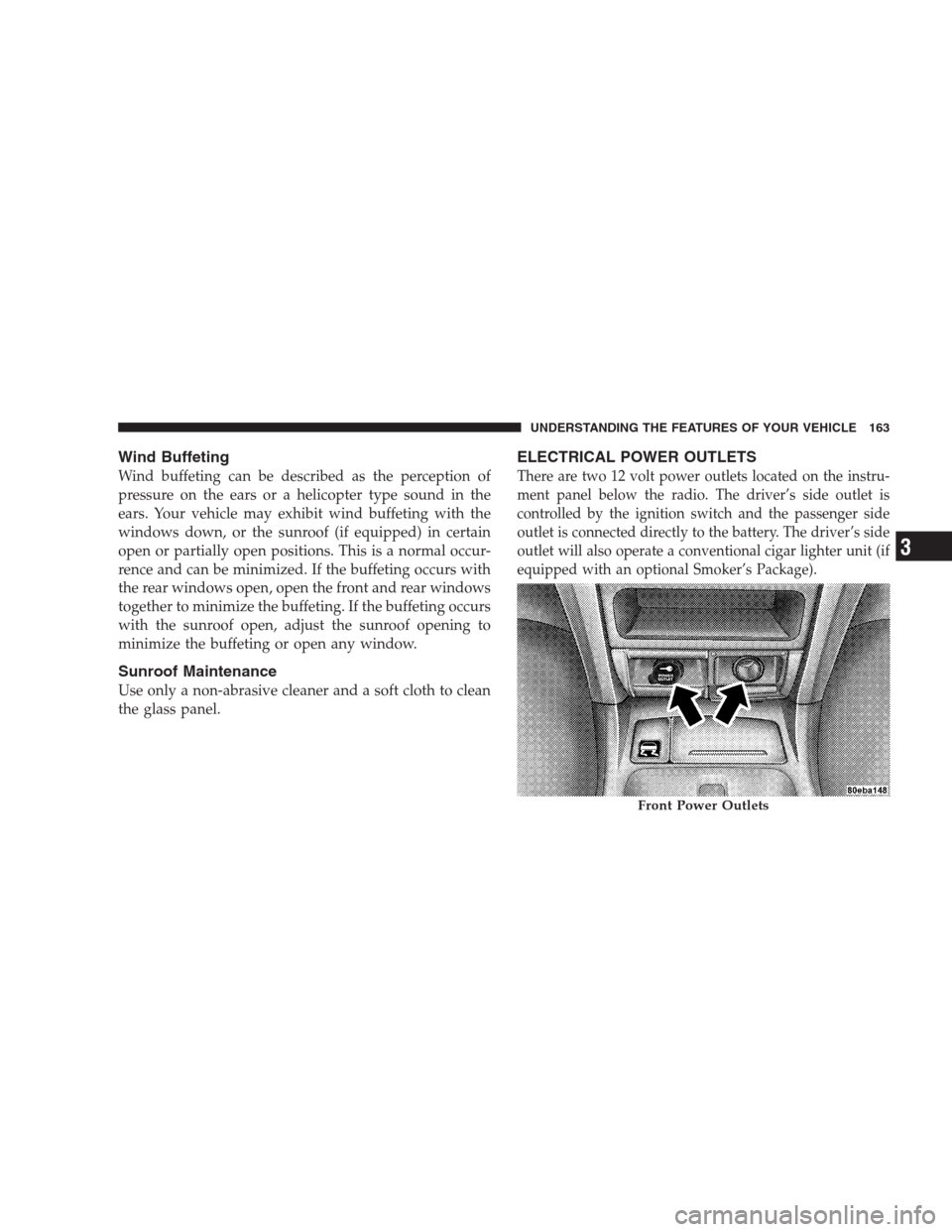
ELECTRICAL POWER OUTLETS
There are two 12 volt power outlets located on the instru-
ment panel below the radio. The driver’s side outlet is
controlled by the ignition switch and the passenger side
outlet is connected directly to the battery. The driver’s side
outlet will also operate a conventional cigar lighter unit (if
equipped with an optional Smoker’s Package).
Front Power Outlets
UNDERSTANDING THE FEATURES OF YOUR VEHICLE 163
3
Page 164 of 464
A third outlet is located on the back of the front center
console near the floor, and is also controlled by the
ignition switch.
A fourth outlet is located on the driver’s side, in the rear
cargo area and is also controlled by the ignition switch.
The outlets include tethered caps labeled with a key or
battery symbol indicating the power source. The passen-
ger side instrument panel and center console outlets are
powered directly from the battery, items plugged into
these outlets may discharge the battery and/or prevent
engine starting.
The passenger side and center console outlets are protected
by an automatic reset circuit breaker. The automatic circuit
breaker restores power when the overload is removed.
NOTE:If desired, the fourth power outlet in the rear cargo
area can be converted by your authorized dealer to provide
power with the ignition switch in the OFF position.
Electrical Outlet Use With Engine Off
CAUTION!
•Many accessories that can be plugged in draw power from
the vehicle’s battery, even when not in use (i.e. cellular
phones, etc.). Eventually, if plugged in long enough, the
vehicle’s battery will discharge sufficiently to degrade
battery life and/or prevent engine starting.
•Accessories that draw higher power (i.e. coolers, vacuum
cleaners, lights, etc.), will degrade the battery even more
quickly. Only use these intermittently and with greater
caution.
•After the use of high power draw accessories, or long
periods of the vehicle not being started (with accessories
still plugged in), the vehicle must be driven a sufficient
length of time to allow the alternator to recharge the
vehicle’s battery.
•Power outlets are designed for accessory plugs only. Do
not hang any type of accessory or accessory bracket from
the plug. Improper use of the power outlet can cause
damage.
164 UNDERSTANDING THE FEATURES OF YOUR VEHICLE
Page 191 of 464

ELECTRONIC VEHICLE INFORMATION CENTER
(EVIC) — IF EQUIPPED
The Electronic Vehicle Information Center (EVIC) con-
sists of the following:
•Vehicle information warning message displays
•Tire Pressure Monitor System — If Equipped
•Customer programmable features
•Compass display
•Mini-Trip functions
Pressing the MENU button will change the displayed
programming features. Pressing the STEP button will
display the available choices. Pressing the MENU button
a second time accepts a selected choice.
When the appropriate conditions exist, the Electronic
Vehicle Information Center (EVIC) displays the following
messages.
•LEFT/RIGHT TURN SIGNAL ON (with a continuous
warning chime)
•INVALID KEY & FOB (with a single chime)
•PARK ASSIST DISABLED
•SERVICE PARK ASSIST SYSTEM
•SERVICE IMMOBILIZER (with a single chime)
•KEY FOB BATTERY LOW (with a single chime)
•KEY & FOB PROGRAMMED (with a single chime)
•PROGRAM KEY & FOB
•MEMORY #1/#2 POSITION SET (with a single chime)
•MEMORY #1/#2 POS SELECTED
•MEMORY SYSTEM DISABLED VEHICLE NOT IN
PARK (with a single chime)
UNDERSTANDING YOUR INSTRUMENT PANEL 191
4
Page 228 of 464
Remote Control Battery Service
•
To replace the batteries for the remote control slide the
cover rearward.
The replacement batteries for the remote control are two
AAA batteries.
Operating Instructions — Video Screen
Push up on the release button to lower the video screen.
1. Screen Width Button
Changes the width of the screen picture.
Screen handle
228 UNDERSTANDING YOUR INSTRUMENT PANEL
Page 231 of 464

Headphone Battery Service
•
Press the button at the bottom of each headphone
earpiece and lift the cover upward.
•Replace the battery in each earpiece and reinstall the
cover. The headphones require two AAA batteries.
General Information
This device complies with part 15 of the FCC rules and
RSS 210 of Industry Canada. Operation is subject to the
following two conditions: (1) This device may not cause
harmful interference and (2) This device must accept any
interference received, including interference that may
cause undesired operation.
If you do not hear sound coming from the headphones,
check for the following conditions:
1. Rear Seat Audio/Video System and headphones are
on. Press the headphone transmitter button (1) on the
remote control and the power button on the headphones.
An indicator light will illuminate on the headphone
earpiece to indicate the headphones are ON.
2. Weak batteries in the headphones.
Headphone Battery Service
UNDERSTANDING YOUR INSTRUMENT PANEL 231
4
Page 269 of 464
WARNING!
Do not attempt to push or tow your vehicle to get it
started. Vehicles equipped with an automatic trans-
mission cannot be started this way. Unburned fuel
could enter the catalytic converter and once the
engine has started, ignite and damage the converter
and vehicle. If the vehicle has a discharged battery,
booster cables may be used to obtain a start from a
booster battery or the battery in another vehicle. This
type of start can be dangerous if done improperly.
See section 6 of this manual for the proper jump
starting procedures and follow them carefully.
If the engine has been flooded, it may start to run, but not
have enough power to continue running when the key is
released. If this occurs, continue cranking with the accel-
erator pedal pushed all the way to the floor. Release the
accelerator pedal and the key once the engine is running
smoothly.
If the engine shows no sign of starting after two 15
second periods of cranking with the accelerator pedal
held to the floor, the normal starting procedure should be
repeated.
After Starting
The idle speed will automatically decrease as the engine
warms up.
STARTING AND OPERATING 269
5
Page 345 of 464
NOTE:With extended use, the Hazard Warning Flash-
ers may wear down your battery.
IF YOUR ENGINE OVERHEATS
In any of the following situations, you can reduce the
potential for overheating by taking the appropriate ac-
tion.
•On the highways — Slow down.
•In city traffic — While stopped, put transmission in
neutral, but do not increase engine idle speed.
NOTE:There are steps that you can take to slow down
an impending overheat condition. If your air conditioner
is on, turn it off. The air conditioning system adds heat to
the engine cooling system and turning off the A/C
removes this heat. You can also turn the Temperature
control to maximum heat, the Mode control to floor, andthe fan control to High. This allows the heater core to act
as a supplement to the radiator and aids in removing heat
from the engine cooling system.
CAUTION!
Driving with a hot cooling system could damage
your vehicle. If temperature gauge reads “H”, pull
over and stop the vehicle. Idle the vehicle with the
air conditioner turned off until the pointer drops
back into the normal range. If the pointer remains on
the “H”, turn the engine off immediately, and call for
service.
WHAT TO DO IN EMERGENCIES 345
6
Page 354 of 464

NOTE:When reinstalling the wheel center cap, insure
that the valve stem symbol on the back of the cap is
pointed toward the wheel valve stem. Install the center
cap using hand pressure only. Do not use a hammer.
Wheel Nuts
All wheel nuts should be tightened occasionally to elimi-
nate the possibility of wheel studs being sheared or the
bolt holes in the wheels becoming elongated. This is
especially important during the first few hundred miles
of operation, and after each time a tire is changed, to
allow the wheel nuts to become properly set. All nuts
should first be firmly seated against the wheel. The nuts
should then be tightened to recommended torque.
Tighten the nuts to final torque in increments. Progress
around the bolt circle, tightening the nut opposite to the
nut just previously tightened until final torque is
achieved. Recommended torque is 130 N·m (95 ft. lbs).
JUMP-STARTING PROCEDURE
WARNING!
•Do not attempt to push or tow your vehicle to get it started.
Vehicles equipped with an automatic transmission cannot be
started this way. Unburned fuel could enter the catalytic
converter and once the engine has started, ignite and damage
the converter and vehicle. If the vehicle has a discharged
battery, booster cables may be used to obtain a start from
another vehicle. This type of start can be dangerous if done
improperly, so follow this procedure carefully.
•Battery fluid is a corrosive acid solution; do not allow battery
fluid to contact eyes, skin or clothing. Don’t lean over battery
when attaching clamps or allow the clamps to touch each other.
If acid splashes in eyes or on skin, flush contaminated area
immediately with large quantities of water.
•A battery generates hydrogen gas which is flammable and
explosive. Keep flame or spark away from the vent holes. Do
not use a booster battery or any other booster source with an
output that exceeds 12 volts.
•Take care to avoid the radiator cooling fan whenever the hood
is raised. It can start anytime the ignition switch is on. You can
be hurt by the fan.
354 WHAT TO DO IN EMERGENCIES