2007 CHEVROLET SILVERADO AUX
[x] Cancel search: AUXPage 369 of 684
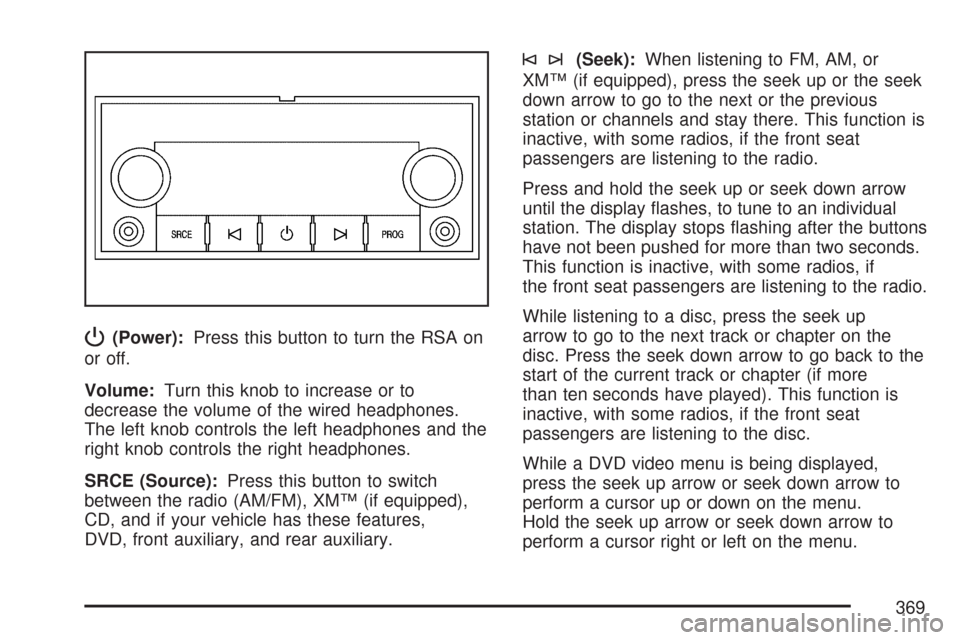
P(Power):Press this button to turn the RSA on
or off.
Volume:Turn this knob to increase or to
decrease the volume of the wired headphones.
The left knob controls the left headphones and the
right knob controls the right headphones.
SRCE (Source):Press this button to switch
between the radio (AM/FM), XM™ (if equipped),
CD, and if your vehicle has these features,
DVD, front auxiliary, and rear auxiliary.
©¨(Seek):When listening to FM, AM, or
XM™ (if equipped), press the seek up or the seek
down arrow to go to the next or the previous
station or channels and stay there. This function is
inactive, with some radios, if the front seat
passengers are listening to the radio.
Press and hold the seek up or seek down arrow
until the display ashes, to tune to an individual
station. The display stops ashing after the buttons
have not been pushed for more than two seconds.
This function is inactive, with some radios, if
the front seat passengers are listening to the radio.
While listening to a disc, press the seek up
arrow to go to the next track or chapter on the
disc. Press the seek down arrow to go back to the
start of the current track or chapter (if more
than ten seconds have played). This function is
inactive, with some radios, if the front seat
passengers are listening to the disc.
While a DVD video menu is being displayed,
press the seek up arrow or seek down arrow to
perform a cursor up or down on the menu.
Hold the seek up arrow or seek down arrow to
perform a cursor right or left on the menu.
369
Page 371 of 684
When a CD/DVD is playing, press the up or the
down arrow to go to the next or previous track or
chapter.
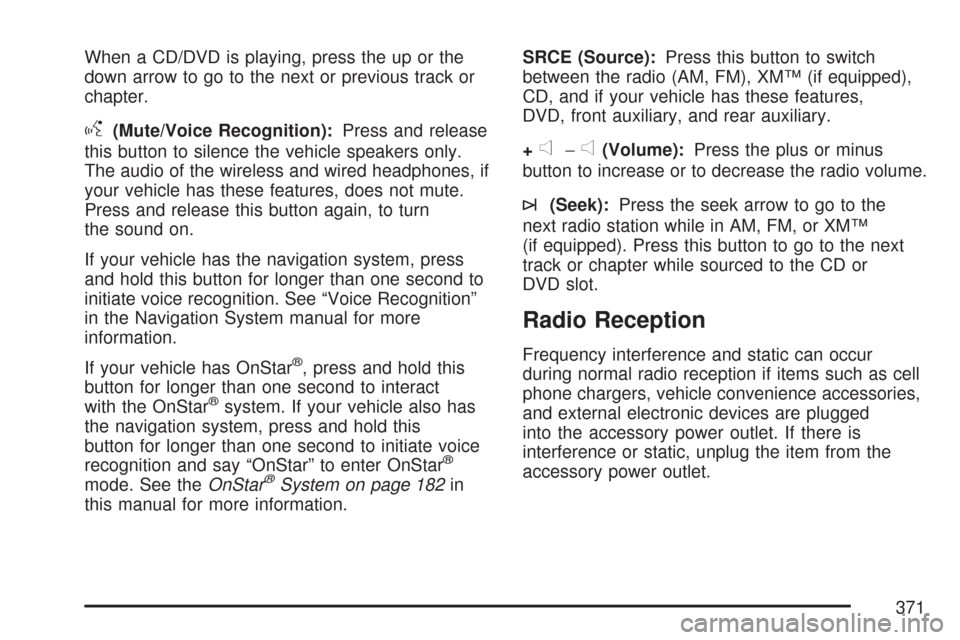
g(Mute/Voice Recognition):Press and release
this button to silence the vehicle speakers only.
The audio of the wireless and wired headphones, if
your vehicle has these features, does not mute.
Press and release this button again, to turn
the sound on.
If your vehicle has the navigation system, press
and hold this button for longer than one second to
initiate voice recognition. See “Voice Recognition”
in the Navigation System manual for more
information.
If your vehicle has OnStar
®, press and hold this
button for longer than one second to interact
with the OnStar
®system. If your vehicle also has
the navigation system, press and hold this
button for longer than one second to initiate voice
recognition and say “OnStar” to enter OnStar
®
mode. See theOnStar®System on page 182in
this manual for more information.SRCE (Source):Press this button to switch
between the radio (AM, FM), XM™ (if equipped),
CD, and if your vehicle has these features,
DVD, front auxiliary, and rear auxiliary.
+
e−e(Volume):Press the plus or minus
button to increase or to decrease the radio volume.
¨(Seek):Press the seek arrow to go to the
next radio station while in AM, FM, or XM™
(if equipped). Press this button to go to the next
track or chapter while sourced to the CD or
DVD slot.
Radio Reception
Frequency interference and static can occur
during normal radio reception if items such as cell
phone chargers, vehicle convenience accessories,
and external electronic devices are plugged
into the accessory power outlet. If there is
interference or static, unplug the item from the
accessory power outlet.
371
Page 438 of 684
Q:What is total vehicle reserve capacity?
A:This is the difference between your GVWR and
the weight of your truck with full fuel and
passengers. It is the amount of weight you can
add to your vehicle before reaching your
GVWR. Keep in mind that reserve capacity
numbers are intended as a guide when
selecting the amount of equipment or cargo
your truck can carry. If you are unsure of your
vehicle’s front, rear, or total weight, go to a
weigh station and weigh your vehicle.
Your dealer can also help you with this.
The total vehicle reserve capacity for your
vehicle can be found in the lower right corner
of the Certication/Tire label as shown
previously.
See your dealer for additional advice and
information about using a snow plow on your
vehicle. Also, seeLoading Your Vehicle on
page 427.
Emergency Roof Lamp Provisions
Vehicles with the RPO VYU snow plow prep
package also have an emergency roof lamp
provision package, RPO TRW. Wiring for the
emergency roof lamp is provided above the
overhead console. SeeAuxiliary Roof Mounted
Lamp on page 227for switch location.
Truck-Camper Loading Information
Notice:Installing a truck-camper to a
vehicle that is equipped with the SS trim
package could damage the vehicle. Do not
install a truck-camper on a vehicle equipped
with the SS trim package.
A vehicle specic Truck-Camper Loading
information label is attached to the inside of your
vehicle’s glove box. This label will tell you if
your vehicle can carry a slide-in camper, how
much of a load your vehicle can carry, and how to
correctly spread out the load. Also, it will help
you match the right slide-in camper to your vehicle.
438
Page 481 of 684
Heavy-DutyTrailer Wiring Harness
Package
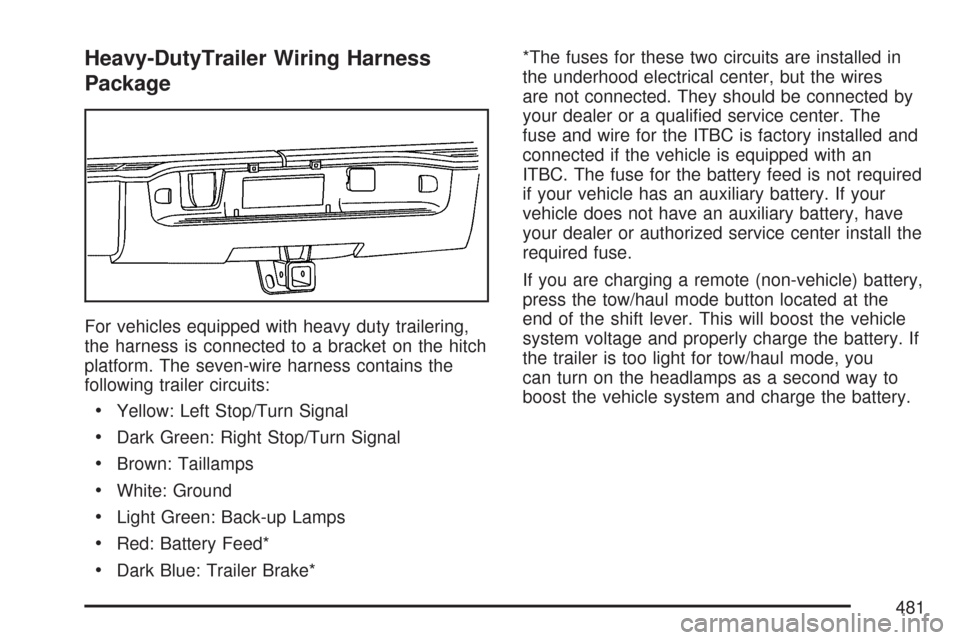
For vehicles equipped with heavy duty trailering,
the harness is connected to a bracket on the hitch
platform. The seven-wire harness contains the
following trailer circuits:
Yellow: Left Stop/Turn Signal
Dark Green: Right Stop/Turn Signal
Brown: Taillamps
White: Ground
Light Green: Back-up Lamps
Red: Battery Feed*
Dark Blue: Trailer Brake**The fuses for these two circuits are installed in
the underhood electrical center, but the wires
are not connected. They should be connected by
your dealer or a qualied service center. The
fuse and wire for the ITBC is factory installed and
connected if the vehicle is equipped with an
ITBC. The fuse for the battery feed is not required
if your vehicle has an auxiliary battery. If your
vehicle does not have an auxiliary battery, have
your dealer or authorized service center install the
required fuse.
If you are charging a remote (non-vehicle) battery,
press the tow/haul mode button located at the
end of the shift lever. This will boost the vehicle
system voltage and properly charge the battery. If
the trailer is too light for tow/haul mode, you
can turn on the headlamps as a second way to
boost the vehicle system and charge the battery.
481
Page 484 of 684
Auxiliary Battery
The auxiliary battery provision can be used to
supply electrical power to additional equipment that
you may choose to add, such as a slide-in
camper. If your vehicle has this provision, this
relay will be located on the driver’s side of
the vehicle, next to the underhood electrical center.
Be sure to follow the proper installation instructions
that are included with any electrical equipment
that you install.
Notice:Leaving electrical equipment on for
extended periods will drain the battery. Always
turn off electrical equipment when not in
use and do not use equipment that exceeds
the maximum amperage rating for the auxiliary
battery provision.
Power Winches
If you wish to use a power winch on your vehicle,
only use it when your vehicle is stationary or
anchored.
Trailer Recommendations
You must subtract your hitch loads from the CWR
for your vehicle. Weigh your vehicle with the
trailer attached, so that you won’t go over
the GVWR or GAWR. If you are using a
weight-distributing hitch, weigh the vehicle without
the spring bars in place.
You’ll get the best performance if you spread out
the weight of your load the right way, and if
you choose the correct hitch and trailer brakes.
For more information, seeTowing a Trailer
on page 447.
484
Page 613 of 684
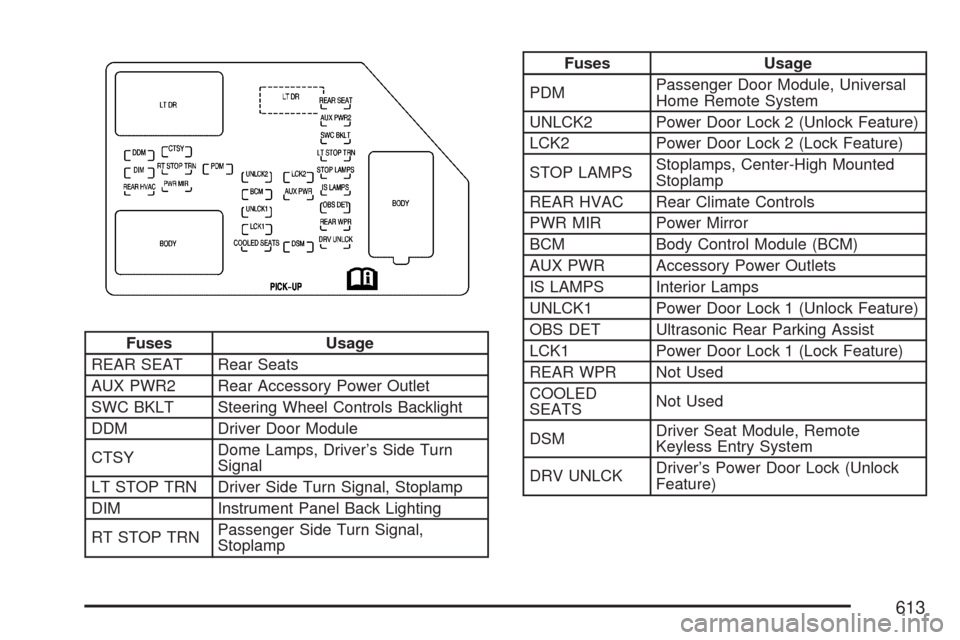
Fuses Usage
REAR SEAT Rear Seats
AUX PWR2 Rear Accessory Power Outlet
SWC BKLT Steering Wheel Controls Backlight
DDM Driver Door Module
CTSYDome Lamps, Driver’s Side Turn
Signal
LT STOP TRN Driver Side Turn Signal, Stoplamp
DIM Instrument Panel Back Lighting
RT STOP TRNPassenger Side Turn Signal,
Stoplamp
Fuses Usage
PDMPassenger Door Module, Universal
Home Remote System
UNLCK2 Power Door Lock 2 (Unlock Feature)
LCK2 Power Door Lock 2 (Lock Feature)
STOP LAMPSStoplamps, Center-High Mounted
Stoplamp
REAR HVAC Rear Climate Controls
PWR MIR Power Mirror
BCM Body Control Module (BCM)
AUX PWR Accessory Power Outlets
IS LAMPS Interior Lamps
UNLCK1 Power Door Lock 1 (Unlock Feature)
OBS DET Ultrasonic Rear Parking Assist
LCK1 Power Door Lock 1 (Lock Feature)
REAR WPR Not Used
COOLED
SEATSNot Used
DSMDriver Seat Module, Remote
Keyless Entry System
DRV UNLCKDriver’s Power Door Lock (Unlock
Feature)
613
Page 618 of 684

Fuses Usage
35 Sunroof
36Key Ignition System, Theft Deterrent
System
37 Windshield Wiper
38 SEO B2 Uptter Usage (Battery)
39 Electric Adjustable Pedals
40 Climate Controls (Battery)
41 Airbag System (Ignition)
42 Amplier
43 Audio System
44Miscellaneous (Ignition), Cruise
Control
45 Tailgate Open/Close Assist
46 Airbag System (Battery)
47OnStar
®, Rear Seat Entertainment
Display
Fuses Usage
48 Instrument Panel Cluster
49 Power Take-Off
50Auxiliary Climate Control (Ignition),
Compass-Temperature Mirror
51Center High-Mounted Stoplamp
(CHMSL)
52 Rear Defogger
53 Heated Mirrors
54 SEO B1 Uptter Usage (Battery)
55Cigarette Lighter, Auxiliary Power
Outlet
56Automatic Level Control Compressor
Relay, SEO Uptter Usage
57 Climate Controls (Ignition)
58Engine Control Module, Secondary
Fuel Pump (Ignition)
618
Page 670 of 684

Appearance Care (cont.)
Weatherstrips........................................... 604
Windshield and Wiper Blades................... 606
Ashtray....................................................... 235
Audio System.............................................. 302
AM-FM Radio.......................................... 306
Audio Steering Wheel Controls................. 370
Care of Your CD and DVD Player............ 373
Care of Your CDs and DVDs................... 372
Fixed Mast Antenna................................. 373
Navigation/Radio System, see
Navigation Manual................................ 357
Radio with CD................................308, 314
Rear Seat Audio (RSA)............................ 368
Setting the Time...................................... 303
Theft-Deterrent Feature............................ 370
Understanding Radio Reception............... 371
XM™ Satellite Radio Antenna System...... 373
Audio System(s)
Radio with CD and DVD.......................... 324
Automatic Headlamp System....................... 225
Automatic Transmission
Fluid........................................................ 510
Operation................................................. 140
Auxiliary Roof Mounted Lamp Switch.......... 227B
Battery........................................................ 533
Electric Power Management..................... 229
Run-Down Protection............................... 230
Before Leaving on a Long Trip.................... 416
Brake
Emergencies............................................ 383
Parking.................................................... 164
Brakes........................................................ 529
System Warning Light.............................. 258
Braking....................................................... 380
Braking in Emergencies............................... 383
Break-In, New Vehicle................................. 134
Bulb Replacement....................................... 545
Center High-Mounted Stoplamp
(CHMSL) and Cargo Lamp................... 547
Halogen Bulbs......................................... 545
Headlamps............................................... 546
License Plate Lamps................................ 550
Pickup Box Identication and Fender
Marker Lamps...................................... 548
Replacement Bulbs.................................. 551
Taillamps, Turn Signal, Stoplamps and
Back-up Lamps..................................... 548
Buying New Tires........................................ 572
670