2007 CHEVROLET SILVERADO radio controls
[x] Cancel search: radio controlsPage 328 of 684
Setting the Tone
(Bass/Midrange/Treble)
BASS/MID/TREB (Bass, Midrange, or Treble):To
adjust bass, midrange, or treble, press the tune
knob until the tone control labels display. Continue
pressing to highlight the desired label, or press the
pushbutton positioned under the desired label. Turn
the tune knob clockwise or counterclockwise to
adjust the highlighted setting. If a station’s
frequency is weak or if there is static, decrease
the treble.
To quickly adjust bass, midrange, or treble to the
middle position, press the pushbutton positioned
under the BASS, MID, or TREB label for more than
two seconds. A beep sounds and the level adjusts
to the middle position.
To quickly adjust all tone and speaker controls to
the middle position, press the tune knob for more
than two seconds until a beep sounds.
EQ (Equalization):Press this button to choose
bass and treble equalization settings designed for
different types of music. The choices are pop,
rock, country, talk, jazz, and classical. Selecting
MANUAL or changing bass or treble, returns
the EQ to the manual bass and treble settings.Unique EQ settings can be saved for each source.
If the radio has a Bose
®audio system, the EQ
settings are either MANUAL or TALK.
Adjusting the Speakers (Balance/Fade)
BAL/FADE (Balance/Fade):To adjust balance
or fade, press the tune knob until the speaker
control labels display. Press the pushbutton
positioned under the desired label. Turn the tune
knob clockwise or counterclockwise to adjust
the highlighted setting. The highlighted setting can
also be adjusted by pressing either the SEEK,
FWD (forward), or REV (reverse) button until the
desired levels are obtained.
To quickly adjust balance or fade to the middle
position, press the pushbutton positioned under the
BAL or FADE label for more than two seconds.
A beep sounds and the level adjusts to the middle
position.
To quickly adjust both the balance and fade to the
middle position at one time, press the tune knob for
more than two seconds until a beep sounds.
If the Rear Seat Audio (RSA) is turned on, the radio
disables FADE and mutes the rear speakers.
328
Page 336 of 684
©SEEK (Previous Track/Chapter):Press this
button to return to the start of the current track
or chapter. Press this button again to go to
the previous track or chapter. This button might
not work when the DVD is playing the copyright
information or the previews.
SEEK
¨(Next Track/Chapter):Press this
button to go to the next track or chapter. This
button might not work when the DVD is playing the
copyright information or the previews.
sREV (Reverse):Press this button to quickly
reverse the CD or DVD at ve times the normal
speed. The radio displays the elapsed time while in
fast reverse. To stop fast reversing, press this
button again. This button might not work when the
DVD is playing the copyright information or the
previews.
\FWD (Fast Forward):Press this button to
fast forward the CD or DVD. The radio displays the
elapsed time and fast forwards ve times the
normal speed. To stop fast forwarding, press this
button again. This button might not work when
the DVD is playing the copyright information or the
previews.
Z(Eject):Press this button to eject a CD or
DVD. If a CD or DVD is ejected, but not removed,
the player automatically pulls it back in after
15 seconds.
If loading and reading of a CD cannot be
completed, because of an unknown format, etc.,
and the disc fails to eject, press and hold the
CD eject button for more than ve seconds to force
the disc to eject.
DVD-V (Video) Display Buttons
Once a DVD-V is inserted, the radio display menu
shows several tag options for DVD playing.
Press the pushbuttons located under any desired
tag option during DVD playback. See the tag
options listed below for more information.
The rear seat passenger can navigate the DVD-V
menus and controls through the remote control.
See “Remote Control”, underRear Seat
Entertainment System on page 357for more
information. The Video Screen automatically turns
on when the DVD-V is inserted into the DVD slot.
336
Page 338 of 684
The rear seat operator can navigate the DVD-A
menus and controls through the remote control.
See “Remote Control”, underRear Seat
Entertainment System on page 357for more
information. The Video Screen does not
automatically power on when the DVD-A is
inserted into the DVD slot. It must be manually
turned on by the rear seat occupant through
the remote control power button.
r/j(Play/Pause):Press either the play or
pause icon displays on the radio system, to toggle
between pausing or restarting playback of a
DVD. If the forward arrow is showing on display,
the system is in pause mode. If the pause
icon is showing on display, the system is in
playback mode.
qGroupr:Press this button to cycle through
musical groupings on the DVD-A disc.
Nav (Navigate):Press this button to
display directional arrows for navigating
through the menus.
e(Audio Stream):Press this button to cycle
through audio stream formats located on the
DVD-A disc. There is not any type of notication
for the customer to see through the radio
display, but VSM has a text eld that shows audio
stream changing.
Inserting a Disc
To play a disc, gently insert the disc, with the label
side up, into the loading slot. The DVD player
might not accept some paper labeled media. The
player starts loading the disc into the system
and show “Loading Disc” on the radio display. At
the same time, the radio displays a softkey
menu of option(s). Some discs automatically play
the movie while others default to the softkey
menu display, which requires the Play, Enter, or
Navigation softkeys to be pressed; either by
softkey or by the rear seat passenger using the
remote control.
Loading a disc into the system, depending
on media type and format, ranges from
5 to 20 seconds for a CD, and up to
30 seconds for a DVD.
338
Page 369 of 684
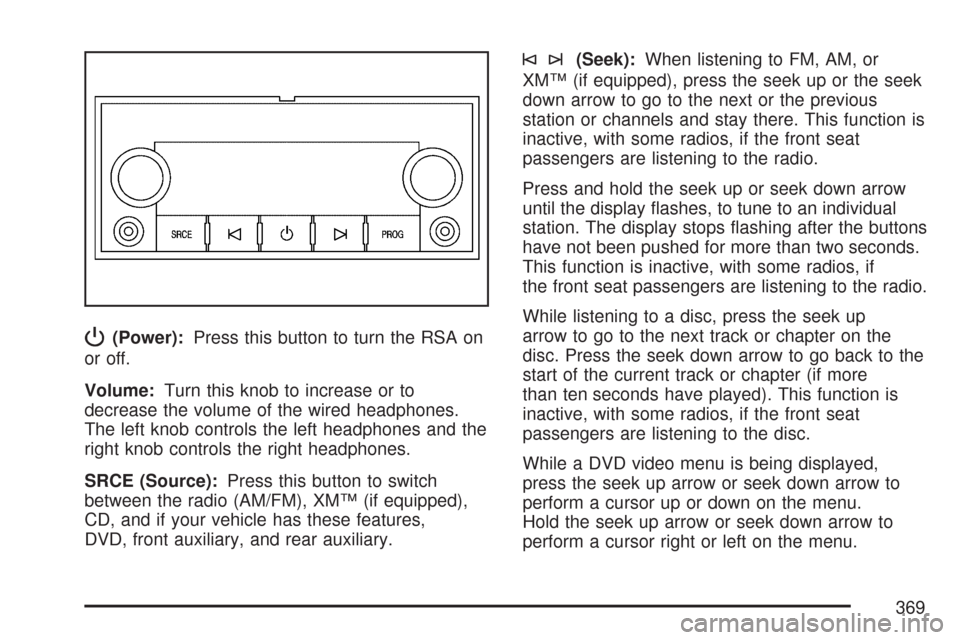
P(Power):Press this button to turn the RSA on
or off.
Volume:Turn this knob to increase or to
decrease the volume of the wired headphones.
The left knob controls the left headphones and the
right knob controls the right headphones.
SRCE (Source):Press this button to switch
between the radio (AM/FM), XM™ (if equipped),
CD, and if your vehicle has these features,
DVD, front auxiliary, and rear auxiliary.
©¨(Seek):When listening to FM, AM, or
XM™ (if equipped), press the seek up or the seek
down arrow to go to the next or the previous
station or channels and stay there. This function is
inactive, with some radios, if the front seat
passengers are listening to the radio.
Press and hold the seek up or seek down arrow
until the display ashes, to tune to an individual
station. The display stops ashing after the buttons
have not been pushed for more than two seconds.
This function is inactive, with some radios, if
the front seat passengers are listening to the radio.
While listening to a disc, press the seek up
arrow to go to the next track or chapter on the
disc. Press the seek down arrow to go back to the
start of the current track or chapter (if more
than ten seconds have played). This function is
inactive, with some radios, if the front seat
passengers are listening to the disc.
While a DVD video menu is being displayed,
press the seek up arrow or seek down arrow to
perform a cursor up or down on the menu.
Hold the seek up arrow or seek down arrow to
perform a cursor right or left on the menu.
369
Page 370 of 684
PROG (Program):Press this button to go to the
next preset radio station or channel set on the
main radio. This function is inactive, with
some radios, if the front seat passengers are
listening to the radio.
While a CD or DVD audio is playing, press this
button to go to the beginning of the CD or
DVD audio. This function is inactive, with some
radios, if the front seat passengers are listening to
the CD or DVD audio.
While a disc is playing in the CD or DVD changer,
press this button to select the next disc, if
multiple discs are loaded. This function is inactive,
with some radios, if the front seat passengers
are listening to the disc.
While a DVD video menu is being displayed,
press the PROG button to perform the menu
function, Enter.Theft-Deterrent Feature
THEFTLOCK®is designed to discourage theft of
your vehicle’s radio. The feature works
automatically by learning a portion of the Vehicle
Identication Number (VIN). If the radio is
moved to a different vehicle, it does not operate
and LOCKED displays.
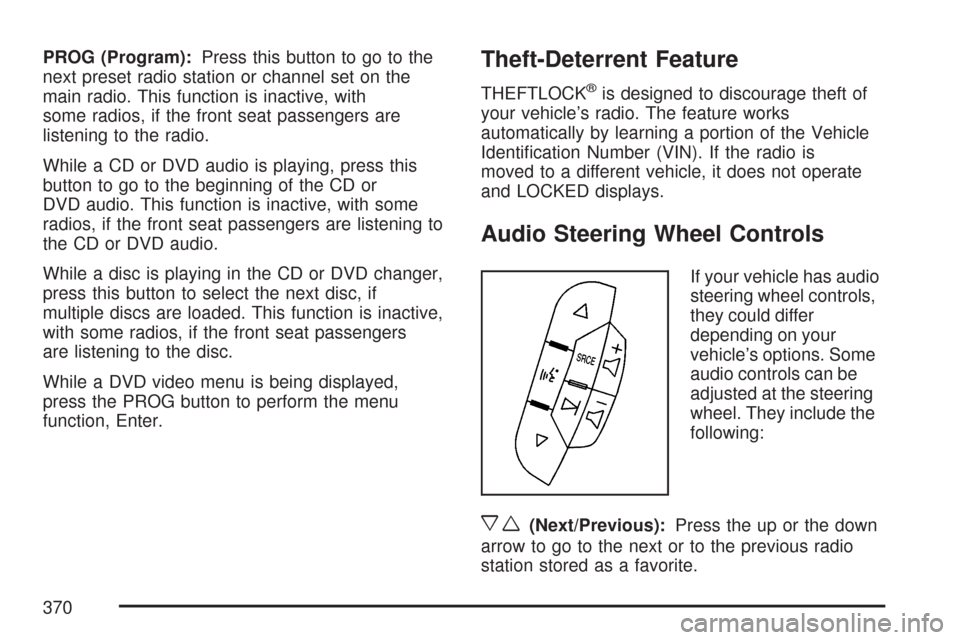
Audio Steering Wheel Controls
If your vehicle has audio
steering wheel controls,
they could differ
depending on your
vehicle’s options. Some
audio controls can be
adjusted at the steering
wheel. They include the
following:
xw(Next/Previous):Press the up or the down
arrow to go to the next or to the previous radio
station stored as a favorite.
370
Page 670 of 684

Appearance Care (cont.)
Weatherstrips........................................... 604
Windshield and Wiper Blades................... 606
Ashtray....................................................... 235
Audio System.............................................. 302
AM-FM Radio.......................................... 306
Audio Steering Wheel Controls................. 370
Care of Your CD and DVD Player............ 373
Care of Your CDs and DVDs................... 372
Fixed Mast Antenna................................. 373
Navigation/Radio System, see
Navigation Manual................................ 357
Radio with CD................................308, 314
Rear Seat Audio (RSA)............................ 368
Setting the Time...................................... 303
Theft-Deterrent Feature............................ 370
Understanding Radio Reception............... 371
XM™ Satellite Radio Antenna System...... 373
Audio System(s)
Radio with CD and DVD.......................... 324
Automatic Headlamp System....................... 225
Automatic Transmission
Fluid........................................................ 510
Operation................................................. 140
Auxiliary Roof Mounted Lamp Switch.......... 227B
Battery........................................................ 533
Electric Power Management..................... 229
Run-Down Protection............................... 230
Before Leaving on a Long Trip.................... 416
Brake
Emergencies............................................ 383
Parking.................................................... 164
Brakes........................................................ 529
System Warning Light.............................. 258
Braking....................................................... 380
Braking in Emergencies............................... 383
Break-In, New Vehicle................................. 134
Bulb Replacement....................................... 545
Center High-Mounted Stoplamp
(CHMSL) and Cargo Lamp................... 547
Halogen Bulbs......................................... 545
Headlamps............................................... 546
License Plate Lamps................................ 550
Pickup Box Identication and Fender
Marker Lamps...................................... 548
Replacement Bulbs.................................. 551
Taillamps, Turn Signal, Stoplamps and
Back-up Lamps..................................... 548
Buying New Tires........................................ 572
670
Page 679 of 684
Passing....................................................... 389
PASS-Key®III+........................................... 131
PASS-Key®III+ Operation........................... 132
Pickup Conversion to Chassis Cab.............. 441
Power
Door Locks.............................................. 121
Electrical System..................................... 611
Lumbar Controls........................................ 11
Retained Accessory (RAP)....................... 136
Seat.......................................................... 10
Sliding Rear Window................................ 128
Steering Fluid.......................................... 526
Windows.................................................. 127
Pretensioners, Safety Belt............................. 45
Privacy........................................................ 659
Programmable Automatic Door Locks.......... 121
Puddle Lamps............................................. 226
Q
Questions and Answers About Safety Belts ... 26
R
Radios........................................................ 302
AM-FM Radio.......................................... 306
Care of Your CD and DVD Player............ 373Radios (cont.)
Care of Your CDs and DVDs................... 372
Navigation/Radio System, see
Navigation Manual................................ 357
Radio with CD................................308, 314
Radio with CD and DVD.......................... 324
Rear Seat Audio...................................... 368
Setting the Time...................................... 303
Theft-Deterrent......................................... 370
Understanding Reception......................... 371
Rainsense™ II Wipers................................. 218
Reading Lamps........................................... 228
Rear Axle.................................................... 540
Locking.................................................... 383
Rear Door Security Locks........................... 122
Rear Doors................................................. 123
Rear Safety Belt Comfort Guides.................. 42
Rear Seat Armrest...................................... 201
Rear Seat Audio (RSA)............................... 368
Rear Seat Entertainment System................. 357
Rear Seat Operation.............................. 20, 21
Rear Seat Passengers, Safety Belts.............. 39
Rearview Mirror, Automatic Dimming with
Compass and Temperature Display.......... 175
Rearview Mirror, Automatic Dimming with
OnStar®, Compass and Temperature
Display..................................................... 171
679