Page 200 of 460

AUTOMATIC LIGHT CONTROL OFF
This message displays when the automatic
headlamps are turned off. SeeExterior Lamps on
page 160for more information.
AUTOMATIC LIGHT CONTROL ON
This message displays when the automatic
headlamps are turned on. SeeExterior Lamps on
page 160for more information.
BATTERY SAVER ACTIVE
This message displays when the system detects
that the battery voltage is dropping beyond a
reasonable level. The battery saver system starts
reducing certain features of the vehicle that
you may be able to notice. At the point that the
features are disabled, this message is displayed.
It means that the vehicle is trying to save the
charge in the battery.Turn off all unnecessary accessories to allow the
battery to recharge.
The normal battery voltage range is
11.5 to 15.5 volts.
CHANGE ENGINE OIL SOON
This message displays when service is required
for the vehicle. See your dealer. SeeEngine Oil on
page 310andScheduled Maintenance on
page 408for more information.
Acknowledging the CHANGE ENGINE OIL SOON
message will not reset the OIL LIFE REMAINING.
That must be done at the OIL LIFE screen
under the vehicle information menu. See “Oil Life”
underDIC Operation and Displays on page 191
andEngine Oil Life System on page 314.
200
Page 202 of 460
ENGINE OIL LOW ADD OIL
This message displays when the vehicle’s engine
oil is low. Fill the oil to the proper level as soon as
possible. SeeEngine Compartment Overview on
page 306for the engine oil ll location. Also, see
Engine Oil on page 310for information on the kind
of oil to use and the proper oil level.
ENGINE OVERHEATED IDLE ENGINE
Notice:If you drive your vehicle while the
engine is overheating, severe engine damage
may occur. If an overheat warning appears
on the instrument panel cluster and/or
DIC, stop the vehicle as soon as possible.
Do not increase the engine speed above
normal idling speed. SeeEngine Overheating
on page 323for more information.
This message displays when the engine coolant
temperature is too hot. Stop and allow the vehicle
to idle until it cools down.
ENGINE OVERHEATED STOP ENGINE
Notice:If you drive your vehicle while the
engine is overheating, severe engine damage
may occur. If an overheat warning appears on
the instrument panel cluster and/or DIC, stop
the vehicle as soon as possible. SeeEngine
Overheating on page 323for more information.
This message displays along with a continuous
chime when the engine has overheated. Stop and
turn the engine off immediately to avoid severe
engine damage. SeeEngine Overheating on
page 323.
ENGINE POWER IS REDUCED
This message displays when the vehicle’s engine
power is reduced. Reduced engine power can
affect the vehicle’s ability to accelerate. If this
message is on, but there is no reduction in
performance, proceed to your destination. The
performance may be reduced the next time the
vehicle is driven. The vehicle may be driven at a
reduced speed while this message is on, but
acceleration and speed may be reduced. Anytime
this message stays on, the vehicle should be taken
to your dealer for service as soon as possible.
202
Page 203 of 460
ERROR
This message displays while viewing the odometer
or trip odometers if there is a problem with the
instrument panel cluster. See your dealer for
service.
FUEL LEVEL LOW
This message displays when your vehicle is low
on fuel. Rell the fuel tank as soon as possible.
SeeFuel Gage on page 190andFilling the Tank
on page 302for more information.
HOOD OPEN
If your vehicle has the remote start feature, this
message displays when the hood is not closed
properly. When this message appears, make sure
that the hood is closed completely. SeeHood
Release on page 305.
ICE POSSIBLE DRIVE WITH CARE
This message displays when the outside air
temperature is cold enough to create icy road
conditions. Adjust your driving accordingly.
LEFT REAR DOOR OPEN
This message displays when the driver’s side rear
door is not closed properly. When this message
appears, make sure that the driver’s side rear door
is closed completely.
OIL PRESSURE LOW STOP ENGINE
Notice:If you drive your vehicle while
the engine oil pressure is low, severe engine
damage may occur. If a low oil pressure
warning appears on the Driver Information
Center (DIC), stop the vehicle as soon as
possible. Do not drive the vehicle until the
cause of the low oil pressure is corrected. See
Engine Oil on page 310for more information.
This message displays when the vehicle’s
engine oil pressure is low. The oil pressure light
also appears on the instrument panel cluster.
SeeOil Pressure Light on page 188.
Stop the vehicle immediately, as engine damage
can result from driving a vehicle with low oil
pressure. Have the vehicle serviced by your dealer
as soon as possible when this message is
displayed.
203
Page 269 of 460
Once you are moving on the freeway, make
certain you allow a reasonable following distance.
Expect to move slightly slower at night.
When you want to leave the freeway, move to the
proper lane well in advance. If you miss your
exit, do not, under any circumstances, stop and
back up. Drive on to the next exit.
The exit ramp can be curved, sometimes quite
sharply. The exit speed is usually posted. Reduce
your speed according to your speedometer, not
to your sense of motion. After driving for any
distance at higher speeds, you may tend to think
you are going slower than you actually are.
Before Leaving on a Long Trip
Make sure you are ready. Try to be well rested.
If you must start when you are not fresh — such as
after a day’s work — do not plan to make too
many miles that rst part of the journey. Wear
comfortable clothing and shoes you can easily
drive in.Is your vehicle ready for a long trip? If you keep it
serviced and maintained, it is ready to go. If it
needs service, have it done before starting out.
Of course, you will nd experienced and able
service experts in GM dealerships all across North
America. They will be ready and willing to help
if you need it.
Here are some things you can check before a trip:
Windshield Washer Fluid:Is the reservoir
full? Are all windows clean inside and outside?
Wiper Blades:Are they in good shape?
Fuel, Engine Oil, Other Fluids:Have you
checked all levels?
Lamps:Are they all working? Are the
lenses clean?
Tires:They are vitally important to a safe,
trouble-free trip. Is the tread good enough
for long-distance driving? Are the tires
all inated to the recommended pressure?
Weather Forecasts:What is the weather
outlook along your route? Should you
delay your trip a short time to avoid a major
storm system?
Maps:Do you have up-to-date maps?
269
Page 307 of 460
A. Windshield Washer Fluid Reservoir. See
“Adding Washer Fluid” underWindshield
Washer Fluid on page 333.
B. Battery. SeeBattery on page 337.
C. Underhood Fuse Block. SeeUnderhood Fuse
Block on page 400.
D. Remote Positive (+) Terminal. SeeJump
Starting on page 338.
E. Coolant Recovery Tank. See “Checking
Coolant” underCooling System on page 326.
F. Pressure Cap. SeePressure Cap on page 323.
G. Power Steering Fluid Cap. SeePower
Steering Fluid on page 332.H. Engine Oil Fill Cap. See “When to Add Engine
Oil” underEngine Oil on page 310.
I. Engine Oil Dipstick. See “Checking Engine Oil”
underEngine Oil on page 310.
J. Automatic Transaxle Fluid Dipstick (Out of
View). See “Checking the Fluid Level” under
Automatic Transaxle Fluid on page 317.
K. Brake Master Cylinder Reservoir. See “Brake
Fluid” underBrakes on page 334.
L. Engine Air Cleaner/Filter. SeeEngine Air
Cleaner/Filter on page 316.
307
Page 309 of 460
A. Windshield Washer Fluid Reservoir. See
“Adding Washer Fluid” underWindshield
Washer Fluid on page 333.
B. Battery. SeeBattery on page 337.
C. Underhood Fuse Block. SeeUnderhood Fuse
Block on page 400.
D. Remote Positive (+) Terminal. SeeJump
Starting on page 338.
E. Pressure Cap. SeePressure Cap on page 323.
F. Power Steering Fluid Cap. SeePower
Steering Fluid on page 332.
G. Engine Oil Dipstick. See “Checking Engine Oil”
underEngine Oil on page 310.H. Engine Oil Fill Cap. See “When to Add Engine
Oil” underEngine Oil on page 310.
I. Automatic Transaxle Fluid Dipstick (Out of
View). See “Checking the Fluid Level” under
Automatic Transaxle Fluid on page 317.
J. Brake Master Cylinder Reservoir. See “Brake
Fluid” underBrakes on page 334.
K. Engine Air Cleaner/Filter. SeeEngine Air
Cleaner/Filter on page 316.
L. Coolant Recovery Tank. See “Checking
Coolant” underCooling System on page 326.
309
Page 310 of 460
Engine Oil
If the ENGINE OIL LOW ADD OIL message
appears in the Driver Information Center (DIC),
check the engine oil level right away. For
more information, seeDIC Warnings and
Messages on page 199. You should check the
engine oil level regularly; this is an added
reminder.
Checking Engine Oil
It is a good idea to check the engine oil every time
you get fuel. In order to get an accurate reading,
the oil must be warm and the vehicle must be
on level ground.The engine oil dipstick handle is a yellow loop.
SeeEngine Compartment Overview on page 306
for the location of the engine oil dipstick.
1. Turn off the engine and give the oil several
minutes to drain back into the oil pan. If you
do not do this, the oil dipstick might not
show the actual level.
2. Pull out the dipstick and clean it with a paper
towel or cloth, then push it back in all the
way. Remove it again, keeping the tip down,
and check the level.
310
Page 311 of 460
When to Add Engine Oil
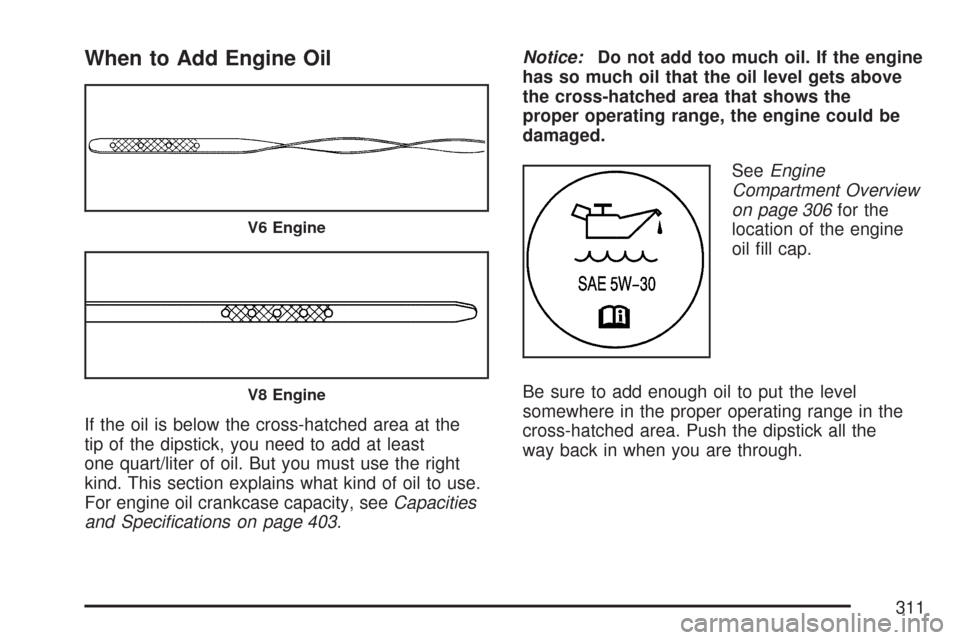
If the oil is below the cross-hatched area at the
tip of the dipstick, you need to add at least
one quart/liter of oil. But you must use the right
kind. This section explains what kind of oil to use.
For engine oil crankcase capacity, seeCapacities
and Specications on page 403.Notice:Do not add too much oil. If the engine
has so much oil that the oil level gets above
the cross-hatched area that shows the
proper operating range, the engine could be
damaged.
SeeEngine
Compartment Overview
on page 306for the
location of the engine
oil ll cap.
Be sure to add enough oil to put the level
somewhere in the proper operating range in the
cross-hatched area. Push the dipstick all the
way back in when you are through.
V6 Engine
V8 Engine
311