Page 130 of 460
OnStar®Virtual Advisor
OnStar®Virtual Advisor is a feature of OnStar®
Hands-Free Calling that uses your minutes to
access location-based weather, local traffic reports,
and stock quotes. By pressing the phone button
and giving a few simple voice commands, you can
browse through the various topics. See the OnStar
®
Owners Guide for more information (Only available
in the continental U.S.).
OnStar®Steering Wheel Controls
Your vehicle may have a Talk/Mute button that
can be used to interact with OnStar®Hands-Free
Calling. SeeAudio Steering Wheel Controls on
page 243for more information.
On some vehicles, you may have to hold the
button for a few seconds and give the command
“ONSTAR” in order to activate the OnStar
®
Hands-Free Calling feature.
On some vehicles, the mute button can be used to
dial numbers into voicemail systems, or to dial
phone extensions. See the OnStar
®Owner’s
Guide for more information.
How OnStar®Service Works
In order to provide you with OnStar®services,
your vehicle’s OnStar®system has the capability
of recording and transmitting vehicle information.
This information is automatically sent to an
OnStar
®Call Center at the time of an OnStar®
button press, Emergency button press or if
your airbags or AACN system deploys. The vehicle
information usually includes your GPS location
and, in the event of a crash, additional information
regarding the accident that your vehicle has
been involved in (e.g. the direction from which
your vehicle was hit). When you use the Virtual
Advisor feature of OnStar
®Hands-Free Calling,
your vehicle also sends OnStar®your GPS
location so that we can provide you with
location-based services.
130
Page 148 of 460
Tire Pressure Light.................................... 184
Malfunction Indicator Lamp........................ 185
Oil Pressure Light..................................... 188
Security Light............................................ 189
Fog Lamp Light......................................... 189
Cruise Control Light.................................. 189
Highbeam On Light................................... 189
Fuel Gage................................................. 190
Driver Information Center (DIC).................. 190
DIC Operation and Displays...................... 191
DIC Compass............................................ 197
DIC Warnings and Messages.................... 199
DIC Vehicle Customization........................ 208Audio System(s)......................................... 215
Setting the Time........................................ 216
Radio with CD (Base)............................... 219
Radio with CD (MP3)................................ 225
Using an MP3........................................... 236
XM Radio Messages................................. 241
Theft-Deterrent Feature............................. 243
Audio Steering Wheel Controls.................. 243
Radio Reception........................................ 244
Care of Your CDs..................................... 245
Care of the CD Player.............................. 245
Backglass Antenna.................................... 246
XM™ Satellite Radio Antenna System....... 246
Section 3 Instrument Panel
148
Page 151 of 460
The main components of your instrument panel are listed here:
A. Air Vent. SeeOutlet Adjustment on page 172.
B. Remote Trunk Release Button. See “Remote
Trunk Release” underTrunk on page 102.
C. Multifunction Lever. SeeTurn
Signal/Multifunction Lever on page 153.
D. Instrument Panel Cluster. SeeInstrument Panel
Cluster on page 175.
E. Hazard Warning Flasher Button. SeeHazard
Warning Flashers on page 152.
F. Driver Information Center. SeeDriver
Information Center (DIC) on page 190.
G. Passenger Air Bag status Indicator. See
Passenger Airbag Status Indicator on page 179.
H. Audio System. SeeAudio System(s) on
page 215.
I. Exterior Lamps Control. SeeExterior Lamps on
page 160.
J. Instrument Panel Brightness. SeeInstrument
Panel Brightness on page 163.
K. Traction Control On/Off Button (If Equipped).
SeeTraction Control System (TCS) on
page 256.L. Tilt Steering Wheel Lever. SeeTilt Wheel on
page 153.
M. Steering Wheel Cruise Control. SeeCruise
Control on page 157.
N. Hood Release. SeeHood Release on
page 305.
O. Horn. SeeHorn on page 152.
P. Audio Steering Wheel Controls (If Equipped).
SeeAudio Steering Wheel Controls on
page 243.
Q. Ignition Switch. SeeIgnition Positions on
page 112.
R. Climate Controls. SeeClimate Control System
on page 168.
S. Accessory Power Outlets. SeeAccessory
Power Outlet(s) on page 167.
T. Center Console Shift Lever (If Equipped).
See “Console Shift Lever” underShifting Into
Park (P) on page 121.
U. Glove Box. SeeGlove Box on page 144.
151
Page 152 of 460
Hazard Warning Flashers
The hazard warning ashers let you warn others.
They also let police know you have a problem.
The front and rear turn signal lamps will ash on
and off.
The hazard warning
asher button is located
on top of the steering
column.
The hazard warning ashers work no matter what
position the key is in, and even if the key is not
in the ignition.Press the button to make the front and rear turn
signal lamps ash on and off. Press the button
again to turn the ashers off.
When the hazard warning ashers are on, the turn
signals will not work.
Other Warning Devices
If you carry reective triangles, you can set them
up at the side of the road about 300 feet (100 m)
behind your vehicle.
Horn
Press near or on the horn symbols on the steering
wheel pad to sound the horn.
152
Page 153 of 460
Tilt Wheel
A tilt wheel allows you to adjust the steering wheel
before you drive. The steering wheel can be
raised to the highest level to give your legs more
room when you enter and exit the vehicle.
The tilt wheel lever is located on the left side of
the steering column.
To tilt the wheel, hold the wheel and pull the lever.
Then move the wheel to a comfortable position
and release the lever to lock the wheel in place.
Turn Signal/Multifunction Lever
The lever on the left side of the steering column
includes the following:
GTurn and Lane Change Signals. See
Turn and Lane-Change Signals on page 154.
2Headlamp High/Low-Beam Changer.
SeeHeadlamp High/Low-Beam Changer on
page 155.
Flash-to-Pass. SeeFlash-to-Pass on page 155.
NWindshield Wipers. SeeWindshield Wipers
on page 155.
LQWindshield Washer. SeeWindshield
Washer on page 156.
For information on the headlamps, seeExterior
Lamps on page 160.
153
Page 158 of 460
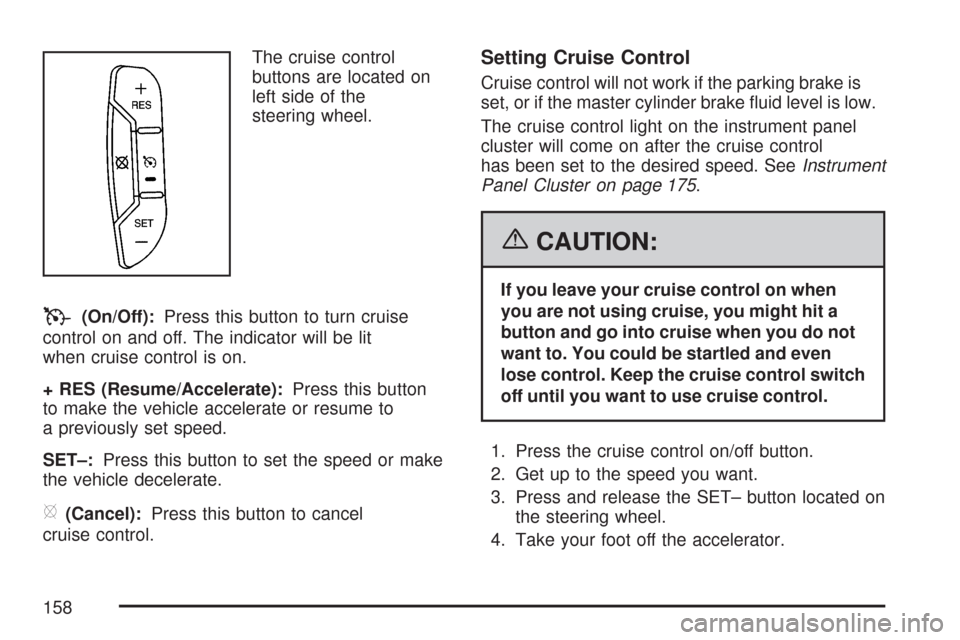
The cruise control
buttons are located on
left side of the
steering wheel.
T(On/Off):Press this button to turn cruise
control on and off. The indicator will be lit
when cruise control is on.
+ RES (Resume/Accelerate):Press this button
to make the vehicle accelerate or resume to
a previously set speed.
SET–:Press this button to set the speed or make
the vehicle decelerate.
[(Cancel):Press this button to cancel
cruise control.
Setting Cruise Control
Cruise control will not work if the parking brake is
set, or if the master cylinder brake uid level is low.
The cruise control light on the instrument panel
cluster will come on after the cruise control
has been set to the desired speed. SeeInstrument
Panel Cluster on page 175.
{CAUTION:
If you leave your cruise control on when
you are not using cruise, you might hit a
button and go into cruise when you do not
want to. You could be startled and even
lose control. Keep the cruise control switch
off until you want to use cruise control.
1. Press the cruise control on/off button.
2. Get up to the speed you want.
3. Press and release the SET– button located on
the steering wheel.
4. Take your foot off the accelerator.
158
Page 159 of 460
Resuming a Set Speed
Suppose you set the cruise control at a desired
speed and then you apply the brake. This shuts
off the cruise control, but it does not need to
be reset.
Once you are driving about 25 mph (40 km/h) or
more, press the +RES button on the steering
wheel. The vehicle will go back to your chosen
speed and stay there.
Increasing Speed While Using
Cruise Control
To increase the cruise speed while using cruise
control:
Press and hold the +RES button on the
steering wheel until you reach your new
desired speed, then release it.
To increase vehicle speed in small increments,
press the +RES button.
Reducing Speed While Using
Cruise Control
To reduce your speed while using cruise control:
Press and hold the SET– button on the
steering wheel until you reach the lower speed
you want, then release it.
To slow down in very small amounts, press
the SET– button on the steering wheel
briey. Each time this is done, you will go
about 1 mph (1.6 km/h) slower.
Passing Another Vehicle While Using
Cruise Control
Use the accelerator pedal to increase vehicle
speed. When you take your foot off the pedal, the
vehicle will slow down to the cruise speed you
set earlier.
159
Page 160 of 460

Using Cruise Control on Hills
How well the cruise control will work on hills
depends upon the vehicle speed, load and the
steepness of the hills. When going up steep hills,
you may have to step on the accelerator pedal
to maintain your speed. When going downhill, you
may have to brake or shift to a lower gear to
keep your speed down. Of course, applying the
brake ends the cruise control. Many drivers
nd this to be too much trouble and do not use
cruise control on steep hills.
Ending Cruise Control
There are three ways to end cruise control:
Step lightly on the brake pedal.
Press the[(cancel) button on the
steering wheel.
Press theT(on/off) button on the
steering wheel.
Erasing Speed Memory
The cruise control set speed memory is erased by
turning off the cruise control or the ignition.
Exterior Lamps
The exterior lamps
control is located on
the instrument panel
to the left of the
steering wheel.
It controls the following systems:
Headlamps
Taillamps
Parking Lamps
License Plate Lamps
Instrument Panel Lights
Fog Lamps (if equipped)
160