Page 157 of 458
Instrument Panel Brightness
Press this knob located
next to the exterior
lamps knob to extend it,
and then turn it to
adjust the instrument
panel brightness.
Turn the knob all the way clockwise to turn on the
interior lamps. Press the knob back into its
stored position when not in use.
Dome Lamps
The dome lamps will automatically come on when
a door is opened and turn off shortly after all
doors are closed.
Dome Lamp Override
You can use the dome
lamp override button,
located below the
exterior lamp control, to
override the automatic
operation of the
dome lamps.
To turn the automatic operation of the lamps off,
press the button. The dome lamps will remain
off while a door is open. To return the lamps to
automatic operation, press the button again.
While pressed in, this will override the illuminated
entry feature unless you use your keyless entry
transmitter to unlock the vehicle.
157
Page 261 of 458
Loading Your Vehicle
It is very important to know how much weight your
vehicle can carry. This weight is called the vehicle
capacity weight and includes the weight of all
occupants, cargo, and all nonfactory-installed
options. Two labels on your vehicle show how
much weight it was designed to carry, the Tire and
Loading Information label and the Certification/
Tire label.
{CAUTION:
Do not load your vehicle any heavier than
the Gross Vehicle Weight Rating (GVWR),
or either the maximum front or rear Gross
Axle Weight Rating (GAWR). If you do,
parts on your vehicle can break, and it
can change the way your vehicle handles.
These could cause you to lose control
and crash. Also, overloading can shorten
the life of your vehicle.
Tire and Loading Information Label
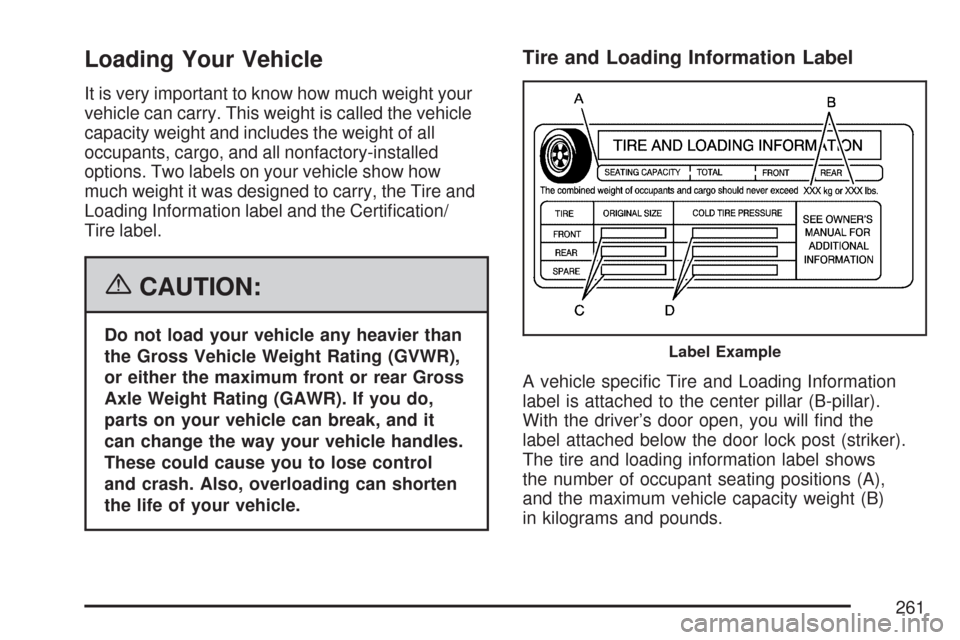
A vehicle specific Tire and Loading Information
label is attached to the center pillar (B-pillar).
With the driver’s door open, you will find the
label attached below the door lock post (striker).
The tire and loading information label shows
the number of occupant seating positions (A),
and the maximum vehicle capacity weight (B)
in kilograms and pounds.
Label Example
261
Page 297 of 458
Filling the Tank
{CAUTION:
Fuel vapor burns violently and a fuel re
can cause bad injuries. To help avoid
injuries to you and others, read and follow
all the instructions on the pump island.
Turn off your engine when you are
refueling. Do not smoke if you are near
fuel or refueling your vehicle. Do not use
cellular phones. Keep sparks, ames, and
smoking materials away from fuel. Do not
leave the fuel pump unattended when
refueling your vehicle. This is against the
law in some places. Do not re-enter the
vehicle while pumping fuel. Keep children
away from the fuel pump; never let
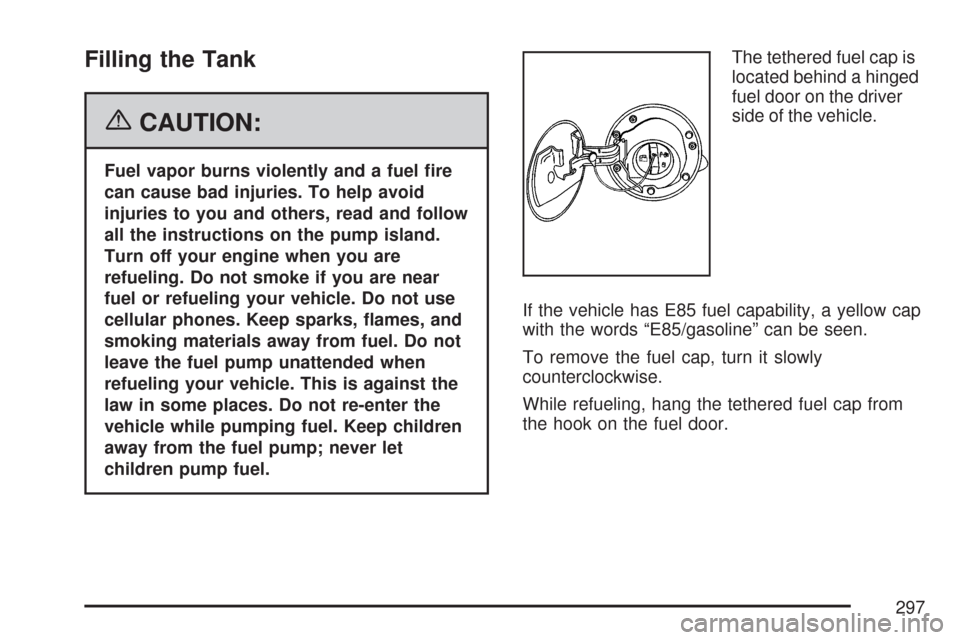
children pump fuel.The tethered fuel cap is
located behind a hinged
fuel door on the driver
side of the vehicle.
If the vehicle has E85 fuel capability, a yellow cap
with the words “E85/gasoline” can be seen.
To remove the fuel cap, turn it slowly
counterclockwise.
While refueling, hang the tethered fuel cap from
the hook on the fuel door.
297
Page 342 of 458
Front Turn Signal, Sidemarker and
Parking Lamps
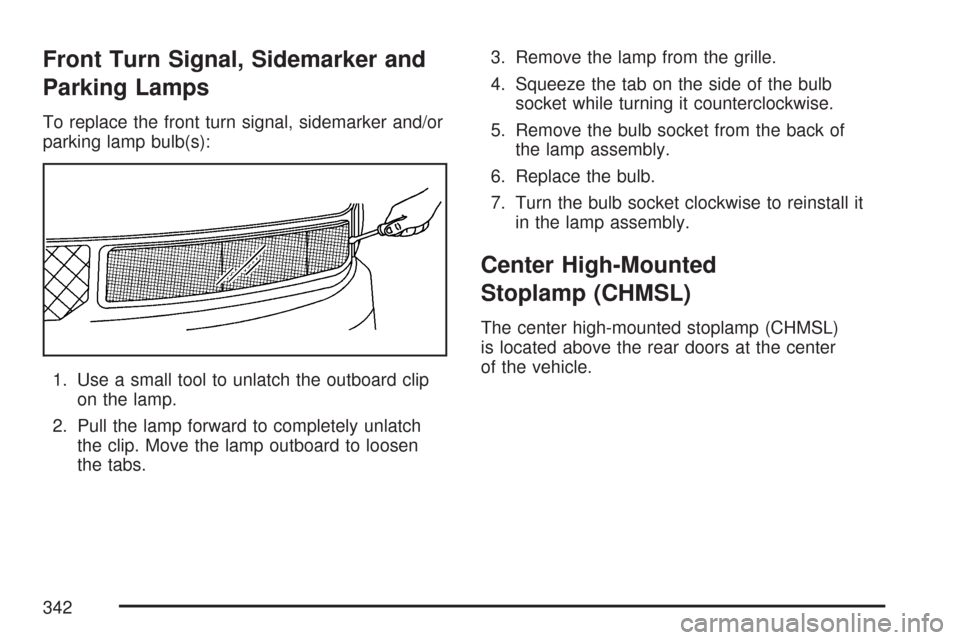
To replace the front turn signal, sidemarker and/or
parking lamp bulb(s):
1. Use a small tool to unlatch the outboard clip
on the lamp.
2. Pull the lamp forward to completely unlatch
the clip. Move the lamp outboard to loosen
the tabs.3. Remove the lamp from the grille.
4. Squeeze the tab on the side of the bulb
socket while turning it counterclockwise.
5. Remove the bulb socket from the back of
the lamp assembly.
6. Replace the bulb.
7. Turn the bulb socket clockwise to reinstall it
in the lamp assembly.
Center High-Mounted
Stoplamp (CHMSL)
The center high-mounted stoplamp (CHMSL)
is located above the rear doors at the center
of the vehicle.
342
Page 394 of 458
Floor Console Fuse Block
The floor console fuse block is located under the
driver’s seat.
Fuse Usage
1 Spare
2 Outside Rear View Mirror
3 Courtesy Lamp/SEO
Fuse Usage
4 Left Rear Stop/Turn Signal
5 Cargo Locks
6 Right Rear Stop/Turn Signal
7 Driver Locks
8Stop/Center High Mounted
Stop Lamp
9 Climate Control 1
10 Climate Control
11 Brakes
12 Heated Mirror/Defogger
13 Right Rear Blower
14 Driver Turn Mirror
15 Door Locks
16 Upfitter Park
17 Not Available
18 Left Rear Park Lamp
19 Pass Turn Mirror
20 Right Rear Park Lamp
394
Page 395 of 458
Fuse Usage
21 Trailer Park Lamp
22 Front Park Lamp
32 Auxiliary 1
33 Auxiliary 2
Relays Usage
23 Window Retained Accessory Power
24 Auxiliary
25 Rear Window Defogger
26 Courtesy Lamp
27 Cargo Unlock
28 Driver Unlock
29 Park Lamp
30 Door Locks
31 Passenger Unlock
Circuit Breaker Usage
34 Power Window
Engine Compartment Fuse Block
The fuse block is located in the engine
compartment on the driver’s side of the vehicle.
Fuse Usage
1 Radio Battery
2Powertrain Control Module
Battery (Gas), FOH, Engine Control
Module, Transmission Control
Module Battery (Diesel)
3 Left Rear Turn Lamp
4 Right Rear Turn Lamp
395
Page 410 of 458

(c)Visually inspect hoses and have them replaced
if they are cracked, swollen, or deteriorated.
Inspect all pipes, ttings, and clamps; replace with
genuine parts as needed. To help ensure proper
operation, a pressure test of the cooling system
and pressure cap and cleaning the outside of the
radiator and air conditioning condenser is
recommended at least once a year.
(d)Inspect wiper blades for wear, cracking,
or contamination. Clean the windshield and wiper
blades, if contaminated. Replace wiper blades
that are worn or damaged. See Windshield Wiper
Blade Replacement on page 344 and Windshield
and Wiper Blades on page 387 for more
information.
(e)Make sure the safety belt reminder light and
all belts, buckles, latch plates, retractors, and
anchorages are working properly. Look for
any other loose or damaged safety belt system
parts. If you see anything that might keep a safety
belt system from doing its job, have it repaired.
Have any torn or frayed safety belts replaced.
Also look for any opened or broken airbag
coverings, and have them repaired or replaced.
The airbag system does not need regular
maintenance.(f)Lubricate all key lock cylinders, hood hinges,
hood prop rod pivot, hood latch assembly,
secondary latch, pivots, spring anchor, release
pawl, rear compartment hinges, latches, locks, fuel
door hinge, and any moving seat hardware. More
frequent lubrication may be required when exposed
to a corrosive environment. Applying silicone grease
on weatherstrips with a clean cloth will make them
last longer, seal better, and not stick or squeak.
(g)Vehicles with Gross Vehicle Weight Rating
(GVWR) above 10,000 lbs (4 536 kg) only: Inspect
shields for damage or looseness. Adjust or
replace as required. This is a Noise Emission
Control Service. Applicable to vehicles sold in the
United States and recommended for vehicles
sold in Canada.
(h)Change automatic transmission uid and lter
if the vehicle is mainly driven under one or
more of these conditions:
-In heavy city traffic where the outside
temperature regularly reaches 90°F (32°C)
or higher.
-In hilly or mountainous terrain.
-When doing frequent trailer towing.
-Uses such as found in taxi, police,
or delivery service.
410
Page 443 of 458
OnStar
If your vehicle has OnStar®and you subscribe
to the OnStar®services, please refer to the
OnStar®Terms and Conditions for information
on data collection and use.
Navigation System
If your vehicle has anavigation system,
use of the system may result in the storage of
destinations, addresses, telephone numbers,
and other trip information.Please refer to
the navigation system operating manual for
information on stored data and for deletion
instructions.
Radio Frequency
Identication (RFID)
RFIDtechnology is used in some vehicles for
functions such as tire pressure monitoring
and ignition system security, as well as in
connection with conveniences such as key fobs
for remote door locking/unlocking and starting,
and in-vehicle transmitters for garage door
openers. RFID technology in GM vehicles does
not use or record personal information or link
with any other GM system containing personal
information.
443