2007 CHEVROLET EQUINOX air conditioning
[x] Cancel search: air conditioningPage 167 of 492
#(Air Conditioning):Press this button to turn
the air conditioning system on or off. When
this button is pressed, an indicator light on the
button will come on to let you know the air
conditioning is activated. The air conditioning can
be selected in any mode as long as the fan
switch is on.
On hot days, open the windows to let hot inside
air escape; then close them. This helps to reduce
the time it takes for the vehicle to cool down. It
also helps the system to operate more efficiently.
For quick cool down on hot days, do the
following:
1. Select the vent mode.
2. Select the outside air.
3. Select air conditioning.
4. Select the coolest temperature.
5. Select the highest fan speed.
6. Once the vehicle’s interior temperature is
below the outside temperature, select
recirculation mode for enhanced cooling.Using these settings together for long periods
of time may cause the air inside of the vehicle to
become too dry. To prevent this from happening,
after the air inside of the vehicle has cooled,
turn the recirculation mode off.
The air conditioning system removes moisture
from the air, so you may sometimes notice a small
amount of water dripping underneath the vehicle
while idling or after turning off the engine. This
is normal.
((Heated Seats):If your vehicle has heated
seats, seeHeated Seats on page 10.
167
Page 168 of 492
Defogging and Defrosting
Fog or frost on the inside of windows is a result of
high humidity (moisture) condensing on the cool
window glass. This can be minimized if the climate
control system is used properly. To avoid fogging
windows on rainy and humid days at temperatures
above freezing, turn on the air conditioning
system. Also, it is best to avoid the use of the
recirculation mode, except when maximum
A/C performance is needed or for short times to
avoid exterior odors.
Use the defog mode to clear the windows of fog or
moisture and warm the passengers. Use the defrost
mode to remove fog or frost from the windshield
more quickly. When you select either of these
modes, or the oor mode which also helps defog
the windows slightly, the system runs the air
conditioning compressor and cancels recirculation
mode to dry the air; however, the recirculation light
will stay on. For best results, clear all snow and ice
from the windshield before defrosting.Turn the right knob to select the defog or
defrost mode.-(Defog):This mode directs half of the air to
the windshield and the side window outlets,
and half to the oor outlets.
0(Defrost):This mode directs most of the air to
the windshield and the side window outlets, with
some air directed to the oor outlets.
Rear Window Defogger
The rear window defogger uses a warming grid to
remove fog from the rear window.
The rear window defogger will only work when the
ignition is in RUN.
<(Rear):Press this button to turn the rear
window defogger on or off. An indicator light on
the button will come on to let you know that
the rear window defogger is activated.
The rear window defogger will only work when
the ignition is in RUN. The rear window defogger
will stay on for about 10 minutes after the
button is pressed, unless the ignition is turned to
168
Page 200 of 492
CHECK TIRE PRESSURE
This message displays when the tire pressure
in one of the tires needs to be checked. This
message also displays LEFT FRONT, RIGHT
FRONT, LEFT REAR, or RIGHT REAR to indicate
which tire needs to be checked. You can receive
more than one tire pressure message at a time.
To read the other messages that may have
been sent at the same time, press the set/reset
button. If a tire pressure message appears on
the DIC, stop as soon as you can. Have the tire
pressures checked and set to those shown on
the Tire Loading Information label. SeeTires on
page 382,Loading Your Vehicle on page 315, and
Ination - Tire Pressure on page 390. The DIC
display also shows the tire pressure values for
the front and rear tires by pressing the vehicle
information button. SeeDIC Operation and
Displays on page 193. If the tire pressure is low,
the low tire pressure warning light comes on.
SeeTire Pressure Light on page 182.
DRIVER DOOR OPEN
This message displays when the driver’s door is
not closed properly. When this message appears,
make sure that the driver’s door is closed
completely.
ENGINE HOT A/C
(Air Conditioning) OFF
This message displays when the engine coolant
becomes hotter than the normal operating
temperature. To avoid added strain on a hot
engine, the air conditioning compressor is
automatically turned off. When the coolant
temperature returns to normal, the A/C operation
automatically resumes. You can continue to
drive your vehicle.
200
Page 203 of 492
PASSENGER DOOR
FRONT/REAR OPEN
This message displays when one or more of the
passenger’s doors are not closed properly.
When this message appears, make sure that all
passenger doors are closed completely.
REMOTE KEY LEARNING ACTIVE
This message displays while you are matching
a Remote Keyless Entry (RKE) transmitter to
your vehicle. See “LEARN REMOTE KEY” under
DIC Operation and Displays on page 193for
more information.
SERVICE A/C (Air Conditioning)
SYSTEM
This message displays when there is a problem
detected in the air conditioning system. Have
the vehicle serviced by your dealer.
SERVICE AIR BAG
This message displays when there is a problem
with the airbag system. Have your vehicle serviced
by your dealer immediately. SeeAirbag Readiness
Light on page 174for more information.
SERVICE ALL WHEEL DRIVE
If your vehicle has the All-Wheel Drive (AWD)
system, this message displays along with
the service all-wheel drive light if a problem occurs
with this system. SeeService All-Wheel Drive
Light on page 189. If this message appears, stop
as soon as possible and turn off the vehicle.
Restart the vehicle and check for the message on
the DIC display. If the message is still displayed
or appears again when you begin driving, the AWD
system needs service. See your dealer.
SERVICE BATTERY CHARGING
SYSTEM
This message displays when there is a problem
with the generator and battery charging systems.
Driving with this problem could drain the
vehicle’s battery. Turn off all unnecessary
accessories. Stop and turn off the vehicle as soon
as it is safe to do so. Have the electrical system
checked by your dealer immediately.
Connecting a battery charger to your vehicle while
the ignition is in any position other than LOCK
may cause this message to appear. If you need to
charge your vehicle, make sure that the key is
in LOCK or out of the ignition during charging.
203
Page 387 of 492
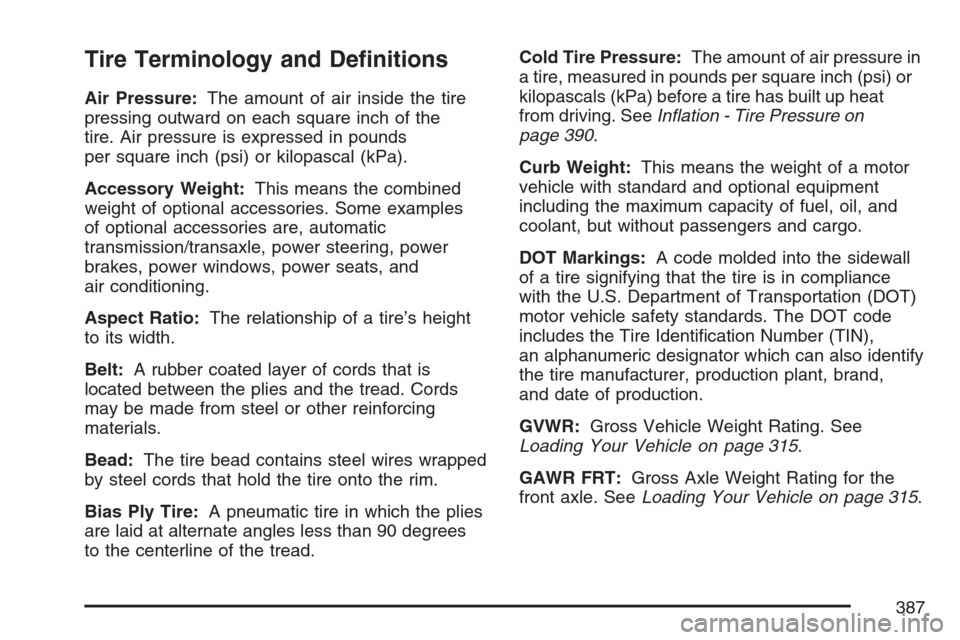
Tire Terminology and Denitions
Air Pressure:The amount of air inside the tire
pressing outward on each square inch of the
tire. Air pressure is expressed in pounds
per square inch (psi) or kilopascal (kPa).
Accessory Weight:This means the combined
weight of optional accessories. Some examples
of optional accessories are, automatic
transmission/transaxle, power steering, power
brakes, power windows, power seats, and
air conditioning.
Aspect Ratio:The relationship of a tire’s height
to its width.
Belt:A rubber coated layer of cords that is
located between the plies and the tread. Cords
may be made from steel or other reinforcing
materials.
Bead:The tire bead contains steel wires wrapped
by steel cords that hold the tire onto the rim.
Bias Ply Tire:A pneumatic tire in which the plies
are laid at alternate angles less than 90 degrees
to the centerline of the tread.Cold Tire Pressure:The amount of air pressure in
a tire, measured in pounds per square inch (psi) or
kilopascals (kPa) before a tire has built up heat
from driving. SeeInation - Tire Pressure on
page 390.
Curb Weight:This means the weight of a motor
vehicle with standard and optional equipment
including the maximum capacity of fuel, oil, and
coolant, but without passengers and cargo.
DOT Markings:A code molded into the sidewall
of a tire signifying that the tire is in compliance
with the U.S. Department of Transportation (DOT)
motor vehicle safety standards. The DOT code
includes the Tire Identication Number (TIN),
an alphanumeric designator which can also identify
the tire manufacturer, production plant, brand,
and date of production.
GVWR:Gross Vehicle Weight Rating. See
Loading Your Vehicle on page 315.
GAWR FRT:Gross Axle Weight Rating for the
front axle. SeeLoading Your Vehicle on page 315.
387
Page 432 of 492
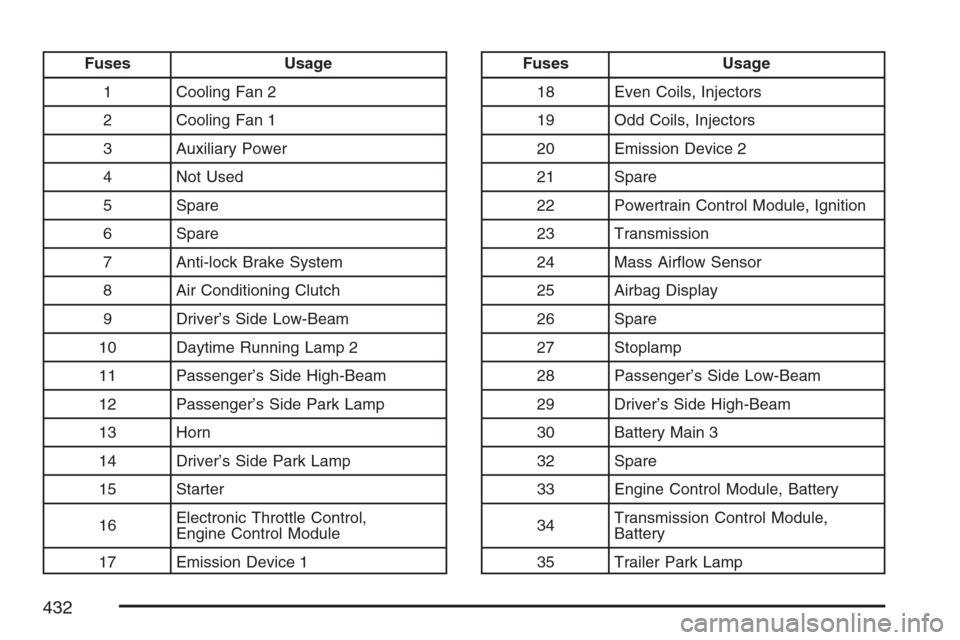
Fuses Usage
1 Cooling Fan 2
2 Cooling Fan 1
3 Auxiliary Power
4 Not Used
5 Spare
6 Spare
7 Anti-lock Brake System
8 Air Conditioning Clutch
9 Driver’s Side Low-Beam
10 Daytime Running Lamp 2
11 Passenger’s Side High-Beam
12 Passenger’s Side Park Lamp
13 Horn
14 Driver’s Side Park Lamp
15 Starter
16Electronic Throttle Control,
Engine Control Module
17 Emission Device 1Fuses Usage
18 Even Coils, Injectors
19 Odd Coils, Injectors
20 Emission Device 2
21 Spare
22 Powertrain Control Module, Ignition
23 Transmission
24 Mass Airow Sensor
25 Airbag Display
26 Spare
27 Stoplamp
28 Passenger’s Side Low-Beam
29 Driver’s Side High-Beam
30 Battery Main 3
32 Spare
33 Engine Control Module, Battery
34Transmission Control Module,
Battery
35 Trailer Park Lamp
432
Page 433 of 492
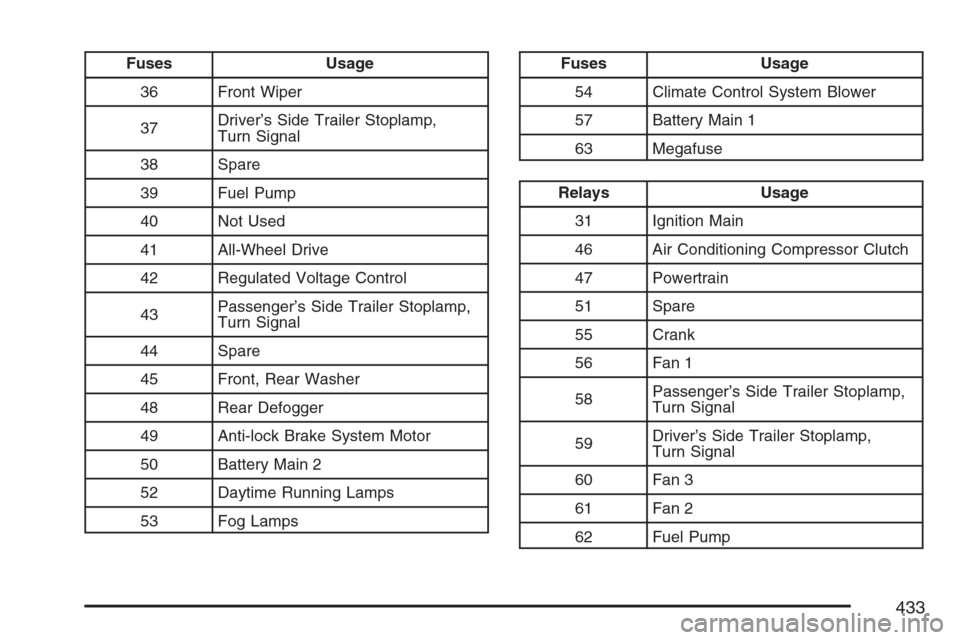
Fuses Usage
36 Front Wiper
37Driver’s Side Trailer Stoplamp,
Turn Signal
38 Spare
39 Fuel Pump
40 Not Used
41 All-Wheel Drive
42 Regulated Voltage Control
43Passenger’s Side Trailer Stoplamp,
Turn Signal
44 Spare
45 Front, Rear Washer
48 Rear Defogger
49 Anti-lock Brake System Motor
50 Battery Main 2
52 Daytime Running Lamps
53 Fog LampsFuses Usage
54 Climate Control System Blower
57 Battery Main 1
63 Megafuse
Relays Usage
31 Ignition Main
46 Air Conditioning Compressor Clutch
47 Powertrain
51 Spare
55 Crank
56 Fan 1
58Passenger’s Side Trailer Stoplamp,
Turn Signal
59Driver’s Side Trailer Stoplamp,
Turn Signal
60 Fan 3
61 Fan 2
62 Fuel Pump
433
Page 434 of 492
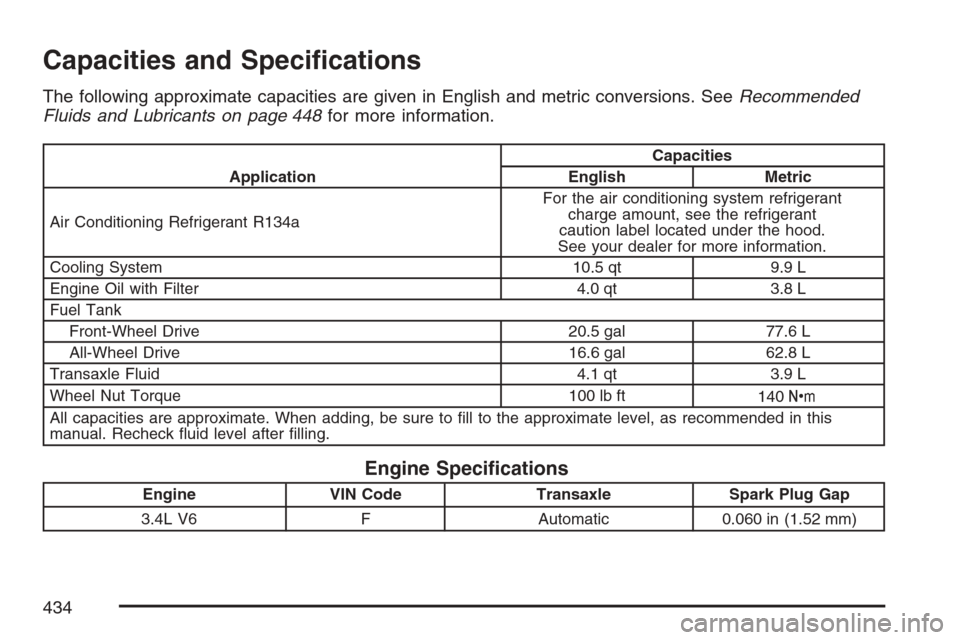
Capacities and Specications
The following approximate capacities are given in English and metric conversions. SeeRecommended
Fluids and Lubricants on page 448for more information.
ApplicationCapacities
English Metric
Air Conditioning Refrigerant R134aFor the air conditioning system refrigerant
charge amount, see the refrigerant
caution label located under the hood.
See your dealer for more information.
Cooling System 10.5 qt 9.9 L
Engine Oil with Filter 4.0 qt 3.8 L
Fuel Tank
Front-Wheel Drive 20.5 gal 77.6 L
All-Wheel Drive 16.6 gal 62.8 L
Transaxle Fluid 4.1 qt 3.9 L
Wheel Nut Torque 100 lb ft
140Y
All capacities are approximate. When adding, be sure to ll to the approximate level, as recommended in this
manual. Recheck uid level after lling.
Engine Specications
Engine VIN Code Transaxle Spark Plug Gap
3.4L V6 F Automatic 0.060 in (1.52 mm)
434