2007 CHEVROLET COBALT engine oil
[x] Cancel search: engine oilPage 187 of 450

To change feature settings, use the following
procedure:
Entering Personalization Menu
1. Turn the ignition on while the vehicle is
stopped.
To avoid excessive drain on the battery,
it is recommended that the headlamps are
turned off.
2. Press and hold the information and reset
buttons at the same time for one second, then
release to enter the personalization menu.
If the vehicle speed is greater than
2 mph (3 km/h), only the UNITS menu
will be accessible.
3. Press the information button to scroll through
the available personalization menu modes.
Press the reset button to scroll through
the available settings for each mode.
If you do not make a selection within
ten seconds, the display will go back to
the previous information displayed.
Personalization Menu Modes
OIL LIFE RESET
When this feature is displayed, you can reset
the engine oil life system. To reset the system,
seeEngine Oil Life System on page 298.
See “OIL LIFE” underDIC Operation and
Displays on page 181for more information.
UNITS
This feature allows you to select the units of
measurement in which the DIC will display the
vehicle information. When UNITS appears on the
display, press and hold the reset button for at
least one second to scroll through the available
settings:
ENGLISH (default in United States):All
information will be displayed in English units.
METRIC (default in Canada):All information will
be displayed in metric units.
Choose one of the available settings and press
the information button to select it and move on to
the next feature.
187
Page 251 of 450

Here are some things you can check before a trip:
Windshield Washer Fluid:Is the reservoir
full? Are all windows clean inside and outside?
Wiper Blades:Are they in good shape?
Fuel, Engine Oil, Other Fluids:Have you
checked all levels?
Lamps:Are they all working? Are the
lenses clean?
Tires:They are vitally important to a safe,
trouble-free trip. Is the tread good enough
for long-distance driving? Are the tires
all inated to the recommended pressure?
Weather Forecasts:What is the weather
outlook along your route? Should you
delay your trip a short time to avoid a major
storm system?
Maps:Do you have up-to-date maps?
Highway Hypnosis
Is there actually such a condition as highway
hypnosis? Or is it just plain falling asleep at the
wheel? Call it highway hypnosis, lack of
awareness, or whatever.
There is something about an easy stretch of road
with the same scenery, along with the hum of the
tires on the road, the drone of the engine, and the
rush of the wind against the vehicle that can make
you sleepy. Do not let it happen to you! If it does,
your vehicle can leave the road in less than a
second, and you could crash and be injured.
What can you do about highway hypnosis?
First, be aware that it can happen.
Then here are some tips:
Make sure your vehicle is well ventilated,
with a comfortably cool interior.
Keep your eyes moving. Scan the road ahead
and to the sides. Check your rearview mirrors
and your instruments frequently.
If you get sleepy, pull off the road into a rest,
service, or parking area and take a nap, get
some exercise, or both. For safety, treat
drowsiness on the highway as an emergency.
251
Page 276 of 450

When You Are Ready to Leave After
Parking on a Hill
1. Apply your regular brakes and hold the pedal
down while you:
Start your engine.
Shift into a gear.
Release the parking brake.
2. Let up on the brake pedal.
3. Drive slowly until the trailer is clear of the
chocks.
4. Stop and have someone pick up and store
the chocks.
Maintenance When Trailer Towing
Your vehicle will need service more often when
you are pulling a trailer. SeeScheduled
Maintenance on page 396for more on this.
Things that are especially important in trailer
operation are transaxle uid (do not overll),
engine oil, drive belt, cooling system and brake
system.
Each of these is covered in this manual, and the
Index will help you nd them quickly. If you
are trailering, it is a good idea to review this
information before you start your trip.
Check periodically to see that all hitch nuts and
bolts are tight.
Engine Cooling When Trailer Towing
Your cooling system may temporarily overheat
during severe operating conditions. SeeEngine
Overheating on page 309.
276
Page 277 of 450
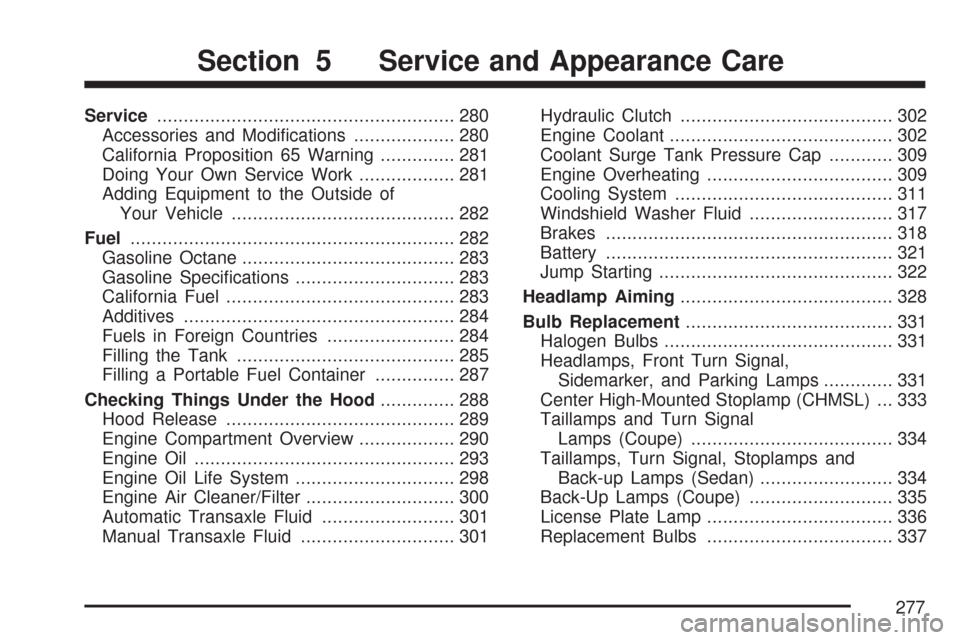
Service........................................................ 280
Accessories and Modications................... 280
California Proposition 65 Warning.............. 281
Doing Your Own Service Work.................. 281
Adding Equipment to the Outside of
Your Vehicle.......................................... 282
Fuel............................................................. 282
Gasoline Octane........................................ 283
Gasoline Specications.............................. 283
California Fuel........................................... 283
Additives................................................... 284
Fuels in Foreign Countries........................ 284
Filling the Tank......................................... 285
Filling a Portable Fuel Container............... 287
Checking Things Under the Hood.............. 288
Hood Release........................................... 289
Engine Compartment Overview.................. 290
Engine Oil................................................. 293
Engine Oil Life System.............................. 298
Engine Air Cleaner/Filter............................ 300
Automatic Transaxle Fluid......................... 301
Manual Transaxle Fluid............................. 301Hydraulic Clutch........................................ 302
Engine Coolant.......................................... 302
Coolant Surge Tank Pressure Cap............ 309
Engine Overheating................................... 309
Cooling System......................................... 311
Windshield Washer Fluid........................... 317
Brakes...................................................... 318
Battery...................................................... 321
Jump Starting............................................ 322
Headlamp Aiming........................................ 328
Bulb Replacement....................................... 331
Halogen Bulbs........................................... 331
Headlamps, Front Turn Signal,
Sidemarker, and Parking Lamps............. 331
Center High-Mounted Stoplamp (CHMSL) ... 333
Taillamps and Turn Signal
Lamps (Coupe)...................................... 334
Taillamps, Turn Signal, Stoplamps and
Back-up Lamps (Sedan)......................... 334
Back-Up Lamps (Coupe)........................... 335
License Plate Lamp................................... 336
Replacement Bulbs................................... 337
Section 5 Service and Appearance Care
277
Page 284 of 450

Additives
To provide cleaner air, all gasolines in the
United States are now required to contain additives
that will help prevent engine and fuel system
deposits from forming, allowing your emission
control system to work properly. In most cases,
you should not have to add anything to your fuel.
However, some gasolines contain only the
minimum amount of additive required to meet
U.S. Environmental Protection Agency regulations.
To help keep fuel injectors and intake valves clean,
or if your vehicle experiences problems due to
dirty injectors or valves, look for gasoline that is
advertised as TOP TIER Detergent Gasoline. Also,
your dealer has additives that will help correct and
prevent most deposit-related problems.
Gasolines containing oxygenates, such as
ethers and ethanol, and reformulated gasolines
may be available in your area. General Motors
recommends that you use these gasolines if they
comply with the specications described earlier.
However, E85 (85% ethanol) and other fuels
containing more than 10% ethanol must not be
used in vehicles that were not designed for
those fuels.Notice:Your vehicle was not designed for
fuel that contains methanol. Do not use fuel
containing methanol. It can corrode metal parts
in the fuel system and also damage plastic and
rubber parts. That damage would not be
covered under your warranty.
Some gasolines that are not reformulated for low
emissions may contain an octane-enhancing
additive called methylcyclopentadienyl manganese
tricarbonyl (MMT); ask the attendant where you
buy gasoline whether the fuel contains MMT.
General Motors recommends against the use of
such gasolines. Fuels containing MMT can reduce
the life of spark plugs and the performance of
the emission control system may be affected.
The malfunction indicator lamp may turn on.
If this occurs, return to your dealer for service.
Fuels in Foreign Countries
If you plan on driving in another country outside the
United States or Canada, the proper fuel might be
hard to nd. Never use leaded gasoline or any other
fuel not recommended in the previous text on fuel.
Costly repairs caused by use of improper fuel would
not be covered by your warranty.
To check the fuel availability, ask an auto club, or
contact a major oil company that does business
in the country where you will be driving.
284
Page 288 of 450

Checking Things Under
the Hood
{CAUTION:
An electric fan under the hood can start up
and injure you even when the engine is not
running. Keep hands, clothing, and tools
away from any underhood electric fan.
{CAUTION:
Things that burn can get on hot engine
parts and start a re. These include
liquids like fuel, oil, coolant, brake uid,
windshield washer and other uids, and
plastic or rubber. You or others could be
burned. Be careful not to drop or spill
things that will burn onto a hot engine.
288
Page 291 of 450

A. Engine Air Cleaner/Filter. SeeEngine
Air Cleaner/Filter on page 300.
B. Engine Oil Fill Cap. See “When to Add
Engine Oil” underEngine Oil on page 293.
C. Engine Oil Dipstick (Out of View).
See “Checking Engine Oil” under
Engine Oil on page 293.
D. Brake Master Cylinder Reservoir. See “Brake
Fluid” underBrakes on page 318andHydraulic
Clutch on page 302.
E. Engine Compartment Fuse Block. SeeEngine
Compartment Fuse Block on page 386.F. Remote Positive (+) Terminal. SeeJump
Starting on page 322.
G. Remote Negative (−) Terminal. SeeJump
Starting on page 322.
H. Engine Coolant Surge Tank. SeeCooling
System on page 311.
I. Windshield Washer Fluid Reservoir.
See “Adding Washer Fluid” underWindshield
Washer Fluid on page 317.
291
Page 293 of 450

A. Windshield Washer Fluid Reservoir. See
“Adding Washer Fluid” underWindshield
Washer Fluid on page 317.
B. Engine Oil Dipstick. See “Checking Engine Oil”
underEngine Oil on page 293.
C. Engine Oil Fill Cap. See “When to Add Engine
Oil” underEngine Oil on page 293.
D. Intercooler System Pressure Cap. SeeEngine
Coolant on page 302.
E. Brake Master Cylinder Reservoir. See “Brake
Fluid” underBrakes on page 318andHydraulic
Clutch on page 302.
F. Engine Compartment Fuse Block. SeeEngine
Compartment Fuse Block on page 386.
G. Remote Positive (+) Terminal. SeeJump
Starting on page 322.
H. Remote Negative (−) Terminal. SeeJump
Starting on page 322.
I. Engine Coolant Surge Tank. SeeCooling
System on page 311.
J. Engine Air Cleaner/Filter. SeeEngine
Air Cleaner/Filter on page 300.Engine Oil
Checking Engine Oil
It is a good idea to check the engine oil every time
you get fuel. In order to get an accurate reading,
the oil must be warm and the vehicle must be
on level ground.
The engine oil dipstick handle is a yellow loop.
SeeEngine Compartment Overview on page 290
for the location of the engine oil dipstick.
1. Turn off the engine and give the oil several
minutes to drain back into the oil pan. If you
do not do this, the oil dipstick might not
show the actual level.
2. Pull out the dipstick and clean it with a paper
towel or cloth, then push it back in all the
way. Remove it again, keeping the tip down,
and check the level.
293