2007 CHEVROLET AVALANCHE air condition
[x] Cancel search: air conditionPage 232 of 618

Automatic Operation
AUTO (Automatic):When automatic operation
is active the system will control the inside
temperature, the air delivery, and the fan speed.
Use the steps below to place the entire system
in automatic mode:
1. Press the AUTO button.
When AUTO is selected, the display will
change to show the current temperature(s)
and AUTO will be lit on the display. The
current delivery mode and fan speed will also
be displayed for approximately 5 seconds.
When AUTO is selected, the air conditioning
operation and air inlet will be automatically
controlled. The air conditioning compressor
will run when the outside temperature is over
about 40°F (4°C). The air inlet will normally
be set to outside air. If it is hot outside, the
air inlet may automatically switch to recirculate
inside air to help quickly cool down your
vehicle. The light on the button will illuminate
in recirculation.2. Set the driver’s and passenger’s temperature.
To nd your comfort setting, start with a
74°F (23°C) temperature setting and allow
about 20 minutes for the system to regulate.
Use the driver’s or passenger’s temperature
buttons to adjust the temperature setting
as necessary. If you choose the temperature
setting of 60°F (15°C), the system will
remain at the maximum cooling setting.
If you choose the temperature setting of
90°F (32°C), the system will remain at the
maximum heat setting. Choosing either
maximum setting will not cause the vehicle
to heat or cool any faster.
Be careful not to cover the solar sensor located
on the top of the instrument panel near the
windshield. This sensor regulates air temperature
based on sun load and also turns on your
headlamps. For more information on the solar
sensor, see “Sensors” later in this section.
232
Page 233 of 618

To avoid blowing cold air in cold weather, the
system will delay turning on the fan until warm
air is available. The length of delay depends on
the engine coolant temperature. Pressing the
fan switch will override this delay and change
the fan to a selected speed.
O(On/Off):Press this button to turn off the
climate control system. Outside air will still enter
the vehicle, and will be directed to the oor.
This direction can be changed by pressing the
mode button. Recirculation can be selected once
you have selected vent or bi-level mode. The
temperature can also be adjusted using either
temperature button. If you adjust the air delivery
mode or temperature settings with the system
off, the display will illuminate briey to show
you the settings and then return off. Press the
on/off button or the up down arrows on the
fan switch, the defrost button, AUTO button,
or the air conditioning button to turn the system
on when it is off.
Manual Operation
You may manually adjust the air delivery mode
or fan speed.
y9z(Fan):The buttons with the fan symbols
allow you to manually adjust the fan speed.
Press the up arrow to increase fan speed and
the down arrow to decrease fan speed.
Pressing one of these buttons when the system
is off will turn the system on. Pressing one of these
buttons when in automatic control will place the
fan under manual control. The fan setting will
remain displayed and the AUTO light will turn off.
The air delivery mode will remain under
automatic control.
yNz(Mode):Press the mode up and down
buttons to manually change the direction of
the airow in your vehicle. Repeatedly press the
button until the desired mode appears on the
display. Pressing one of these buttons when the
system is off will change air delivery mode without
turning the system on. Pressing one of these
buttons when in automatic control will place the
mode under manual control.
233
Page 234 of 618

The air delivery mode setting will be displayed
and the AUTO light will turn off. The fan will
remain under automatic control.
H(Vent):This setting will deliver air to the
instrument panel outlets.
)(Bi-Level):This mode directs half of the
air to the instrument panel outlets and to the
oor outlets. The ow can be divided between
vent and oor outlets depending upon where the
knob is placed between the settings. A little
air is directed towards the windshield and side
window outlets. Cooler air is directed to the
upper outlets and warmer air to the oor outlets.
6(Floor):This mode directs most of the air
to the oor outlets, with some of the air directed
to the windshield, side window outlets, and
second row oor outlets. In this mode, the system
will automatically select outside air.
-(Defog):See “Defogging and Defrosting” later
in this section.
@(Recirculation):Press this button to turn
the recirculation mode on. When the button
is pressed, an indicator light will come on.
This mode keeps outside air from entering the
vehicle. It can be used to reduce outside air
and prevent odors from entering your vehicle.
Recirculation may also help cool the air inside
your vehicle more quickly once the temperature
inside the vehicle is less than the outside
temperature.
The recirculation mode cannot be used with
oor, defrost, or defogging modes. If you try to
select recirculation in one of those modes,
the indicator will ash three times and turn off.
The air conditioning compressor will also come on
when this mode is activated. While in recirculation
mode the windows may fog when the weather
is cold and damp. To clear the fog, select either
the defog or defrost mode and increase the
fan speed. Recirculation mode can be turned off
by pressing the button again, or turning off
the engine.
234
Page 235 of 618
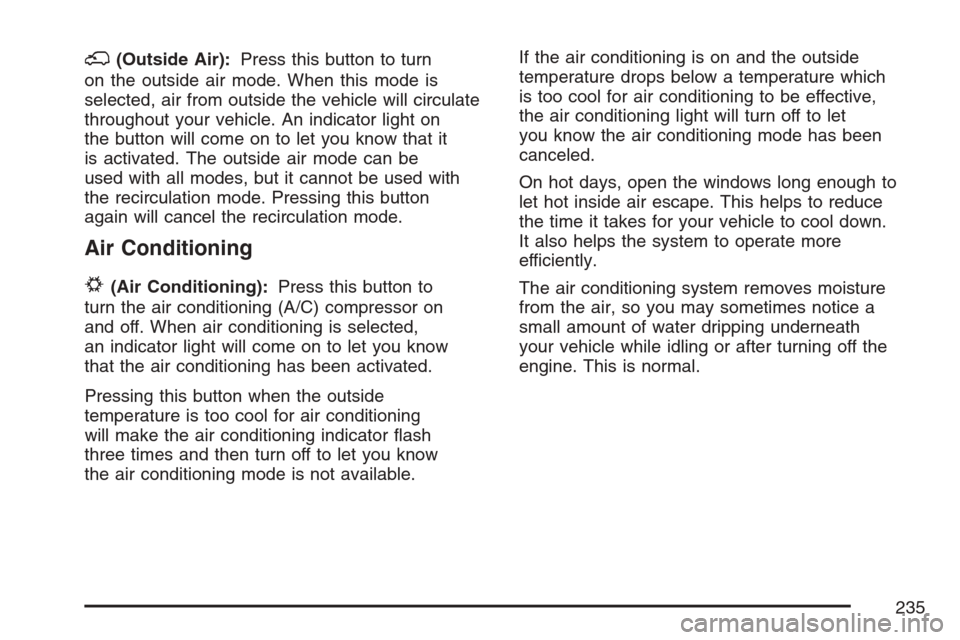
;(Outside Air):Press this button to turn
on the outside air mode. When this mode is
selected, air from outside the vehicle will circulate
throughout your vehicle. An indicator light on
the button will come on to let you know that it
is activated. The outside air mode can be
used with all modes, but it cannot be used with
the recirculation mode. Pressing this button
again will cancel the recirculation mode.
Air Conditioning
#
(Air Conditioning):Press this button to
turn the air conditioning (A/C) compressor on
and off. When air conditioning is selected,
an indicator light will come on to let you know
that the air conditioning has been activated.
Pressing this button when the outside
temperature is too cool for air conditioning
will make the air conditioning indicator ash
three times and then turn off to let you know
the air conditioning mode is not available.If the air conditioning is on and the outside
temperature drops below a temperature which
is too cool for air conditioning to be effective,
the air conditioning light will turn off to let
you know the air conditioning mode has been
canceled.
On hot days, open the windows long enough to
let hot inside air escape. This helps to reduce
the time it takes for your vehicle to cool down.
It also helps the system to operate more
efficiently.
The air conditioning system removes moisture
from the air, so you may sometimes notice a
small amount of water dripping underneath
your vehicle while idling or after turning off the
engine. This is normal.
235
Page 237 of 618

In order to prevent false temperature readings
at startup, the displayed temperature will not
change until the following occurs:
Vehicle speed is above 10 mph (16 kmh)
for 5 minutes.
Vehicle speed is above 32 mph (51 kmh)
for 2 and a half minutes.
The climate control system uses the information
from these sensors to maintain your comfort
setting by adjusting the outlet temperature, fan
speed, and the air delivery mode. The system
may also supply cooler air to the side of the
vehicle facing the sun. The recirculation mode
will also be used as needed to maintain cool
outlet temperatures.
Defogging and Defrosting
Fog on the inside of the windows is a result of
high humidity (moisture) condensing on the
cool window glass. This can be minimized if the
climate control system is used properly. There
are two modes to clear fog or frost from your
windshield.Use the mode up and down arrows to select the
defog or defrost modes.
-(Defog):The defog mode is used to clear
the windows of fog or moisture and warm
the passengers. This mode directs air to the
windshield, oor outlets, and side window vents.
When you select this mode, the system turns
off recirculation and runs the air conditioning
compressor unless the outside temperature is
close to freezing. The recirculation mode cannot
be selected while in the defog mode. Do not
drive the vehicle until all the windows are clear.
0(Defrost):Press this button to remove fog
or frost from the windshield more quickly.
This mode directs a portion of the air to the
windshield and side window vents and some to
the oor vents. In this mode, the system will
automatically force outside air into your vehicle.
The recirculation mode cannot be selected
while in the defrost mode. The air conditioning
compressor will run automatically in this setting,
unless the outside temperature is close to
freezing. Do not drive the vehicle until all the
windows are clear.
237
Page 238 of 618
Rear Window Defogger
The rear window defogger uses a warming grid
to remove fog from the rear window.
<(Rear Window Defogger):Press this button
to turn on the rear window defogger. It will
automatically turn off several minutes after it
has been activated. The defogger can also be
turned off by pressing the button again or by
turning off the engine. Do not drive the vehicle
until all the windows are clear.
If your vehicle has heated outside rearview
mirrors, the mirrors will heat to help clear fog
or frost from the surface of the mirror when
the rear window defog button is pressed.
Notice:Do not use a razor blade or sharp
object to clear the inside rear window. Do not
adhere anything to the defogger grid lines
in the rear glass. These actions may damage
the rear defogger. Repairs would not be
covered by your warranty.
Outlet Adjustment
Your vehicle has air outlets located in the center
and on the side of your instrument panel that
allow you to adjust the direction and amount of
airow inside the vehicle. Move the louvers up or
down. Use the thumbwheel next to or underneath
the outlet to close the louvers. For the most
efficient airow and temperature control, keep
the outlet in the fully opened position.
Operation Tips
Keep the hood and front air inlets free of ice,
snow, or any other obstruction, such as
leaves. The heater and defroster will work far
better, reducing the chance of fogging the
inside of your windows.
Keep the air path under the front seats clear
of objects. This helps air to circulate
throughout your vehicle.
Adding outside equipment to the front of your
vehicle, such as hood-air deectors, etc.,
may affect the performance of the heating
and air conditioning system. Check with
your dealer before adding equipment to the
outside of your vehicle.
238
Page 245 of 618

If, after several seconds, all status indicator lights
remain on, or if there are no lights at all, there
may be a problem with the lights or the passenger
sensing system. See your dealer for service.
{CAUTION:
If the off indicator and the airbag
readiness light ever come on together,
it means that something may be wrong
with the airbag system. If this ever
happens, have the vehicle serviced
promptly, because an adult-size person
sitting in the right front passenger seat
may not have the protection of the frontal
airbag. SeeAirbag Readiness Light
on page 242.
Charging System Light
The charging system
light will come on briey
when you turn on the
ignition, but the engine is
not running, as a check
to show you it is working.
It should go out once the engine is running. If it
stays on, or comes on while you are driving, you
may have a problem with the charging system.
It could indicate that you have problems with the
generator, the generator drive belt, or another
electrical problem. Have it checked right away.
Driving while this light is on could drain your battery.
When this light comes on, the Driver Information
Center (DIC) will also display the SERVICE
BATTERY NOT CHARGING SYSTEM message.
SeeDIC Warnings and Messages on page 267
for more information.
If you must drive a short distance with the light
on, be certain to turn off all your accessories,
such as the radio and air conditioner, to reduce
the drain on your battery.
245
Page 251 of 618

This may prevent more serious damage to your
vehicle. This system is also designed to assist your
service technician in correctly diagnosing any
malfunction.
Notice:If you keep driving your vehicle with
this light on, after awhile, the emission controls
might not work as well, your vehicle’s fuel
economy might not be as good, and the engine
might not run as smoothly. This could lead
to costly repairs that might not be covered
by your warranty.
Notice:Modications made to the engine,
transmission, exhaust, intake, or fuel system
of your vehicle or the replacement of the
original tires with other than those of the same
Tire Performance Criteria (TPC) can affect
your vehicle’s emission controls and can cause
this light to come on. Modications to these
systems could lead to costly repairs not
covered by your warranty. This could also
result in a failure to pass a required Emission
Inspection/Maintenance test. SeeAccessories
and Modifications on page 433.This light should come on, as a check to show
you it is working, when the ignition is on and
the engine is not running. If the light does
not come on, have it repaired. This light will also
come on during a malfunction in one of two ways:
Light Flashing— A misre condition has
been detected. A misre increases vehicle
emissions and may damage the emission
control system on your vehicle. Diagnosis
and service may be required.
Light On Steady— An emission control
system malfunction has been detected on
your vehicle. Diagnosis and service may be
required.
If the Light is Flashing
The following may prevent more serious damage
to your vehicle:
Reducing vehicle speed
Avoiding hard accelerations
Avoiding steep uphill grades
If you are towing a trailer, reduce the amount
of cargo being hauled as soon as it is possible
If the light stops ashing and remains on steady,
see “If the Light Is On Steady” following.
251