Page 387 of 560

3. Loosen the clamp and remove the duct from
the passenger’s side of the engine air
cleaner/lter.
4. The two sides of the airbox are hinged at the
bottom. Open the airbox by pushing the top of
the airbox cover toward the engine.
5. Remove the air lter by lifting it straight up
through the opening in the airbox.
6. Inspect or replace the engine air cleaner/lter.
SeeNormal Maintenance Replacement Parts
on page 518for the correct part number
for the lter.
7. Reinstall the cover by reversing
Steps 1 through 4.
If your vehicle has the 4.4L V8 STS-V engine,
there is a special procedure for checking
and changing the air cleaner/lter. Because this
procedure is difficult, you should have this done at
the dealership service department. Contact your
dealer for additional information or the procedure
can be found in the service manual. To purchase
a service manual, seeService Publications
Ordering Information on page 543.
{CAUTION:
Operating the engine with the air cleaner/
lter off can cause you or others to be
burned. The air cleaner not only cleans the
air; it helps to stop ames if the engine
backres. If it is not there and the engine
backres, you could be burned. Do not
drive with it off, and be careful working on
the engine with the air cleaner/lter off.
Notice:If the air cleaner/lter is off, a backre
can cause a damaging engine re. And, dirt
can easily get into your engine, which will
damage it. Always have the air cleaner/lter in
place when you are driving.
387
Page 389 of 560

Engine Coolant
The cooling system in your vehicle is lled with
DEX-COOL®engine coolant. This coolant is
designed to remain in your vehicle for ve years or
150,000 miles (240 000 km), whichever occurs
rst, if you add only DEX-COOL
®extended
life coolant.
The following explains your cooling system and
how to add coolant when it is low. If you have
a problem with engine overheating, seeEngine
Overheating on page 393.
A 50/50 mixture of clean, drinkable water and
DEX-COOL
®coolant will:
Give freezing protection down to
−34°F (−37°C).
Give boiling protection up to 265°F (129°C).
Protect against rust and corrosion.
Help keep the proper engine temperature.
Let the warning lights and gages work as
they should.
Notice:Using coolant other than
DEX-COOL
®may cause premature engine,
heater core, or radiator corrosion. In addition,
the engine coolant may require changing
sooner, at the rst maintenance service after
each 30,000 miles (50 000 km) or 24 months,
whichever occurs rst. Any repairs
would not be covered by your warranty.
Always use DEX-COOL
®(silicate-free)
coolant in your vehicle.
389
Page 406 of 560

What to Add
When you do need brake uid, DOT-3 brake uid
is recommended for use. DOT-4 brake uid is
also compatible with your vehicle’s brake system
parts. However, if you choose to use DOT-4
uid, it is recommended that you ush your brake
hydraulic system and rell it with new DOT-4
uid at a regular maintenance service every
two years. SeeAdditional Required Services on
page 508. Use new brake uid from a sealed
container only. SeeRecommended Fluids
and Lubricants on page 516.
Always clean the brake uid reservoir cap and the
area around the cap before removing it. This
will help keep dirt from entering the reservoir.
{CAUTION:
With the wrong kind of uid in the brake
system, the brakes may not work well, or
they may not even work at all. This could
cause a crash. Always use the proper
brake uid.Notice:
Using the wrong uid can badly damage
brake system parts. For example, just a
few drops of mineral-based oil, such
as engine oil, in the brake system can
damage brake system parts so badly that
they will have to be replaced. Do not
let someone put in the wrong kind of uid.
If you spill brake uid on your vehicle’s
painted surfaces, the paint nish can
be damaged. Be careful not to spill brake
uid on your vehicle. If you do, wash it
off immediately. SeeWashing Your Vehicle
on page 480.
Brake Wear
Your vehicle has four-wheel disc brakes.
Disc brake pads have built-in wear indicators that
make a high-pitched warning sound when the
brake pads are worn and new pads are needed.
The sound may come and go or be heard all
the time your vehicle is moving, except when you
are pushing on the brake pedal rmly.
406
Page 408 of 560

Battery
Your vehicle has a maintenance free battery.
When it is time for a new battery, get one that has
the replacement number shown on the original
battery’s label. We recommend an ACDelco
®
replacement battery. SeeEngine Compartment
Overview on page 373for battery location
and access.
Warning:Battery posts, terminals, and related
accessories contain lead and lead compounds,
chemicals known to the State of California
to cause cancer and reproductive harm. Wash
hands after handling.
Vehicle Storage
If you are not going to drive your vehicle for
25 days or more, remove the black, negative (−)
cable from the battery. This will help keep
your battery from running down.
{CAUTION:
Batteries have acid that can burn you and
gas that can explode. You can be badly
hurt if you are not careful. SeeJump
Starting on page 408for tips on working
around a battery without getting hurt.
Jump Starting
If your vehicle’s battery has run down, you may
want to use another vehicle and some jumper
cables to start your vehicle. Be sure to use
the following steps to do it safely.
408
Page 415 of 560
Transfer Case
When to Check Lubricant
It is not necessary to regularly check the transfer
case uid unless you suspect there is a leak
or you hear an unusual noise. A uid loss could
indicate a problem. Have it inspected and repaired.
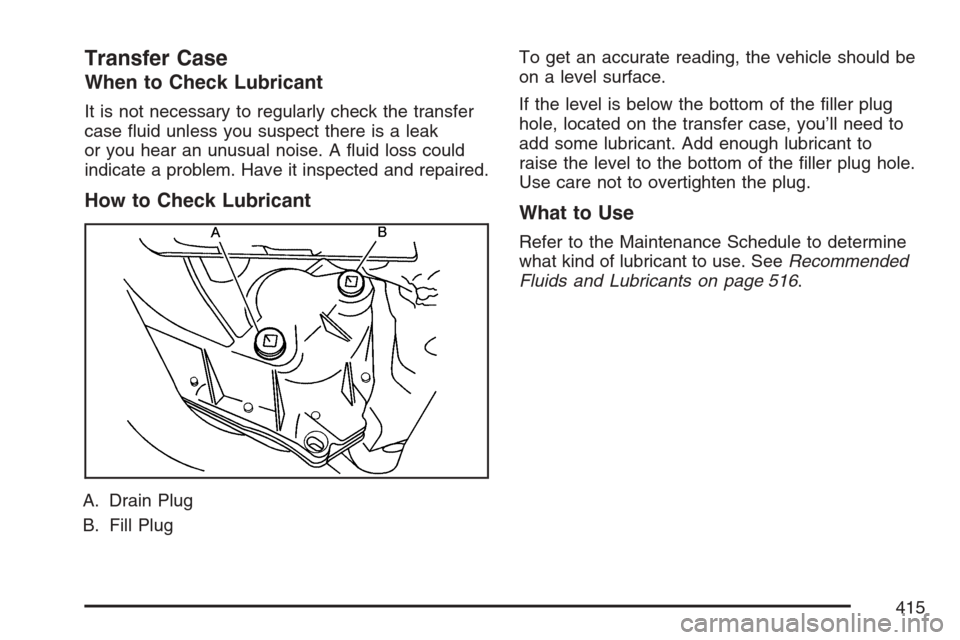
How to Check Lubricant
A. Drain Plug
B. Fill PlugTo get an accurate reading, the vehicle should be
on a level surface.
If the level is below the bottom of the ller plug
hole, located on the transfer case, you’ll need to
add some lubricant. Add enough lubricant to
raise the level to the bottom of the ller plug hole.
Use care not to overtighten the plug.
What to Use
Refer to the Maintenance Schedule to determine
what kind of lubricant to use. SeeRecommended
Fluids and Lubricants on page 516.
415
Page 416 of 560
Rear Axle
When to Check Lubricant
It is not necessary to regularly check rear axle
uid unless you suspect there is a leak or you hear
an unusual noise. A uid loss could indicate a
problem. Have it inspected and repaired.
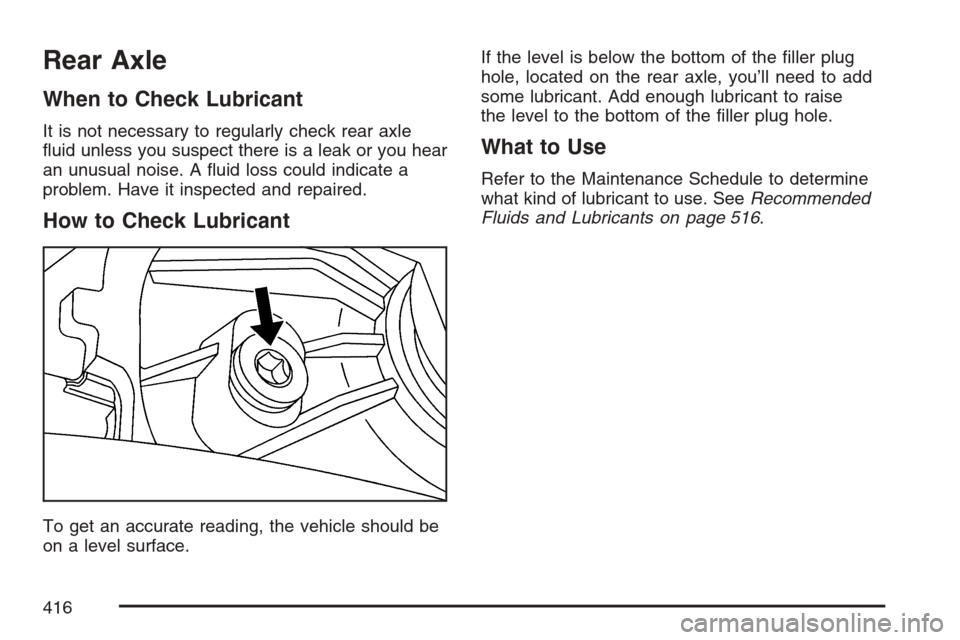
How to Check Lubricant
To get an accurate reading, the vehicle should be
on a level surface.If the level is below the bottom of the ller plug
hole, located on the rear axle, you’ll need to add
some lubricant. Add enough lubricant to raise
the level to the bottom of the ller plug hole.
What to Use
Refer to the Maintenance Schedule to determine
what kind of lubricant to use. SeeRecommended
Fluids and Lubricants on page 516.
416
Page 417 of 560
Front Axle
When to Check and Change Lubricant
It is not necessary to regularly check the front axle
uid unless you suspect there is a leak or you
hear an unusual noise. A uid loss could indicate
a problem. Have it inspected and repaired.
How to Check Lubricant
A. Drain Plug
B. Filler PlugTo get an accurate reading, the vehicle should be
on a level surface.
If the level is below the bottom of the ller plug
hole, located on the front axle, you may need
to add some lubricant.
What to Use
Refer to the Maintenance Schedule to determine
what kind of lubricant to use. SeeRecommended
Fluids and Lubricants on page 516.
Bulb Replacement
For the proper type of replacement bulbs, see
Replacement Bulbs on page 419.
For any bulb changing procedure not listed in this
section, contact your dealer.
417
Page 419 of 560

2. Pull out the push pins holding down the top
portion of the cloth cover.
3. Fold the cover down slightly and locate the
lamp assembly.
4. Turn the socket counterclockwise and pull it
straight out to remove it from the lamp
assembly.
5. Pull the old bulb straight out and reinstall the
new bulb.
6. Reverse the steps to reinstall.
Replacement Bulbs
Exterior Lamp Bulb Number
Back-up 3157K
For replacement bulbs not listed here, contact
your dealer.
Windshield Replacement
Keep in mind that your windshield is part of the
Head-Up Display (HUD) system. If you ever have
to get your windshield replaced, be sure to get
one that is designed for HUD or your HUD image
may look blurred or out of focus.
Windshield Wiper Blade
Replacement
Windshield wiper blades should be inspected for
wear or cracking. SeeScheduled Maintenance
on page 505.
It’s a good idea to clean or replace the wiper
blade assembly on a regular basis or when worn.
For proper windshield wiper blade length and
type, seeNormal Maintenance Replacement Parts
on page 518.
419