2007 BUICK TERRAZA change time
[x] Cancel search: change timePage 293 of 562

To use the RSE OSD menu when using a CD or
an MP3, do the following:
Make sure that a CD or an MP3 is loaded in the
RSE system and that the system is not in auxiliary,
then press the display button on the remote control.
Once the menu is on the screen, use the directional
arrows and the enter button to navigate the screen.
This menu will let you select default preferences for
language and playback settings. To exit this menu,
press the display or the return button on the remote
control or wait for the menu to time out.
Battery Replacement
To change the remote control batteries, do the
following:
1. Slide the battery door, located on the back
of the remote control, down.
2. Replace the two AA batteries in the
compartment. Make sure that they are
installed correctly, using the diagram on
the inside of the battery compartment.
3. Close the battery door.
If the remote control is to be stored for a long
period of time, remove the batteries and keep
hem in a cool, dry place.
Tips and Troubleshooting Chart
Problem Recommended Action
No power. The ignition may not be
in ACCESSORY, RUN,
or RAP.
Disc will not play. The system might be off.
The parental control
button might have been
pressed. The power
indicator lights will ash.
The system might be in
auxiliary source mode.
Press the AUX button to
switch between the DVD
player and the auxiliary
source. The disc is upside
down or is not compatible.
No sound — Wireless
HeadphonesTurn the headphones on.
Make sure the correct
channel is selected on
the wireless headphones.
Check the batteries.
The volume on the
headphones could be too
low, adjust the volume.
293
Page 300 of 562

Battery Replacement
To change the batteries, do the following:
1. Loosen the screw on the battery compartment
door located on the left side of the headphone
earpiece.
2. Replace the two batteries in the compartment.
Make sure that they are installed correctly
using the diagram on the inside of the
battery compartment.
3. Tighten the screw on the battery
compartment door.
If the headphones are to be stored for a long
period of time, remove the batteries, and keep
them in a cool, dry place.
Wired Headphones
There is a right and left wired headphone jack.
To adjust the volume, do the following:
1. Plug the headphone into the corresponding
jack, located behind the video screen,
next to the auxiliary jacks.2. Press the headphone volume control button
until the Wired Headset Volume is displayed
and the Left wired headphone is highlighted
for selection. Press the volume control button
again to select the Right volume control.
Another way to select either the Left or Right
Wired Headset Volume is to press the up
or down arrows on the DVD faceplate.
3. Press the right and left arrow buttons on the
DVD faceplate to increase or to decrease
the volume. Press the headphone volume
control button again or wait for a few seconds
until the screen disappears.
The wired headphones work as follows:
DVD on / RSA off: The wired headphones
will play RSE audio.
DVD off / RSA on: The wired headphones
will play RSA audio.
DVD on / RSA on: The wired headphones
will play RSA audio.
300
Page 309 of 562

To use the RSE OSD menu when using a CD or
an MP3, do the following:
Make sure that a CD or an MP3 is loaded in the
RSE system and that the system is not in auxiliary,
then press the display button on the remote
control, or faceplate if there is no rear seat climate
control. Once the menu is on the screen, use
the directional arrows and the enter button
to navigate the screen. This menu lets you select
default preferences for language and playback
settings. To exit this menu, press the display
button, or the return button on the remote control,
or faceplate if there is no rear seat climate
control, or wait for the menu to time out.
Battery Replacement
To change the remote control batteries, do the
following:
1. Slide the battery door, located on the back of
the remote control, down.
2. Replace the two batteries in the compartment.
Make sure that they are installed correctly,
using the diagram on the inside of the battery
compartment.
3. Close the battery door.If the remote control is to be stored for a long period
of time, remove the batteries and keep them in a
cool, dry place.
Tips and Troubleshooting Chart
Problem Recommended Action
No power. The ignition may not be
in ACCESSORY, RUN,
or RAP.
Disc will not play. The system might be off.
The parental control
button might have been
pressed. The power
indicator lights will ash.
The system might be in
auxiliary source mode.
Press the DVD AUX
button on the player
faceplate or the AUX
button on the remote to
switch between the DVD
player and the auxiliary
sources. The disc is
upside down or is not
compatible.
309
Page 324 of 562
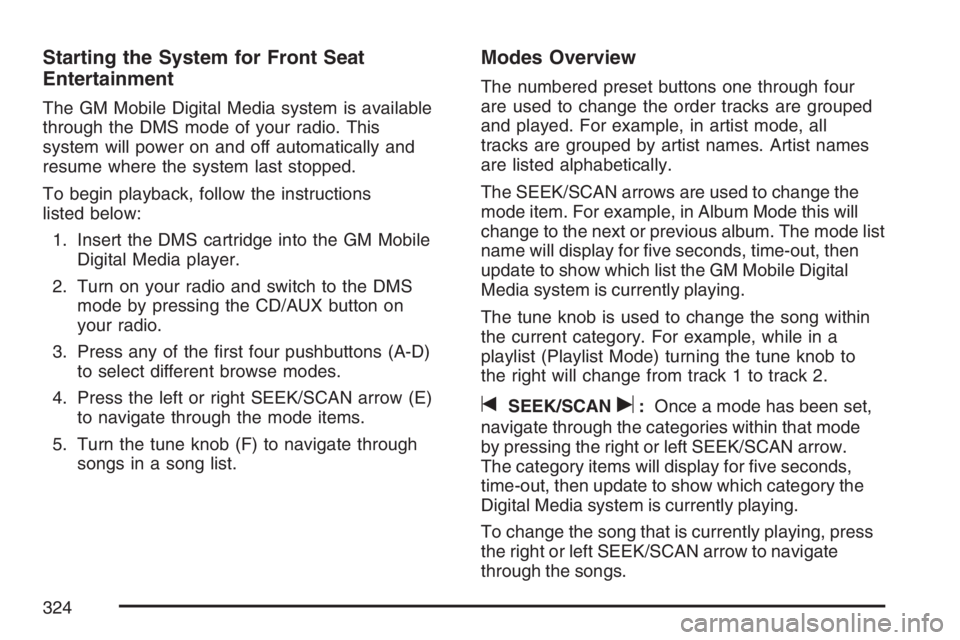
Starting the System for Front Seat
Entertainment
The GM Mobile Digital Media system is available
through the DMS mode of your radio. This
system will power on and off automatically and
resume where the system last stopped.
To begin playback, follow the instructions
listed below:
1. Insert the DMS cartridge into the GM Mobile
Digital Media player.
2. Turn on your radio and switch to the DMS
mode by pressing the CD/AUX button on
your radio.
3. Press any of the rst four pushbuttons (A-D)
to select different browse modes.
4. Press the left or right SEEK/SCAN arrow (E)
to navigate through the mode items.
5. Turn the tune knob (F) to navigate through
songs in a song list.
Modes Overview
The numbered preset buttons one through four
are used to change the order tracks are grouped
and played. For example, in artist mode, all
tracks are grouped by artist names. Artist names
are listed alphabetically.
The SEEK/SCAN arrows are used to change the
mode item. For example, in Album Mode this will
change to the next or previous album. The mode list
name will display for ve seconds, time-out, then
update to show which list the GM Mobile Digital
Media system is currently playing.
The tune knob is used to change the song within
the current category. For example, while in a
playlist (Playlist Mode) turning the tune knob to
the right will change from track 1 to track 2.
tSEEK/SCANu:Once a mode has been set,
navigate through the categories within that mode
by pressing the right or left SEEK/SCAN arrow.
The category items will display for ve seconds,
time-out, then update to show which category the
Digital Media system is currently playing.
To change the song that is currently playing, press
the right or left SEEK/SCAN arrow to navigate
through the songs.
324
Page 353 of 562

Remember: ABS does not change the time you
need to get your foot up to the brake pedal
or always decrease stopping distance. If you get
too close to the vehicle in front of you, you will not
have time to apply your brakes if that vehicle
suddenly slows or stops. Always leave enough
room up ahead to stop, even though you
have ABS.
Using ABS
Do not pump the brakes. Just hold the brake
pedal down rmly and let anti-lock work for you.
You may feel a slight brake pedal pulsation
or notice some noise, but this is normal.
Braking in Emergencies
With ABS, you can steer and brake at the same
time. In many emergencies, steering can help you
more than even the very best braking.
Traction Control System (TCS)
Your vehicle may have a traction control system
that limits wheel spin. This is especially useful
in slippery road conditions. The system operates if
it senses that one or both of the front wheels
are spinning or beginning to lose traction. When
this happens, the system brakes the spinning
wheel(s) and/or reduces engine power to
limit wheel spin.
The TRACTION CONTROL ACTIVE message will
come on in the Driver Information Center (DIC)
when the traction control system is limiting wheel
spin. You may feel or hear the system working,
but this is normal.
If your vehicle is in cruise control when the
traction control system begins to limit wheel spin,
the cruise control will automatically disengage.
When road conditions allow you to safely
use it again, you may re-engage the cruise control.
353
Page 361 of 562

So here are some tips for passing:
Drive ahead. Look down the road, to the
sides, and to crossroads for situations
that might affect your passing patterns. If you
have any doubt whatsoever about making
a successful pass, wait for a better time.
Watch for traffic signs, pavement markings,
and lines. If you can see a sign up ahead
that might indicate a turn or an intersection,
delay your pass. A broken center line
usually indicates it is all right to pass, providing
the road ahead is clear. Never cross a solid
line on your side of the lane or a double solid
line, even if the road seems empty of
approaching traffic.
Do not get too close to the vehicle you want
to pass while you are awaiting an opportunity.
For one thing, following too closely reduces
your area of vision, especially if you are
following a larger vehicle. Also, you will not
have adequate space if the vehicle ahead
suddenly slows or stops. Keep back a
reasonable distance.
When it looks like a chance to pass is coming
up, start to accelerate but stay in the right lane
and do not get too close. Time your move so
you will be increasing speed as the time comes
to move into the other lane. If the way is clear to
pass, you will have a running start that more
than makes up for the distance you would lose
by dropping back. And if something happens to
cause you to cancel your pass, you need only
slow down and drop back again and wait for
another opportunity.
If other vehicles are lined up to pass a slow
vehicle, wait your turn. But take care that
someone is not trying to pass you as you pull
out to pass the slow vehicle. Remember to
glance over your shoulder and check the
blind spot.
Check your vehicle’s mirrors, glance over your
shoulder, and start your left lane change signal
before moving out of the right lane to pass.
When you are far enough ahead of the passed
vehicle to see its front in your vehicle’s inside
mirror, activate the right lane change signal and
move back into the right lane. Remember that
your vehicle’s passenger side outside mirror is
convex. The vehicle you just passed may seem
to be farther away from you than it really is.
361
Page 385 of 562

Dinghy Towing
Your vehicle was not designed to be towed with
all of its wheels on the ground. It can be towed
with the two rear wheels on the ground. See “Dolly
Towing” following for more information.
Dolly Towing
To dolly tow your vehicle, do the following:
1. Put the front wheels on a dolly.
2. Put the vehicle in PARK (P).
3. Set the parking brake and then remove
the key.
4. Clamp the steering wheel in a straight-ahead
position with a clamping device designed for
towing.
5. Release the parking brake.
Level Control
With this feature, the rear of the vehicle is
automatically kept level as you load or unload
your vehicle. However, you should still not exceed
the GVWR or the GAWR. SeeLoading Your
Vehicle on page 378.
You may hear the compressor operating when you
load or unload your vehicle, and periodically as
the system self-adjusts. This is normal. The
compressor should operate for brief periods of
time. If the sound continues for an extended period
of time, your vehicle needs service.
Using heavier suspension components to get
added durability might not change your weight
ratings. Ask your dealer to help you load
your vehicle the right way.
385
Page 386 of 562

Towing a Trailer
{CAUTION:
If you do not use the correct equipment
and drive properly, you can lose control
when you pull a trailer. For example, if the
trailer is too heavy, the brakes may not
work well — or even at all. You and your
passengers could be seriously injured.
Pull a trailer only if you have followed all
the steps in this section. Ask your dealer
for advice and information about towing a
trailer with your vehicle.
Notice:Pulling a trailer improperly can
damage your vehicle and result in costly
repairs that would not be covered by your
warranty. Always follow the instructions in this
section and check with your dealer for more
information about towing a trailer with
your vehicle.Your vehicle can tow a trailer. To identify the
trailering capacity of your vehicle, you should read
the information in “Weight of the Trailer” that
appears later in this section. Trailering is different
than just driving your vehicle by itself. Trailering
means changes in handling, acceleration, braking,
durability, and fuel economy. Successful, safe
trailering takes correct equipment, and it has to be
used properly.
That is the reason for this section. In it are many
time-tested, important trailering tips and safety
rules. Many of these are important for your safety
and that of your passengers. So please read
this section carefully before you pull a trailer.
Load-pulling components such as the engine,
transaxle, wheel assemblies, and tires are forced
to work harder against the drag of the added
weight. The engine is required to operate
at relatively higher speeds and under greater
loads, generating extra heat. The trailer also adds
considerably to wind resistance, increasing the
pulling requirements.
386