2007 BUICK RAINIER ECO mode
[x] Cancel search: ECO modePage 246 of 534

To insert multiple CDs, do the following:
1. Turn the ignition on.
2. Press and hold the LOAD button for
two seconds.
A beep sounds and the indicator light, located
to the right of the slot, begins to ash and
MULTI LOAD # displays.
3. Once the light stops ashing and turns green,
INSERT CD # displays, load a CD. Insert the
CD part way into the slot, label side up.
The player pulls the CD in.
Once the CD is loaded, the indicator light
begins ashing again. Once the light stops
ashing and turns green, you can load another
CD. The CD player takes up to six CDs.
Do not try to load more than six.
To load more than one CD but less than six,
complete Steps 1 through 3. When nished loading
CDs, press the LOAD button to cancel the
loading function. The radio begins to play the last
CD loaded.
If more than one CD has been loaded, a number
for each CD displays.Playing a Specic Loaded CD
For every CD loaded, a number displays. To play
a specic CD, rst press the CD AUX button
(if not already in CD mode), then press the
numbered pushbutton that corresponds to the CD.
A small bar displays under the CD number that
is playing and the track number displays.
If an error displays, see “CD Messages” later in
this section.
CD
Z(Eject):Press this button to eject CD(s).
To eject the CD that is currently playing, press
and release this button.
To eject multiple CDs, do the following:
1. Press and hold the CD eject button for
two seconds.
A beep sounds and the indicator light, located
to the right of the slot, begins to ash and
EJECT ALL displays.
2. Once the light stops ashing, REMOVE CD #
displays. The CD ejects and can be removed.
Once the CD is removed, the indicator light
begins ashing again and another CD ejects.
To stop ejecting the CDs, press the eject
button.
246
Page 248 of 534

AUTO EQ (Automatic Equalization):Press
AUTO EQ to select the equalization setting while
playing a CD. The equalization is stored
whenever a CD is played. For more information on
AUTO EQ, see “AUTO EQ” listed previously in
this section.
©SEEK¨:Press the left arrow to go to the
start of the current track, if more than ten seconds
have played. Press the right arrow to go to the
next track. If either arrow is pressed more
than once, the player continues moving backward
or forward through the CD.
©SCAN¨:To scan one CD, press and hold
either SCAN arrow for more than two seconds until
TRACK SCAN displays and a beep sounds. The
radio goes to the next track, plays for 10 seconds,
then goes to the next track. Press either SCAN
arrow again, to stop scanning.
To scan all loaded CDs, press and hold either
SCAN arrow for more than four seconds until
ALL CD SCAN displays and a beep sounds. Use
this feature to listen to 10 seconds of the rst
track of each loaded CD. Press either SCAN arrow
again, to stop scanning.INFO (Information):Press this knob to see how
long the current track has been playing. To change
the default on the display, track or elapsed time,
press the knob until you see the desired display,
then press and hold the knob until a beep sounds.
The selected display becomes the default.
BAND:Press this button to listen to the radio
when a CD is playing. The inactive CD(s) remains
inside the radio for future listening.
Using Song List Mode
The six-disc CD changer has a feature called
song list. This feature is capable of saving 20 track
selections.
To save tracks into the song list feature, perform
the following steps:
1. Turn the CD player on and load it with at least
one CD. See “LOAD CD” listed previously in
this section for more information.
2. Check to see that the CD changer is not in
song list mode. S-LIST should not appear on
the display. If S-LIST is displayed, press
the SONG LIST button to turn it off.
248
Page 250 of 534

To delete the entire song list, perform the
following steps:
1. Turn the CD player on.
2. Press the SONG LIST button to turn song list
on. S-LIST displays.
3. Press and hold the SONG LIST button for
more than four seconds. One beep sounds,
followed by two beeps after two seconds, and
a nal beep sounds after four seconds.
S-LIST EMPTY displays indicating the song
list has been deleted.
If a CD is ejected, and the song list contains
saved tracks from that CD, those tracks are
automatically deleted from the song list. Any tracks
saved to the song list again are added to the
bottom of the list.
To end song list mode, press the SONG LIST
button. One beep sounds and S-LIST is removed
from the display.CD Messages
CHECK CD:If this message appears on the
display and/or the CD ejects, it could be for one of
the following reasons:
It is very hot. When the temperature returns to
normal, the CD should play.
You are driving on a very rough road.
When the road becomes smoother, the CD
should play.
The CD is dirty, scratched, wet, or
upside down.
The air is very humid. If so, wait about an
hour and try again.
There could have been a problem while
burning the CD.
The label could be caught in the CD player.
If the CD is not playing correctly, for any
other reason, try a known good CD.
If any error occurs repeatedly or if an error cannot
be corrected, contact your dealer. If the radio
displays an error message, write it down and
provide it to your dealer when reporting the
problem.
250
Page 256 of 534

DISPL (Display):Press this knob to switch
between track mode, folder/playlist mode, and
time of day mode. The display shows only eight
characters, but there can be up to four pages
of text. If there are more than eight characters in
the song, folder, or playlist name, they are
displayed if the knob is not pressed again,
pressing this knob within two seconds takes you
to the next display mode.
Track mode displays the current track number
and the ID3 tag song name.
Folder/playlist mode displays the current folder
or playlist number and the folder/playlist name.
Time of day mode displays the time of day and
the ID3 tag song name.
To change the default on the display, press the
DISPL knob until you see the desired display, then
press and hold this knob for two seconds. The
radio produces one beep and the selected display
becomes the default.INFO (Information):INFO displays when a
current track has ID3 tag information. Press this
button to display the artist name and album
contained in the tag. INFO disappears from the
display when the information in the ID3 tag
has nished.
BAND:Press this button to listen to the radio
when a CD is playing. The inactive CD remains
inside the radio for future listening.
CD AUX (Auxiliary):Press this button to play a
CD when listening to the radio. The CD symbol
displays when a CD is loaded.Z(Eject):Press this button to eject a CD. Eject
can activate with either the ignition or radio off.
CDs can be loaded with the ignition and radio off if
this button is pressed rst.
256
Page 272 of 534
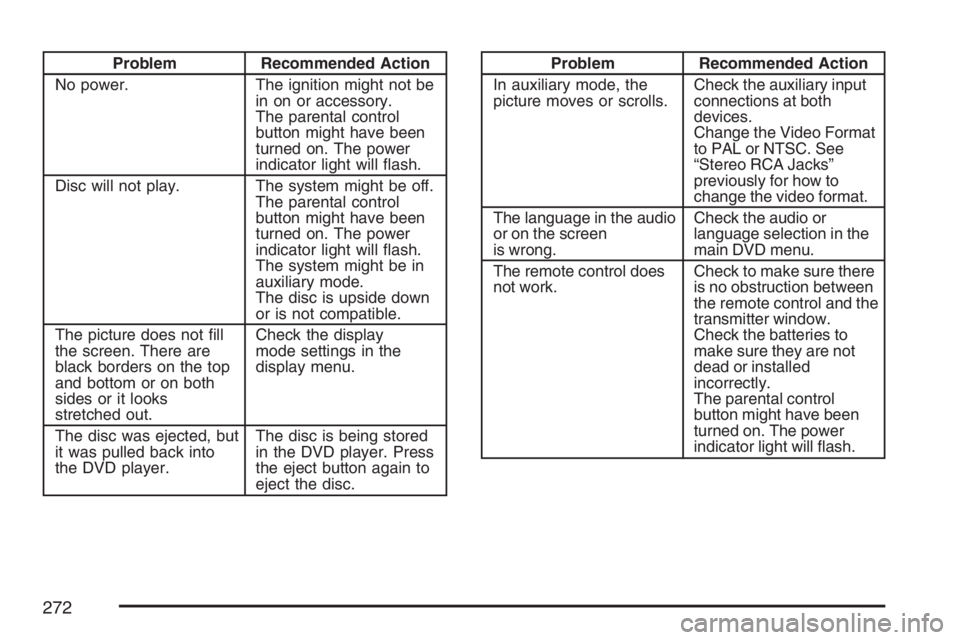
Problem Recommended Action
No power. The ignition might not be
in on or accessory.
The parental control
button might have been
turned on. The power
indicator light will ash.
Disc will not play. The system might be off.
The parental control
button might have been
turned on. The power
indicator light will ash.
The system might be in
auxiliary mode.
The disc is upside down
or is not compatible.
The picture does not ll
the screen. There are
black borders on the top
and bottom or on both
sides or it looks
stretched out.Check the display
mode settings in the
display menu.
The disc was ejected, but
it was pulled back into
the DVD player.The disc is being stored
in the DVD player. Press
the eject button again to
eject the disc.Problem Recommended Action
In auxiliary mode, the
picture moves or scrolls.Check the auxiliary input
connections at both
devices.
Change the Video Format
to PAL or NTSC. See
“Stereo RCA Jacks”
previously for how to
change the video format.
The language in the audio
or on the screen
is wrong.Check the audio or
language selection in the
main DVD menu.
The remote control does
not work.Check to make sure there
is no obstruction between
the remote control and the
transmitter window.
Check the batteries to
make sure they are not
dead or installed
incorrectly.
The parental control
button might have been
turned on. The power
indicator light will ash.
272
Page 273 of 534

Problem Recommended Action
After stopping the player,
I push Play but
sometimes the DVD
starts where I left off and
sometimes at the
beginning.If the stop button was
pressed one time, the
DVD player will resume
playing where the DVD
was stopped. If the stop
button was pressed two
times the DVD player will
begin to play from the
beginning of the DVD.
The auxiliary source is
running but there is no
picture or sound.Check that the DVD
player is in the auxiliary
source mode.
Check the auxiliary input
connections at both
devices.
My disc is stuck in the
player. The Load/Eject
button does not work.Turn the DVD power off,
then on, then press the
load/eject button on the
DVD player.
Do not attempt to forcibly
remove the disc from the
DVD player. This could
permanently damage the
disc and DVD player.Problem Recommended Action
Sometimes the wireless
headphone audio cuts
out or buzzes.Check for obstructions,
low batteries, reception
range, and interference
from cellular telephone
towers or by using your
cellular telephone in the
vehicle.
Check that the
headphones are facing
the front of the vehicle.
I lost the remote and/or
the headphones.See your dealer for
assistance.
The DVD is playing,
but there is no picture
or sound.Check that the DVD
player is in DVD mode.
The audio/video skips
or jumps.The DVD or CD could be
dirty, scratched, or
damaged.
The audio from the radio
for the Radio with
Six-Disc CD and XM™
has taken over the audio
from the DVD or CD
when using the wired
headphones.The RSE is working
correctly.
Use the wireless
headphones or have the
front seat passengers
listen to another audio
source.
273
Page 291 of 534

STABILITRAK OFF — The driver can turn off
StabiliTrak®by pressing the StabiliTrak®button for
more than ve seconds. The StabiliTrak®light will
come on and STABILITRAK OFF will be displayed.
For vehicles without a DIC, the StabiliTrak
®
indicator light will come on. Momentarily pressing
the StabiliTrak®button again will return the system
to the STABILITRAK ON mode. See StabiliTrak®
Off below for more information.
Traction Control Off
In this mode, stability control and brake-traction
control are functional. Engine speed management
will be modied and the driven wheels can spin
more freely. This can cause the brake-traction
control to activate more frequently. If the controller
detects excessive wheel spin in this mode, the
StabiliTrak
®indicator light may blink and the
STABILITRAK ACTIVE message may be displayed
to warn the driver that damage may occur to the
transfer case.
StabiliTrak®Off
In this mode, both stability control and part of the
traction control system are disabled. Your vehicle
will still have brake-traction control, but will not be
able to use the engine speed management system.
You may still hear system noises as a result of the
brake-traction control coming on. If the controller
detects excessive wheel spin in this mode, the
StabiliTrak
®indicator light may blink and the
STABILITRAK ACTIVE message may be displayed
to warn the driver that damage may occur to the
transfer case.
It is recommended to leave the system on for
normal driving conditions, but it may be necessary
to turn the system off if your vehicle is stuck in sand,
mud, ice or snow, and you may want to “rock” your
vehicle in an attempt to free it. It may also be
necessary to turn off the system when driving in
extreme off-road conditions where high wheel spin
is required. SeeIf Your Vehicle is Stuck in Sand,
Mud, Ice, or Snow on page 329for more
information.
291
Page 338 of 534

The ignition has to be on for the system to inate,
in order to raise the vehicle to the standard ride
height after loading. The system can lower
the vehicle to the standard ride height after
unloading with the ignition on and also for up to
30 minutes after the ignition has been turned off.
You may hear the compressor operating when you
load your vehicle, and periodically as the system
adjusts the vehicle to the standard ride height.
Load leveling will not function normally with the
inator hose attached to the inator outlet.
Remove the inator hose from the outlet during
loading and unloading.
If the vehicle is parked for an extended period of
time, some bleed down of the suspension is
normal. Upon starting the vehicle, proper height
will be achieved.
Overload Protection
The air suspension system is equipped with
overload protection. Overload protection is
designed to protect the air suspension system,
and it is an indicator to the driver that the vehicle
is overloaded. When the overload protectionmode is on, it will not allow damage to the air
compressor. However, do not overload the vehicle.
SeeLoading Your Vehicle on page 330.
If the suspension remains at a low height, the rear
axle load has exceeded GAWR (Gross Axle Weight
Rating). When the overload protection mode is
activated, the compressor operates for about
30 seconds to one minute without raising the
vehicle depending on the amount of overload.
This will continue each time the ignition is turned on
until the rear axle load is reduced below GAWR.
Indicator Light
The indicator light on the inator switch in the rear
passenger compartment also serves as an
indicator for internal system error. If the indicator
light is ashing without the load leveling function
or the inator being active, turn off the ignition.
The next day turn on the ignition and check
the indicator light. The vehicle can be driven with
the light ashing, but if it is you should have
the vehicle serviced as soon as possible.
338