2007 BUICK LACROSSE headlamp
[x] Cancel search: headlampPage 158 of 512
Exterior Lamps
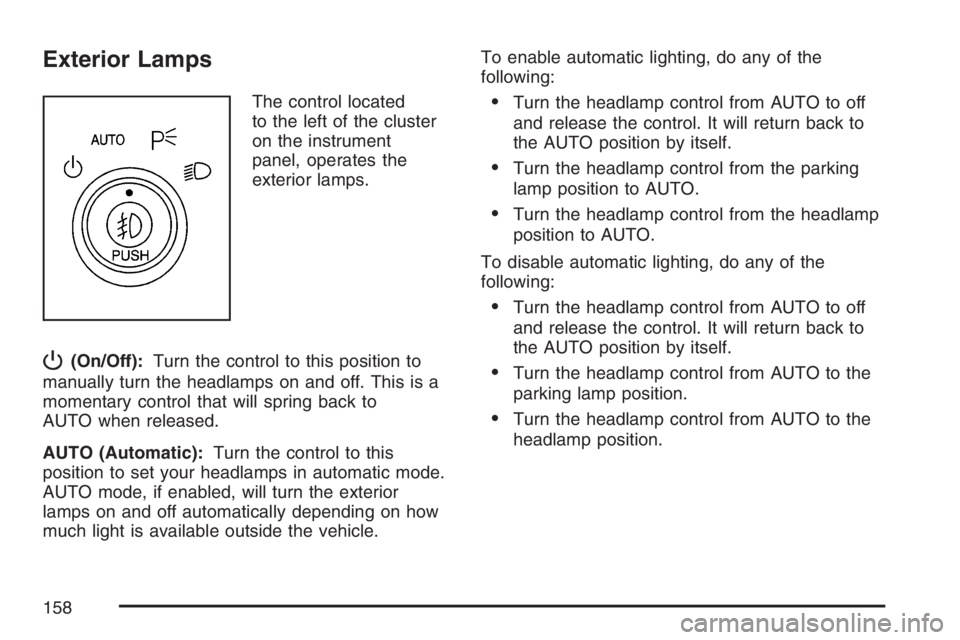
The control located
to the left of the cluster
on the instrument
panel, operates the
exterior lamps.
P(On/Off):Turn the control to this position to
manually turn the headlamps on and off. This is a
momentary control that will spring back to
AUTO when released.
AUTO (Automatic):Turn the control to this
position to set your headlamps in automatic mode.
AUTO mode, if enabled, will turn the exterior
lamps on and off automatically depending on how
much light is available outside the vehicle.To enable automatic lighting, do any of the
following:
Turn the headlamp control from AUTO to off
and release the control. It will return back to
the AUTO position by itself.
Turn the headlamp control from the parking
lamp position to AUTO.
Turn the headlamp control from the headlamp
position to AUTO.
To disable automatic lighting, do any of the
following:
Turn the headlamp control from AUTO to off
and release the control. It will return back to
the AUTO position by itself.
Turn the headlamp control from AUTO to the
parking lamp position.
Turn the headlamp control from AUTO to the
headlamp position.
158
Page 159 of 512

<(Parking Lamps):Turn the control to this
position to turn on the parking lamps together with
the following:
Taillamps
License Plate Lamps
Sidemarker Lamps
Instrument Panel Lights
2(Headlamps):Turn the control to this position
to turn your headlamps on, together with the
previously listed lamps and lights.
A warning chime will sound if the driver’s door is
opened when the ignition switch is turned to
OFF or ACCESSORY and the headlamps or
parking lamps are on.
-(Foglamps):If your vehicle has fog lamps,
press this button to turn them on and off. SeeFog
Lamps on page 160for additional information.
Daytime Running Lamps (DRL)/
Automatic Headlamp System
Daytime Running Lamps (DRL) can make it easier
for others to see the front of your vehicle during
the day. DRL can be helpful in many different
driving conditions, but they can be especially
helpful in the short periods after dawn and before
sunset. DRL lamps are required to function at
all times on all vehicles rst sold in Canada.
A light sensor on top of the instrument panel
makes the DRL work, so be sure it is not covered.
The DRL system will make the low-beam
headlamps come on at reduced brightness when
the following conditions are met:
The ignition is on.
The exterior lamps control is off.
The parking brake is released.
While the DRL are on, only the vehicle’s low-beam
headlamps will be on at reduced brightness.
The turn signal, taillamps, sidemarker, and other
lamps will not be on. The instrument panel will not
be lit up either.
159
Page 160 of 512

When it is dark enough outside, the DRL will turn
off and the vehicle’s headlamps and parking
lamps will turn on. The other lamps that come on
with the headlamps will also come on.
When it is bright enough outside, the headlamps
will go off and the DRL will come on.
To idle the vehicle with the DRL off, turn the
exterior lamp control off and then do one of the
following:
Turn the exterior lamp control to the parking
lamp position.
Turn the exterior lamp control to the
headlamp position.
Turn the exterior lamp control from AUTO to
off and back to AUTO.
This feature is not available for vehicles rst sold
in Canada.
To turn off the automatic headlamp feature when it
is dark outside, move the exterior lamp control
to the parking lamp position. The parking lamps
remain on and the headlamps turn off. The
fog lamps also go on if they were on previously.
As with any vehicle, the regular headlamp system
should be turned on when needed.
Fog Lamps
If your vehicle has fog
lamps, the button is
located in the center of
the exterior lamps
control on the left side
of the steering column.
Press the fog lamps button to turn the lamps
on or off.
While the high-beam headlamps are on, the fog
lamps are off.
Some localities have laws that require the
headlamps to be on along with the fog lamps.
Exterior Lighting Battery Saver
If the parking lamps or headlamps have been left
on after the ignition has been turned to off, the
exterior lamps will turn off after about 10 minutes.
This protects the battery from being drained.
Use the exterior lamp control to turn the lamps
back on, if they are still needed.
160
Page 164 of 512

A high electrical load occurs when several of the
following loads are on: headlamps, high beams,
fog lamps, rear window defogger, climate
control fan at high speed, heated seats, engine
cooling fans, trailer loads, and loads plugged into
accessory power outlets.
EPM works to prevent excessive discharge of the
battery. It does this by balancing the generator’s
output and the vehicle’s electrical needs. It
can increase engine idle speed to generate more
power, whenever needed. It can temporarily
reduce the power demands of some accessories.
Normally, these actions occur in steps or levels,
without being noticeable. In rare cases at the
highest levels of corrective action, this action may
be noticeable to the driver. If so, the Driver
Information Center (DIC) message might display
Battery Saver Active. If this message is displayed,
it is recommended that the driver reduce the
electrical loads as much as possible. See
DIC Warnings and Messages on page 208.Battery Run-Down Protection
This helps prevent the vehicle’s battery from
draining in case the interior courtesy lamps,
reading lamps, trunk lamp, underhood lamp, glove
box lamps, or sun visor vanity lamps, if equipped,
are accidently left on. If any of these lamps
are left on while the ignition is off, they will
automatically turn off after 10 minutes. The lamps
will not come back on again until one of the
following occurs:
The ignition is turned on.
The interior lamps control is turned off, then to
door or on.
Ultrasonic Rear Parking
Assist (URPA)
Your vehicle may be equipped with Ultrasonic Rear
Parking Assist (URPA). URPA is designed to help
you park while in REVERSE (R) and operates only
at speeds less than 3 mph (5 km/h). URPA can help
you avoid colliding with objects such as parked
vehicles. The system can detect objects 5 feet
(1.5 m) behind your vehicle and tell you how close
those objects are to your rear bumper.
164
Page 196 of 512

Reduced Engine Power Light
If the reduced engine
power light is on, a
chime will sound and a
noticeable reduction
in the vehicle’s
performance may occur.
If the reduced engine power light is on, but there
is no reduction in performance, proceed to
your destination. The performance may be reduced
the next time the vehicle is driven. The vehicle
may be driven at a reduced speed while the
reduced engine power light is on, but acceleration
and speed may be reduced.
Anytime the reduced engine power light stays on,
the vehicle should be taken to an authorized
GM dealer as soon as possible for service.
Highbeam On Light
This light comes on
when the high-beam
headlamps are in use.
SeeHeadlamp High/Low-Beam Changer on
page 153.
Headlamps Suggested Light
This light will come on
when the use of
headlamps is
suggested.
196
Page 213 of 512

ENGINE COOLANT HOT
Notice:If you drive your vehicle while the
engine is overheating, severe engine damage
may occur. If an overheat warning appears
on the instrument panel cluster and/or
DIC, stop the vehicle as soon as possible.
Do not increase the engine speed above
normal idling speed. SeeEngine Overheating
on page 367for more information.
This message displays when the engine coolant
temperature is too hot. The engine coolant
temperature warning light also appears on the
instrument panel cluster. SeeEngine Coolant
Temperature Warning Light on page 188
andEngine Coolant Temperature Gage on
page 189for more information.
To avoid added strain on the engine, turn off the
air conditioner if it is on. When the coolant
temperature returns to normal, the air conditioner
can be turned back on.
This message displays only when the ignition is in
RUN. A chime sounds continuously when this
message is displayed. Press any of the DIC
buttons to acknowledge this message and to clear
it from the screen.This message continues to display for two seconds
if it has not been acknowledged when the engine is
turned off. It also re-displays for two seconds if the
message has been acknowledged, but the
condition still exists when the engine is turned off.
If the condition still exists, the message re-appears
when the engine is turned on.
HEADLAMPS SUGGESTED
This message displays when the amount of
available light outside of the vehicle is low, or the
windshield wipers have been on for about
30 seconds, and the exterior lamps control is off
or in the parking lamps position. This message
informs the driver that turning on the exterior lamps
is recommended. SeeExterior Lamps on
page 158for more information.
This message displays while the ignition is in RUN.
Press any of the DIC buttons to acknowledge this
message and to clear it from the screen.
213
Page 219 of 512

PARK LAMPS ON
This message displays to alert the driver when the
headlamps or parking lamps are on while the
ignition is off and the driver’s door is opened. See
Exterior Lamps on page 158for more information.
A chime sounds continuously while this message
is displayed.
Press any of the DIC buttons to acknowledge this
message and to clear it from the screen.
PASSENGER’S DOOR AJAR
This message displays when the front passenger’s
door is not closed properly. Make sure that the
front passenger’s door is closed completely.
This message displays while the ignition is in RUN.
A chime sounds when the ignition is shifted out of
PARK (P). Press any of the DIC buttons to
acknowledge this message and to clear it from
the screen.
This message continues to display for two seconds
if it has not been acknowledged when the engine is
turned off. It also re-displays for two seconds if the
message has been acknowledged, but the
condition still exists when the engine is turned off.
If the condition still exists, the message re-appears
when the engine is turned on.
PASSENGER’S REAR DOOR AJAR
This message displays when the passenger side
rear door is not closed properly. Make sure
that the passenger side rear door is closed
completely.
This message displays while the ignition is in
RUN. A chime sounds when the ignition is shifted
out of PARK (P). Press any of the DIC buttons
to acknowledge this message and to clear it from
the screen.
This message continues to display for two seconds
if it has not been acknowledged when the engine is
turned off. It also re-displays for two seconds if the
message has been acknowledged, but the
condition still exists when the engine is turned off.
If the condition still exists, the message re-appears
when the engine is turned on.
219
Page 230 of 512
Entering the Personal Program Menu
1. Turn the ignition on and place the vehicle
in PARK (P).
To avoid excessive drain on the battery, it is
recommended that the headlamps are
turned off.
2. Press the option button until PERSONAL
PROGRAM displays.
If the vehicle is not in PARK (P), PERSONAL
PROGRAM ONLY IN PARK will display.
If the vehicle is not able to enter the personal
program menu, PERSONAL PROGRAM
NOT AVAILABLE will display.
3. Press the set/reset button to begin.
4. The DIC will then display an
instruction screen.
Press the option button to display the features
that are available to program.
Press the set/reset button to change the
setting of each feature.
Customization Menu Items
The following are customization features that allow
you to program settings to the vehicle:
FACTORY DEFAULTS
This feature allows you to set all of the
customization and personalization features back to
their factory default settings.
Press the option button until FACTORY DEFAULTS
appears on the DIC display. Press the set/reset
button to scroll through the following choices:
NO (default):The customization and
personalization features will not be set to their
factory default settings.
YES:The customization and personalization
features will be set to their factory default settings.
Select one of the available choices and press
the option button while it is displayed on the DIC
to select it and move on to the next feature.
230