2007 BMW X3 3.0SI Snow
[x] Cancel search: SnowPage 45 of 139

Reference
At a glance
Controls
Driving tips
Mobility
43
Cruise control*
The vehicle maintains and stores the speed that
you set at speeds greater than approx. 20 mph/
30 km/h.
You can use cruise control whenever the sys-
tem is active while the engine is running.
Do not use the cruise control under unfa-
vorable conditions that do not permit a
constant speed, e.g. when driving on winding
roads or in heavy traffic or when negotiating
poor road conditions such as snow, rain, ice, or
a loose road surface. Otherwise, you could lose
control of the vehicle and cause an accident.<
Indicator lamp
The indicator lamp lights up green: sys-
tem ready for operation using the but-
tons on the steering wheel.
Activating system
With ignition key in position 2 or higher:
Press button on steering wheel; the indicator
lamp in the instrument cluster comes on. The
cruise control mode is enabled.
Deactivating system
Press the button repeatedly until the indicator
lamp in the instrument cluster goes out.
The cruise control is also deactivated when the
ignition key is turned to position 0. The speed
stored in the memory is deleted in the process.
Maintaining speed, storing, and
accelerating
Briefly press + button:
The system maintains and stores the current
vehicle speed. Each additional touch of the but-ton increases the speed by approx. 1 mph/
1km/h.
Press and hold + button:
The vehicle accelerates without pressure on
the accelerator pedal. When you release the
button, the system maintains and stores the
current speed.
If the braking action of the engine is insufficient
on a downhill stretch, then the set vehicle can
exceed the set speed. Speed can drop on uphill
grades if the engine output is insufficient.
Decelerating
Briefly press – button:
Each press of the button decreases the vehi-
cle's speed by roughly 1 mph/1 km/h, provided
that you have already activated the cruise con-
trol.
Press and hold – button:
With the cruise control active, the system auto-
matically reduces the fuel supply to slow the
vehicle. When you release the button, the sys-
tem maintains and stores the current speed.
Interrupting cruise control
When the system is activated, press the button.
The indicator lamp stays on. You can use the
cruise control again whenever required by
requesting the speed that was stored last.
In addition, the system is automatically inter-
rupted in response to the following conditions:
>When you apply pressure to the brake pedal
>When you apply pressure to the clutch
pedal or when you move the automatic
transmission selector lever from D to N
>If you exceed or fall below the set speed for
an extended period, by pressing the accel-
erator, for example
>When DSC is activated
Page 52 of 139

Technology for comfort, convenience and safety
50
Malfunction
The LED in the button flashes and a short con-
tinuous tone sounds. PDC is malfunctioning.
Switch off PDC. Have the system checked.
To prevent this problem, keep the sensors
clean and free of ice or snow in order to ensure
that they will continue to operate effectively.
When using high-pressure washers, do not
spray sensors for long periods and keep the
sprayer at least 4 in/10 cm away from the sen-
sors.
System limits
Even with PDC, final responsibility for
estimating the distance between the
vehicle and any obstructions always remains
with the driver. Even when sensors are involved,
there is a blind spot in which objects cannot be
detected. The system is also subject to the
physical limits that apply to all forms of ultra-
sonic measurement, such as those encoun-
tered with tow bars and trailer couplings, or thin
and wedge-shaped objects. Low objects
already displayed, e.g. curb edges, can come
into the blind spot of the sensors before or after
a continuous tone sounds. The system may fail
to detect higher obstacles such as projections
from walls.
Loud sources of sound, inside and outside the
vehicle, could drown out the PDC signal tone.<
Driving stability control
systems
Your BMW is equipped with an extended array
of systems designed to enhance and maintain
vehicle stability even under unfavorable driving
conditions.
ABS Antilock Brake System
ABS prevents the wheels from locking during
braking. Safe steering response is maintained
even during full braking. This results in an
increase in the active safety.
ABS is operational every time you start the
engine. Safe braking, refer to page81.
Electronic brake-force distribution
The system controls the brake pressure in the
rear wheels to ensure a stable braking behavior.
Brake assistant
When the brake pedal is depressed quickly, this
system automatically generates a maximum
braking force distribution and thus helps keep
the braking distance to a minimum during full
braking. This system exploits all of the benefits
provided by ABS.
As long as you want full braking to continue, do
not reduce pressure on the brake.
DSC Dynamic Stability Control
DSC prevents slip at the drive wheels when
starting off and accelerating. The system also
detects unstable driving conditions, such as a
fishtailing of the vehicle's rear end or the sliding
of the vehicle on its front wheels. In these cir-
cumstances, DSC helps keep the vehicle on a
safe path, within physical limits, by reducing
engine output and by applying the brakes in
individual wheels.
The laws of physics cannot be repealed,
even with DSC. An appropriate driving
style always remains the responsibility of the
driver. Do not squander the additional margin of
safety by driving dangerously; otherwise, you
run the risk of causing an accident.<
Deactivating DSC
Maintain pressure on the button until the DSC
indicator lamp lights up, but do not press for
longer than approx. 10 seconds. DTC Dynamic
Traction Control and DSC are deactivated
Page 53 of 139

Reference
At a glance
Controls
Driving tips
Mobility
51
jointly. These systems do not take their cus-
tomary stabilizing actions.
To increase vehicle stability, reactivate DSC as
soon as possible.
Activating DSC
Press the button again; the indicator lamp in the
instrument cluster goes out.
For monitoring purposes
When the indicator lamp flashes:
DSC is controlling the drive and braking
forces.
When the indicator lamp lights up:
DSC is deactivated.
Dynamic Traction Control DTC
DTC is a variation of DSC that is optimized for
forward momentum for particular road condi-
tions, e.g. unplowed snow-covered roads. In
this mode, the system assures maximum for-
ward momentum, but with limited driving stabil-
ity. For this reason, drive with corresponding
caution.
In the following exceptional circumstances, it
may be useful to temporarily activate DTC:
>When driving on snow-covered inclines, in
slush, or on unplowed, snow-covered roads
>When freeing a stuck vehicle or starting up
in deep snow, sand, or on a loose ground
surface
>When driving with snow chains
*
Activating DTC
Press the button; the DTC indicator lamp in the
instrument cluster lights up.
For monitoring purposes
When the indicator lamp flashes:
DTC is controlling the drive forces and
braking forces.
When the indicator lamp lights up:
DTC is activated.
Deactivating DTC
Press the button again; the DTC indicator lamp
in the instrument cluster goes out.
xDrive
xDrive is the all-wheel drive system of your X3.
The combined effects of xDrive and DSC fur-
ther optimize the traction and dynamic driving
characteristics. The all-wheel drive system
xDrive variably distributes the drive torque to
the front and rear axle depending on the driving
situation and prevailing road conditions.
HDC Hill Descent Control
The concept
HDC is a system for hill descent assistance that
reduces the speed on steep downward inclines
and makes it even easier to control the driving
characteristics of your BMW under these condi-
tions. The vehicle moves at slightly more than
walking speed without active intervention from
the driver.
You can activate HDC at vehicle speeds below
approx. 20 mph/35 km/h. If it is traveling down a
steep slope at a speed below approx. 20 mph/
35 km/h, the vehicle then automatically decel-
erates down to slightly more than walking
speed, approx. 5 mph/8 km/h, and then keeps
this speed constant.
You can use the accelerator or brakes to vary
this automatically controlled speed within a
range extending from approx. 3 mph/5 km/h to
15 mph/25 km/h.
You can specify a target speed within the same
range by using the +/– buttons of the cruise
control on the steering wheel.
Page 55 of 139

Reference
At a glance
Controls
Driving tips
Mobility
53
After releasing the brake, start driving immedi-
ately; otherwise, the acceleration assistant will
no longer hold the vehicle after approx. 2 sec-
onds and the vehicle will start to roll back-
ward.<
Malfunction
The warning lamp for the brake system
lights up in yellow. The acceleration
assistant has failed. The vehicle will not
be held after the brake is released. Have the
system checked as soon as possible.
Flat Tire Monitor FTM*
The concept
The Flat Tire Monitor keeps track of the infla-
tion pressures in the four mounted tires as you
drive. The system triggers an alert whenever
the inflation pressure in one tire drops signifi-
cantly in relation to the pressure in another tire.
When a loss of pressure occurs, the rolling
radius changes and with it, the rotational speed
of the wheels. This change is detected and sig-
naled as a flat tire.
Functional requirement
To ensure the reliable signaling of a flat tire, the
system must be initialized at the correct tire
inflation pressure.
The initialization must be carried out after
each correction of the tire inflation pres-
sure and after every tire or wheel change.<
System limits
The Flat Tire Monitor cannot predict sud-
den severe tire damage caused by out-
side factors and does not detect a natural, even
pressure drop in all four tires.<
In the following situations, the system could be
delayed or malfunction:
>When the system has not been initialized
>When driving on snow-covered or slippery
road surfaces>Sporty driving style: slip in the drive wheels,
high lateral acceleration.
>When driving with snow chains
*
When driving with a compact wheel, the Flat
Tire Monitor cannot operate.
Initializing system
The initialization is completed while driv-
ing and can be interrupted at any time.
The initialization automatically continues when
driving resumes.
Do not initialize the system when driving with
snow chains
* or with a compact wheel.<
1.Start the engine just before driving, but do
not begin to drive.
2.Press the button for at least 4 seconds, but
not longer than 2 minutes. After the button
is released, the indicator lamp in the instru-
ment cluster lights up yellow for a few sec-
onds.
3.Begin driving.
The initialization is completed while driving,
without requiring any further input from you.
Indication of a flat tire
The warning lamp lights up red. In addi-
tion, an acoustic signal sounds. There is
a flat tire or extensive inflation pressure
loss.
1.Reduce speed and stop the vehicle care-
fully. Avoid sudden braking and steering
maneuvers.
2.Identify damaged tire.
If identification is not possible, con-
tact your BMW Sports Activity Vehi-
cle Center.<
Page 75 of 139

Reference
At a glance
Controls
Driving tips
Mobility
73
Car phone preparation*
Hands-free microphone
In vehicles with car phone preparation*, the
hands-free microphone is located on the head-
liner near the interior lamp.
For more information on the car phone, refer to
the Owner's Manual for Telephone.
Ski bag*
The ski bag allows the safe and clean transport
of up to four pairs of standard skis or up to two
snowboards.
The ski bag allows you to stow skis up to a
length of up to 6.8 ft/2.1 m. When skis of 6.8 ft/
2.1 m in length are loaded, the ski bag will tend
to narrow, reducing its overall capacity.
Loading
1.Fold down the center armrest, pull off the
cover panel, press the button and disen-
gage the door.
2.Press the button again; the door in the
cargo area opens. If you press the button
firmly the first time, this also opens the door
in the cargo area.3.Place the ski bag between the front seats
and load.
The zipper facilitates access to the stowed
items.
4.Insert the latch plate of the ski bag retaining
belt into the center safety belt buckle.
Make sure to load only clean skis into the ski
bag. Wrap sharp edges so that no damage
occurs.
Securing load
After loading, secure the ski bag and its con-
tents. Tension the retaining strap on the ten-
sioning buckle for this purpose.
Always secure the ski bag in this way.
If you fail to do so, it can endanger occu-
pants during braking or evasive maneuvers.<
To store the ski bag, perform the above steps in
reverse order.
Inserting ski bag
The ski bag is located in the cargo area under
the floor cover.
1.Fold down the center armrest and pull off
the cover.
2.Remove the tray behind the cover panel
with a screwdriver. Pivot the handle of the
Page 87 of 139

Reference
At a glance
Controls
Driving tips
Mobility
85
tribute the drive torque to the individual
wheels.
Please bear the following points in mind after
driving on poor roads, in order to preserve the
road safety of your BMW:
>Clean the heavy dirt from the body.
>Clean mud, snow, ice and other materials
from the wheels and tires. Check the tires
for damage.
Page 98 of 139

Wheels and tires
96
Snow chains*
Only certain fine-link snow chains are tested,
classified as road-safe, and recommended by
BMW. You can obtain a list of these from your
BMW Sports Activity Vehicle Center. It is only
permissible to use them in pairs and on the rear
wheels.
Follow the manufacturer's instructions when
installing snow chains.
Do not exceed a vehicle speed of 30 mph/
50 km/h with snow chains mounted.
Do not initialize the Flat Tire Monitor
*
w i t h s n o w c h a in s in s t a ll e d ; o t h er w is e , t he
instrument might issue an incorrect reading.
When you are driving with snow chains, it can
be beneficial to temporarily activate DTC, refer
to page51.<
Page 110 of 139
Replacing components
108 Brake lamp:
1.Remove bulb holder, refer to arrow 2.
2.Remove and replace the bulb.
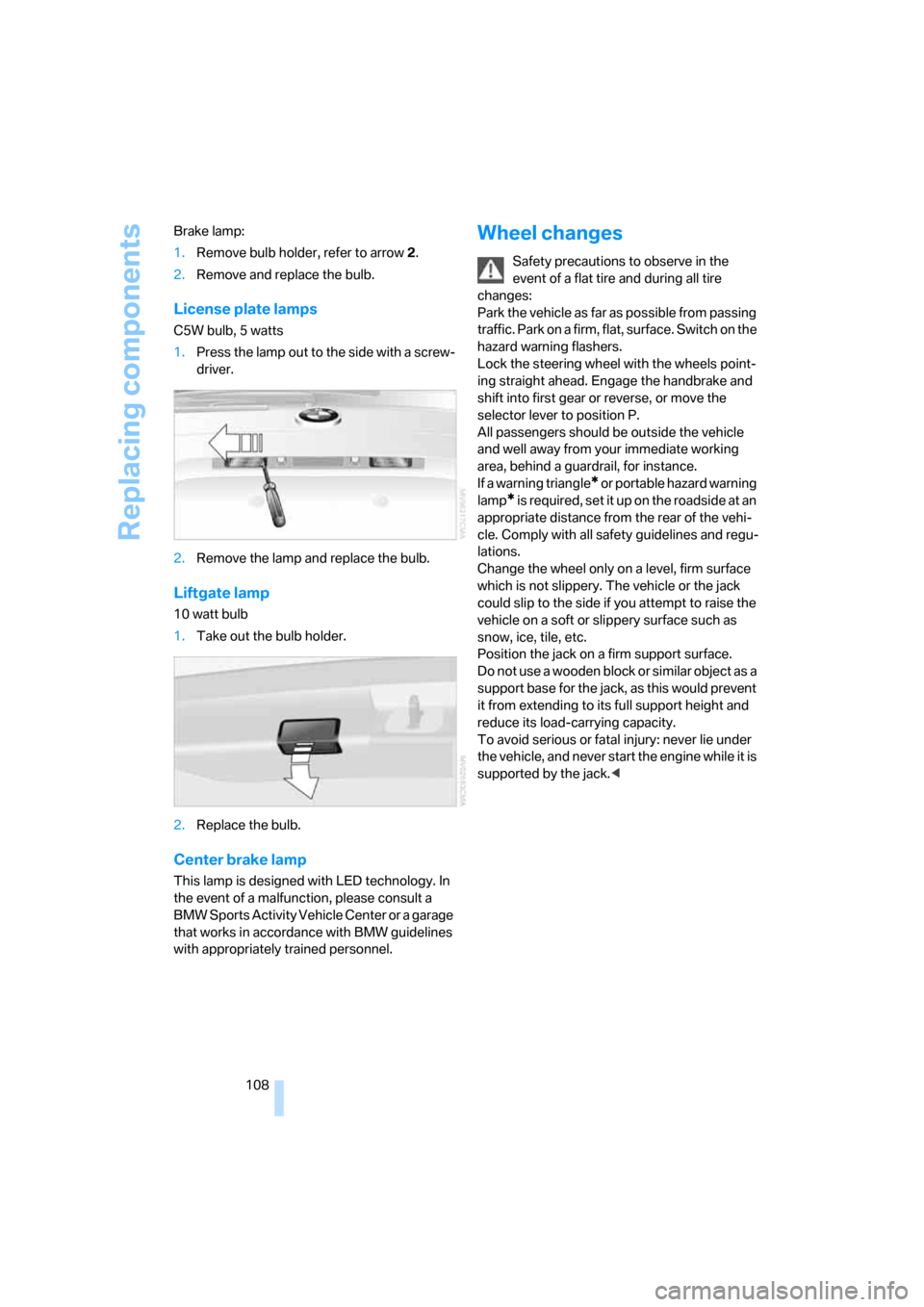
License plate lamps
C5W bulb, 5 watts
1.Press the lamp out to the side with a screw-
driver.
2.Remove the lamp and replace the bulb.
Liftgate lamp
10 watt bulb
1.Take out the bulb holder.
2.Replace the bulb.
Center brake lamp
This lamp is designed with LED technology. In
the event of a malfunction, please consult a
BMW Sports Activity Vehicle Center or a garage
that works in accordance with BMW guidelines
with appropriately trained personnel.
Wheel changes
Safety precautions to observe in the
event of a flat tire and during all tire
changes:
Park the vehicle as far as possible from passing
traffic. Park on a firm, flat, surface. Switch on the
hazard warning flashers.
Lock the steering wheel with the wheels point-
ing straight ahead. Engage the handbrake and
shift into first gear or reverse, or move the
selector lever to position P.
All passengers should be outside the vehicle
and well away from your immediate working
area, behind a guardrail, for instance.
If a warning triangle
* or portable hazard warning
lamp
* is required, set it up on the roadside at an
appropriate distance from the rear of the vehi-
cle. Comply with all safety guidelines and regu-
lations.
Change the wheel only on a level, firm surface
which is not slippery. The vehicle or the jack
could slip to the side if you attempt to raise the
vehicle on a soft or slippery surface such as
snow, ice, tile, etc.
Position the jack on a firm support surface.
Do not use a wooden block or similar object as a
support base for the jack, as this would prevent
it from extending to its full support height and
reduce its load-carrying capacity.
To avoid serious or fatal injury: never lie under
the vehicle, and never start the engine while it is
supported by the jack.<