2007 BMW X3 3.0SI Accessories
[x] Cancel search: AccessoriesPage 5 of 139

Reference
At a glance
Controls
Driving tips
Mobility
Contents
The fastest way to find specific topics is to use
the index, refer to page124.
Using this Owner's Manual
4Notes
7Reporting safety defects
At a glance
10Cockpit
Controls
18Opening and closing
27Adjustments
34Transporting children safely
37Driving
45Everything under control
49Technology for comfort, convenience
and safety
58Lamps
61Air conditioner
67Practical interior accessories
Driving tips
80Things to remember when driving
Mobility
88Refueling
90Wheels and tires
97Under the hood
102Maintenance
104Replacing components
113Giving and receiving assistance
Reference
120Technical data
124Everything from A to Z
Page 8 of 139
Notes
6
Parts and accessories
For your own safety, use genuine parts
and accessories approved by BMW.
When you purchase accessories tested and
approved by BMW and Genuine BMW Parts,
you simultaneously acquire the assurance that
they have been thoroughly tested by BMW to
ensure optimum performance when installed
on your vehicle.
BMW warrants these parts to be free from
defects in material and workmanship.
BMW will not accept any liability for damage
resulting from installation of parts and accesso-
ries not approved by BMW.
BMW cannot test every product made by other
manufacturers to verify if it can be used on a
BMW safely and without risk to either the vehi-
cle, its operation or its occupants.
Genuine BMW Parts, BMW Accessories and
other products approved by BMW, together
with professional advice on using these items,
are available from all BMW Sports Activity Vehi-
cle Centers.
Installation and operation of non-BMW
approved accessories such as alarms, radios,
amplifiers, radar detectors, wheels, suspension
components, brake dust shields, telephones,
including operation of any mobile phone from
within the vehicle without using an externally
mounted antenna, or transceiver equipment, for
instance, CBs, walkie-talkies, ham radios or
similar accessories, may cause extensive dam-
age to the vehicle, compromise its safety, inter-
fere with the vehicle's electrical system, or
affect the validity of the BMW Limited Warranty.
See your BMW Sports Activity Vehicle Center
for additional information.<
Maintenance, replacement, or repair of
the emission control devices and sys-
tems may be performed by any automotive
repair establishment or individual using any cer-
tified automotive part.<
Service and warranty
We recommend that you read this publication
thoroughly.
Your BMW is covered by the following warran-
ties:
>New Vehicle Limited Warranty
>Rust Perforation Limited Warranty
>Federal Emissions System Defect Warranty
>Federal Emissions Performance Warranty
>California Emission Control System Limited
Warranty.
Detailed information about these warranties is
listed in the Service and Warranty Information
Booklet for US models or in the Warranty and
Service Guide Booklet for Canadian models.
Page 15 of 139
At a glance
Controls
Driving tips
Mobility Reference
13
Colors
The indicator and warning lamps can light up in
different colors and combinations.
The following section explains the significance
of the individual colors as well as how you
should respond when they appear.
>red:
Stop the vehicle immediately
or
An important reminder
>yellow:
Have the system inspected as soon as
possible
or
For your information
>green:
For your information
>blue:
For your information
Buttons* on steering wheel
The buttons integrated into the steering wheel
are provided so that you can operate a number
of accessories quickly and without being dis-
tracted from traffic conditions. You may oper-
ate:
>Selected audio source functions
>Recirculated-air mode/steering wheel
heater
>Cruise control
>Selected telephone functions
>Voice command system
In order to operate a system, it must be
switched on.<
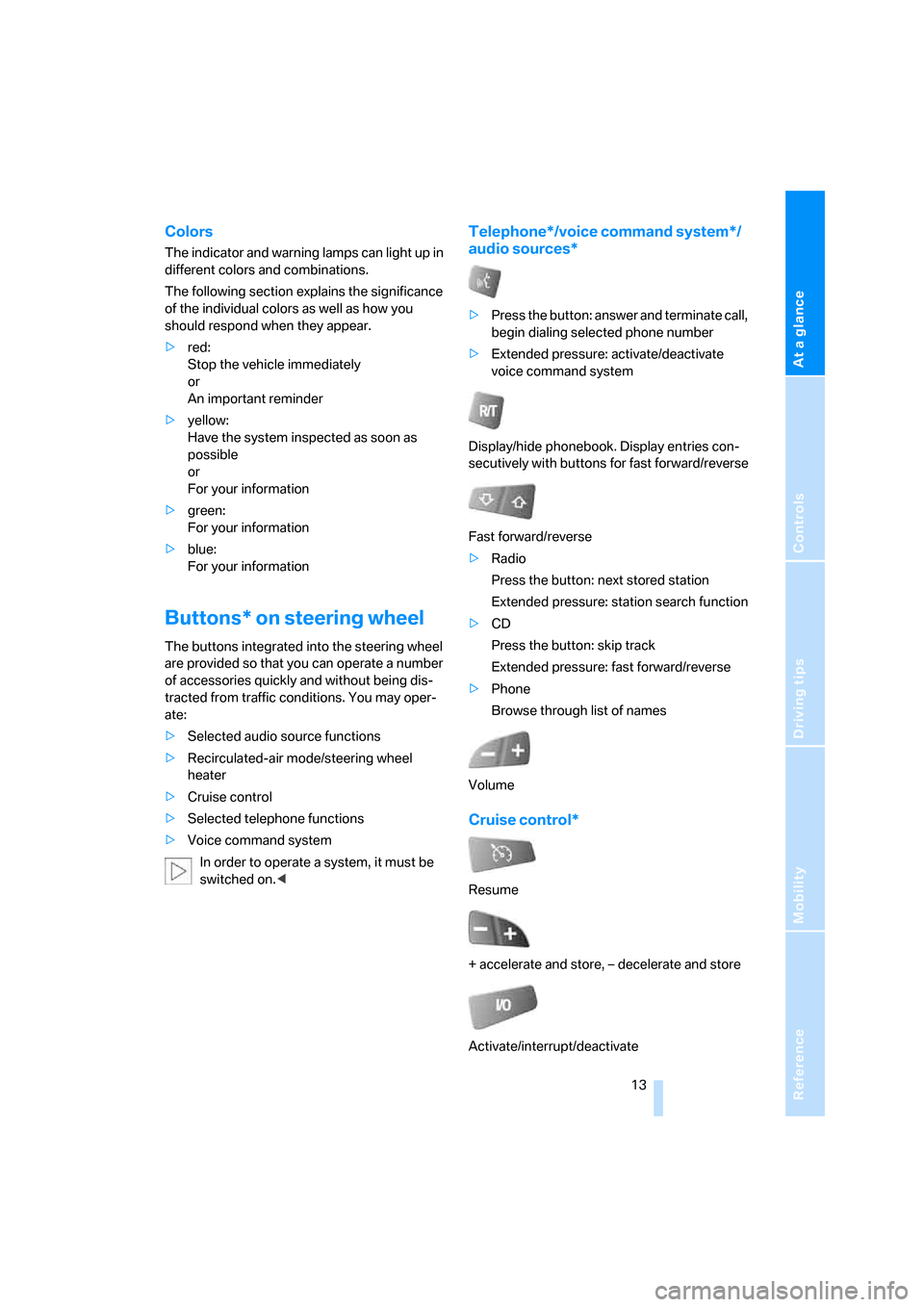
Telephone*/voice command system*/
audio sources*
>Press the button: answer and terminate call,
begin dialing selected phone number
>Extended pressure: activate/deactivate
voice command system
Display/hide phonebook. Display entries con-
secutively with buttons for fast forward/reverse
Fast forward/reverse
>Radio
Press the button: next stored station
Extended pressure: station search function
>CD
Press the button: skip track
Extended pressure: fast forward/reverse
>Phone
Browse through list of names
Volume
Cruise control*
Resume
+ accelerate and store, – decelerate and store
Activate/interrupt/deactivate
Page 19 of 139

Controls
This chapter is intended to provide you with
information for complete control of your vehicle
and describes its extensive array of features
and accessories, both for driving and for your
own safety, comfort and convenience.
Controls
Page 25 of 139

Reference
At a glance
Controls
Driving tips
Mobility
23
In the back, separate switches are provided in
the armrests.
For convenience operation using the remote
control or the door lock, refer to pages20, 21.
After switching off ignition
You can operate the windows for up to 1 minute
as long as no door has been opened.
Pinch protection system
If the closing force rises beyond a predefined
threshold when a window is being closed, the
system will interrupt the closing of the window
prior to lowering it slightly.
Despite the presence of the pinch protec-
tion system, inspect the window's travel
path prior to closing it, as the safety system
might fail to detect certain kinds of obstruc-
tions, such as very thin objects, and the window
would continue closing.
Do not install any accessories in the movement
range of the window as this could impair the
function of the pinch protection system.<
Closing without pinch protection
system
When there is danger outside or when, for
example, ice on the window prevents a normal
closing, press the switch past the resistance
point and hold it there. The window will close
without the pinch protection system.
Following interruptions in electrical
power supply
After disconnecting the battery, the pinch pro-
tection system must be reinitialized. To do this,
open and close the windows once and continue
pull the switch for longer than approx. 2 sec-
onds after closing.
Safety switch
With the safety switch, you can prevent the rear
windows from being opened or closed via the
switches in the rear passenger area, by chil-
dren, for example. The LED lights up when this
safety function is activated.
Press the safety switch when children
ride in the rear; otherwise, unsupervised
closing of the windows could lead to injuries.<
Panorama glass sunroof*
The panorama glass sunroof is ready for opera-
tion with the ignition key in position 2.
Keep panorama glass sunroof in your line
of sight while closing. Failure to do so can
result in bodily injury.
Always remove the key when leaving the vehi-
cle; otherwise, children could operate the sun-
roof and injure themselves.<
Page 39 of 139

Reference
At a glance
Controls
Driving tips
Mobility
37
Driving
Ignition lock
0Steering locked
1Steering unlocked
2Ignition switched on
3Starting engine
Steering locked
T h e k e y c a n b e i n s e r t ed o r r em o v e d in t h is p o s i -
tion only.
After removing the key, turn the steering wheel
slightly to the left or right until you hear the lock
engage.
Interlock with automatic transmission
The key can only be turned back to position0 or
removed if the selector lever is in position P:
interlock.
Steering unlocked
A slight steering wheel movement often makes
it easier to turn the key from0 to1.
Some power accessories are ready for opera-
tion.
Ignition switched on
All vehicle systems are ready for operation.
Starting engine
Do not run the engine in enclosed spaces;
otherwise, inhalation of toxic exhaust
gases can cause unconsciousness and death.
The exhaust gases contain carbon monoxide,
an odorless and colorless, but highly toxic gas.
Do not leave the vehicle unattended with the
engine running, since an unattended vehicle
with a running engine is a safety hazard.
To prevent the vehicle from rolling, always shift
into neutral or selector lever position P and
engage the handbrake firmly before leaving the
vehicle with the engine running.<
Do not discontinue the starting procedure pre-
maturely, but also do not prolong it for more
than 20 seconds. Release the ignition key
immediately as soon as the engine starts.
When starting the engine, do not press the
accelerator pedal.
Do not allow the engine to warm up while
parked; instead, start driving immediately at a
moderate engine speed.
Indicator lamps
The warning lamp lights up. Exhaust
values are deteriorating. Have the vehi-
cle checked as soon as possible.
Under certain conditions, the indicator will flash.
This indicates a serious rate of engine misfire.
When this occurs, you should reduce speed
and consult the nearest BMW Sports Activity
Vehicle Center as soon as possible. Severe
engine misfire, even for only a short period of
time, can seriously damage emission control
components, especially the catalytic converter.
Display of the previously described mal-
function on Canadian models.
The warning lamp lights up. Malfunc-
tion in the engine electronics. You can
continue to drive with reduced engine
Page 69 of 139

Reference
At a glance
Controls
Driving tips
Mobility
67
Practical interior accessories
Integrated universal remote
control*
The concept
The integrated universal remote control can
replace as many as three hand-held transmit-
ters for various radio-controlled accessories,
such as garages, exterior gates, or lighting sys-
tems. The integrated universal remote control
recognizes and learns the transmitted signal of
each of the original hand-held transmitters.
The signal of an original hand-held transmitter
can be programmed on one of the three mem-
ory buttons1. Then, the programmed memory
button1 can operate the device whenever the
ignition is switched on. The LED2 indicates
transmission of the signal.
Should you sell your vehicle one day, be sure to
delete the stored programs beforehand for your
security, refer to page68.
To prevent possible damage or injury,
before programming or using the inte-
grated universal remote control, always inspect
the immediate area to make certain that no peo-
ple, animals or objects are within the travel
range of the device. Also, comply with the
safety precautions of the original hand-held
transmitter.<
Checking compatibility
If you see this symbol on the packaging
or in the manual supplied with the origi-
nal hand-held transmitter, then it is safe
to assume that the radio-controlled device is
compatible with the integrated universal
remote control.
If you have additional questions, please
ask at your BMW Sports Activity Vehicle
Center or call: 1-800-355-3515.
You can find also information on the Internet at:
www.bmwusa.com or
www.homelink.com. HomeLink is a registered trademark of
Johnson Controls, Inc.<
Programming
1Memory buttons
2LED
Fixed-code hand-held transmitters
1.Turn the ignition key to position 2.
2.For initial use: press the left and right mem-
ory button1 for approx. 20 seconds until
the LED2 flashes rapidly. All stored pro-
grams are deleted.
3.Hold the original hand-held transmitter at a
distance of approx. 4 in/10 cm to 12 in/
30 cm from the memory buttons1.
The required distance between the
hand-held transmitter and memory
buttons1 depends on the relevant system
of the original hand-held transmitter used.<
4.Simultaneously press the transmit button
on the original hand-held transmitter and
the desired memory button 1 of the inte-
grated universal remote control. Initially, the
LED2 flashes slowly. Release both buttons
as soon as the LED2 flashes rapidly. If the
LED2 does not flash rapidly after approx.
15 seconds, then change the distance and
repeat the step.
5.To program other original hand-held trans-
mitters, repeat steps 3 and 4.
Page 70 of 139

Practical interior accessories
68 The corresponding memory button1 is now
programmed with the signal of the original
hand-held transmitter.
You can use the system when the engine is run-
ning or when the ignition is switched on.
If the system cannot be operated after
repeated programming, check whether
the original hand-held transmitter uses an alter-
nating-code system. To do so, either read the
instructions of the original hand-held transmit-
ter or press and hold down the programmed
memory button1 of the integrated universal
remote control. If the LED2 on the integrated
universal remote control flashes rapidly for a
short time then lights up for approx. 2 seconds,
this indicates that the original hand-held trans-
mitter uses an alternating-code system. In the
case of an alternating-code system, program
the memory buttons1 as described in the sec-
tion below on alternating-code hand-held
transmitters.<
Alternating-code hand-held
transmitters
Consult the operating instructions of the unit
you wish to set when programming the univer-
sal remote control. You will find information
there on the possibilities for synchronization.
When programming hand-held transmitters
that employ an alternating code, please follow
these additional instructions:
Programming will be easier with the aid of
a second person.<
1.Park your vehicle within the range of the
remote-controlled equipment.
2.Program the integrated universal remote
control as described above in the section on
Fixed-code hand-held transmitters.
3.Locate the button on the receiver of the
equipment to be set, e.g. on its drive unit.
4.Press the button on the receiver of the
device you want to set up. After step 4, you
have approx. 30 seconds for step 5.
5.Press the programmed memory button1
of the integrated universal remote control
three times.The corresponding memory button1 is now
programmed with the signal of the original
hand-held transmitter.
If you have questions, please contact your
BMW Sports Activity Vehicle Center.<
Deleting stored programs
Press the left and right memory button1 for
approx. 20 seconds until the LED2 flashes rap-
idly.
All stored programs are deleted.
It is not possible to delete individual programs.
Digital compass*
1Adjusting button
2Display
The display indicates the cardinal or intercardi-
nal direction in which you are currently driving.
Basic operation
You can call up a number of functions by press-
ing the adjusting button with a sharp object
such as a ball-point pen or the like. The follow-
ing possible adjustments are displayed one
after another, depending on how long you press
and hold the adjusting button:
>Press briefly: switches display on/off
>3 to 6 seconds: set compass zone
>6 to 9 seconds: calibrate compass
>9 to 12 seconds: set for left-hand/right-
hand drive
>12 to 15 seconds: set language