2007 BMW X3 3.0SI steering
[x] Cancel search: steeringPage 53 of 139

Reference
At a glance
Controls
Driving tips
Mobility
51
jointly. These systems do not take their cus-
tomary stabilizing actions.
To increase vehicle stability, reactivate DSC as
soon as possible.
Activating DSC
Press the button again; the indicator lamp in the
instrument cluster goes out.
For monitoring purposes
When the indicator lamp flashes:
DSC is controlling the drive and braking
forces.
When the indicator lamp lights up:
DSC is deactivated.
Dynamic Traction Control DTC
DTC is a variation of DSC that is optimized for
forward momentum for particular road condi-
tions, e.g. unplowed snow-covered roads. In
this mode, the system assures maximum for-
ward momentum, but with limited driving stabil-
ity. For this reason, drive with corresponding
caution.
In the following exceptional circumstances, it
may be useful to temporarily activate DTC:
>When driving on snow-covered inclines, in
slush, or on unplowed, snow-covered roads
>When freeing a stuck vehicle or starting up
in deep snow, sand, or on a loose ground
surface
>When driving with snow chains
*
Activating DTC
Press the button; the DTC indicator lamp in the
instrument cluster lights up.
For monitoring purposes
When the indicator lamp flashes:
DTC is controlling the drive forces and
braking forces.
When the indicator lamp lights up:
DTC is activated.
Deactivating DTC
Press the button again; the DTC indicator lamp
in the instrument cluster goes out.
xDrive
xDrive is the all-wheel drive system of your X3.
The combined effects of xDrive and DSC fur-
ther optimize the traction and dynamic driving
characteristics. The all-wheel drive system
xDrive variably distributes the drive torque to
the front and rear axle depending on the driving
situation and prevailing road conditions.
HDC Hill Descent Control
The concept
HDC is a system for hill descent assistance that
reduces the speed on steep downward inclines
and makes it even easier to control the driving
characteristics of your BMW under these condi-
tions. The vehicle moves at slightly more than
walking speed without active intervention from
the driver.
You can activate HDC at vehicle speeds below
approx. 20 mph/35 km/h. If it is traveling down a
steep slope at a speed below approx. 20 mph/
35 km/h, the vehicle then automatically decel-
erates down to slightly more than walking
speed, approx. 5 mph/8 km/h, and then keeps
this speed constant.
You can use the accelerator or brakes to vary
this automatically controlled speed within a
range extending from approx. 3 mph/5 km/h to
15 mph/25 km/h.
You can specify a target speed within the same
range by using the +/– buttons of the cruise
control on the steering wheel.
Page 55 of 139

Reference
At a glance
Controls
Driving tips
Mobility
53
After releasing the brake, start driving immedi-
ately; otherwise, the acceleration assistant will
no longer hold the vehicle after approx. 2 sec-
onds and the vehicle will start to roll back-
ward.<
Malfunction
The warning lamp for the brake system
lights up in yellow. The acceleration
assistant has failed. The vehicle will not
be held after the brake is released. Have the
system checked as soon as possible.
Flat Tire Monitor FTM*
The concept
The Flat Tire Monitor keeps track of the infla-
tion pressures in the four mounted tires as you
drive. The system triggers an alert whenever
the inflation pressure in one tire drops signifi-
cantly in relation to the pressure in another tire.
When a loss of pressure occurs, the rolling
radius changes and with it, the rotational speed
of the wheels. This change is detected and sig-
naled as a flat tire.
Functional requirement
To ensure the reliable signaling of a flat tire, the
system must be initialized at the correct tire
inflation pressure.
The initialization must be carried out after
each correction of the tire inflation pres-
sure and after every tire or wheel change.<
System limits
The Flat Tire Monitor cannot predict sud-
den severe tire damage caused by out-
side factors and does not detect a natural, even
pressure drop in all four tires.<
In the following situations, the system could be
delayed or malfunction:
>When the system has not been initialized
>When driving on snow-covered or slippery
road surfaces>Sporty driving style: slip in the drive wheels,
high lateral acceleration.
>When driving with snow chains
*
When driving with a compact wheel, the Flat
Tire Monitor cannot operate.
Initializing system
The initialization is completed while driv-
ing and can be interrupted at any time.
The initialization automatically continues when
driving resumes.
Do not initialize the system when driving with
snow chains
* or with a compact wheel.<
1.Start the engine just before driving, but do
not begin to drive.
2.Press the button for at least 4 seconds, but
not longer than 2 minutes. After the button
is released, the indicator lamp in the instru-
ment cluster lights up yellow for a few sec-
onds.
3.Begin driving.
The initialization is completed while driving,
without requiring any further input from you.
Indication of a flat tire
The warning lamp lights up red. In addi-
tion, an acoustic signal sounds. There is
a flat tire or extensive inflation pressure
loss.
1.Reduce speed and stop the vehicle care-
fully. Avoid sudden braking and steering
maneuvers.
2.Identify damaged tire.
If identification is not possible, con-
tact your BMW Sports Activity Vehi-
cle Center.<
Page 56 of 139

Technology for comfort, convenience and safety
54 3.Replace the damaged wheel, refer to
Wheel changes on page108.
Malfunction
The warning lamp lights up yellow. The
Flat Tire Monitor is malfunctioning or
out of order. Have the system checked
as soon as possible.
TPM Tire Pressure Monitor*
The concept
TPM controls the tire inflation pressure in the
four mounted wheels. The system notifies you
if the tire inflation pressure has fallen signifi-
cantly in one or more tires.
Functional requirement
To ensure the reliable signaling of a flat tire, the
system must be reset at the correct tire inflation
pressure.
Always use wheels equipped with TPM elec-
tronics, including a metal valve; otherwise, there
is no guarantee that the system will function
properly.
The system must be reset after every cor-
rection of tire inflation pressure and after
every tire or wheel change.<
System limits
TPM cannot warn you of sudden, serious
tire damage due to external factors.<
The system does not function properly if it has
not been reset, e.g. it may identify a tire as flat in
spite of the fact that the tire is filled to the cor-
rect inflation pressure.
The system is deactivated and is unable to
detect flat tires if a wheel not equipped with
TPM electronics has been mounted, e.g. a
compact wheel, or if TPM is experiencing tem-
porary interference from other systems or
devices that use the same frequency.
Resetting system
The system must be reset after every cor-
rection of tire inflation pressure and after
every tire or wheel change.<
1.Start engine, but do not begin to drive.
2.Press the button until the yellow warning
lamp in the instrument cluster lights up for a
few seconds.
3.Begin driving.
After a few minutes of driving, the tire infla-
tion pressures in the tires are adopted as
the desired values to be monitored. The
resetting is completed during driving and
can be interrupted at any time without
requiring any input from you. The resetting
automatically continues when driving
resumes.
Low tire pressure message
The warning lamp lights up yellow. In
addition, a signal sounds. You have a
flat tire or a significant loss of tire pres-
sure in one or more tires.
1.Reduce speed and stop the vehicle care-
fully. Avoid sudden braking and steering
maneuvers.
2.Identify the damaged wheel or wheels.
If identification is not possible, con-
tact your BMW Sports Activity Vehi-
cle Center.<
3.Replace the damaged wheel, refer to
Wheel changes on page108.
4.Check tire inflation pressure and correct as
needed.
Page 58 of 139
Technology for comfort, convenience and safety
56
Airbags
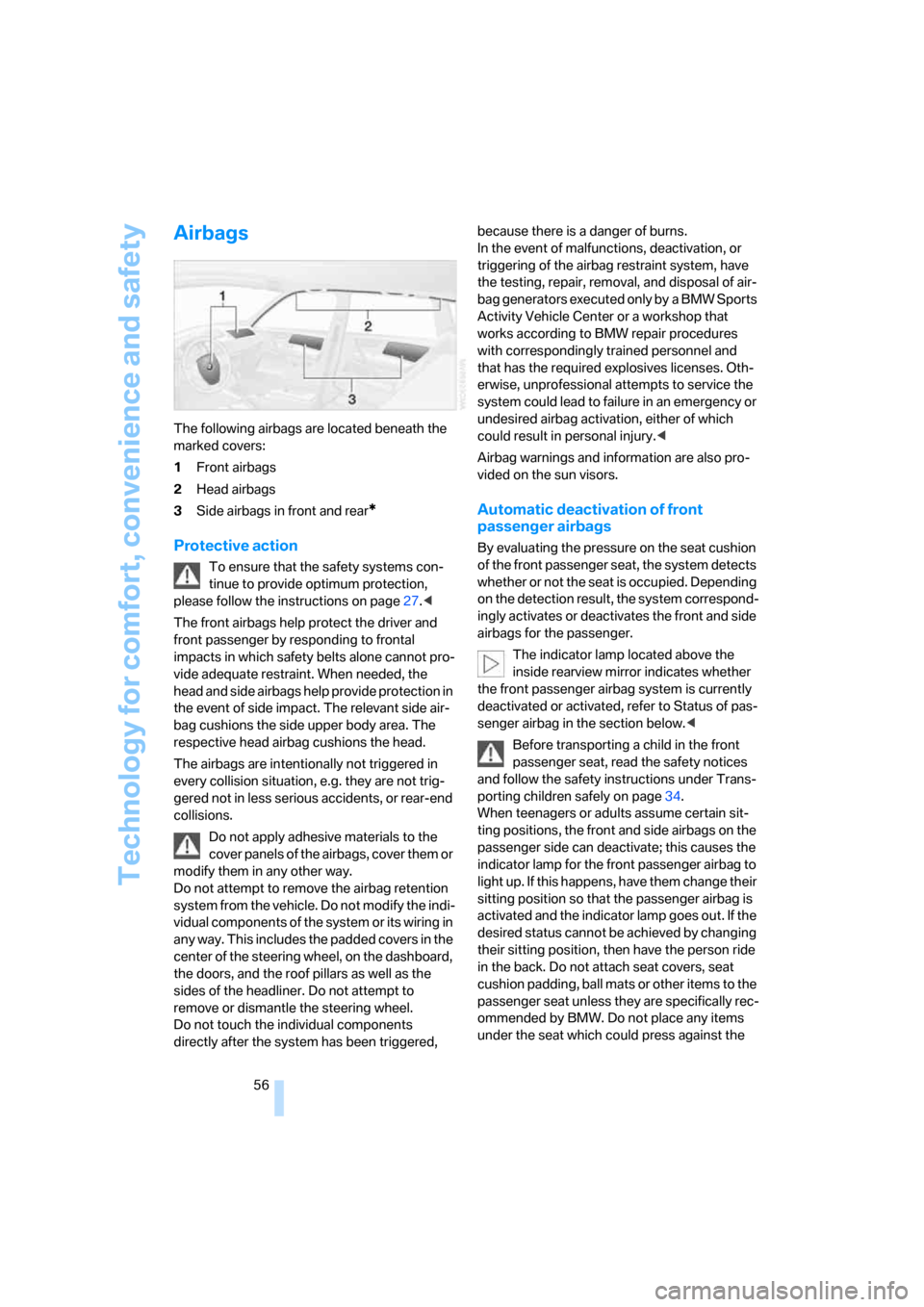
The following airbags are located beneath the
marked covers:
1Front airbags
2Head airbags
3Side airbags in front and rear
*
Protective action
To ensure that the safety systems con-
tinue to provide optimum protection,
please follow the instructions on page27.<
The front airbags help protect the driver and
front passenger by responding to frontal
impacts in which safety belts alone cannot pro-
vide adequate restraint. When needed, the
head and side airbags help provide protection in
the event of side impact. The relevant side air-
bag cushions the side upper body area. The
respective head airbag cushions the head.
The airbags are intentionally not triggered in
every collision situation, e.g. they are not trig-
gered not in less serious accidents, or rear-end
collisions.
Do not apply adhesive materials to the
cover panels of the airbags, cover them or
modify them in any other way.
Do not attempt to remove the airbag retention
system from the vehicle. Do not modify the indi-
vidual components of the system or its wiring in
any way. This includes the padded covers in the
center of the steering wheel, on the dashboard,
the doors, and the roof pillars as well as the
sides of the headliner. Do not attempt to
remove or dismantle the steering wheel.
Do not touch the individual components
directly after the system has been triggered, because there is a danger of burns.
In the event of malfunctions, deactivation, or
triggering of the airbag restraint system, have
the testing, repair, removal, and disposal of air-
bag generators executed only by a BMW Sports
Activity Vehicle Center or a workshop that
works according to BMW repair procedures
with correspondingly trained personnel and
that has the required explosives licenses. Oth-
erwise, unprofessional attempts to service the
system could lead to failure in an emergency or
undesired airbag activation, either of which
could result in personal injury.<
Airbag warnings and information are also pro-
vided on the sun visors.
Automatic deactivation of front
passenger airbags
By evaluating the pressure on the seat cushion
of the front passenger seat, the system detects
whether or not the seat is occupied. Depending
on the detection result, the system correspond-
ingly activates or deactivates the front and side
airbags for the passenger.
The indicator lamp located above the
inside rearview mirror indicates whether
the front passenger airbag system is currently
deactivated or activated, refer to Status of pas-
senger airbag in the section below.<
Before transporting a child in the front
passenger seat, read the safety notices
and follow the safety instructions under Trans-
porting children safely on page34.
When teenagers or adults assume certain sit-
ting positions, the front and side airbags on the
passenger side can deactivate; this causes the
indicator lamp for the front passenger airbag to
light up. If this happens, have them change their
sitting position so that the passenger airbag is
activated and the indicator lamp goes out. If the
desired status cannot be achieved by changing
their sitting position, then have the person ride
in the back. Do not attach seat covers, seat
cushion padding, ball mats or other items to the
passenger seat unless they are specifically rec-
ommended by BMW. Do not place any items
under the seat which could press against the
Page 61 of 139

Reference
At a glance
Controls
Driving tips
Mobility
59
Automatic headlamp control cannot
serve as a substitute for the driver's judg-
ment in determining when the vehicle lamps
should be switched on. For example, the sys-
tem cannot detect fog or hazy weather. To
avoid safety risks, you should always switch on
the low beams manually under these condi-
tions.<
You can have the sensitivity of the head-
lamp control adjusted.<
Adaptive Head Light*
The concept
Adaptive Head Light is a variable headlamp
control system that enables better illumination
of the road surface. Depending on the steering
angle and other parameters, the light from the
headlamp follows the course of the road.
In tight curves, e.g. serpentines, or when mak-
ing turns, up to a speed of approx. 43 mph/
70 km/h, a turning lamp is switched on and illu-
minates the inside of the curve.
Activating Adaptive Head Light
With the ignition on, turn the light switch to the
Control automatic driving lamp position, refer to
page58.
The turning lamp is switched on automatically
depending on the steering angle or the turn sig-
nal position.
In order not to blind oncoming traffic, the Adap-
tive Head Light points toward the passenger
side when the vehicle is stopped. When driving
in reverse, only the turning lamp is active and
lights up the region on the outside of the curve.
Malfunction
The LED next to the symbol for automatic head-
lamp control flashes. Adaptive Head Light is
malfunctioning or has failed. Have the system
checked as soon as possible.
High beams/
roadside parking lamps
1High beams
2Headlamp flasher
3Roadside parking lamps
Roadside parking lamps, left or right*
You also have the option of lighting up just one
side of your vehicle when parking. When doing
so, be sure to comply with national regulations.
After switching off the engine, press the lever
up or down past the resistance point, arrow 3.
The roadside parking lamps drain the bat-
tery. For this reason, avoid using them for
extended periods; otherwise, it may no longer
be possible to start the engine.<
Front fog lamps*
Briefly press the button to switch on/off.
The parking lamps or low beams must
be switched on for the fog lamps to
operate. The green indicator lamp lights
up when the fog lamps are on.
Page 83 of 139

Reference
At a glance
Controls
Driving tips
Mobility
81
2.Greatly increase the air supply of the air
conditioning system or automatic climate
control, refer to page62 or65.
Hot exhaust system
High temperatures occur in the exhaust
system of every vehicle. Do not remove
the heat shields installed adjacent to various
sections of the exhaust system, and never apply
undercoating to them. When driving, standing
at idle, and parking, take care to avoid possible
contact between the hot exhaust system and
any highly flammable materials such as hay,
leaves, grass, etc. Such contact could lead to
a fire, resulting in serious personal injury and
property damage. Do not touch hot exhaust
pipe, it can cause burns.<
Mobile communications devices in
vehicle
BMW does not recommend using mobile
communications devices, e.g. mobile
phones, on the interior of the vehicle without a
direct connection to an outside antenna. Other-
wise, the vehicle electronics and mobile com-
munications device can affect each other. In
addition, there is no assurance that the radia-
tion which results during transmission will be
dissipated from the vehicle interior.<
When the vehicle is parked
Condensation forms in the air conditioner/auto-
matic climate control system during operation,
and then exits under the vehicle. Traces of con-
densed water under the vehicle are therefore
normal.
Before driving into a car wash
Fold in the exterior mirrors, refer to page32;
otherwise, they could be damaged due to the
width of the vehicle.
Deactivate the rain sensor; otherwise, damage
could result from undesired wiper activation,
refer to page41.
Hydroplaning
When driving on wet or slushy roads,
reduce road speed. If you do not, a wedge
of water can form between tires and road sur-
face. This phenomenon is referred to as hydro-
planing, and is characterized by a partial or
complete loss of contact between tires and
road surface, ultimately undermining your abil-
ity to steer and brake the vehicle.<
The danger of hydroplaning increases as tire
tread depth decreases, also refer to Minimum
tread depth on page94.
Driving through water
Do not drive through water on the road if it
is deeper than 20 in/50 cm, and then only
at walking speed. Otherwise, the vehicle's
engine, the electrical systems, and the trans-
mission may be damaged.<
Using handbrake on inclines
Do not hold the vehicle in place on slopes
by slipping or riding the clutch, use the
handbrake instead. Otherwise, greater clutch
wear will result.<
Safe braking
Your BMW is equipped with ABS as standard
equipment. In situations in which it is required, it
is best to apply the brakes fully. Since the vehi-
cle maintains steering responsiveness, you can
nevertheless avoid possible obstacles with a
minimum of steering effort.
Pulsation at the brake pedal combined with
sounds from the hydraulic circuits indicates to
the driver that ABS is in its active mode.
Wet roads
On wet roads or in heavy rain, briefly apply light
pressure to the brake pedal every few miles.
Watch traffic conditions to ensure that this
maneuver does not endanger other road users.
The heat that is generated by the brake applica-
tions helps to dry the brake pads and rotors.
The full braking force will then be available
when you need it.
Page 86 of 139

Things to remember when driving
84
Roof-mounted luggage rack*
A special rack system is available as an optional
accessory for your BMW. Please familiarize
yourself with the information contained in the
installation instructions.
Loading luggage rack
Because roof racks raise the vehicle's center of
gravity when loaded, they have a major effect on
its handling and steering response. You should
therefore always remember not to exceed the
approved roof load capacity, the approved
gross vehicle weight, or the axle loads when
loading the rack.
These specifications can be found under
Weights on page122.
The roof load must be evenly distributed and
must not extend outward beyond the limits of
the loading surface. Always stow the heaviest
pieces on the bottom. Be sure that adequate
clearance is maintained for raising the glass
sunroof and that objects do not project into the
opening path of the liftgate.
Secure roof-mounted cargo correctly and
securely to prevent it from shifting or falling off
while you drive.
Drive smoothly. Avoid sudden acceleration and
braking maneuvers. Take corners gently.
Driving on poor roads
Your X3 is at home on all paved and unpaved
roads. It combines all-wheel drive with the
advantages of a normal passenger car.
Driving on unpaved terrain can cause
damage to the vehicle.<
When you are driving on poor roads, there are a
few points which you should strictly observe –
for your own safety and that of your passengers,
as well as to protect the vehicle:
>Familiarize yourself with the vehicle before
you begin driving. Do not take risks with the
vehicle under any circumstances.>Always adapt your driving speed to the road
conditions. The more steep and uneven the
roadway is, the lower the speed should be.
>You can operate your vehicle on uphill and
downhill gradients with a maximum slope
of 50 %. If you wish to drive on uphill and
downhill grades of this nature, make sure
beforehand that the engine oil and coolant
levels are near the MAX mark, refer to
pages99 and101.
>When descending very steep hills, use
HDC Hill Descent Control, refer to page51.
It is possible to start off on inclines of up
to 32 %.
The permitted side tilt is 32 %.
>While driving, watch carefully for obstacles
such as rocks or holes. Try to avoid these
obstacles whenever possible.
>Avoid having the body make contact with
the ground, e.g. on the crests of hills and
bumpy roads. The ground clearance of the
vehicle is a maximum of approx. 8.0 in/
20 cm. Please be aware that the ground
clearance can vary depending on the load
and operating conditions of the vehicle.
>Do not drive in water that is deeper than
20 in/50 cm. If you must drive through water
up to that depth, drive at a walking speed
and do not stop.
After leaving the water, press on the foot-
brake gently several times while driving at a
low speed. The brake applications will help
to dry the brakes, thus preventing a reduc-
tion in braking performance caused by the
moisture.
To clean the handbrake, apply the lever
slightly at approx. 25 mph/40 km/h and con-
tinue to drive for approx. 200 yards/
200 meters, provided that traffic conditions
allow you to do so.
>Depending on the road condition, it can be
useful to temporarily activate DTC, refer to
DTC Dynamic Traction Control on page51.
>If the drive wheels spin on one side, depress
the accelerator pedal far enough to permit
the driving stability control systems to dis-
Page 110 of 139
Replacing components
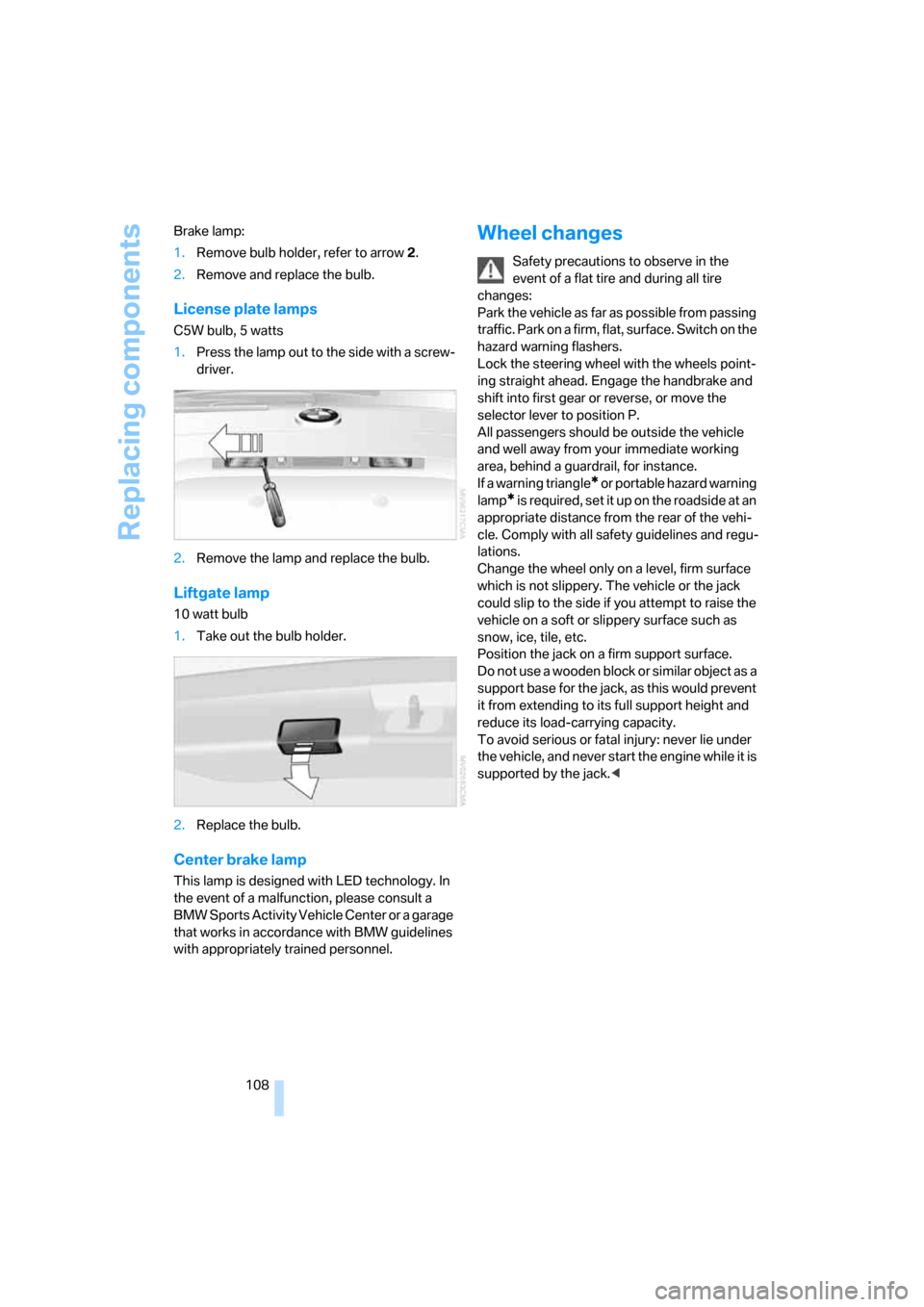
108 Brake lamp:
1.Remove bulb holder, refer to arrow 2.
2.Remove and replace the bulb.
License plate lamps
C5W bulb, 5 watts
1.Press the lamp out to the side with a screw-
driver.
2.Remove the lamp and replace the bulb.
Liftgate lamp
10 watt bulb
1.Take out the bulb holder.
2.Replace the bulb.
Center brake lamp
This lamp is designed with LED technology. In
the event of a malfunction, please consult a
BMW Sports Activity Vehicle Center or a garage
that works in accordance with BMW guidelines
with appropriately trained personnel.
Wheel changes
Safety precautions to observe in the
event of a flat tire and during all tire
changes:
Park the vehicle as far as possible from passing
traffic. Park on a firm, flat, surface. Switch on the
hazard warning flashers.
Lock the steering wheel with the wheels point-
ing straight ahead. Engage the handbrake and
shift into first gear or reverse, or move the
selector lever to position P.
All passengers should be outside the vehicle
and well away from your immediate working
area, behind a guardrail, for instance.
If a warning triangle
* or portable hazard warning
lamp
* is required, set it up on the roadside at an
appropriate distance from the rear of the vehi-
cle. Comply with all safety guidelines and regu-
lations.
Change the wheel only on a level, firm surface
which is not slippery. The vehicle or the jack
could slip to the side if you attempt to raise the
vehicle on a soft or slippery surface such as
snow, ice, tile, etc.
Position the jack on a firm support surface.
Do not use a wooden block or similar object as a
support base for the jack, as this would prevent
it from extending to its full support height and
reduce its load-carrying capacity.
To avoid serious or fatal injury: never lie under
the vehicle, and never start the engine while it is
supported by the jack.<