2007 BMW M6 COUPE steering
[x] Cancel search: steeringPage 186 of 256
Telephoning
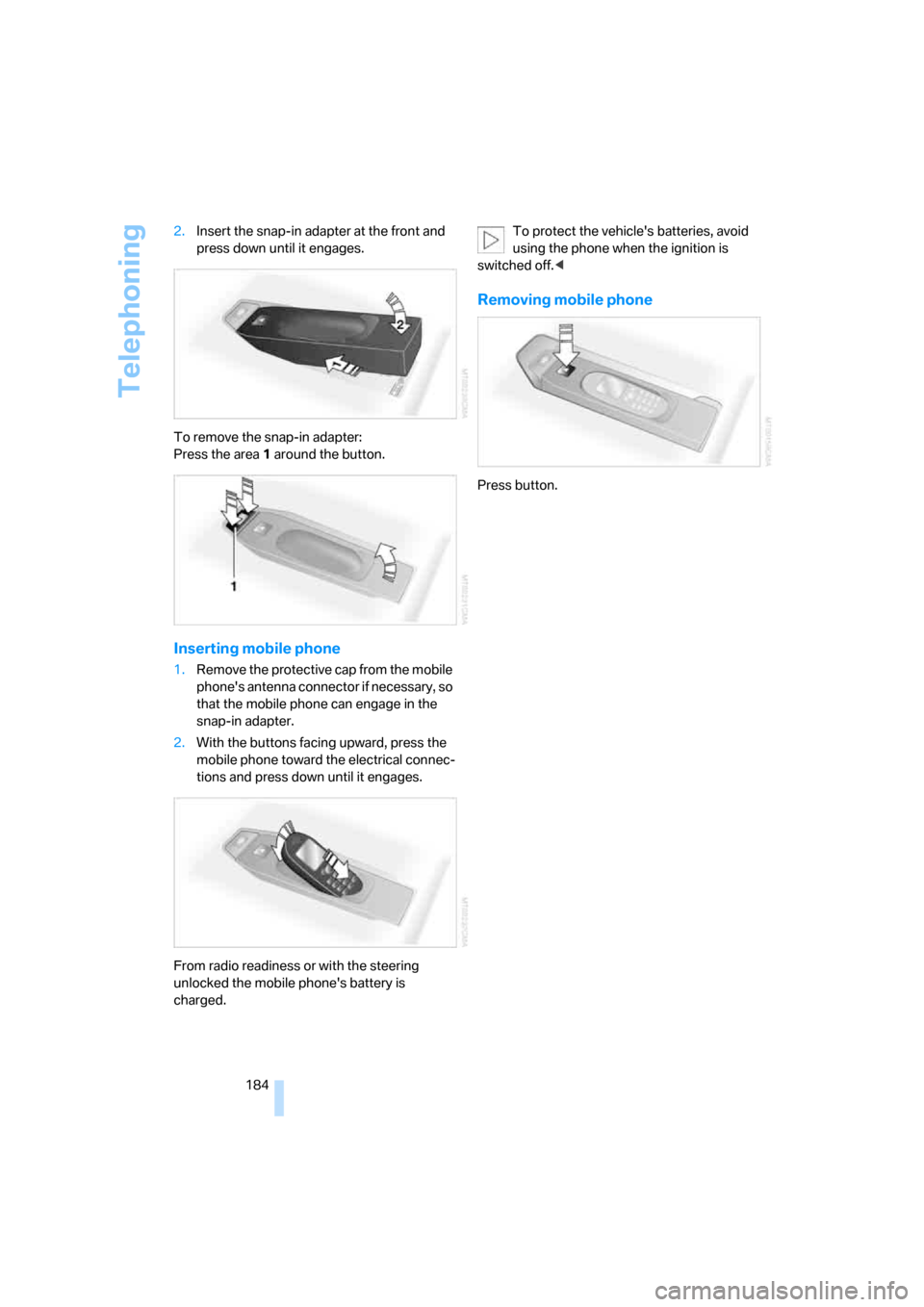
184 2.Insert the snap-in adapter at the front and
press down until it engages.
To remove the snap-in adapter:
Press the area 1 around the button.
Inserting mobile phone
1.Remove the protective cap from the mobile
phone's antenna connector if necessary, so
that the mobile phone can engage in the
snap-in adapter.
2.With the buttons facing upward, press the
mobile phone toward the electrical connec-
tions and press down until it engages.
From radio readiness or with the steering
unlocked the mobile phone's battery is
charged.To protect the vehicle's batteries, avoid
using the phone when the ignition is
switched off.<
Removing mobile phone
Press button.
Page 212 of 256
Replacing components
210 Have work on the xenon lighting system
performed only by your BMW center or a
workshop that works according to BMW repair
procedures with correspondingly trained per-
sonnel. Due to the high voltage involved, there
is a danger to life and limb when work is carried
out improperly.<
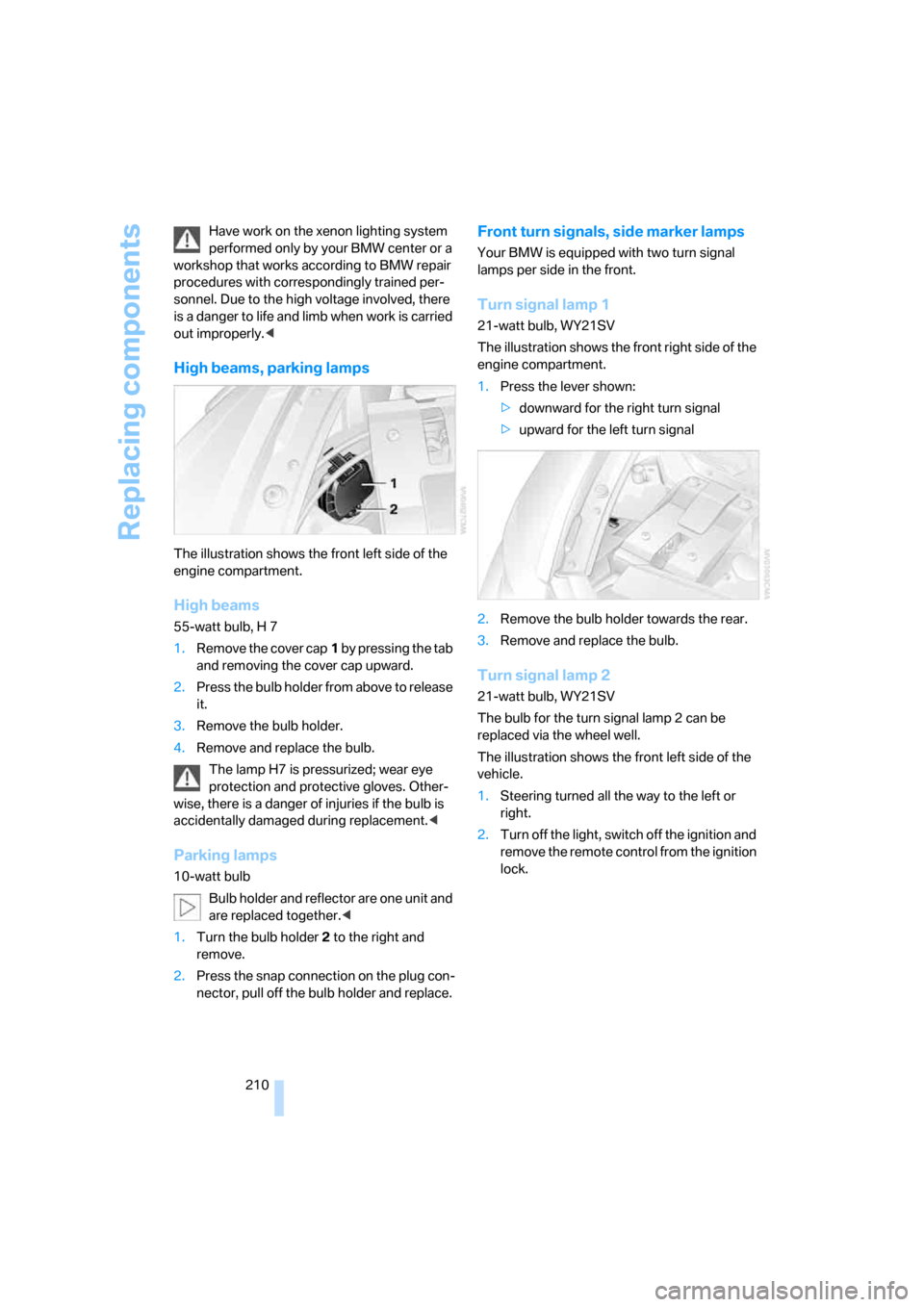
High beams, parking lamps
The illustration shows the front left side of the
engine compartment.
High beams
55-watt bulb, H 7
1.Remove the cover cap1 by pressing the tab
and removing the cover cap upward.
2.Press the bulb holder from above to release
it.
3.Remove the bulb holder.
4.Remove and replace the bulb.
The lamp H7 is pressurized; wear eye
protection and protective gloves. Other-
wise, there is a danger of injuries if the bulb is
accidentally damaged during replacement.<
Parking lamps
10-watt bulb
Bulb holder and reflector are one unit and
are replaced together.<
1.Turn the bulb holder2 to the right and
remove.
2.Press the snap connection on the plug con-
nector, pull off the bulb holder and replace.
Front turn signals, side marker lamps
Your BMW is equipped with two turn signal
lamps per side in the front.
Turn signal lamp 1
21-watt bulb, WY21SV
The illustration shows the front right side of the
engine compartment.
1.Press the lever shown:
>downward for the right turn signal
>upward for the left turn signal
2.Remove the bulb holder towards the rear.
3.Remove and replace the bulb.
Turn signal lamp 2
21-watt bulb, WY21SV
The bulb for the turn signal lamp 2 can be
replaced via the wheel well.
The illustration shows the front left side of the
vehicle.
1.Steering turned all the way to the left or
right.
2.Turn off the light, switch off the ignition and
remove the remote control from the ignition
lock.
Page 215 of 256
Mobility
213Reference
At a glance
Controls
Driving tips
Communications
Navigation
Entertainment
Pull the sticker for the speed limit off the sealant
bottle and apply it to the steering wheel.
Please observe the best-by date on the
sealant bottle.<
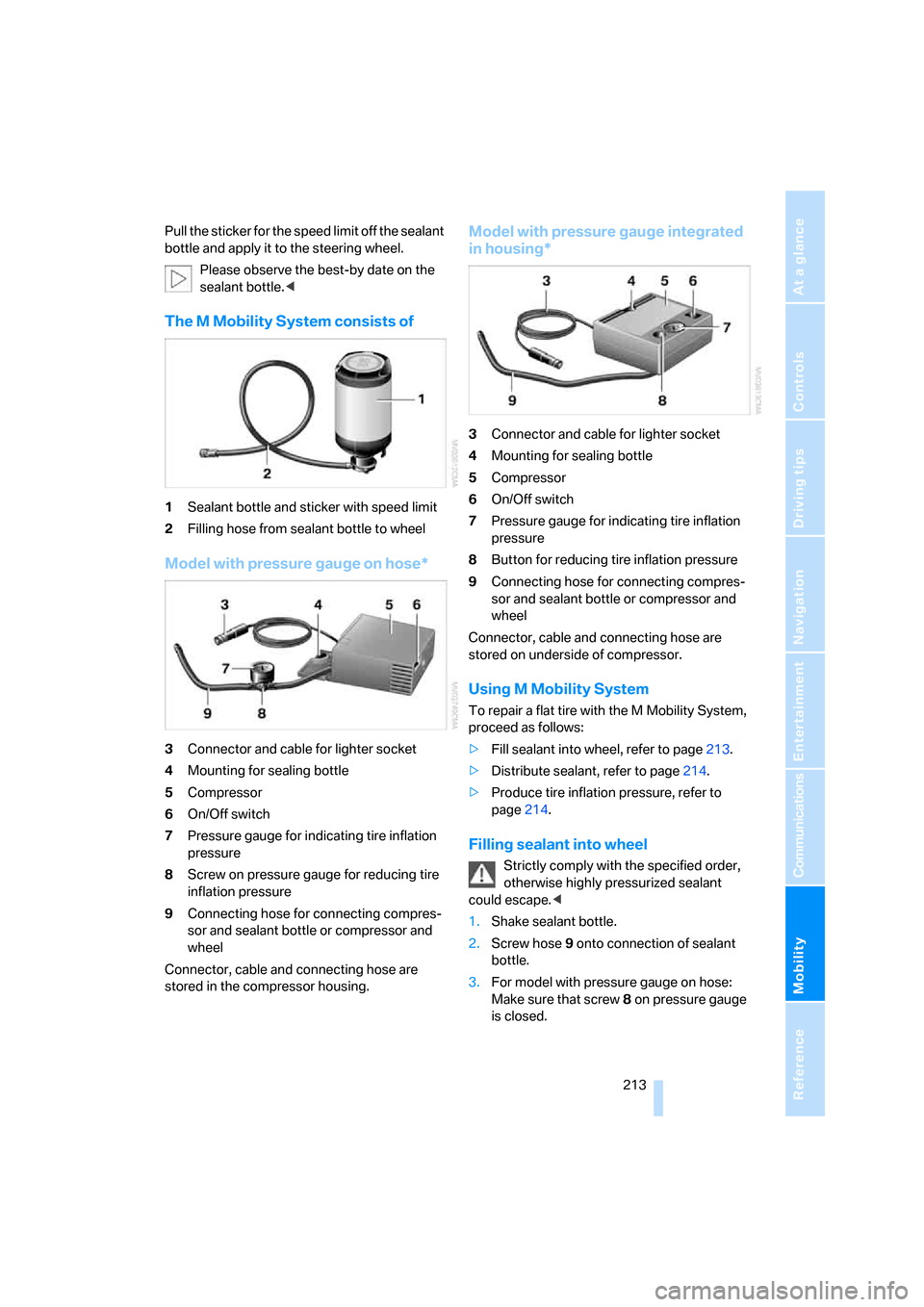
The M Mobility System consists of
1Sealant bottle and sticker with speed limit
2Filling hose from sealant bottle to wheel
Model with pressure gauge on hose*
3Connector and cable for lighter socket
4Mounting for sealing bottle
5Compressor
6On/Off switch
7Pressure gauge for indicating tire inflation
pressure
8Screw on pressure gauge for reducing tire
inflation pressure
9Connecting hose for connecting compres-
sor and sealant bottle or compressor and
wheel
Connector, cable and connecting hose are
stored in the compressor housing.
Model with pressure gauge integrated
in housing*
3Connector and cable for lighter socket
4Mounting for sealing bottle
5Compressor
6On/Off switch
7Pressure gauge for indicating tire inflation
pressure
8Button for reducing tire inflation pressure
9Connecting hose for connecting compres-
sor and sealant bottle or compressor and
wheel
Connector, cable and connecting hose are
stored on underside of compressor.
Using M Mobility System
To repair a flat tire with the M Mobility System,
proceed as follows:
>Fill sealant into wheel, refer to page213.
>Distribute sealant, refer to page214.
>Produce tire inflation pressure, refer to
page214.
Filling sealant into wheel
Strictly comply with the specified order,
otherwise highly pressurized sealant
could escape.<
1.Shake sealant bottle.
2.Screw hose9 onto connection of sealant
bottle.
3.For model with pressure gauge on hose:
Make sure that screw8 on pressure gauge
is closed.
Page 219 of 256

Mobility
217Reference
At a glance
Controls
Driving tips
Communications
Navigation
Entertainment
4.Coupe: hook the belt into the lashing eyes5
and lay it in the belt guide which runs in the
center of the lid.
Convertible: hook the belt into the lashing
eyes5 and7 and lay it in the belt guide of
the lid which runs offset.
5.Completely open the tensioning lock.
6.Thread the belt3 through the axis6 of the
tensioning lock without twisting it and ten-
sion it by hand.
7.Tighten the belt firmly with the tensioning
lock by opening and closing the lock several
times.
8.Fold the tensioning lock closed and stow
the protruding belt end.
Driving with spare wheel
With certain wheel-and-tire combinations
the size of the spare wheel differs from
that of the other wheels. The spare wheel is
equivalent to them in all load and speed ranges.
However, to restore the original state, the nor-
mal wheel should be remounted as soon as
possible.<
Vehicle battery
Maintenance
The battery is 100 % maintenance-free, i.e., the
electrolyte will last for the life of the battery
when the vehicle is operated in a temperate cli-
mate.
Your BMW center will be glad to advise in all
matters concerning the battery.
Charging battery
Only charge the battery in the vehicle via the
terminals in the engine compartment with the
engine switched off. For the connections, refer
to Jump starting on page220.
Disposal
After replacement, have old batteries dis-
posed of by your BMW center or deposit
them at a recycling center. Maintain the battery
in an upright position for transport and storage.
Always secure the battery to prevent it from tip-
ping over during transport.<
Power failure
Following a temporary interruption of the power
supply, the operation of some equipment is lim-
ited and must be reinitialized. Individual settings
are also lost and must be updated:
>Seat, mirror and steering wheel memory
The position must be stored again, refer to
page48.
>Time and Date
The values must be updated, refer to
page76.
>Radio
Stations must be stored again if necessary,
refer to page154.
>Navigation system
Wait until the system starts, refer to
page122.
Page 224 of 256

Giving and receiving assistance
222 Rear: press the arrow symbol on the cover while
prying out the cover upward by hand.
Being towed
Make sure that the ignition is switched on,
refer to page58; otherwise, the low-beam
headlamps, tail lights, turn signals and wind-
shield wipers would not be available. Do not tow
the vehicle with the rear axle raised, as other-
wise the steering can turn to the left or right.
When the engine is stopped, there is no power
assist. This then requires increased effort for
braking and steering.<
Switch on the hazard warning flashers depend-
ing on the local regulations. If the electrical sys-
tem fails, mark the vehicle to be towed, e.g. with
a sign or warning triangle in the rear window.
Manual transmission
Gearshift lever in neutral position.
Sequential Manual Transmission with
Drivelogic
Make sure that selector lever position N is
engaged with the ignition switched on, as
otherwise the engine can be damaged during
towing.<
Towing methods
Do not lift vehicle by tow fitting or body
and chassis parts; otherwise, damage
may result.<
In some countries, towing with tow bars or
ropes in public traffic is not permitted. Familiar-
ize yourself with the regulations on towing in the
respective country.
With tow bar
The towing vehicle may not be lighter
than the vehicle to be towed; otherwise, it
will not be possible to reliably control vehicle
response.<
The tow fittings used should be on the same
side on both vehicles. Should it prove impossi-
ble to avoid mounting the tow bar at an offset
angle, please note the following:
>Clearance and maneuvering capability will
be strictly limited during cornering.
>When mounted at an angle, the tow bar will
exert lateral forces, tending to push the
vehicle sideways.
Attach the tow bar to the tow fittings only,
as attachment to other vehicle parts can
lead to damage.<
With tow rope
When starting off in the towing vehicle, make
sure that the tow rope is taut.
To avoid jerking and the associated
stresses on vehicle components when
towing, always use nylon ropes or nylon straps.
Attach tow ropes to the tow fittings only, as
attachment to other vehicle parts can lead to
damage.<
With tow truck
Do not tow the vehicle with only the front
or rear axle raised, as otherwise the
engine may be damaged or the steering can
turn to the left or right.<
Have the vehicle transported on a flatbed sur-
face only.
Page 234 of 256

Short commands of voice command system
232
Climate
menu
FunctionCommand
To open "Vent settings"101{Vent settings}
To open "Automatic programs"100{Automatic programs}
To open "Parked car ventilation"103{Parked car operation}
To open "Automatic ventilation"103{Automatic ventilation}
To display the activation times103{Activation time}
FunctionCommand
To open the menu{Settings menu}
"Display off"21{Display off}
To open "Info sources"{Info sources}
To open "Settings"{Settings}
To open "Door locks"30, 32{Door locks}
To open "Steering wheel buttons"53{Steering wheel buttons}
To open MDrive54{MDrive}
To open "Lighting"64, 95{Lighting}
To open "Service requirements"72, 187{Service requirements}
To open "Service"72, 187{Service}
To open "BMW Service settings" settings189{BMW service settings}
To display "Check Control messages"73{Check Control messages}
To open "Head-Up Display"92{Head-up display}
To adjust the brightness of the Control
Display78{Brightness}
To open "Units"78{Units}
To open "Languages"79, 122{Language}
To open "Time"77{Time}
To open "Date"78{Date}
To open "PDC"81{
PDC}
To open "FTM"85{FTM}
To open "TPM"87{TPM}
To display "Bluetooth"171{Bluetooth}
Page 236 of 256

Everything from A to Z
234
Everything from A to Z
Index
"..." Identifies Control Display
texts used to select
individual functions, and
indicates where to find them
in the text.
A
ABS Antilock Brake
System81
– indicator/warning lamp83
Accepted calls178
Accessories6
Accident, refer to Emergency
call219
Activated-charcoal filter for
automatic climate
control103
Activating hour signal77
"Activation time" for parked-
car ventilation103
Adapter for spare key28
Adaptive brake lamps, refer to
Brake force display88
Adaptive Head Light96
"Add digits" for mobile
phone178
Additives
– coolant205
– engine oil, refer to Approved
engine oils205
"Address book" for navigation
system132
Address for navigation
– deleting133
– entering124,127
– selecting132
– storing132
– storing current position132
"Add to address book"131
"Add to destination
list"127,129Adjusting interior
temperature100
Adjusting thigh support47
Adjusting tone in audio mode,
refer to Tone control149
"After door opened"49
"After unlocking"49
Airbags89
– deactivating, refer to
Exception for front
passenger seat56
– indicator/warning lamp90
– indicator lamp for front
passenger airbags90
– sitting safely46
Air distribution
– automatic100
– manual101
Airing, refer to Ventilation102
Air outlets, refer to
Ventilation102
Air recirculation, refer to AUC
Automatic recirculated-air
control102
"Air recirculation on / off"53
Air supply, automatic climate
control99
Air volume
101
AKI, refer to Fuel
specifications195
Alarm system35
– avoiding unintentional
alarms36
– interior motion sensor36
– switching off alarm36
– switching off tilt alarm
sensor and interior motion
sensor36
– tilt alarm sensor36
"All channels"158
"All doors"30
All-season tires, refer to
Winter tires200"All stations", calling up with
radio152,155
Alterations, technical, refer to
For your own safety6
"AM", reception
range148,152
Antenna, refer to Caring for
your vehicle brochure
Antenna for mobile phone170
Antifreeze
– coolant205
– washer fluid66
Antilock Brake System
ABS81
– indicator/warning lamp83
Anti-theft alarm system, refer
to Alarm system35
Anti-theft system, refer to
Central locking system30
Approved axle loads, refer to
Weights228
Approved engine oils205
Approved gross vehicle
weight, refer to Weights228
Armrest, refer to Center
armrest107
Around the center console14
Around the steering wheel10
Arrival time
– refer to Computer70
– refer to Starting destination
guidance136
"Arrow display" for navigation
system137
Artificial leather, refer to
Caring for your vehicle
brochure
Ashtray108
Assist, refer to
BMW Assist185
Assistance systems, refer to
Driving stability control
systems81
Page 237 of 256

Reference 235
At a glance
Controls
Driving tips
Communications
Navigation
Entertainment
Mobility
Assistance window20
"Assist. window off"21
AUC Automatic recirculated-
air control102
"Audio"149,151,156
Audio148
– controls148
– switching on/off148
– tone control149
– volume149
Audio device, external107
Automatic
– air distribution100
– air volume100
– cruise control66
– headlamp control95
– recirculated-air control
AUC102
– service notification187
– steering wheel
adjustment48
– storing stations153
Automatic car washes116
– also refer to Caring for your
vehicle brochure
Automatic climate control99
– automatic air
distribution100
– convertible program100
– switching on and off102
– ventilation with vehicle
parked103
Automatic closing of doors,
refer to Automatic soft
closing34
Automatic curb monitor52
Automatic lighting
– refer to Automatic headlamp
control95
– refer to Daytime running
lamps96
– refer to Interior lamps97
– refer to Pathway lighting95
"Automatic programs"100
Automatic soft closing34
Automatic station search153
"Automatic ventilation"103AUTO program with
automatic climate
control100
"Autostore" on the
radio152,154
"AUX"148,167
AUX-In connection107,167
Average fuel consumption70
– setting units78
"Avoid ferries" for navigation
system135
"Avoid highways" for
navigation system134
Avoiding freeways for
navigation134
Avoiding unintentional
alarms36
"Avoid tollroads" for
navigation system135
Axle loads, refer to
Weights228
"A - Z"178
B
Backrest contour, refer to
Lumbar support47
Backrests, refer to Seats47
Backrest width adjustment47
Backup lamps, replacing
bulbs, refer to Tail
lamps211
"Balance", refer to Tone
control150
Band-aids, refer to First-aid
kit220
Bass, refer to Tone
control149
"Bass", tone control149
Battery
– jump starting220
– refer to Vehicle battery217
Battery replacement, remote
control for comfort
access38
BC button, refer to
Computer69
Being towed222
Belts, refer to Safety belts51Beverage holder, refer to Cup
holders108
Blower, refer to Air
volume101
"Bluetooth"172
"BMW Assist"186
BMW Assist185
– activating190
– breakdown assistance186
– contacting BMW Customer
Relations188
– displaying vehicle data191
– information service188
– services offered185
– TeleService187
– updating189
"BMW Contact"180
"BMW Contact
Numbers"180
BMW homepage4
BMW Maintenance
System207
"BMW Service settings"189
BMW website4
Bottle holder, refer to Cup
holders108
Bracket for telephone or
mobile phone, refer to Snap-
in adapter183
Brake assistant82
Brake force display88
Brake lamps
– replacing bulbs, refer to Tail
lamps211
– two-stage88
Brake rotors
– breaking-in114
– refer to Braking safely116
Brakes
– ABS Antilock Brake
System81
– brake force display88
– breaking-in114
– CBC Cornering Brake
Control81
– electronic brake-force
distribution81
– handbrake60
– refer to Braking safely116