2007 BMW M5 SEDAN transmission
[x] Cancel search: transmissionPage 218 of 256
Replacing components
216 select a drive position with the selector level for
a sequential transmission.
Have all vehicle occupants get out of the vehicle
and ensure that they remain outside the imme-
diate area in a safe place, such as behind a
guardrail.
If a warning triangle
* or portable hazard warning
lamp
* is required, set it up on the roadside at an
appropriate distance from the rear of the vehi-
cle. Comply with all safety guidelines and regu-
lations.
Change the wheel only on a level, firm surface
which is not slippery. The vehicle or the jack
could slip to the side if you attempt to raise the
vehicle on a soft or slippery surface such as
snow, ice, tiles, etc.
Position the jack on a firm support surface.
Do not use a wooden block or similar object as a
support base for the jack, as this would prevent
it from extending to its full support height and
reduce its load-carrying capacity.
To avoid serious or fatal injury: never lie under
the vehicle, and never start the engine while it is
supported by the jack.<
What you will need
To avoid rattling noises later on, note the posi-
tions of the tools before removing them, then
return them to their initial positions after com-
pleting work.
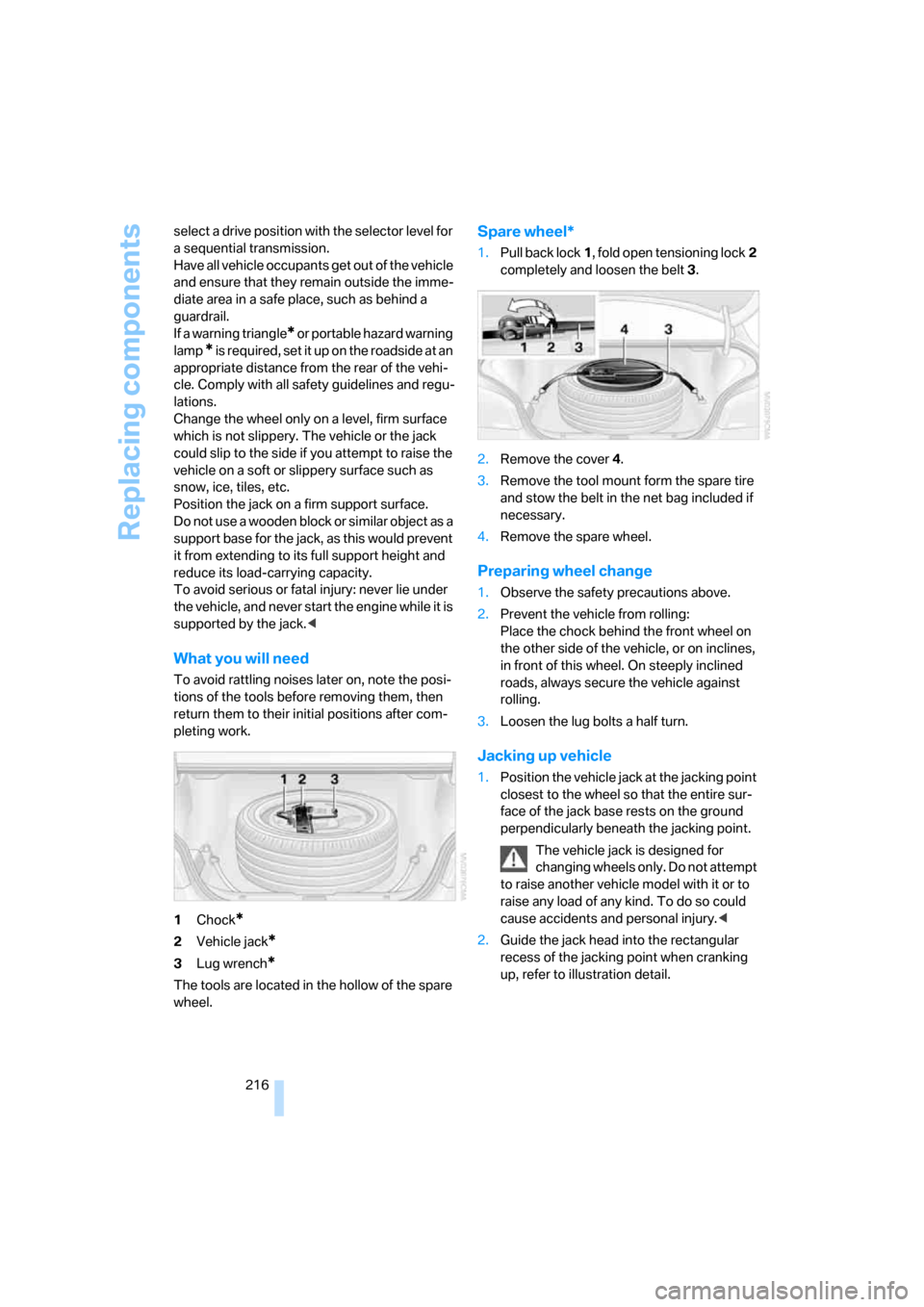
1Chock
*
2Vehicle jack*
3Lug wrench*
The tools are located in the hollow of the spare
wheel.
Spare wheel*
1.Pull back lock1, fold open tensioning lock2
completely and loosen the belt3.
2.Remove the cover4.
3.Remove the tool mount form the spare tire
and stow the belt in the net bag included if
necessary.
4.Remove the spare wheel.
Preparing wheel change
1.Observe the safety precautions above.
2.Prevent the vehicle from rolling:
Place the chock behind the front wheel on
the other side of the vehicle, or on inclines,
in front of this wheel. On steeply inclined
roads, always secure the vehicle against
rolling.
3.Loosen the lug bolts a half turn.
Jacking up vehicle
1.Position the vehicle jack at the jacking point
closest to the wheel so that the entire sur-
face of the jack base rests on the ground
perpendicularly beneath the jacking point.
The vehicle jack is designed for
changing wheels only. Do not attempt
to raise another vehicle model with it or to
raise any load of any kind. To do so could
cause accidents and personal injury.<
2.Guide the jack head into the rectangular
recess of the jacking point when cranking
up, refer to illustration detail.
ba8_m5us.book Seite 216 Montag, 5. Februar 2007 12:03 12
Page 224 of 256

Giving and receiving assistance
222
Being towed
Make sure that the ignition is switched on,
refer to page55, otherwise the low
beams, tail lamps, turn signals and windshield
wipers would not be available. Do not tow the
vehicle with the rear axle raised, as otherwise
the steering can turn to the left or right. When
the engine is stopped, there is no power assist.
This then requires increased effort for braking
and steering.<
Switch on the hazard warning flashers depend-
ing on the local regulations. If the electrical sys-
tem fails, mark the vehicle to be towed, e.g. with
a sign or warning triangle in the rear window.
Manual transmission
Gearshift lever in neutral position.
Sequential Manual Transmission with
Drivelogic
Make sure that selector lever position N is
engaged with the ignition switched on, as
otherwise the engine can be damaged during
towing.<
Towing methods
Do not lift vehicle by tow fitting or body
and chassis parts, otherwise damage may
result.<
In some countries, towing with tow bars or
ropes in public traffic is not permitted. Familiar-
ize yourself with the regulations on towing in the
respective country.
With tow bar
The towing vehicle may not be lighter
than the vehicle to be towed, otherwise it
will not be possible to reliably control vehicle
response.<
The tow fittings used should be on the same
side on both vehicles. Should it prove impossi-
ble to avoid mounting the tow bar at an offset
angle, please observe the following:
>Clearance and maneuvering capability will
be sharply limited during cornering.>When mounted at an angle, the tow bar will
exert lateral forces, tending to push the
vehicle sideways.
Only attach the tow bar to the tow fittings,
as attachment to other vehicle parts can
lead to damage.<
With tow rope
When starting off in the towing vehicle, make
sure that the tow rope is taut.
To avoid jerking and the associated
stresses on vehicle components when
towing, always use nylon ropes or nylon straps.
Only attach tow ropes to the tow fittings, as
attachment to other vehicle parts can lead to
damage.<
With tow truck
Do not tow the vehicle with only the front
or rear axle raised, as otherwise the
engine may be damaged or the steering can
turn to the left or right.<
Have the vehicle transported on a flatbed sur-
face only.
Tow-starting
Do not tow-start the vehicle if possible, but
instead start the engine by means of jump start-
ing, refer to page220. With a catalytic con-
verter, the vehicle should only be tow-started
with the engine cold.
ba8_m5us.book Seite 222 Montag, 5. Februar 2007 12:03 12
Page 225 of 256

Mobility
223Reference
At a glance
Controls
Driving tips
Communications
Navigation
Entertainment
Manual transmission
1.Switch on the hazard warning flashers,
comply with country-specific regulations.
2.Switch on the ignition, refer to page55.
3.Shift into 3rd gear.
4.Tow-start with the clutch completely
depressed and slowly release the clutch.
After the engine starts, immediately
depress the clutch again completely.
5.Stop at a suitable location, remove the tow
bar or rope and switch off the hazard warn-
ing flashers.
6.Have the vehicle checked.
Sequential Manual Transmission with
Drivelogic
1.Switch on the hazard warning flashers,
comply with country-specific regulations.
2.Switch on the ignition, refer to page55.
3.Tow-start in selector lever position N.
4.Move the selector lever into the drive posi-
tion and pull toward + within 2 seconds.
The correct gear will be selected and
engaged automatically.
5.Stop at a suitable location, remove the tow
bar or rope and switch off the hazard warn-
ing flashers.
6.Have the vehicle checked.
ba8_m5us.book Seite 223 Montag, 5. Februar 2007 12:03 12
Page 243 of 256

Reference 241
At a glance
Controls
Driving tips
Communications
Navigation
Entertainment
Mobility
Gear display, refer to Displays
in instrument cluster60
Gearshift lever59
– manual transmission57
Gearshift lever positions,
manual transmission57
General driving notes112
Glass sunroof, electric38
– comfort operation from
outside32
– comfort operation with
comfort access36
– moving manually39
– remote control31
Glove compartment103
– lighting103
– rechargeable flashlight104
GPS navigation, refer to
Navigation system120
Grills, refer to Ventilation99
Gross vehicle weight, refer to
Weights228
Ground clearance114
H
Handbrake57
– indicator lamp13,57
Hand lamp, refer to
Rechargeable flashlight104
Hands-free system, refer to
Microphone14
Hazard warning flashers15
"HD radio"154
HD radio, refer to High
Definition Radio154
Head airbags86
Headlamp control,
automatic91
Headlamp flasher61
Headlamps91
– care, refer to Caring for your
vehicle brochure
– cleaning, refer to Wiper
system62
– cleaning tank, refer to
Capacities228
– filler neck for washer
fluid204Head Light, refer to Adaptive
Head Light93
Head restraints44
– installing45
– removing45
– sitting safely41
"Head-Up Display"51,88
Head-Up Display88
– default view88
– M view88
– shift lights61
Heated
– mirrors48
– rear window97
– seats46
– steering wheel49
Heating95
– exterior mirrors48
– interior95
– rear window97
– residual heat98
– seats46
– steering wheel49
Heating with engine switched
off, refer to Residual heat98
Heavy cargo, refer to Securing
cargo116
Height, refer to
Dimensions227
Height adjustment
– seats42
– steering wheel49
High beams93
– headlamp flasher93
– indicator lamp13
High Definition Radio154
High water, refer to Driving
through water113
Hills114
Holder for cups105
"Home address" for
navigation system132
Homepage of BMW4
Hood203
Horn10
Hot exhaust system112
"Hour memo"74
"House number" for
destination entry125Hydraulic brake assistant,
refer to Brake assistant79
Hydroplaning113
I
IBOC, refer to High Definition
Radio154
Ice, refer to Outside
temperature warning66
ID3 tag, refer to Information on
track161
Identification mark
– recommended tire
brands202
– tire coding199
Idle59
iDrive16
– assistance window20
– automatic climate control
with expanded scope96
– changing date and time74
– changing language76
– changing menu page19
– changing settings73
– changing units of measure
and display type75
– confirming selection or
entry19
– controller16
– controls16
– displays, menus17
– operating principle17
– selecting menu item19
– setting brightness75
– start menu17
– status information20
– symbols18
Ignition55
– switched off56
– switched on55
Ignition key, refer to Keys/
remote control28
Ignition key position 1, refer to
Radio readiness55
Ignition key position 2, refer to
Ignition on55
ba8_m5us.book Seite 241 Montag, 5. Februar 2007 12:03 12
Page 245 of 256

Reference 243
At a glance
Controls
Driving tips
Communications
Navigation
Entertainment
Mobility
Light switch91
"Limit"73
Loading
– securing cargo116
– stowing cargo115
– vehicle114
Load securing equipment,
refer to Securing cargo116
"Lock after driving"33
Lock buttons in the doors,
refer to Locking33
Locking31
– confirmation signals31
– from inside33
– from outside31
– without key, refer to Comfort
access36
Locking and unlocking doors
– confirmation signals31
– from inside32
– from outside30
Low beams91
– automatic91
– indicator lamp13
Lower back support, refer to
Lumbar support42
Lug bolts216
– tightening torque, refer to
After mounting217
– wrench216
Luggage compartment lid33
– emergency release34
– locking with remote
control31
– opening from inside33
– opening from outside34
– opening with remote
control31
– unlocking and locking from
inside32
Luggage compartment lid/
tailgate, comfort access37
Luggage rack, refer to Roof-
mounted luggage rack116
Lumbar support42
LW, waveband150M
M Dynamic Mode MDM79
– indicator lamp13,79
M Engine Dynamic Control58
– "P 400"58
– "P 500"58
– "P 500 Sport"58
M Mobility System213
M+S tires, refer to Winter
tires202
Maintenance208
– refer to Service and
Warranty Information
Booklet for US models208
– refer to Service
requirements68
– refer to Warranty and
Service Guide Booklet for
Canadian models208
Maintenance system208
Malfunction warnings, refer to
Check Control70
Manual air distribution97
"Manual" on the radio151
Manual operation
– door lock32
– driver's door32
– fuel filler door196
– glass sunroof39
– luggage compartment lid34
Manual transmission57
– tow-starting223
"Map direction of travel"136
Map display136
"Map facing north"136
Map for navigation
– changing scale136
– destination entry127
Map view facing north136
Master key, refer to Keys/
remote control28
Maximum cooling98
Maximum speed with winter
tires202
MDM, refer to M Dynamic
Mode79MDrive50
"M Dynamic Mode"79
Measurements, refer to
Dimensions227
Memory, refer to Seat, mirror
and steering wheel
memory43
MENU, button refer to Start
menu17
Menus, refer to iDrive16
Message list for traffic
information139
Microfilter99
Microphone
– for telephone14
– for voice command
system14
Mirror dimming feature49
Mirrors48
– automatic curb monitor48
– folding in and out48
– heating48
– memory, refer to Seat, mirror
and steering wheel
memory43
"Missed calls"180
Missed calls181
Mobile communications
devices in vehicle113
Mobile phone
– accepted calls181
– adjusting volume178
– calling179
– ending call179
– installation location, refer to
Center armrest104
– missed calls181
– operation by voice183
– operation via iDrive178
– redialing181
– refer to separate operating
instructions
– Top 8181
– touch tone dialing, refer to
Tone dialing method182
Mobile phone battery186
ba8_m5us.book Seite 243 Montag, 5. Februar 2007 12:03 12
Page 248 of 256

Everything from A to Z
246 Rain sensor62
"Random", random play
sequence162
"Random all" in audio
mode163
"Random directory" in audio
mode163
"RDS"153
Reading lamps94
Rear armrest, refer to Center
armrest, rear107
Rear lamps, refer to Tail
lamps212
– replacing bulbs212
Rear seats
– adjusting head restraints45
– folding over backrest108
– heating47
– removing head restraints45
Rear socket107
Rear ventilation99
Rearview mirror48
Rear window
– heating97
– roller sun blind, refer to Sun
blinds103
Rear window safety switch38
"Received calls"180
Reception
– quality153
– radio stations153
– regional station152
Reception level of mobile
phone, refer to Status
information20
Rechargeable flashlight104
Recirculated-air mode98
– air recirculation98
– AUC Automatic
recirculated-air control98
Reclining seat, refer to
Seats42
Recording times, refer to
Stopwatch73
"Redial" for mobile phone180
Redialing with mobile
phone185Reflectors, refer to Tail
lamps212
Refueling196
Releasing, hood203
Releasing the locks, refer to
Unlocking36
"Relock door if not
opened"33
Remaining distance, refer to
Cruising range67
Remaining distance to
destination, refer to
Computer67
Remote control28
– comfort access
36
– garage door opener102
– luggage compartment lid31
– malfunction31,37
– replacing battery37
Removing condensation on
the windows97
"Repeat directory" in audio
mode162
"Repeat" in audio mode162
"Repeat track" in audio
mode162
Replacement fuses218
Replacement of tires, refer to
Changing wheels215
Replacement remote control,
refer to New remote
controls28
Replacing bulbs, refer to
Lamps and bulbs210
Replacing tires201
Replacing wheels/tires, refer
to New wheels and tires201
Reporting safety defects7
Reserve warning, refer to Fuel
gauge66
"Reset"82,84
– stopwatch73
– tone settings149
Reset, refer to Resetting tone
settings149
"resetting FTM …"83
"Reset to default" with
MDrive51Residual heat98
Restraint systems
– for children52
– refer to Safety belts45
Retreaded tires201
Reverse, fast
– CD changer163
– CD player163
Reverse gear59
– manual transmission57
Road map136
"Roadside
Assistance"182,188
Roadside Assistance220
Roadside parking lamps93
Roof load capacity228
Roof-mounted luggage
rack116
Rope, refer to Tow-starting
and towing221
Rotary/pushbutton, refer to
iDrive16
Route132
– bypassing sections138
– changing138
– changing criteria132
– displaying135
– displaying arrow display135
– displaying map view136
– displaying streets or towns/
cities137
– selecting132
Route information, refer to
Destination guidance with
voice instructions137
Route map, refer to Displaying
map view136
"Route preference",
changing132
Route selection132
Rubber parts, refer to Caring
for your vehicle brochure
ba8_m5us.book Seite 246 Montag, 5. Februar 2007 12:03 12
Page 249 of 256

Reference 247
At a glance
Controls
Driving tips
Communications
Navigation
Entertainment
Mobility
S
Safety5
Safety belts45
– damage46
– refer to Caring for your
vehicle brochure
– sitting safely41
– warning lamp46
Safety belt tensioners
– refer to Airbags86
– refer to Safety belts45
Safety systems
– ABS Antilock Brake
System78
– airbags86
– driving stability control
systems78
– safety belts45
Satellite radio156
– enabling channel156
– selecting channel157
– storing channel157
"SAT" with radio146,156
"Save current
destination"132
"Scan"
– music tracks on CD161
– stations with radio151
Scan
– CD changer161
– CD player161
– radio151
"Scan all" in audio mode161
"Scan directory" in audio
mode161
Screen, refer to iDrive16
Screw thread for tow
fitting221
SDARS, refer to Satellite
radio156
"Seat heater distribution"47Seats42
– active backrest width
adjustment43
– adjusting backrest width42
– adjusting height42
– adjusting shoulder
support42
– adjusting the seats42
– adjusting thigh support42
– easy entry/exit43
– heating46
– lumbar support42
– memory, refer to Seat, mirror
and steering wheel
memory43
– shoulder support42
– sitting safely41
– storing the setting43
– ventilation, refer to Active
seat ventilation47
Securing load
– refer to Securing cargo116
– with ski bag, refer to
Securing cargo109
"Select as
destination"128,191
"Select current speed"73
Selecting audio sources, refer
to Operation via iDrive146
Selecting frequency
manually151
Selecting menu items19
Selecting route132
Selection options with
navigation system132
Selector lever, Sequential
Manual Transmission59
Selector lever positions,
Sequential Manual
Transmission59Sequential Manual
Transmission with
Drivelogic58
– Drivelogic driving
programs60
– idle59
– initializing system, refer to
After changing wheels/
tires202
– reverse gear59
– Sequential mode59
– shift lights61
– shiftlock59
– towing222
– tow-starting223
Sequential mode59
"Service"69,189
Service, refer to Roadside
Assistance220
Service and Warranty
Information Booklet for
US models208
Service Interval Display
– refer to CBS Condition
Based Service208
– refer to Service
requirements68
"Service notification"189
"Service Request"182,189
"Service
requirements"69,189
Service requirements68
– refer to CBS Condition
Based Service208
"Service Status"193
"Set"
– in audio mode146
– on trip computer68
"Set date"75
"Set service date"70
"Set time"74
Setting button, refer to
Controls, controller16
"Settings"193
– for BMW Assist191
– for MDrive51
– for unlocking30
ba8_m5us.book Seite 247 Montag, 5. Februar 2007 12:03 12
Page 250 of 256

Everything from A to Z
248 Settings
– changing on Control
Display73
– clock, 12h/24h mode74
– configuring, refer to
MDrive50
– configuring, refer to
Personal Profile29
– date75
– language76
– units of measure75
Settings menu, refer to
imenu17
Setting time, refer to
Preselecting activation
times100
Shifting60
Shift lights61
Shiftlock59
Shift paddles on steering
wheel60
Shock absorber control, refer
to EDC Electronic Damping
Control81
Short commands of voice
command system229
"Short route" for
navigation132
Short route in navigation, refer
to Selecting route132
Shoulder support42
"Show current position"127
"Show destination
position"127
Shuffled, refer to Random
– CD changer162
– CD player162
Side airbags86
Side marker lamps, replacing
bulbs212
Side-mounted turn signals,
replacing bulbs212
Side window blinds, refer to
Sun blinds103
Signal horn, refer to Horn10
Sitting safely41
– with airbags41
– with head restraint41
– with safety belts41Ski bag108
Sliding/tilt sunroof, refer to
Glass sunroof, electric38
Slope assistant, refer to
Starting off on slopes113
SMG, refer to Sequential
Manual Transmission with
Drivelogic58
"SMG Drivelogic"51,61
Snap-in adapter
– mounting/removing185
– using172
Snow chains
202
Socket for Onboard
Diagnostics interface209
Socket for remote control,
refer to Ignition lock55
Sockets, refer to Connecting
electrical devices107
Soft closure aid, refer to
Automatic soft closing33
Song search on CD, refer to
Sampling tracks161
SOS, refer to Initiating an
emergency call219
Spare
– adapter for spare key28
– fuses218
– key28
Spare wheel
– driving with spare wheel217
– refer to Changing
wheels215
Special oils, refer to Approved
engine oils206
Specified oil grades, refer to
Approved engine oils206
Speed-dependent
volume148
Speed limit72
Speed limit warning, refer to
Speed limit72
Speedometer12
"Speed volume", tone
control148
Speed with winter tires202
"Sport" with EDC81Stability control, refer to
Driving stability control
systems78
Start/Stop button55
– starting the engine56
– switching off the engine56
"Start" for stopwatch73
"Start guidance"125,134
Starting, refer to Starting
engine56
Starting assistance, refer to
Jump starting220
Starting assistant, refer to
Starting off on slopes113
Starting difficulties, jump
starting220
Starting off
– on a slippery surface113
– on slopes113
Start menu, iDrive17
"Start route guidance"127
"Start service"188
"Start Service" for BMW
Assist190
"State / Province" for
destination entry123
"State inspection"70
Station, refer to Radio150
"Status"69
Status information on Control
Display20
Status of this Owner's Manual
at time of printing5
Steering wheel
– adjustment49
– automatic adjustment, refer
to Steering wheel
memory43
– buttons on steering
wheel11
– easy entry/exit49
– heating49
– lock, refer to Ignition lock55
– MDrive button50
– memory43
– programmable button49
– shift paddles60
"Steering wheel button"50
ba8_m5us.book Seite 248 Montag, 5. Februar 2007 12:03 12