2007 BMW M5 turn signal
[x] Cancel search: turn signalPage 156 of 253
Radio
154
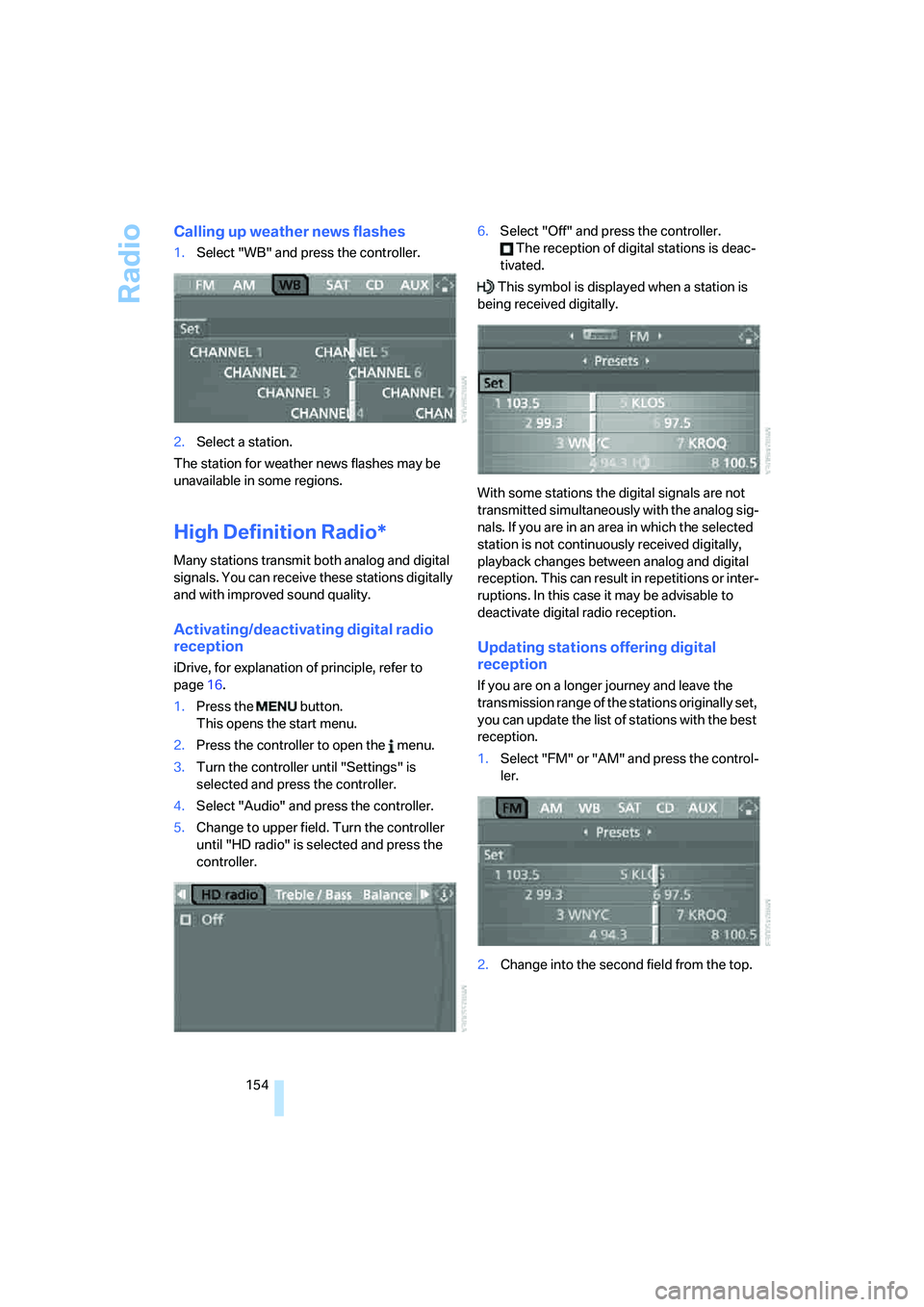
Calling up weather news flashes
1.Select "WB" and press the controller.
2.Select a station.
The station for weather news flashes may be
unavailable in some regions.
High Definition Radio*
Many stations transmit both analog and digital
signals. You can receive these stations digitally
and with improved sound quality.
Activating/deactivating digital radio
reception
iDrive, for explanation of principle, refer to
page16.
1.Press the button.
This opens the start menu.
2.Press the controller to open the menu.
3.Turn the controller until "Settings" is
selected and press the controller.
4.Select "Audio" and press the controller.
5.Change to upper field. Turn the controller
until "HD radio" is selected and press the
controller.6.Select "Off" and press the controller.
The reception of digital stations is deac-
tivated.
This symbol is displayed when a station is
being received digitally.
With some stations the digital signals are not
transmitted simultaneously with the analog sig-
nals. If you are in an area in which the selected
station is not continuously received digitally,
playback changes between analog and digital
reception. This can result in repetitions or inter-
ruptions. In this case it may be advisable to
deactivate digital radio reception.
Updating stations offering digital
reception
If you are on a longer journey and leave the
transmission range of the stations originally set,
you can update the list of stations with the best
reception.
1.Select "FM" or "AM" and press the control-
ler.
2.Change into the second field from the top.
Page 180 of 253

Telephoning
178
Voice commands
Activating system
1.Press the button on the steering wheel.
An acoustic signal indicates that you can
say commands.
2.Say the command.
The text or numbers that the voice com-
mand system has registered will appear on
the Control Display.
Ending/canceling operation by voice
Press the button on the steering wheel
or
In dialogs where text is spoken, not a command,
e.g. a name, canceling is only possible using the
button on the steering wheel.
Having possible commands read aloud
The system understands default commands
that must be spoken word for word.
You can have the possible commands spoken
by the system at any point:
Using alternative commands
There are often a number of commands to run a
function, e.g.:
The system recognizes digits from zero to nine.
You can say each digit individually or group
them into a sequence to accelerate the input.
Example: dialing phone numbers
To start the dialog:
Press the button on the steering wheel.
Adjusting volume
You can adjust the volume for the instructions
from the system:
Turn the knob during an instruction to select
the desired volume.This volume for the instructions is maintained,
even if the other audio sources are set to mini-
mum volume.
The setting is stored for the remote control cur-
rently in use. {Cancel}.
{Help}.
{Dial name} or {Name}.
CommandResponse
{Dial number}{{Please say the number}}
e.g. {123 456 7890}Depending on equipment:
{{123 456 7890. Continue?}} or
{{123 456 7890. And next?}}
{Dial}{{Dialing number}}
Page 202 of 253

Under the hood
200
Engine compartment
1Filler neck for engine oil, refer to Adding
engine oil, page201
2Expansion tank for coolant, refer to
page202
3Starting-aid terminal, refer to page2154Body ground/negative terminal
5Washer fluid reservoir of the headlamp
and windshield cleaning systems, refer to
page63
Engine oil
The engine oil consumption is dependent on
driving style and driving conditions.
Checking engine oil level
Your vehicle is equipped with an electronic oil
level check. You can display the oil level in the
instrument cluster.
1Oil level
2Maximum marking
3Minimum marking
Press the BC button on the turn signal lever
repeatedly until the oil level display is shown in
the instrument cluster. The displayed numeric
Page 203 of 253

Mobility
201Reference
At a glance
Controls
Driving tips
Communications
Navigation
Entertainment
value indicates the current oil level in liters
above Minimum.
After starting the engine, the last determined
value is displayed.
The oil level must be between the two marks.
Manual transmission: the engine oil level
will be shown in the lower display.<
Exact measurement
The oil level is measured continuously while
driving or when stopped with the engine run-
ning.
The determination of a new value can take
30 minutes or longer.
If only dashes are shown in the display, it
was not possible to determine a new
value. This can, for example, be the case when
driving short distances or with a sporty driving
style.<
Fast measurement
In addition to the continuous measurement, you
can also quickly determine the current oil level,
e.g. after adding engine oil, however with a low
measuring accuracy.
1.With the engine at operating temperature,
i.e. after at least 6 miles/10 km of uninter-
rupted driving, park the vehicle in a horizon-
tal position.
2.Allow the engine to run at idle.
3.Press the BC button on the turn signal lever
repeatedly until the oil level display is
shown in the instrument cluster.
4.Press the BC button on the turn signal lever
for at least 2 seconds.
The oil level is determined. A clock symbol
is displayed during the measurement.
5.After approx. 1 minute the current oil level is
displayed.
If not all measuring conditions are met,
e.g. with the engine cold, "-.-" is dis-
played. The requested measurement is carried
out as soon as possible.<
Possible displays
1Oil level OK
2Oil level at minimum:
Add a maximum of 1 US quart/1 liter of
engine oil at the next opportunity, refer to
Adding engine oil below
3Oil level too high
Have the vehicle checked immedi-
ately, otherwise engine damage may
result if too much oil has been added.<
4Oil level at maximum
5Fast measurement running: oil level is being
determined
6No value can be determined at this time
Adding engine oil
Do not add oil until a value slightly above the
Minimum of 0.0 quarts/liters is displayed by the
oil level measurement. In this area a message is
also shown on the Control Display.
Add oil within the next 125 miles/200 km,
otherwise the engine could be damaged.
Add a maximum of 1 US quart/1 liter of oil, oth-
erwise the engine may be damaged by adding
too much oil.
Page 209 of 253

Mobility
207Reference
At a glance
Controls
Driving tips
Communications
Navigation
Entertainment
procedures with correspondingly trained per-
sonnel. Due to the high voltage present in the
system, there is a danger of fatal injuries when
work is carried out improperly.<
Parking and roadside parking lamps
In the event of a malfunction, please go to your
BMW center or a workshop that works accord-
ing to BMW repair procedures with correspond-
ingly trained personnel.
Turn signals, front
21-watt bulb, PY21W
1.Turn the bulb holder to the left and remove.
2.Apply gentle pressure to the bulb while
turning it to the left for removal and replace-
ment.
Side-mounted turn signals
5-watt bulb, W5W
1.Press back against the front edge of the
lamp with the tip of your finger, then pivot it
out.
2.Turn the bulb holder to the left and remove.
3.Remove the bulb for replacement.
Side marker lamps, front and rear
To replace, please go to your BMW center or a
workshop that works according to BMW repair
procedures with correspondingly trained per-
sonnel.
Tail lamps
>Turn signals: 21-watt bulb, PY21W
>Backup lamps: 16-watt bulb, W16W
>Other lamps: 21-watt bulb, P21W
1Turn signal
2Rear lamp and brake lamp
3Rear lamp and brake lamp
4Backup lamp
5Reflector
6Roadside parking lamp, rear lamp and
brake lamp
Center brake lamp
This lamp uses LED technology for operation.
In the event of a malfunction, please go to your
BMW center or a workshop that works accord-
ing to BMW repair procedures with correspond-
ingly trained personnel.
Fender-mounted lamps
The illustration shows the left-hand side of the
cargo bay.
All the bulbs are integrated into a central bulb
fitting.
1.Lift up floor mat.
2.Undo the quick-release fasteners of the
side panel and pull out the panel.
Page 218 of 253

Giving and receiving assistance
216 4.Attach one end of the jumper cable minus/–
to the negative terminal of the battery or to
an engine or body ground of the assisting
vehicle.
Your BMW M5 has a special nut as body
ground or negative terminal.
5.Attach the second end of the cable to the
negative terminal of the battery or to the
engine or body ground of the vehicle to be
started.
Starting engine
1.Start the engine on the assisting vehicle
and allow it to run at idle for several minutes
at slightly increased speed.
2.Start the engine on the other vehicle in the
usual way.
If the first starting attempt is not successful,
wait a few minutes before another attempt
in order to allow the discharged battery to
recharge.
3.Let the engines run for a few minutes.
4.Disconnect the jumper cables by reversing
the connection sequence.
Check the battery and recharge if necessary.
Never use spray fluids to start the
engine.<
Tow-starting and towing
Observe applicable laws and regulations
for tow-starting and towing.<
Do not transport any passengers other
than the driver in a vehicle that is being
towed.<
Using tow fitting
The screw-in tow fitting must always be carried
in the vehicle. It can be screwed in at the front or
rear of the BMW M5.
It is located in the toolkit in the luggage com-
partment lid, refer to page206.
Use only the tow fitting provided with the
vehicle and screw it all the way in. Use the
tow fitting for towing only on roads. Avoid lateral
loading of the tow fitting, e.g. do not lift the vehi-
cle by the tow fitting. Otherwise damage to the
tow fitting and the vehicle can occur.<
Access to screw thread
Press the arrow symbol on the cover in the
bumper.
Front
Rear
Being towed
Make sure that the ignition is switched on,
refer to page55, otherwise the low
beams, tail lamps, turn signals and windshield
wipers would not be available. If the vehicle
electrical system fails, do not tow-start or tow
the vehicle. The electric steering-wheel lock
cannot be unlocked and the vehicle cannot be
Page 236 of 253

Everything from A to Z
234 Control Display, refer to
iDrive16
– setting brightness76
– switching off/on21
Controller, refer to iDrive16
Controls, refer to Cockpit10
Coolant202
– checking level202
– temperature66
Cooling, maximum98
Cooling fluid, refer to
Coolant202
Cooling function, automatic
climate control98
Cooling system, refer to
Coolant202
Copyright2
Cornering Brake Control
CBC79
Country of destination for
navigation122
Courtesy lamps94
Cradle for telephone or mobile
phone104
Cruise control64
Cruising range68
Cup holders105
Curb weight, refer to
Weights224
"Current position"140
Current position
– displaying140
– entering129
– storing129
"Customer
Relations"176,185
Cylinders, refer to Engine
data222
D
Dashboard, refer to
Cockpit10
Data, technical222
– dimensions223
– engine222
– weights224
"Date"75Date
– display format76
– setting75
"Date format"76
"Daytime running lamps"93
Daytime running lamps93
DBC Dynamic Brake
Control80
– warning lamp82
"Deactivated"44
Decommissioning the vehicle
– refer to Caring for your
vehicle brochure
Decommissioning the vehicle,
refer to Caring for your
vehicle brochure
Defect
– door lock32
– fuel filler door192
– glass sunroof40
– luggage compartment lid34
Defrosting windows98
Defrosting windows and
removing condensation98
Defrosting windshield, refer to
Defrosting windows98
Defrost position, refer to
Defrosting windows98
"Delete address book" for
navigation130
"Delete all numbers" on the
mobile phone176
"Delete data" for
navigation130
"Delete" for mobile
phone176
Destination address
– deleting130
– entering121,124
Destination for navigation
– destination list128
– entering via voice124
– entry121
– selecting from address
book129
– selecting using
information127
– storing129Destination guidance133
– bypassing route
sections137
– canceling voice
instructions49
– changing specified
route131
– displaying route
134
– distance and arrival133
– interrupting133
– starting133
– terminating/continuing133
– voice instructions136
– volume of voice
instructions136
Destination list for
navigation128
Destinations recently driven
to128
"Details" in audio mode161
"Detour" for navigation140
"Dial" for mobile phone173
"Dial number"174
Digital clock67
Digital radio, refer to High
Definition Radio154
Dimensions223
Directional indicators, refer to
Turn signals62
Direction announcements,
refer to Voice
instructions136
Direction instructions, refer to
Voice instructions136
Directory, refer to Phone
book174
Directory for navigation, refer
to Address book128
Displacement, refer to Engine
data222
"Display"76
Display, refer to iDrive
controls16
Display elements, refer to
Instrument cluster12
Displaying vehicle data188
Display lighting, refer to
Instrument lighting94
Page 238 of 253

Everything from A to Z
236 Engine oil
– adding201
– additives, refer to Approved
engine oils202
– approved engine oil202
– checking oil level200
– exact measurement201
– fast measurement201
– interval between changes,
refer to Service
requirements69
– oil change202
– oil grades, refer to Approved
engine oils202
– possible displays201
– temperature67
– temperature gauge67
Engine output, refer to Engine
data222
Engine overheating, refer to
Coolant temperature66
Engine speed, refer to Engine
data222
Engine starting, refer to
Starting engine56
"Enter address"122,129
Entering destination via town/
city name122
Entering intersection,
navigation123
Entering the
address121,124
Entering town/city for
navigation122
Entering zip code for
navigation123
"Entertainment"146
Entertainment sound output
on/off147
Entry map for destination126
"Equalizer", refer to Tone
control149Equalizer, refer to Tone
control149
"ESN"156
ESP Electronic Stability
Program, refer to DSC
Dynamic Stability
Control80
Event Data Recorders205
Exhaust system, refer to Hot
exhaust system112
Exterior mirrors47
– adjusting47
– automatic dimming
feature48
– automatic heating48
– folding in and out47
– tilting down passenger-side
exterior mirror48
External audio
device105,165
Eye for tow-starting and
towing, refer to Tow
fitting216
F
"Fader", refer to Tone
control148
Fader, refer to Tone
control148
Failure messages, refer to
Check Control71
False alarm
– refer to Avoiding
unintentional alarms36
– refer to Switching off
alarm35
Fastening safety belts, refer to
Safety belts45
– warning lamp46
Fastest route for
navigation131
"Fast route" for
navigation131
"Favorites" calling up with
radio153
Filling bottle, refer to
M Mobility System208
Filling sealant into wheel209Filter, refer to Microfilter/
activated-charcoal filter100
Fine wood, refer to Caring for
your vehicle brochure
First aid, refer to First-aid
kit215
First-aid kit215
Flashing
– during locking/unlocking,
refer to Setting confirmation
signals31
– Triple turn signal
activation62
Flashlight, refer to
Rechargeable flashlight104
Flat tire
– changing wheels210
– Flat Tire Monitor82,84
– M Mobility System84,208
– spare wheel211
– TPM Tire Pressure
Monitor84
– warning lamp84,85
Flat tire, refer to Tire
condition196
Flat Tire Monitor82
– false alarms83
– initializing system83
– show chains198
– system limits83
– warning lamp84
Floor mat, refer to Caring for
your vehicle brochure
Floor mats/carpets, refer to
Caring for your vehicle
brochure
Fluid reservoir, refer to
Washer fluid reservoir63
"FM", reception
range147,
150
FM, waveband150
Folding rear backrest108
Fold-over rear backrest108
Footbrake, refer to Braking
safely113
Footwell lamps, refer to
Interior lamps94