2007 BMW M5 roof
[x] Cancel search: roofPage 41 of 253

Controls
39Reference
At a glance
Driving tips
Communications
Navigation
Entertainment
Mobility
Raising
Press the switch.
>The closed glass sunroof is raised and the
sliding visor opens slightly.
>The opened glass sunroof automatically
moves into the raised position. The sliding
visor remains completely open.
Do not use force to close the sliding visor
with the glass sunroof in its raised posi-
tion, otherwise the mechanism will be dam-
aged.<
Opening, closing
>Slide the switch back to the resistance
point.
The glass sunroof and the sliding visor open
together for as long as you hold the switch
in this position.
>Slide the switch back beyond the resistance
point.
The glass sunroof and the sliding visor open
automatically. Briefly press the switch again
to stop the opening movement.
In a similar manner, the glass sunroof closes
when you slide the switch forward. The sliding
visor remains open and can be closed by hand.
For information on using the comfort operation
at the door lock or with the remote control, refer
to page31 or32.
For information on comfort closing with comfort
access, refer to page37.
Opening and closing automatically
Press the switch beyond the resistance point.
The following movements are also automatic:
>When the sunroof is open, press the switch
in the raising direction: the sunroof is raised
all the way.
>When the sunroof is raised, press the
switch in the opening direction: the sunroof
is opened all the way.
Pressing the switch again stops the motion.
Pinch protection system
If the glass sunroof encounters resistance when
closing from roughly the center of the roof
opening or when closing from the raised posi-
tion, the closing action is interrupted and the
glass sunroof reopens a short way.
Despite the pinch protection system,
inspect the sunroof's travel path prior to
closing it, as the safety system might fail to
detect certain kinds of obstructions, such as
very thin objects, and the sunroof would con-
tinue closing.<
Closing without pinch protection
system
In case of danger from outside, press the switch
beyond the resistance point and hold. The roof
closes without the pinch protection system.
Following interruptions in electrical
power supply
After a power loss, the sunroof may only
respond to the raise command. The system
must be initialized. BMW recommends having
this work done by your BMW center.
Page 42 of 253
Opening and closing
40
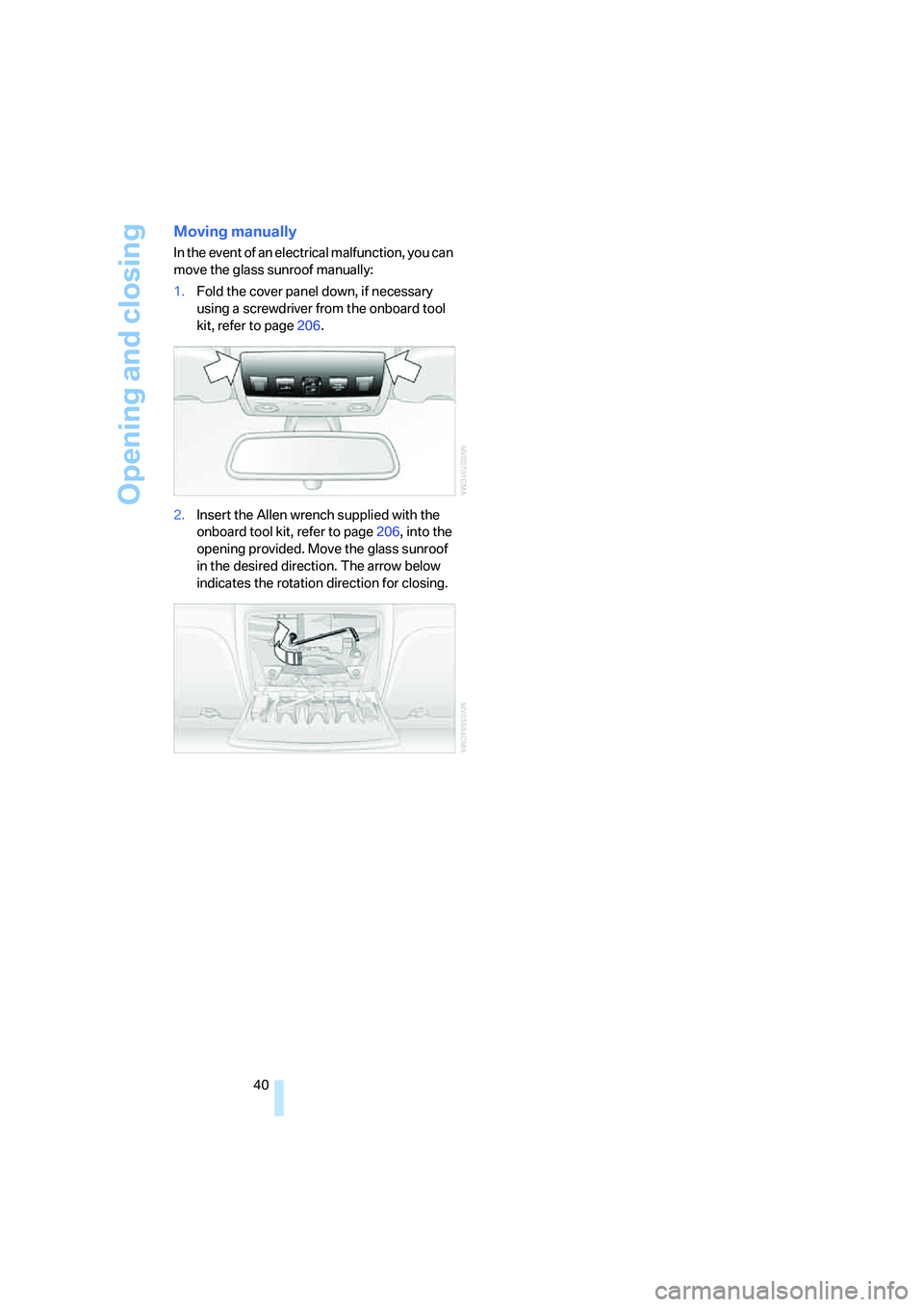
Moving manually
In the event of an electrical malfunction, you can
move the glass sunroof manually:
1.Fold the cover panel down, if necessary
using a screwdriver from the onboard tool
kit, refer to page206.
2.Insert the Allen wrench supplied with the
onboard tool kit, refer to page206, into the
opening provided. Move the glass sunroof
in the desired direction. The arrow below
indicates the rotation direction for closing.
Page 89 of 253

Controls
87Reference
At a glance
Driving tips
Communications
Navigation
Entertainment
Mobility
Airbags
The following airbags are located under the
marked covers:
1Front airbags
2Head airbags
3Side airbags in front and rear
Protective action
To ensure that the safety systems con-
tinue to provide optimized protection,
please observe the adjustment instructions on
page41.<
The front airbags help protect the driver and
front passenger by responding to frontal
impacts in which safety belts alone cannot pro-
vide adequate restraint. When needed, the
head and side airbags help provide protection in
the event of side impact. The relevant side air-
bag supports the side upper body area. The
head air bag supports the head.
The airbags are deliberately not triggered in
every impact situation, e. g. less severe acci-
dents or rear-end collisions.
Do not apply adhesive materials to the
cover panels of the airbags, cover them or
modify them in any other way. Do not attempt to
remove the airbag restraint system from the
vehicle. Do not modify or tamper with either the
wiring or the individual components in the air-
bag system. This category includes the uphol-
stery in the center of the steering wheel, on the
instrument panel, the doors and the roof pillars
along with the sides of the headliner. Do not
attempt to remove or dismantle the steering
wheel. Do not touch the individual components
immediately after the system has been trig-gered, because there is a danger of burns.
In the event of malfunctions, deactivation, or
triggering of the airbag restraint system, have
the testing, repair, removal, and disposal of air-
bag generators executed only by a BMW center
or a workshop that works according to BMW
repair procedures with correspondingly trained
personnel and has the required explosives
licenses. Unprofessional attempts to service
the system could lead to failure in an emer-
gency or undesired airbag activation, either of
which could result in personal injury.<
Warnings and information on the airbags is also
provided on the sun visors.
Automatic deactivation of front
passenger airbags
The occupation of the seat is detected by eval-
uating the impression on the occupied seat sur-
face of the front passenger seat. The front and
side airbags on the front passenger side are
activated or deactivated accordingly by the sys-
tem.
The current status of the front passenger
airbag, i.e. deactivated or activated, is
indicated by the indicator lamp over the interior
rearview mirror, refer to Operating state of front
passenger airbags in the following.<
Before transporting a child on the front
passenger seat, observe the safety infor-
mation and handling instructions under Trans-
porting children safely refer to page52.
The front and side airbags on the front passen-
ger side can be deactivated for teenagers and
adults in certain seat positions; then the indica-
tor lamp for the front passenger airbags lights
Page 114 of 253

Things to remember when driving
112
Things to remember when driving
Break-in period
Moving parts need breaking-in time to adjust to
each other. To ensure that your vehicle contin-
ues to provide optimized economy of operation
throughout an extended service life, we request
that you devote careful attention to the follow-
ing section.
Do not use the driving programs 5 and 6, refer
to Drivelogic on page60, during break-in.
Engine and differential
Always obey all official speed limits.
Up to 1,200 miles/2,000 km
Drive at changing engine and driving speeds,
however do not exceed 5,500 rpm or 105 mph/
170 km/h.
Avoid full-throttle operation and use of the
transmission's kick-down mode during these
initial miles.
From 1,200 miles/2,000 km to
3,000 miles/5,000 km
The engine and driving speed can gradually be
increased up to a continuous vehicle speed of
135 mph/220 km/h. Only drive at top speed
briefly, e.g. when passing.
Transmission
The function of the transmission is only at its
optimized level after driving a distance of
approx. 300 miles/500 km. Do not exceed
engine speeds of 5,500 rpm during this time.
Tires
Due to technical factors associated with their
manufacture, tires do not achieve their full trac-
tion potential until after an initial break-in
period. Therefore, drive reservedly during the
first 200 miles/300 km.
Brake system
Brakes require an initial break-in period of
approx. 300 miles/500 km to achieve optimized
contact and wear patterns between brake pads
and rotors. Drive in a reserved manner during
this break-in period.
Clutch
The function of the clutch is only at its opti-
mized level after a distance driven of approx.
300 miles/500 km. With manual transmission:
during this break-in period, engage the clutch
gently.
Following part replacement
Observe the break-in instructions again if com-
ponents mentioned above must be replaced
after subsequent driving operation.
General driving notes
Closing luggage compartment lid
Operate the vehicle only when the lug-
gage compartment lid is completely
closed. Otherwise, exhaust fumes could pene-
trate into the passenger compartment.<
If special circumstances should make it abso-
lutely necessary to operate the vehicle with the
luggage compartment lid open:
1.Close all windows and the glass sunroof.
2.Increase the air volume of the automatic cli-
mate control to a high level, refer to
page98.
Hot exhaust system
As in all vehicles, extremely high temper-
atures are generated on the exhaust sys-
tem. Do not remove the heat shields installed
adjacent to it, and never apply undercoating to
them. When driving, standing at idle and while
parking take care to avoid possible contact
between the hot exhaust system and any highly
Page 118 of 253

Things to remember when driving
116
Securing cargo
>Use the luggage net*, luggage straps, or
securing straps to hold down small and
lightweight luggage and cargo.
>Heavy-duty cargo straps
* for securing
larger and heavier objects are available at
your BMW center. Four lashing eyes
mounted in the cargo bay are used to
secure these heavy-duty cargo straps, refer
to illustration.
>Please observe the special instructions
supplied with the heavy-duty cargo straps.
Position and secure the cargo as
described above, so that it cannot endan-
ger the car's occupants, for example if sudden
braking or evasive maneuvers are necessary.
Use only the lashing eyes to secure heavy-duty
cargo straps, refer to illustration, otherwise the
cargo straps could become detached or the
vehicle could be damaged.
Never exceed either the approved gross vehicle
weight or either of the approved axle loads, refer
to page224, as excessive loads can pose a
safety hazard, and may also place you in viola-
tion of traffic safety laws.
You should never transport unsecured heavy or
hard objects in the passenger compartment, as
they could fly around and pose a safety hazard
to the vehicle's occupants during abrupt brak-
ing or evasive maneuvers.<
Roof-mounted luggage rack*
A special rack system is available as an option
for your BMW. Please comply with the precau-
tions included with the installation instructions.
Mounting points
The mounting points are located in the door
openings.
Loading roof-mounted luggage rack
Because roof racks raise the vehicle's center of
gravity when loaded, they have a major effect on
its handling and steering response.
You should therefore always remember not to
exceed the approved roof load capacity, the
approved gross vehicle weight or the axle loads
when loading the rack.
You can find the specified weights under
Weights on page224.
The load on the roof must be evenly distributed
and must not extend outward beyond the limits
of the loading surface. Always stow the heaviest
pieces on the bottom. Be sure that adequate
clearance is maintained for raising the glass
sunroof, and that objects do not project into the
opening path of the luggage compartment lid.
Secure roof-mounted cargo correctly and
securely to prevent it from shifting or falling off
during the trip.
Drive smoothly. Avoid sudden acceleration and
braking maneuvers. Take corners gently.
Page 182 of 253

Telephoning
180
Selecting an entry
The connection to the phone number of the
selected entry is established.
Redialing
The {Redial} command calls "Redial".
Notes
The commands in English were available
as of this printing. Other languages are
currently not available. To operate the mobile
phone via the voice command system, refer to
page22.<
Important for voice commands
For voice commands, keep the following in
mind:
>Issue the commands smoothly and at nor-
mal volume, avoiding excessive emphasis
and pauses.
>Keep the doors, windows and glass sunroof
closed to prevent interference from ambi-
ent noise.
>Avoid making other noise in the vehicle
while speaking.
Mounting/removing snap-in
adapter
1.Press the area 1 around the button and
remove the cover.
2.Insert the snap-in adapter at the front and
press down until it engages.
To remove the snap-in adapter:
Press the area 1 around the button. 1.{Dial name}.
The dialog for selecting an entry is
opened.
2.Say the name when prompted.
3.Confirm the prompt with {Yes}.
Page 226 of 253

Technical data
224
Weights
Never exceed either the approved axle loads or
the gross vehicle weight.
Capacities
M5
Curb weight lbs./kg 4,012/1,820
Approved gross vehicle weight lbs./kg 5,071/2,300
Load lbs./kg 1,058/480
Approved front axle load lbs./kg 2,403/1,090
Approved rear axle load lbs./kg 2,800/1,270
Approved roof load capacity lbs./kg 220/100
Cargo bay capacity cu ft/l 17.7/500
Notes
Fuel tank gal/liters approx. 18.5/70 Fuel grade: page193
of that reserve gal/liters approx. 4/15
Window and headlamp
washer system US quarts/liters approx. 5.3/5 For more details: page62
Page 235 of 253

Reference 233
At a glance
Controls
Driving tips
Communications
Navigation
Entertainment
Mobility
CD changer159
– controls146
– fast forward/reverse163
– installation location163
– random order162
– repeating a track162
– sampling tracks161
– selecting a CD159
– selecting a track160
– switching on/off146
– tone control147
– volume147
CD player159
– controls146
– fast forward/reverse163
– random order162
– repeating a track162
– sampling a track161
– selecting a track160
– switching on/off146
– tone control147
– volume147
Center armrest
– front104
– rear107
Center brake lamp207
Center console14
"Central locking"30
Central locking
– from inside32
– from outside30
Central locking system30
– comfort access36
Change "Route
preference"131
Changes, technical, refer to
For your own safety5
Changes, technical, refer to
Parts and accessories6
Changing language on
Control Display76
Changing scale for
navigation135
Changing units of measure on
Control Display76
Changing wheels197,210
CHECK button72
Check Control71"Check Control
messages"72
Check Gas Cap192
Checking the air pressure,
refer to Tire inflation
pressure194
Child restraint fixing system
LATCH53
Child restraint systems52
Child-safety lock54
Child seats, refer to
Transporting children
safely52
Chime, refer to Check
Control71
Chock211
Chrome parts, refer to Caring
for your vehicle brochure
Cigarette lighter106
Cigarette lighter socket, refer
to Connecting electrical
devices106
Cleaning, refer to Caring for
your vehicle brochure
"Climate"46,97
Clock67
– 12h/24h mode75
– hour signal75
– setting time and date74
Closing
– from inside32
– from outside30
Closing fuel filler cap192
Clothes hooks105
Cockpit10
Cold start, refer to Starting
engine56
"Comfort", active backrest
width adjustment43
Comfort access36
– replacing battery, remote
control37
Comfort area, refer to Around
the center console14Comfort operation
– glass sunroof31
– windows31
– windows with comfort
access37
– with comfort access37
"Comfort" with EDC82
"Communication"173,183
Compact Disc
– refer to CD changer159
– refer to CD player159
Compartment for remote
control, refer to Ignition
lock55
Compartments, refer to
Storage compartments105
Compressed audio files159
Computer67
– clock67
– displays on Control
Display68
– hour signal75
"Concert hall", refer to Tone
control148
"Concierge"
185
Condensation, refer to When
vehicle is parked114
Condition Based Service
CBS204
"Confirmation"31
Confirmation signals for
locking and unlocking31
Connecting car vacuum
cleaner, refer to Connecting
electrical devices106
Consumption, refer to
Average fuel
consumption68
Consumption statistics, refer
to Average fuel
consumption68
"Continue guidance to
destination?"134
Control Center, refer to
iDrive16