2007 BMW 760LI SEDAN service interval
[x] Cancel search: service intervalPage 22 of 253
iDrive
20
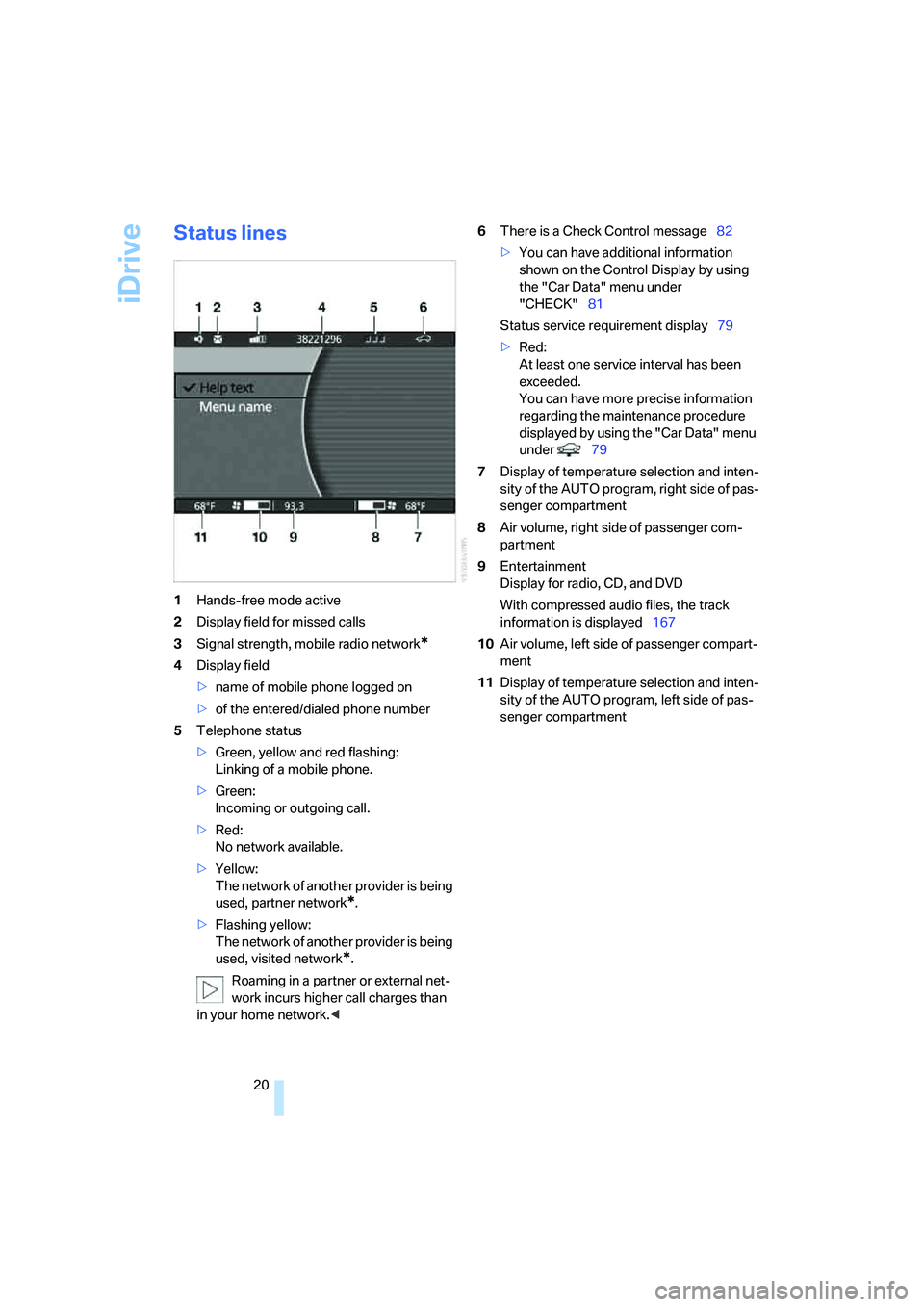
Status lines
1Hands-free mode active
2Display field for missed calls
3Signal strength, mobile radio network
*
4Display field
>name of mobile phone logged on
>of the entered/dialed phone number
5Telephone status
>Green, yellow and red flashing:
Linking of a mobile phone.
>Green:
Incoming or outgoing call.
>Red:
No network available.
>Yellow:
The network of another provider is being
used, partner network
*.
>Flashing yellow:
The network of another provider is being
used, visited network
*.
Roaming in a partner or external net-
work incurs higher call charges than
in your home network.<6There is a Check Control message82
>You can have additional information
shown on the Control Display by using
the "Car Data" menu under
"CHECK"81
Status service requirement display79
>Red:
At least one service interval has been
exceeded.
You can have more precise information
regarding the maintenance procedure
displayed by using the "Car Data" menu
under 79
7Display of temperature selection and inten-
sity of the AUTO program, right side of pas-
senger compartment
8Air volume, right side of passenger com-
partment
9Entertainment
Display for radio, CD, and DVD
With compressed audio files, the track
information is displayed167
10Air volume, left side of passenger compart-
ment
11Display of temperature selection and inten-
sity of the AUTO program, left side of pas-
senger compartment
Page 161 of 253
Navigation
Entertainment
Driving tips
159Reference
At a glance
Controls
Communications
Mobility
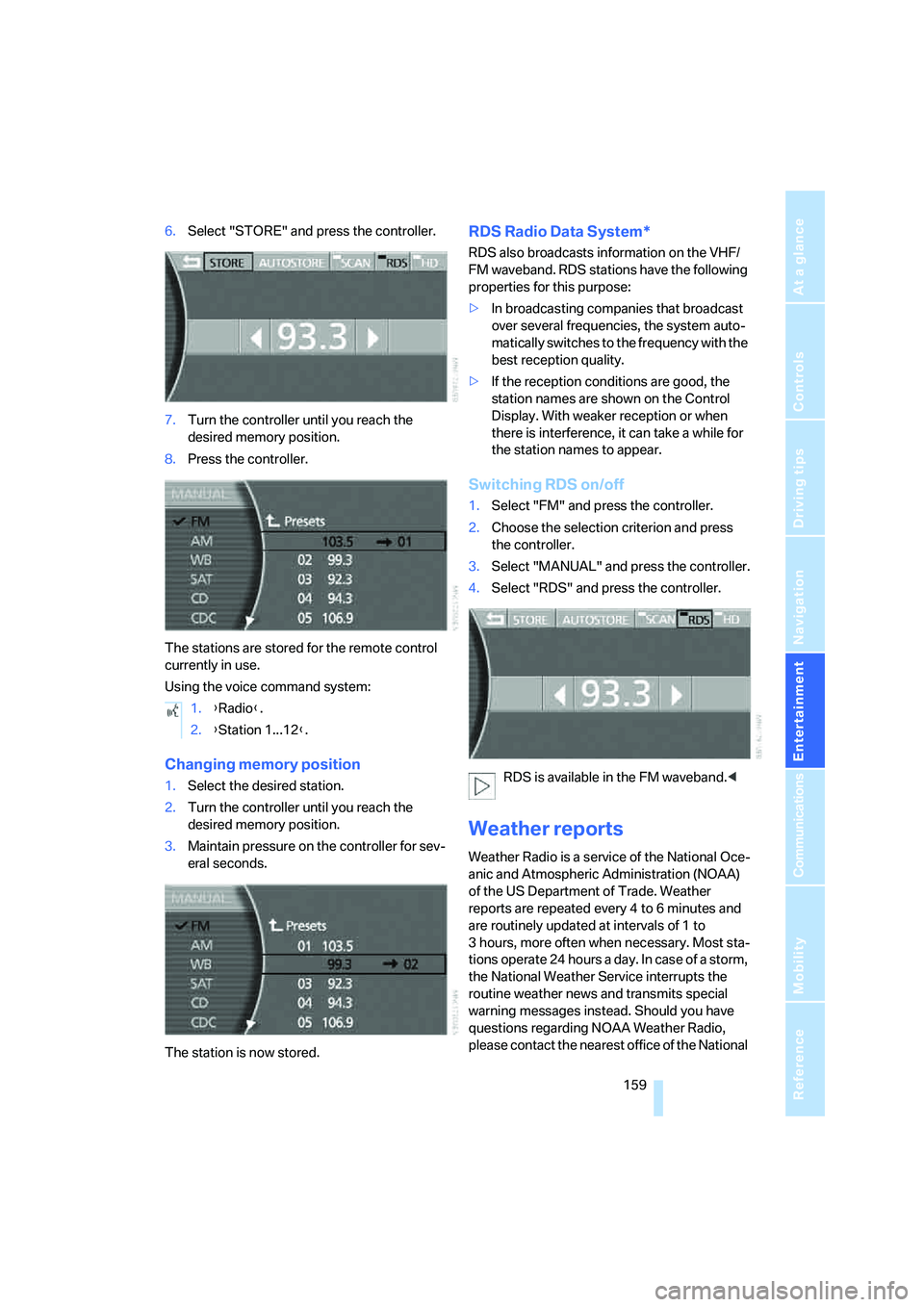
6.Select "STORE" and press the controller.
7.Turn the controller until you reach the
desired memory position.
8.Press the controller.
The stations are stored for the remote control
currently in use.
Using the voice command system:
Changing memory position
1.Select the desired station.
2.Turn the controller until you reach the
desired memory position.
3.Maintain pressure on the controller for sev-
eral seconds.
The station is now stored.
RDS Radio Data System*
RDS also broadcasts information on the VHF/
FM waveband. RDS stations have the following
properties for this purpose:
>In broadcasting companies that broadcast
over several frequencies, the system auto-
matically switches to the frequency with the
best reception quality.
>If the reception conditions are good, the
station names are shown on the Control
Display. With weaker reception or when
there is interference, it can take a while for
the station names to appear.
Switching RDS on/off
1.Select "FM" and press the controller.
2.Choose the selection criterion and press
the controller.
3.Select "MANUAL" and press the controller.
4.Select "RDS" and press the controller.
RDS is available in the FM waveband.<
Weather reports
Weather Radio is a service of the National Oce-
anic and Atmospheric Administration (NOAA)
of the US Department of Trade. Weather
reports are repeated every 4 to 6 minutes and
are routinely updated at intervals of 1 to
3 hours, more often when necessary. Most sta-
tions operate 24 hours a day. In case of a storm,
the National Weather Service interrupts the
routine weather news and transmits special
warning messages instead. Should you have
questions regarding NOAA Weather Radio,
please contact the nearest office of the National 1.{Radio}.
2.{Station 1...12}.
Page 240 of 253
Everything from A to Z
238 Inflation pressure, refer to Tire
inflation pressure198
Inflation pressure monitoring
– refer to Flat Tire Monitor90
– refer to Tire Pressure
Monitor91
Info Display12
"Information", navigation135
Information, navigation
– "On country"135
– "On dest."135
– "On location"135
– "On town/city"135
Info service191
Infrared windshield, refer to
Entry/pass tags126
"INITIALIZE", BMW
Assist193
Inserting navigation CD/
DVD130
Installation location
– CD changer165
– DVD changer170
– mobile phone, refer to
Inserting mobile phone181
– navigation drive130
Instructions, navigation
system, refer to Route
guidance by voice
instructions145
Instrument cluster, refer to
Info Display12
Instrument lighting102
Instrument panel, refer to
Cockpit
– all around the steering
wheel10
– comfort features14
Integrated universal remote
control111
Interior lamps102
– switching on with remote
control32
Interior motion sensor38
– switching off38
Interior rearview mirror,
automatic dimming
feature51Interlock, refer to Switching
off engine58
"INTERM. TIME",
stopwatch83
Interval Display, refer to
Service requirements78
J
Joystick, refer to iDrive16
Jump starting219
K
Keyless-Go, refer to Comfort
Access38
Keyless opening and closing,
refer to Comfort Access38
Key Memory31
Keys30
– adapter for spare key30
– key-related settings, refer to
Key Memory31
Kick-down63
Knock control197
L
Lamps and bulbs212
"Language", settings84
Lashing eyes, refer to
Securing cargo125
"Last", phone186
"Last dest.", navigation137
Last destination driven to,
refer to Destination list137
Last numbers on mobile
phone, refer to Dialing
numbers stored in a list186
LATCH child restraint fixing
system55
Leather care, refer to Caring
for your vehicle brochure
LEDs light-emitting
diodes212
"Left", seat heating49
Length, refer to
Dimensions225Level control system89
Light, refer to Parking lamps/
low beams100
Light alloy wheels, care and
maintenance, refer to Caring
for your vehicle brochure
Light-emitting diodes
LEDs212
Lighter116
Lighter socket, refer to Power
socket116
Lighting
– of instruments102
– of vehicle100
Light switch100
"Limit"82
Limit, refer to Speed limit82
"Limited", rear seat screen22
Load, refer to Loading124
Loading
– securing cargo125
– vehicle124
"LOC.", navigation140
"Location",
navigation139,146,147
Lock buttons in the doors,
refer to Locking34
Locking
– from inside34
– from outside32
Locking without key, refer to
Comfort Access38
Locking without remote
control, refer to Comfort
Access38
"LOGIC7", tone control154
Longlife oils, approved
oils208
"low", automatic climate
control105
Low beams100
– automatic100
– changing bulb, refer to
Xenon light212
Lower back support, refer to
Lumbar support
adjustment45
Page 242 of 253
Everything from A to Z
240 Modifications, technical, refer
to For your own safety5
Monitor, refer to
– iDrive16
– rear seat screen21
Mounting for vehicle jack,
refer to Lifting vehicle215
MP3, refer to Compressed
audio files166
Multi-function steering wheel,
refer to Buttons on steering
wheel11
Multifunction switch
– refer to Turn signals/
headlamp flasher65
– refer to Wiper/washer
system65
N
"Name", navigation132
"Navigation"130,143
Navigation announcements,
refer to Switching voice
instructions on/off145
Navigation destination
– manual entry131
– selecting via map134
Navigation drive, installation
location130Navigation system130
– address book138
– adjusting volume26,145
– changing route145
– current position146
– destination input131
– destination list137
– displaying route144
– manually entering
destination address131
– navigation CD/DVD130
– recent destinations137
– route guidance in assistance
window130
– route list145
– selecting destination via
information135
– selecting destination via
map134
– selecting route criteria141
– starting route guidance143
– switching off, refer to
Terminating/continuing
route guidance143
– terminating/continuing route
guidance143
– voice instructions145
"Navi info", programmable
buttons52
Neck supports, refer to Head
restraints46
Nets, refer to Securing
cargo125
"New dest.",
navigation131,134
"New information",
BMW Assist191
New remote control for
vehicle30
"New route",
navigation141,145
"Next", navigation135
Night vision device, refer to
BMW Night Vision96
"No measurement possible at
this time", checking engine
oil level208
"None", rear seat screen
22Non-smokers' equipment
package, refer to Power
socket116
Notepad of voice command
system26
Nozzles, refer to
Ventilation107
Number of cylinders, refer to
Engine specifications224
Nylon rope, refer to Towing
and tow starting220
O
OBD socket211
Octane numbers, refer to Fuel
specifications197
Odometer75
Oil
– additives, refer to Approved
engine oils208
– approved engine oils208
– consumption, refer to
Engine oil, checking207
– level207
– topping up, refer to Adding
engine oil208
– viscosity ratings208
Oil change interval, refer to
Service requirements78
Oil consumption, refer to
Checking engine oil207
"Oil level at minimum! Add
1 quart engine oil", checking
engine oil level208
"Oil level under min.! Add
1 quart engine oil", checking
engine oil level208
"OK", DVD changer174
"ON / OFF", speed limit82
Onboard monitor, refer to
iDrive16
Onboard tool kit212
"On country", navigation136
"On dest.", navigation136
Online help, refer to Roadside
Assistance189
"On location", navigation136