2007 BMW 760LI SEDAN power steering
[x] Cancel search: power steeringPage 12 of 253
Cockpit
10
Cockpit
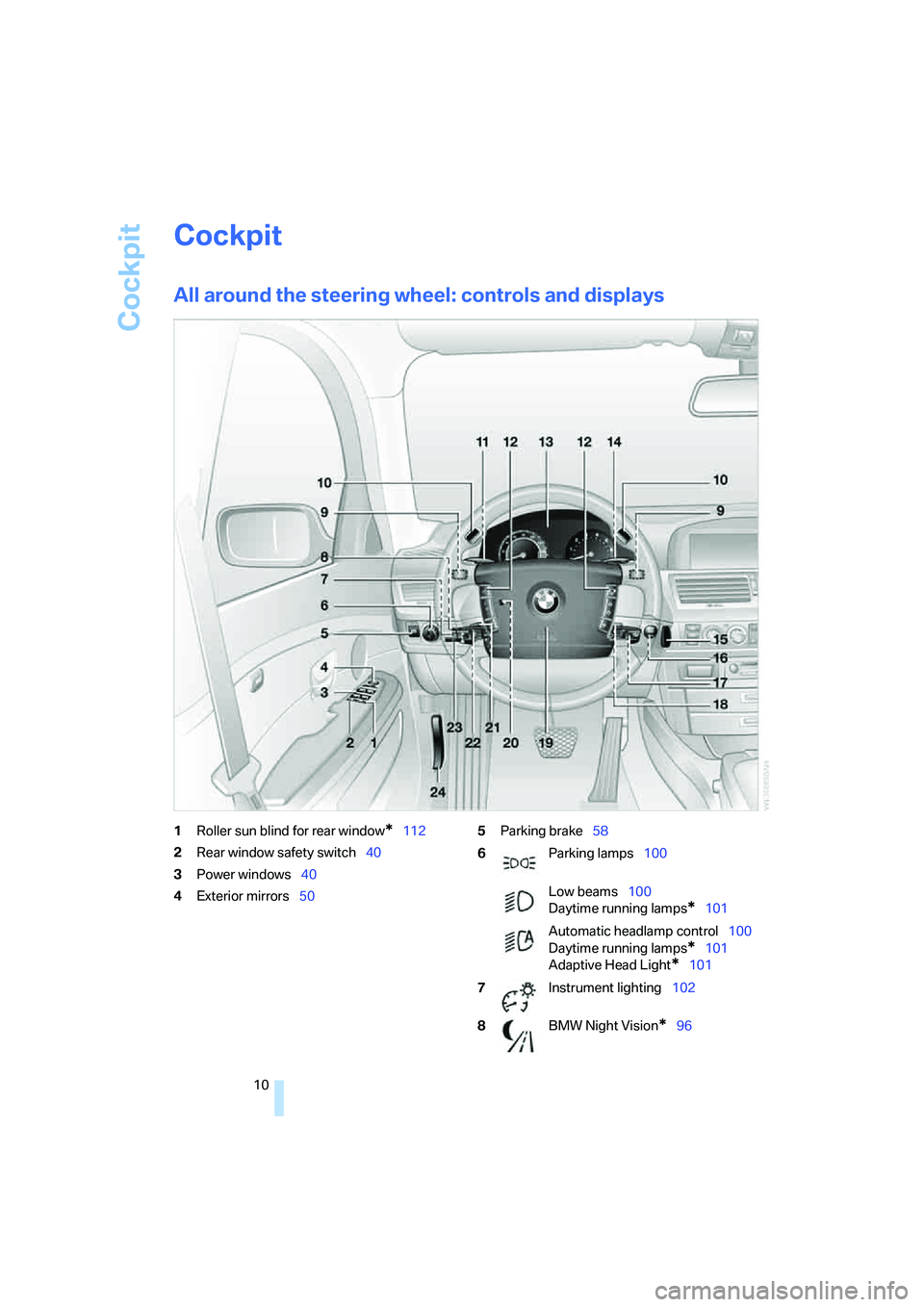
All around the steering wheel: controls and displays
1Roller sun blind for rear window*112
2Rear window safety switch40
3Power windows40
4Exterior mirrors505Parking brake58
6Parking lamps100
Low beams100
Daytime running lamps
*101
Automatic headlamp control100
Daytime running lamps
*101
Adaptive Head Light
*101
7Instrument lighting102
8BMW Night Vision
*96
Page 62 of 253
Driving
60 >Automatic Hold is deactivated.
The green AUTO P status message disap-
pears from the Info Display.
You can program the programmable but-
ton on the steering wheel with the Auto-
matic Hold function, refer to page52. This gives
you the option of being able to quickly activate
or deactivate Automatic Hold without distract-
ing your attention from the road.<
Driving
The parking brake engages automatically when
the vehicle comes to a stop.
The indicator lamp on Info Display lights up
green.
To start off again, simply press the accelerator
pedal. The parking brake is released automati-
cally; the indicator lamp goes out.
Do not drive through an automatic car
wash with the Automatic Hold on and the
engine running. Otherwise, the system will
engage the parking brake the moment the vehi-
cle comes to a stop.<
Parking
The parking brake engages automatically when
you stop the vehicle and switch off the engine.
The indicator lamp changes from green to
red.
You can also release the parking brake
manually after the engine is switched off,
as long as the remote control is in the ignition
lock, refer to page59. You can use this function,
for example, in a car wash.
Automatic Hold is deactivated.<
When leaving the vehicle, release the
remote control from the detent in the igni-
tion lock; this precaution prevents children from
disengaging the parking brake etc.<
For your safety
Automatic Hold is automatically deactivated
when:
>the engine is switched off
>the system detects that the driver's seat is
not occupied while the engine is running>the hood is opened while the engine is run-
ning
>the luggage compartment is opened while
the engine is running and the transmission
is in reverse
>and when the parking brake is used to brake
the vehicle to a stop during driving
The indicator lamp changes from green to
red, and the indication AUTO P on the Info Dis-
play disappears.
Before starting off again, briefly press the but-
ton to disengage the parking brake manually,
refer to page59, or reactivate Automatic Hold,
refer to page59.
Before leaving the vehicle with the engine
running, always move the automatic
transmission's selector lever to position P and
make sure that the parking brake is engaged.
The vehicle could start to roll if you fail to take
these precautions.<
Automatic Hold is automatically deacti-
vated whenever the system detects any
tendency for the wheels to spin in response to
slippery road surfaces.
Pay attention to the messages on the Info Dis-
play. For additional information, refer to Check
Control on page80.<
Releasing parking brake manually
In the event of an electrical power loss or elec-
trical malfunction, you can release the parking
brake manually.
Before manually releasing the parking
brake and each time you park the vehicle
without engaging the parking brake, make sure
that the automatic transmission is in position P,
refer to page62. Be sure to pay attention to the
information on the Info Display.
If circumstances should force you to park on a
steeply inclined road surface, it is essential to
take additional precautions against inadvertent
rolling, e.g. by using the chock, refer to
page215. Otherwise, there is the danger of the
vehicle rolling, depending on the incline.<
Page 64 of 253
Driving
62 Once the electrical power supply has been
restored, you can again use the parking brake:
With the ignition on and the vehicle
stationary, briefly press the button
three times at intervals of approx.
5 seconds. This executes the fol-
lowing initialization sequence:
>Initializing the disengaged setting.
>Engaging: the system registers the new
status and the brake setting is initialized.
The indicator lamp on Info Display lights
up green.
>Releasing: the parking brake is ready for
operation.
The indicator lamp on the Info Display
goes out.
Automatic transmission with
Steptronic
In addition to fully automatic operation, you can
also shift manually using the button on the
steering wheel, refer to page63.
Transmission range selection
P R N D
Displays on Info Display
P R N D S or M1 to M6
The transmission range is indicated, and in the
manual mode, the gear currently engaged.
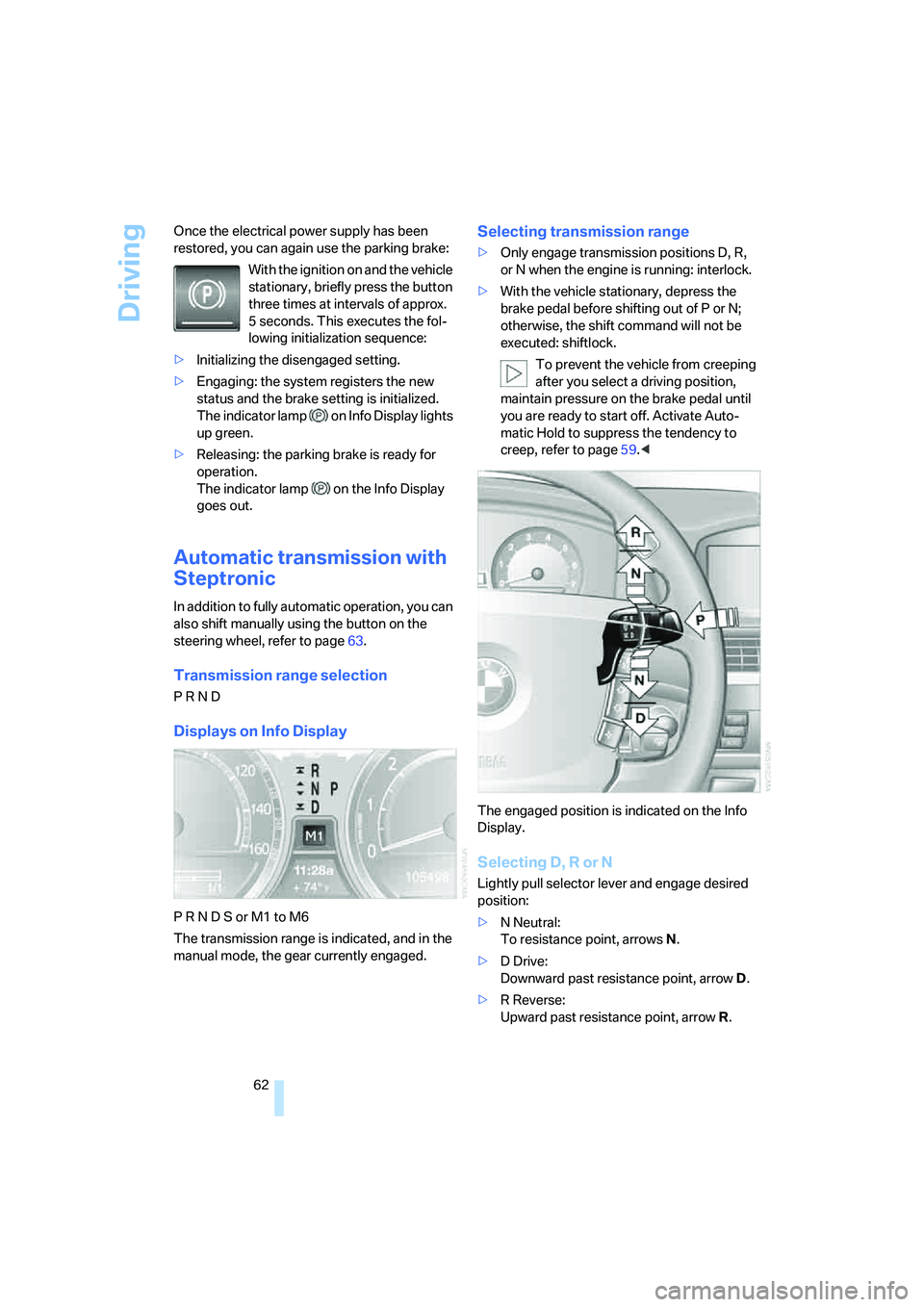
Selecting transmission range
>Only engage transmission positions D, R,
or N when the engine is running: interlock.
>With the vehicle stationary, depress the
brake pedal before shifting out of P or N;
otherwise, the shift command will not be
executed: shiftlock.
To prevent the vehicle from creeping
after you select a driving position,
maintain pressure on the brake pedal until
you are ready to start off. Activate Auto-
matic Hold to suppress the tendency to
creep, refer to page59.<
The engaged position is indicated on the Info
Display.
Selecting D, R or N
Lightly pull selector lever and engage desired
position:
>N Neutral:
To resistance point, arrowsN.
>D Drive:
Downward past resistance point, arrowD.
>R Reverse:
Upward past resistance point, arrowR.
Page 125 of 253
Driving tips
123Reference
At a glance
Controls
Communications
Navigation
Entertainment
Mobility
Hydroplaning
When driving on wet or slushy roads,
reduce road speed. If you do not, a wedge
of water can form between tires and road sur-
face. This phenomenon is referred to as hydro-
planing, and is characterized by a partial or
complete loss of contact between tires and
road surface, ultimately undermining your abil-
ity to steer and brake the vehicle.<
Driving through water
Only drive through water with a maximum
depth of 1 ft/30 cm and then, at no more
than walking speed. Otherwise, you run the risk
of damaging the vehicle's engine, electrical sys-
tems, and transmission.<
Safe braking
Your BMW is equipped with ABS as standard
equipment. In situations that require it, it is best
to apply the brakes fully. Since the vehicle
maintains steering responsiveness, you can
nevertheless avoid possible obstacles with a
minimum of steering effort.
Pulsation at the brake pedal combines with
sounds from the hydraulic circuits to indicate to
the driver that ABS is in its active mode.
Driving in wet conditions
When driving in wet conditions and in heavy
rain, it is a good idea to apply light pressure to
the brake pedal every few miles. Monitor traffic
conditions to ensure that this maneuver does
not endanger other road users. The heat gener-
ated helps dry the pads and rotors to ensure
that full braking efficiency will then be available
when you need it.
Hills
To prevent overheating and reduced effi-
ciency of the brake system, drive long or
steep downhill grades in the gear that requires
the least amount of braking. Otherwise, even
light but consistent pedal pressure can lead to
high temperatures, brake wear, and possibly
even failure of the brake system.
transmission's manual mode, downshifting as
far as first gear on extremely steep stretches,
refer to page63. This strategy helps you avoid
placing excessive loads on the brake system.
Do not drive in idle or with the engine
switched off; otherwise, there will be no
engine braking action or power-assist for the
brakes and steering.
Never allow floor mats, carpets or any other
objects to protrude into the area of movement
of the pedals and impair their operation.<
Corrosion on brake rotors
When the vehicle is driven only occasionally,
during extended periods when the vehicle is not
used at all, and in operating conditions where
brake applications are less frequent, there is an
increased tendency for corrosion to form on
rotors, while contaminants accumulate on the
brake pads. This occurs because the minimal
pressure that must be exerted by the pads dur-
ing brake applications to clean the rotors is not
reached.
Should corrosion form on the brake rotors, the
brakes will tend to respond with a pulsating
effect that even extended application will fail to
cure.
When vehicle is parked
Condensation forms in the automatic climate
control during operation, and then exits under
the vehicle. Traces of condensed water under
the vehicle are therefore normal.
Before driving into a car wash
1.Fold in the exterior mirrors, refer to page50;
otherwise, they could be damaged due to
the width of the vehicle.
To permit the vehicle to roll, follow the
instructions on page58.
2.Release the parking brake, especially when
you have activated Automatic Hold. Refer to
page59.
Page 219 of 253
Mobility
217Reference
At a glance
Controls
Driving tips
Communications
Navigation
Entertainment
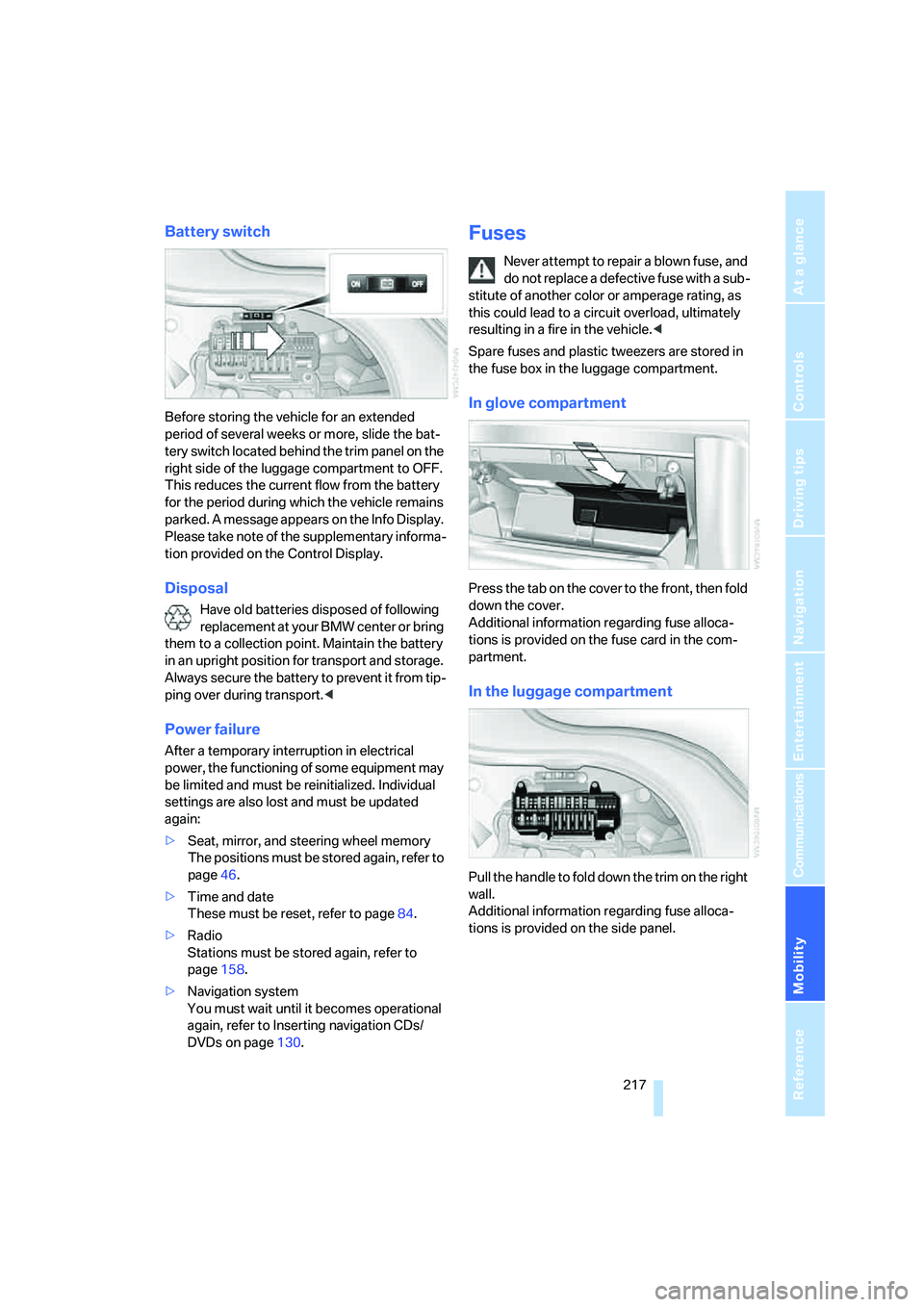
Battery switch
Before storing the vehicle for an extended
period of several weeks or more, slide the bat-
tery switch located behind the trim panel on the
right side of the luggage compartment to OFF.
This reduces the current flow from the battery
for the period during which the vehicle remains
parked. A message appears on the Info Display.
Please take note of the supplementary informa-
tion provided on the Control Display.
Disposal
Have old batteries disposed of following
replacement at your BMW center or bring
them to a collection point. Maintain the battery
in an upright position for transport and storage.
Always secure the battery to prevent it from tip-
ping over during transport.<
Power failure
After a temporary interruption in electrical
power, the functioning of some equipment may
be limited and must be reinitialized. Individual
settings are also lost and must be updated
again:
>Seat, mirror, and steering wheel memory
The positions must be stored again, refer to
page46.
>Time and date
These must be reset, refer to page84.
>Radio
Stations must be stored again, refer to
page158.
>Navigation system
You must wait until it becomes operational
again, refer to Inserting navigation CDs/
DVDs on page130.
Fuses
Never attempt to repair a blown fuse, and
do not replace a defective fuse with a sub-
stitute of another color or amperage rating, as
this could lead to a circuit overload, ultimately
resulting in a fire in the vehicle.<
Spare fuses and plastic tweezers are stored in
the fuse box in the luggage compartment.
In glove compartment
Press the tab on the cover to the front, then fold
down the cover.
Additional information regarding fuse alloca-
tions is provided on the fuse card in the com-
partment.
In the luggage compartment
Pull the handle to fold down the trim on the right
wall.
Additional information regarding fuse alloca-
tions is provided on the side panel.
Page 222 of 253
Giving and receiving assistance
220 5.Attach the second negative/– clamp of the
jumper cable to the negative battery termi-
nal or to an engine or body ground on the
vehicle to be started.
Starting engine
1.Start the engine of the assisting vehicle and
allow it to run for several minutes at a fast
idle.
2.Start the engine on the other vehicle in the
usual way.
If the first start attempt is not successful,
wait a few minutes before another attempt
in order to allow the discharged battery to
recharge.
3.Allow the engines to run for several min-
utes.
4.Disconnect the jumper cables again in the
reverse sequence.
If need be, have the battery checked and
recharged.
Never use spray fluids to start the
engine.<
Towing and tow starting
Observe applicable laws and regulations
for tow-starting and towing.<
Do not transport any passengers other
than the driver in a vehicle that is being
towed.<
Using tow fitting
The threaded tow fitting is stored in the
onboard tool kit and must always remain in the
vehicle. It can be screwed in at the front or rear
of the BMW.
Only use the tow fitting that comes with
the vehicle and screw it in as far as it will
go. Use the tow fitting for towing only on roads.
Avoid lateral loading of the tow fitting, e.g. do
not lift the vehicle by the tow fitting. Otherwise,
damage to the tow fitting and the vehicle can
occur.<
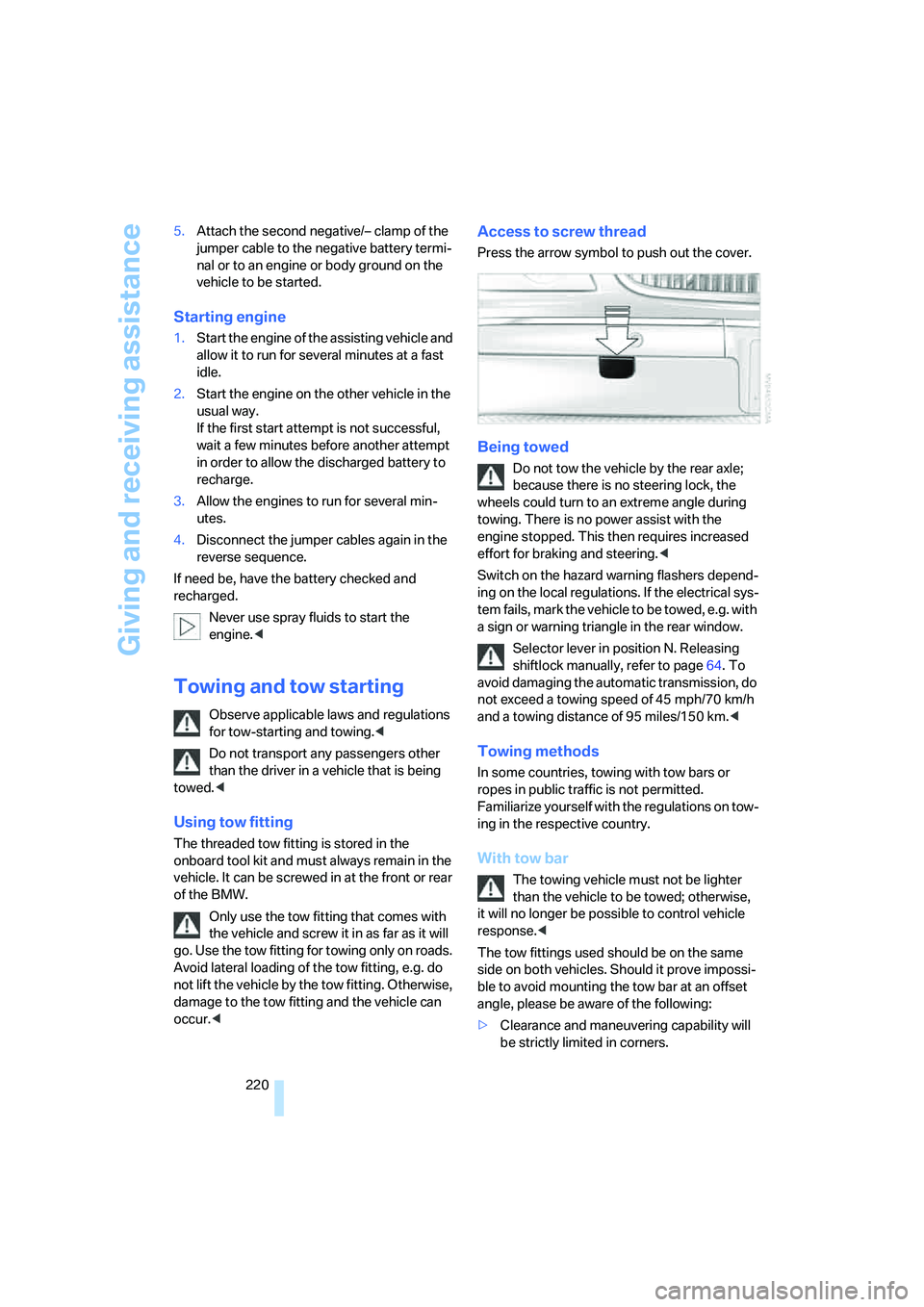
Access to screw thread
Press the arrow symbol to push out the cover.
Being towed
Do not tow the vehicle by the rear axle;
because there is no steering lock, the
wheels could turn to an extreme angle during
towing. There is no power assist with the
engine stopped. This then requires increased
effort for braking and steering.<
Switch on the hazard warning flashers depend-
ing on the local regulations. If the electrical sys-
tem fails, mark the vehicle to be towed, e.g. with
a sign or warning triangle in the rear window.
Selector lever in position N. Releasing
shiftlock manually, refer to page64. To
avoid damaging the automatic transmission, do
not exceed a towing speed of 45 mph/70 km/h
and a towing distance of 95 miles/150 km.<
Towing methods
In some countries, towing with tow bars or
ropes in public traffic is not permitted.
Familiarize yourself with the regulations on tow-
ing in the respective country.
With tow bar
The towing vehicle must not be lighter
than the vehicle to be towed; otherwise,
it will no longer be possible to control vehicle
response.<
The tow fittings used should be on the same
side on both vehicles. Should it prove impossi-
ble to avoid mounting the tow bar at an offset
angle, please be aware of the following:
>Clearance and maneuvering capability will
be strictly limited in corners.
Page 240 of 253
Everything from A to Z
238 Inflation pressure, refer to Tire
inflation pressure198
Inflation pressure monitoring
– refer to Flat Tire Monitor90
– refer to Tire Pressure
Monitor91
Info Display12
"Information", navigation135
Information, navigation
– "On country"135
– "On dest."135
– "On location"135
– "On town/city"135
Info service191
Infrared windshield, refer to
Entry/pass tags126
"INITIALIZE", BMW
Assist193
Inserting navigation CD/
DVD130
Installation location
– CD changer165
– DVD changer170
– mobile phone, refer to
Inserting mobile phone181
– navigation drive130
Instructions, navigation
system, refer to Route
guidance by voice
instructions145
Instrument cluster, refer to
Info Display12
Instrument lighting102
Instrument panel, refer to
Cockpit
– all around the steering
wheel10
– comfort features14
Integrated universal remote
control111
Interior lamps102
– switching on with remote
control32
Interior motion sensor38
– switching off38
Interior rearview mirror,
automatic dimming
feature51Interlock, refer to Switching
off engine58
"INTERM. TIME",
stopwatch83
Interval Display, refer to
Service requirements78
J
Joystick, refer to iDrive16
Jump starting219
K
Keyless-Go, refer to Comfort
Access38
Keyless opening and closing,
refer to Comfort Access38
Key Memory31
Keys30
– adapter for spare key30
– key-related settings, refer to
Key Memory31
Kick-down63
Knock control197
L
Lamps and bulbs212
"Language", settings84
Lashing eyes, refer to
Securing cargo125
"Last", phone186
"Last dest.", navigation137
Last destination driven to,
refer to Destination list137
Last numbers on mobile
phone, refer to Dialing
numbers stored in a list186
LATCH child restraint fixing
system55
Leather care, refer to Caring
for your vehicle brochure
LEDs light-emitting
diodes212
"Left", seat heating49
Length, refer to
Dimensions225Level control system89
Light, refer to Parking lamps/
low beams100
Light alloy wheels, care and
maintenance, refer to Caring
for your vehicle brochure
Light-emitting diodes
LEDs212
Lighter116
Lighter socket, refer to Power
socket116
Lighting
– of instruments102
– of vehicle100
Light switch100
"Limit"82
Limit, refer to Speed limit82
"Limited", rear seat screen22
Load, refer to Loading124
Loading
– securing cargo125
– vehicle124
"LOC.", navigation140
"Location",
navigation139,146,147
Lock buttons in the doors,
refer to Locking34
Locking
– from inside34
– from outside32
Locking without key, refer to
Comfort Access38
Locking without remote
control, refer to Comfort
Access38
"LOGIC7", tone control154
Longlife oils, approved
oils208
"low", automatic climate
control105
Low beams100
– automatic100
– changing bulb, refer to
Xenon light212
Lower back support, refer to
Lumbar support
adjustment45
Page 242 of 253
Everything from A to Z
240 Modifications, technical, refer
to For your own safety5
Monitor, refer to
– iDrive16
– rear seat screen21
Mounting for vehicle jack,
refer to Lifting vehicle215
MP3, refer to Compressed
audio files166
Multi-function steering wheel,
refer to Buttons on steering
wheel11
Multifunction switch
– refer to Turn signals/
headlamp flasher65
– refer to Wiper/washer
system65
N
"Name", navigation132
"Navigation"130,143
Navigation announcements,
refer to Switching voice
instructions on/off145
Navigation destination
– manual entry131
– selecting via map134
Navigation drive, installation
location130Navigation system130
– address book138
– adjusting volume26,145
– changing route145
– current position146
– destination input131
– destination list137
– displaying route144
– manually entering
destination address131
– navigation CD/DVD130
– recent destinations137
– route guidance in assistance
window130
– route list145
– selecting destination via
information135
– selecting destination via
map134
– selecting route criteria141
– starting route guidance143
– switching off, refer to
Terminating/continuing
route guidance143
– terminating/continuing route
guidance143
– voice instructions145
"Navi info", programmable
buttons52
Neck supports, refer to Head
restraints46
Nets, refer to Securing
cargo125
"New dest.",
navigation131,134
"New information",
BMW Assist191
New remote control for
vehicle30
"New route",
navigation141,145
"Next", navigation135
Night vision device, refer to
BMW Night Vision96
"No measurement possible at
this time", checking engine
oil level208
"None", rear seat screen
22Non-smokers' equipment
package, refer to Power
socket116
Notepad of voice command
system26
Nozzles, refer to
Ventilation107
Number of cylinders, refer to
Engine specifications224
Nylon rope, refer to Towing
and tow starting220
O
OBD socket211
Octane numbers, refer to Fuel
specifications197
Odometer75
Oil
– additives, refer to Approved
engine oils208
– approved engine oils208
– consumption, refer to
Engine oil, checking207
– level207
– topping up, refer to Adding
engine oil208
– viscosity ratings208
Oil change interval, refer to
Service requirements78
Oil consumption, refer to
Checking engine oil207
"Oil level at minimum! Add
1 quart engine oil", checking
engine oil level208
"Oil level under min.! Add
1 quart engine oil", checking
engine oil level208
"OK", DVD changer174
"ON / OFF", speed limit82
Onboard monitor, refer to
iDrive16
Onboard tool kit212
"On country", navigation136
"On dest.", navigation136
Online help, refer to Roadside
Assistance189
"On location", navigation136